






Microsoft ODBC driver 18 for SQL setup Issue with SCCM 2309 Upgrade
Let’s try to fix the Microsoft ODBC driver 18 for the SQL setup Issue with the SCCM 2309 Upgrade. This is because the SQL Client prerequisite is missing for Config Manager Setup. It’s important to go through the SCCM 2309 infra upgrade checklist before the upgrade process.
Microsoft released the latest version of SCCM 2309, and it came out with new features and enhancements. Microsoft also announced the deprecation of some of the features, such as configuration profiles etc.
The redistributable installer for Microsoft ODBC Driver 18 for SQL Server installs the client components required during run time to take advantage of newer SQL Server features. Version 18.3.2.1 is the latest general availability (GA) version.
Microsoft added a new feature that allows administrators to schedule script runtimes in UTC. Also added the option to utilize the native Windows Update restart experience when installing monthly patches. More details on SCCM 2309 features are available – SCCM 2309 Upgrade Guide | New Features.

- Is SCCM Dying?
- SCCM Unsupported Features
- Download SCCM 2309 Early Ring Version Using PowerShell Script
SCCM 2309 for Beginners: A Step-by-Step Tutorial for Upgrade Process
Video Tutorial – SCCM 2309 for Beginners: A Step-by-Step Tutorial for Upgrade Process. New features of SCCM 2309 are also discussed in this video. Deprecated feature announcement is also discussed.
Microsoft ODBC driver 18 for SQL setup Issue
If the version of the ODBC driver is missing on the site servers (CAS, Primary, etc), the prerequisite check for 2309 will fail.
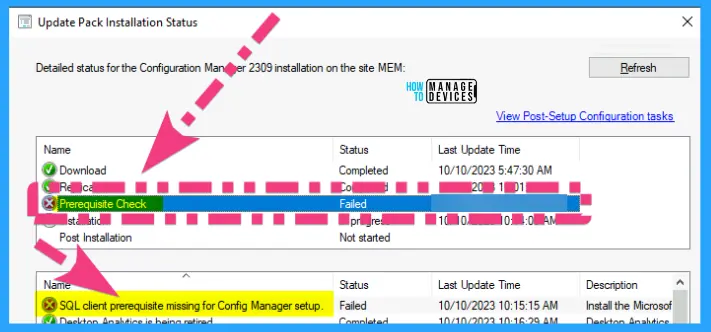
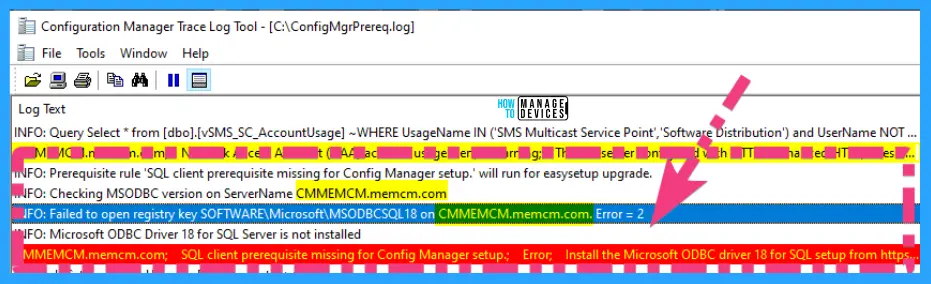
You normally get the following error during the prerequisite checks. You can check the SCCM log file called ConfigMgrPrereq.log to get more details on the issue. The following are the two main errors.
- Microsoft ODBC Driver 18 for SQL Server is not installed
- SQL client prerequisite missing for Config Manager setup.; Error
INFO: Checking MSODBC version on ServerName CMMEMCM.memcm.com
INFO: Failed to open registry key SOFTWARE\Microsoft\MSODBCSQL18 on CMMEMCM.memcm.com. Error = 2
INFO: Microsoft ODBC Driver 18 for SQL Server is not installed
CMMEMCM.memcm.com; SQL client prerequisite missing for Config Manager setup.; Error; Install the Microsoft ODBC driver 18 for SQL setup from https://go.microsoft.com/fwlink/?linkid=2220989. More information https://go.microsoft.com/fwlink/?linkid=2226618
You need to ensure that the Microsoft ODBC driver 18 for SQL setup as part of the SQL client is installed on Primary, SQL, and CAS servers. In the log file below, you can see the standalone primary server name – CMMEMCM.memcm.com.
Download Microsoft ODBC driver 18 Offline File
You can download the offline file for Microsoft ODBC driver 18 for SQL setup from the following Microsoft link. The same link is given in SCCM 2309 prerequisite checks.
Download the Link for msodbcsql.msi – https://go.microsoft.com/fwlink/?linkid=2220989
Install Microsoft ODBC driver 18
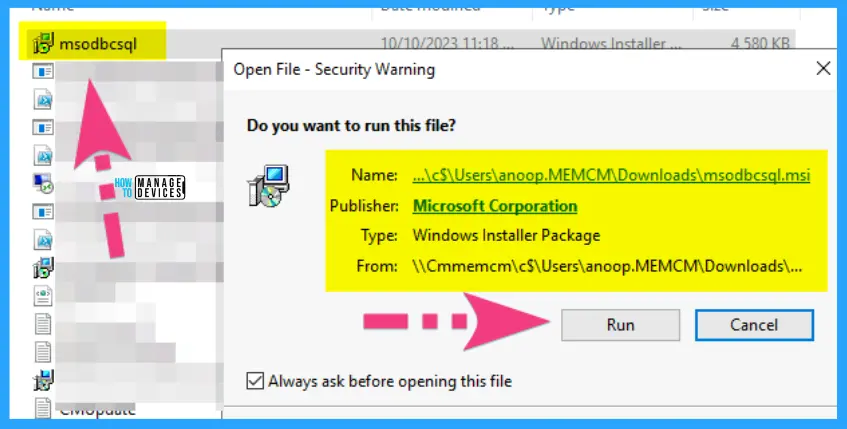
Ensure that the msodbcsql.msi is installed on CAS, Primary, and SQL servers to complete the upgrade of the SCCM 2309 version successfully. We have installed it only on the SQL server, but that didn’t help to fix the issue.
Always check the ConfigMgrPrereq.log to get more details about the server where you have to install Microsoft ODBC driver 18 for SQL, as explained in the above section of the post.
The installation itself is straightforward; you just need to launch it with administrative privileges. Also, there is no need for restarting the servers after the Microsoft ODBC driver 18 for SQL installation.

FIXED SCCM 2309 Prerequisite – SQL Client prerequisite is missing for Config Manager Setup Issue
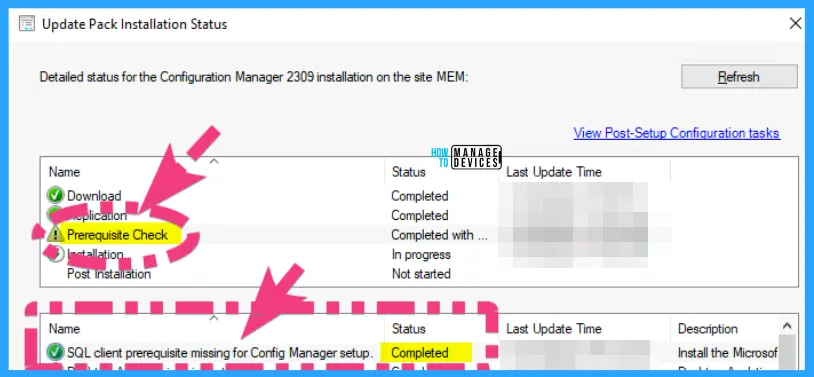
Now, it’s time to rerun the SCCM 2309 prerequisite checks to confirm whether the issue is fixed or not. The SQL Client prerequisite is missing for Config Manager Setup Issue is fixed after installing the Microsoft ODBC driver 18 for the SQL component on the standalone primary server.
Author
Anoop C Nair is Microsoft MVP! He is a Device Management Admin with more than 20 years of experience (calculation done in 2021) in IT. He is Blogger, Speaker, and Local User Group HTMD Community leader. His main focus is on Device Management technologies like SCCM 2012, Current Branch, and Intune. He writes about ConfigMgr, Windows 11, Windows 10, Azure AD, Microsoft Intune, Windows 365, AVD, etc.




Hi Anoop,
I applied the new ODBC driver 18 for SQL, but now I see the following in the ConfigMgrPrereq.log file.
* [08001][-2146893022][Microsoft][ODBC Driver 18 for SQL Server]SSL Provider: The target principal name is incorrect.
* [08001][-2146893022][Microsoft][ODBC Driver 18 for SQL Server]Client unable to establish connection
*** Failed to connect to the SQL Server, connection type: SMS ACCESS.
The log constantly retries the prerequisite checks but fails to access SQL. I see lots of other forums where this driver is causing these errors and it is not just related to ConfigMgr.
Any ideas?
Saw someone post from X who run into prereq issues like “Failed to connect to the SQL Server, connection type SMS ACCESS. check if you have SSL set to force on the SQL instance. He Had to disable to get this to run with the new ODBC driver.
Can you give more details as where this setting is
Hi Anoop, thanks for the post. I can see the docs state that it needs to be on te primary, CAS, Secondary, SUP and MP site systems but couldn’t see anything about the SQL Server (Site Database Role). We just had a Primary with SQL on a seaprate SQl box and also a second DP. I’m assuming that we just need to install it on the Primary SCCM Server. Is that correct?
https://learn.microsoft.com/en-us/mem/configmgr/core/plan-design/configs/site-and-site-system-prerequisites#sql-odbc-driver-for-the-site-server
SCCM Site server is enough, SQL server not needed.
Hi I trying to upgrade 2503 prerequisite is failed stating [Failed]:Install the Microsoft ODBC driver 18 for SQL setup from https://go.microsoft.com/fwlink/?linkid=2220989.
I have installed ODBC driver and still i get the same error .
* [08001][-2146893051][Microsoft][ODBC Driver 18 for SQL Server]A network-related or instance-specific error has occurred while establishing a connection to vmmecmdb.acnktn.com. Server is not found or not accessible. Check if instance name is correct and if SQL Server is configured to allow remote connections. For more information see SQL Server Books Online. CONFIGURATION_MANAGER_UPDATE 4/19/2025 11:31:28 PM 28528 (0x6F70)
* Failed to connect to the SQL Server, connection type: SMS ACCESS. CONFIGURATION_MANAGER_UPDATE 4/19/2025 11:31:28 PM 28528 (0x6F70)
* [08001][-2146893051][Microsoft][ODBC Driver 18 for SQL Server]A network-related or instance-specific error has occurred while establishing a connection to vmmecmdb.acnktn.com. Server is not found or not accessible. Check if instance name is correct and if SQL Server is configured to allow remote connections. For more information see SQL Server Books Online. CONFIGURATION_MANAGER_UPDATE 4/19/2025 11:31:29 PM 28528 (0x6F70)
* Failed to connect to the SQL Server, connection type: SMS ACCESS. CONFIGURATION_MANAGER_UPDATE 4/19/2025 11:31:29 PM 28528 (0x6F70)