






Microsoft SCCM End of Life and Support Timeline for All Major Versions
Let’s discuss the Microsoft SCCM End of Life and Support Timeline for All Major Versions. Let’s find out the end of support dates for the SCCM . In this post, you can find the SCCM life cycle management in the table format.
SCCM support scenarios differ from previous versions of the products, such as SCCM 2007 and SCCM 2012. In SCCM 2007 and 2012, we supported scenarios like “Mainstream Support” and “Extended Support.” This post will provide more details about the SCCM Life Cycle and support scenarios.
To build SCCM technical skills from the basics, refer to free SCCM training from the HTMD community. For more details, see Free SCCM Training 37 Hours Of Latest Technical Content Lab Setup HTMD Blog (anoopcnair.com).
We also have 63 Episodes of Free Intune Training for Device Management Admins. These trainings will help you understand modern management technologies such as Intune.

Table of Contents
- SCCM 2012 to CB Current Branch Upgrade | Migration | Possible Issues | ConfigMgr
- Free SCCM Training 37 Hours of Latest Technical Content Lab Setup
- Top 50+ Latest SCCM Interview Questions and Answers
- Top 75 Latest Intune Interview Questions and Answers
SCCM Life Cycle – Table Format – End of Support Dates for SCCM End of Life
You can find more details about supported versions of SCCM here. What are the end-of-support dates for SCCM?
| SCCM Version | Availability Date | Support End Date |
|---|---|---|
| 2709 | September 2027 | March 2029 |
| 2609 | September 2026 | March 2028 |
| 2603 | March 2026 | September 2027 |
| 2509 | December 2025 | June 2027 |
| 2503 | 31st March 2025 | 30th September 2026 |
| 2409 | 4th December 2024 | 6th June 2026 |
| 2403 | 22nd April 2024 | 22nd Oct 2025 |
| 2309 | 9th Oct 2023 | 9th April 2025 |
| 2303 | 10th April 2023 | 10th Oct 2024 |
| 2211 | December 5, 2022 | 5th June 2024 |
| 2207 | 12th August 2022 | 12th February 2024 |
| 2203 | April 6, 2022 | October 6, 2023 |
| 2111 | December 1, 2021 | June 1, 2023 |
| 2107 | August 2, 2021 | February 2, 2023 |
| 2103 | April 5, 2021 | October 5, 2022 |
| 2010 | Nov 30, 2020 | May 30, 2022 |
| 2006 | August 11, 2020 | February 11, 2022 |
| 2002 | April 1, 2020 | October 1, 2021 |
| 1910 | Nov 27, 2019 | May 29, 2021 |
| 1906 | July 26, 2019 | January 26, 2021 |
| 1902 | March 27, 2019 | September 27, 2020 |
| 1810 | Nov 27, 2018 | May 27, 2020 |
| 1806 | July 31, 2018 | January 31, 2020 |
| 1802 | March 22, 2018 | September 22, 2019 |
| 1710 | Nov 20, 2017 | May 20, 2019 |
| 1706 | July 31, 2017 | July 31, 2018 |
| 1702 | March 27, 2017 | March 27, 2018 |
| 1610 | Nov 18, 2016 | November 18, 2017 |
| 1606 | July 22, 2016 | July 22, 2017 |
| 1602 | March 11, 2016 | March 11, 2017 |
| 1511 | Dec 8, 2015 | December 8, 2016 |
SCCM Mainstream Vs. Extended?
The support scenarios for SCCM do not fall into Mainstream and Extended. Instead, the support lifecycle is divided into two categories: “Security and Critical Updates servicing phase” and “Security Updates (Only) servicing phase.” The table below details the end Support Dates for the SCCM.
Update:-
- SCCM 1710 and later, all support ends after the 18-month lifecycle for a version has expired.
- SCCM versions before 1710, support ends after the 12-month lifecycle expires.
You will get a more detailed explanation of these two new categories at the end of this post. The main reason for this change is that the SCCM product is released “few times” in a year. For example, in 2016, we already had SCCM 1602 and 1606 (and will we have 1610 ?). So, it isn’t easy to follow the old support life cycle.

The latest update is available here.
SCCM update versions (e.g., 1511, 1602, 1606, etc.) will be supported for twelve (12) months—one year—from their general availability (GA) release date. For example, SCCM 1511’s GA release date was 8 December 2015 (12/8/2015), and the support end date for SCCM 1511 is 8 December 2016 (12/8/2016). SCCM Life Cycle.
So, each SCCM version will end support precisely after a year of GA. So the question is whether all the SCCM versions (e.g., 1511, 1602, and 1606) will be fully supported if they have not reached the end of the support date. The answer is NO. Read on to get more details. SCCM Life Cycle Details above?
END of Support Date Details of SCCM Versions – SCCM End of Life
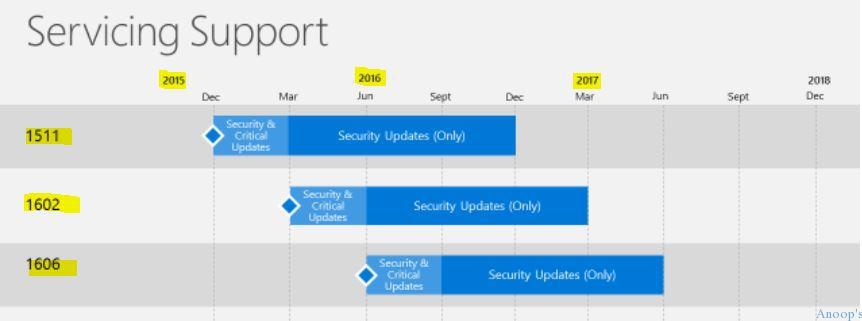
SCCM 1511, 1602, 1606, 1610, 1702, and 1706 – End of Support – Already out of Security and Critical Updates servicing support! There are two kinds of support for new SCCM versions: the “Security and Critical Updates servicing phase” and the “Security Updates (Only) servicing phase.”
So, what is the difference between these two support scenarios? Are these similar to SCCM 2012/2007 “Mainstream Support” and “Extended Support”, which I explained in the previous post here? I would say it’s a similar approach. More details about the SCCM Life Cycle:-
Security and Critical Updates Servicing Support
When running the latest version of SCCM, 1606, you will receive both Security and Critical updates. End of Support Dates for SCCM.
So, the SCCM 1606 version will be fully supported, and Microsoft will release Security and Critical updates until the next version of SCCM (probably 1610 version GA). The security and Critical Updates servicing support phase has already ended for SCCM 1511 and 1602.
Security Updates (Only) Servicing Support
After a new SCCM version (e.g., 1606) is released, support for older SCCM versions (e.g., 1511 and 1602) will be reduced to Security updates only for the remaining support span of months.
For example, SCCM 1511 and 1602 are supported only for security updates and NOT for code defects requiring a critical update.
So, SCCM 1511 and 1606 will release only security updates and are not allowed to get any critical updates. That does mean (to me) that SCCM 1511 and 1602 infra may be at risk up to an extent as it is already in a LIMITED support scenario.
END of Support Date Details of Previous Versions of SCCM
Let’s discuss the END of Support Date details of earlier versions of SCCM. The screenshot below helps you show more information on SCCM versions.
- SCCM 2007 – Already Out of Mainstream Support
- SCCM 2007 – Extended support END date ==> 7th July 2019
- SCCM 2012 – Mainstream support END date ==> 11th July 2017
- SCCM 2012 – Extended Support END date ==> 12th July 2022
We are on WhatsApp now. To get the latest step-by-step guides, news, and updates, Join our Channel. Click here. HTMD WhatsApp.
Author
Anoop C Nair is Microsoft MVP! He is a Device Management Admin with more than 20 years of experience (calculation done in 2021) in IT. He is a Blogger, Speaker, and Local User Group HTMD Community leader. His main focus is on Device Management technologies like SCCM 2012, Current Branch, and Intune. He writes about ConfigMgr, Windows 11, Windows 10, Azure AD, Microsoft Intune, Windows 365, AVD, etc.




Thank you!
I am planning to do sccm certification.Completion date with in next 6 months.Which version you suggest?
Go for 2016 version its pretty soon out
nice blog
Hi Anoop,
thank you for this great article! But I noticed the SCCM 2007 R3 Extended Support Date in this Article is wrong. According to Microsoft it is 9TH July 2019: https://support.microsoft.com/en-us/lifecycle/search?alpha=Microsoft%20System%20Center%20Configuration%20Manager%202007%20R3
kind regards
HI Anoop,
I missed the boat a bit here and cannot find the 1511 download. anyone know where I can find it now that its not supported? LOL
StaffHi Bryan ! – Yes, expected because SCCM CB 1511 is out of support and the baseline version which you should use in SCCM CB is 1606. Here is the link where you can get all the requirements https://www.anoopcnair.com/sccm-configmgr-2012-to-cb-1606-unofficial-upgrade-checklist/
Hello All , Is there any Microsoft Link where we can confirmed the SCCM 2007 has end of support ,Is the maintenance & support still continew ?
Hi Anoop, I have sccm 1706 which is in EOSupport. We are planning to upgrade to the latest CB 1910. How can we go to 1910 from 1706. Pls advice
Thanks,
RBK
thx Anoop, for your akways valuable information about SCCM