






How to Troubleshoot Missing Policies and Access Errors in Intune Admin Center
Hi, let’s discuss How to Troubleshoot Missing Policies and Access Errors in Intune Admin Center. As per the latest report of Microsoft revealing that some admins are experiencing that when they try to access the Device configuration section of the Intune console.
Device configuration is one of the features in Intune. This Device Configuration setting includes rules and options to control how company devices work. With this, IT teams can make sure every device used for work is secure, follows company policies.
Recently, some of the admins have been trying to navigate Device > Configuration they get some errors. The error message shows that it couldn’t load the policies, and there are no settings showing. Even using Incognito mode or switching browsers didn’t fix it.
Device configuration profiles help make sure all company devices follow the same rules, are secure, and work properly for everyone. We know that this is a very important section in Intune when they affect any issues that will always not be good for those rules and security. In this post let’s look at how it will fix and what are the causes of it.

Table of Contents
How to Troubleshoot Missing Policies and Access Errors in Intune Admin Center
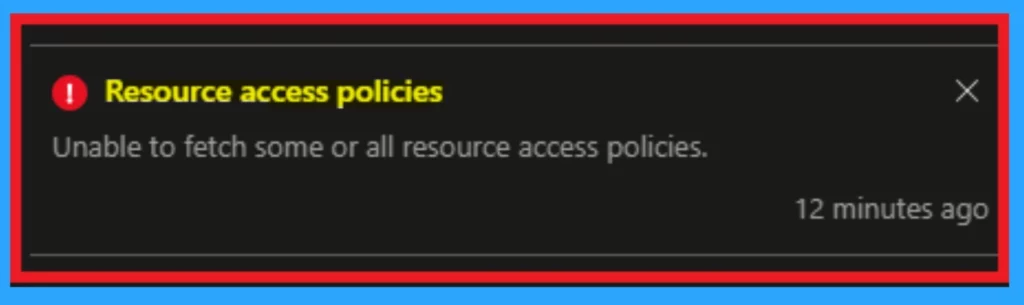
Above We discussed a lot of things about the troubleshooting Intune Admin Console Device Configuration Policy Errors. This errors are now common in some Admins and they are facing this issue for while. When a admin trying to access the Device confoiguration some errors appered that is given in the below screenshot.
! Resource access policies – Unable to fetch some or all resource access policies.
- Fix Windows Autopatch Device Configuration Critical Alerts
- Export Intune Device Configuration Profiles
- Intune Device Configuration Report
Causes for the Issue
This issues are happening to most of the admins so there are many causes for this issue. The main cause of this issue may be a tenant issue or Permission issues. In the case of permission issue Even if someone is a Global Admin or Intune Admin, they may not have full access if their RBAC are not set up correctly.
| Causes for the Issue |
|---|
| If the permission is not granted for the admins |
| May be a tenant issue |
| It may be happen when a network connection issues |
| Sometimes the Intune service has temporary issues or slow syncing |
Workaround
This issue is now ongoing to some of the admins but it’s not fixing yet. You may saw that the some causes of this issue happens. We have some workaround for this. I hope any of them will be helpful for you. First you have to check that your network connections are stable or not.
- Using an Private window will helpful for this issue.
- The admins can use diffrent browser to resolve the issue.
- Sometimes you can log out the Intune admin console and then log in to the Intune admin console meay prevent this issue.
- Check your account has correct roles like Intune Admin or Global Admin and check RBAC settings.
- Your internet or firewall might be blocking access. Try using a different network.
Sync Devices Manually
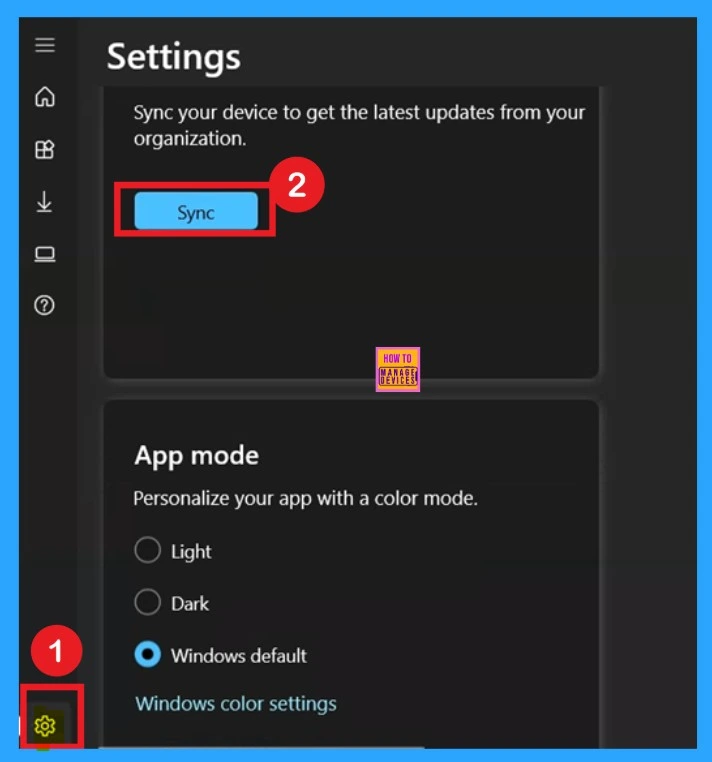
This is another solution to Troubleshoot Missing Policies and Access Errors in Intune Admin Center. Sometimes this solution very helpful. For a manual syncing fist we have to open the Company Portal then go to the Settings and click on the Sync and this will take some times.
Try PowerShell or Graph API
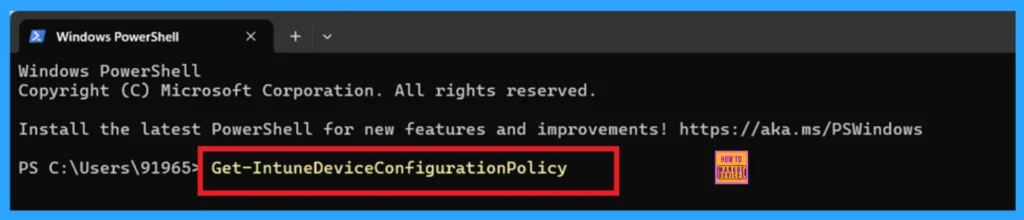
Try PowerShell or Graph API is the another solution we suggesting. For that Run the following PowerShell command to check your policies: The below command will be enterd throgh the Powershell.
Get-IntuneDeviceConfigurationPolicy
Or You can use use Microsoft Graph API for solving Missing Policies and Access Errors in Intune Admin Center. you can use the below command for that. then Look for any outages in the Microsoft 365 Admin Center or Azure Status page.
GET https://graph.microsoft.com/v1.0/deviceManagement/deviceConfigurations
Need Further Assistance or Have Technical Questions?
Join the LinkedIn Page and Telegram group to get the latest step-by-step guides and news updates. Join our Meetup Page to participate in User group meetings. Also, join the WhatsApp Community to get the latest news on Microsoft Technologies. We are there on Reddit as well.
Author
Anoop C Nair has been Microsoft MVP for 10 consecutive years from 2015 onwards. He is a Workplace Solution Architect with more than 22+ years of experience in Workplace technologies. He is a Blogger, Speaker, and Local User Group Community leader. His primary focus is on Device Management technologies like SCCM and Intune. He writes about technologies like Intune, SCCM, Windows, Cloud PC, Windows, Entra, Microsoft Security, Career, etc.


Discussion