






New Updates to Intune App Configuration Policy Reporting
Let’s see what new updates to Intune App Configuration Policy Reporting. Intune report provides insights into the status of app configuration policies. The detailed reports help admins to identify and troubleshoot policy deployment issues quickly related to the configuration policies.
Intune App Configuration Policy Reporting is a feature within Microsoft Intune that provides administrators with valuable insights and data regarding the configuration policies deployed to managed apps on enrolled devices.
By the information provided in MC574366, Microsoft Intune has introduced a new Plan for Change for the updates to Intune app configuration policy reporting. These changes started rolling out, effective from early July, primarily affecting the User Interface (UI) and do not impact the corresponding Microsoft Graph APIs at this time.
If the question comes to your mind, what would the impact of change be? There will be no impact on the tenant, expect some UI improvements. You will get experience in improving the functionality. If you are using app configuration policy reports, It is recommended to use the Device install status report to monitor the policy delivery.

With the Intune Message Center, you can conveniently access informational communications directly from the Intune team. You can get more details in the communications, including messages about changes that have recently happened to the Intune service or are on the way for your tenant.
- Intune Architecture And Sample Architecture Diagram Explained
- Secure Windows Devices With Intune Application Control Policy Managed Installers
Plan for Change: Updates to App Configuration Policy Reporting
As mentioned in MC574366, In early July 2023, Updates to app configuration policy reporting to improve the Microsoft Intune reporting infrastructure will include several user interface (UI) changes in the Microsoft Intune admin center for app configuration policy reporting.

| Message | Service | Category | Published | Message ID |
|---|---|---|---|---|
| Plan for Change: Updates to app configuration policy reporting | Microsoft Intune | Plan for change | 6/7/2023 | MC574366 |
App configuration policies can help you eliminate app setup problems by letting you assign configuration settings to a policy that is assigned to end-users before they run the app. The settings are then supplied automatically when the app is configured on the end-users device, and end-users don’t need to take action.
What’s New Updates to Intune App Configuration Policy Report
The configuration policy settings are used when the app checks for these settings, typically the first time the app is run. You can find configure policy reporting in the Microsoft Intune admin center by selecting Apps > App configuration policies.
Note! The device experience will differ if you are already opt-in for a new experience. Here you can see how you enable and explore new Devices Experience in Intune for checking devices, enrollment, and many more, Explore New Devices Experience In Intune Admin Portal.
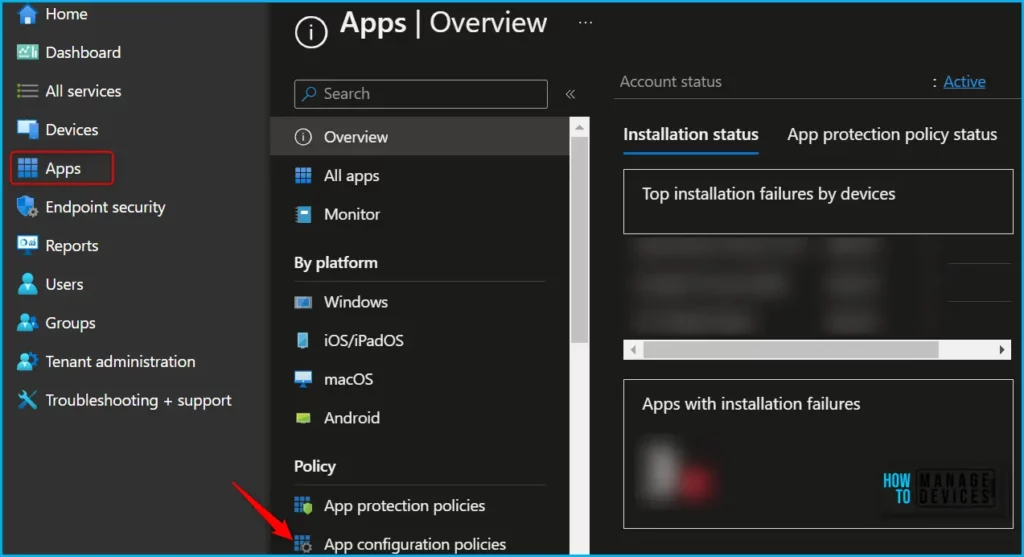
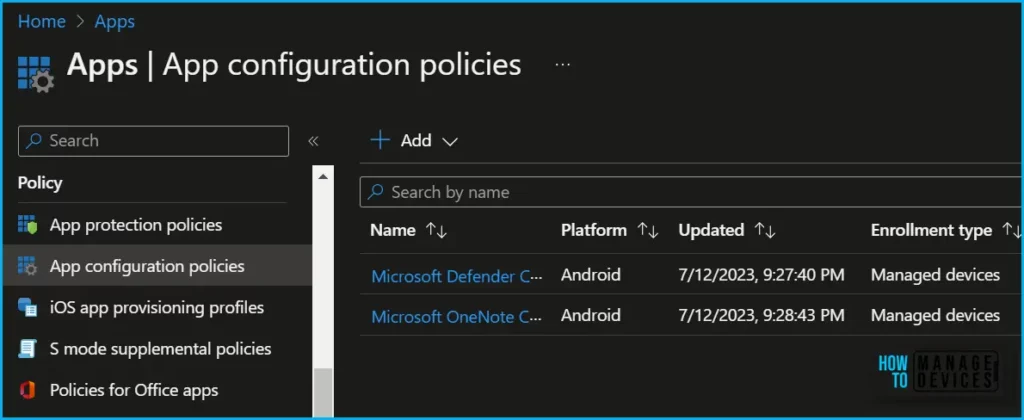
In App configuration policies, You can select a policy for apps on a managed device. You can create and use app configuration policies to provide configuration settings for both iOS/iPadOS or Android apps.
These settings allow an app to be customized using app configuration and management. The configuration settings are unique for each app.
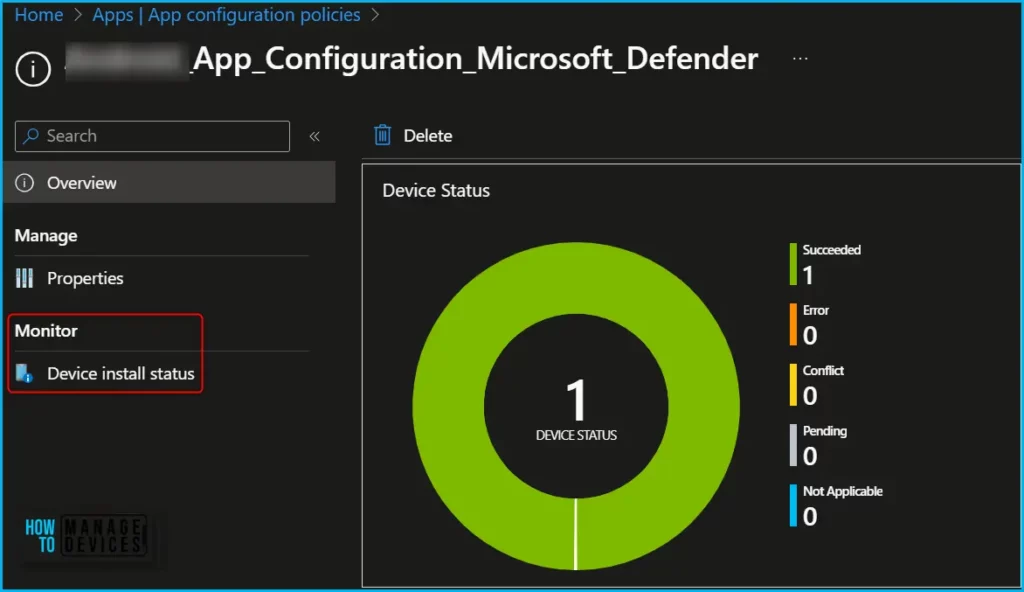
Several user interface (UI) changes have been made for app configuration policy reporting as part of our continuing efforts to improve the Intune reporting infrastructure.
The UI has been updated with the following updates to app configuration policy reporting.
- There is no longer a User status tile or a Not applicable device tile on the Overview section of the App configuration policies workload.
- There is no longer a User install status report on the Monitor section of the App configuration policies workload.
- The Device install status report under the Monitor section of the App configuration policies workload no longer shows the Pending state in the Status column.
Author
About Author – Jitesh, Microsoft MVP, has over six years of working experience in the IT Industry. He writes and shares his experiences related to Microsoft device management technologies and IT Infrastructure management. His primary focus is Windows 10/11 Deployment solution with Configuration Manager, Microsoft Deployment Toolkit (MDT), and Microsoft Intune.


Discussion