






New Widget Updates in Windows 11 Moment 5 Review
Exciting News for Windows 11 users! New Widget Updates in Windows 11 Moment 5 Review. Microsoft Introduced innovative features on Windows 11. Microsoft always releases the best features for users to explore in the changing technological era.
Recently, Microsoft launched Moment 5 features for users to experiment with new improvements in Windows 11. Some Spectualr features arrived on the Widget board as a part of Microsoft’s latest release. These features enhance your experience with the Renovated Settings Page on the Widget.
Widgets are small Dynamic Cards containing a lot of useful content. Widgets are useful for users, and these can easily be personalized according to their interests. A Widget Board is the best option to view the latest news weather, reminders.
Some important updates can be seen in the Widget Board. This blog post helps you to know more about New Widget Updates in Moment 5.

- Windows 11 Search Widget in the Taskbar New Microsoft Experiment
- Add Custom Widgets to Windows 11 Desktop Screen
New Widget Updates in Windows 11 Moment 5 Review
The New Widget board is expanded with exciting features in this new update. Most of the updates can be seen in the Widget Settings. The new settings dialogue now has some settings on its page.
- Select Settings in the Widget
| Different Features of New Widget Updates in Moment 5 |
|---|
| Disable Show Notifications and Announcements on the taskbar |
| Disable Open the Widget board on hover |
| Disabling Show or Hide Feeds |
| Adding 3rd Party News Feeds to the Widget Boards |
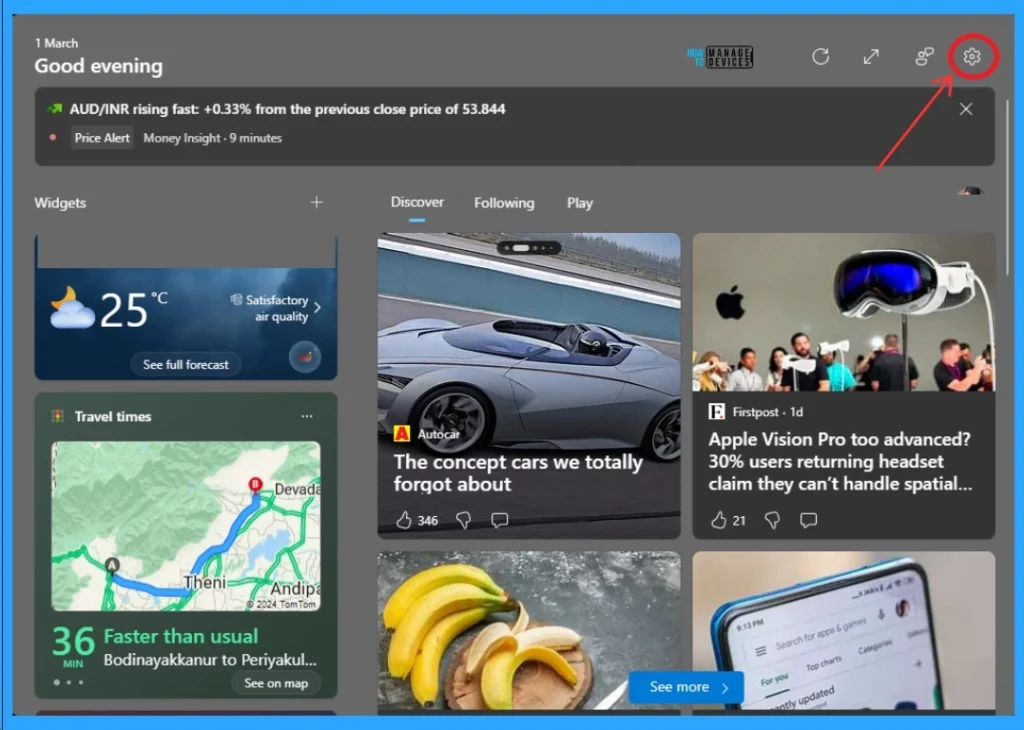
1. Disable Show Notifications and Announcements on the Taskbar
After selecting the Settings option in Widget, Select the Notification option in Settings. The notifications on Widget settings help manage taskbar notifications from your Widgets and feed.
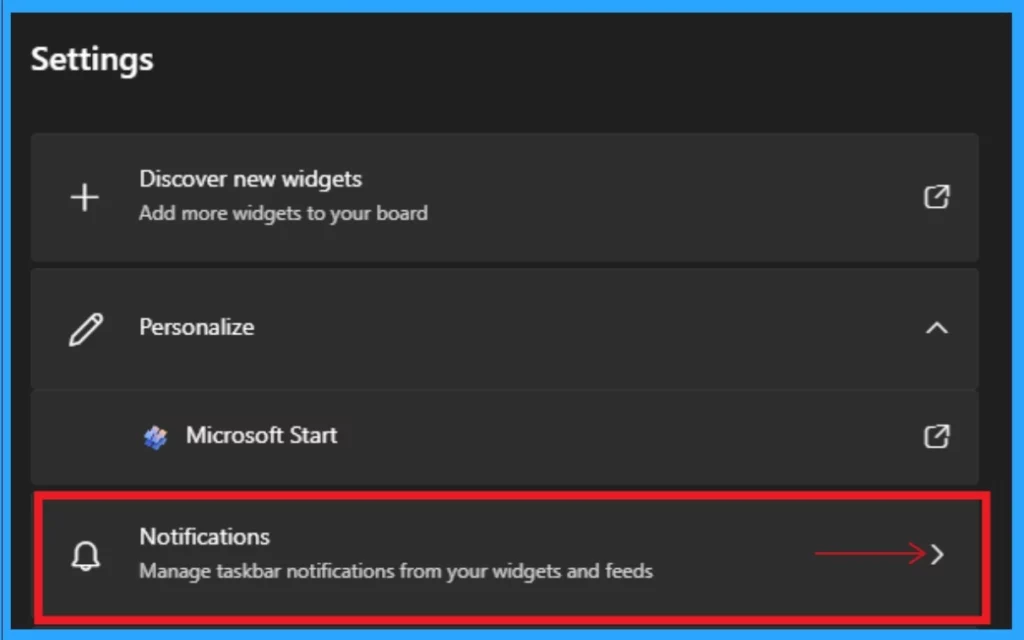
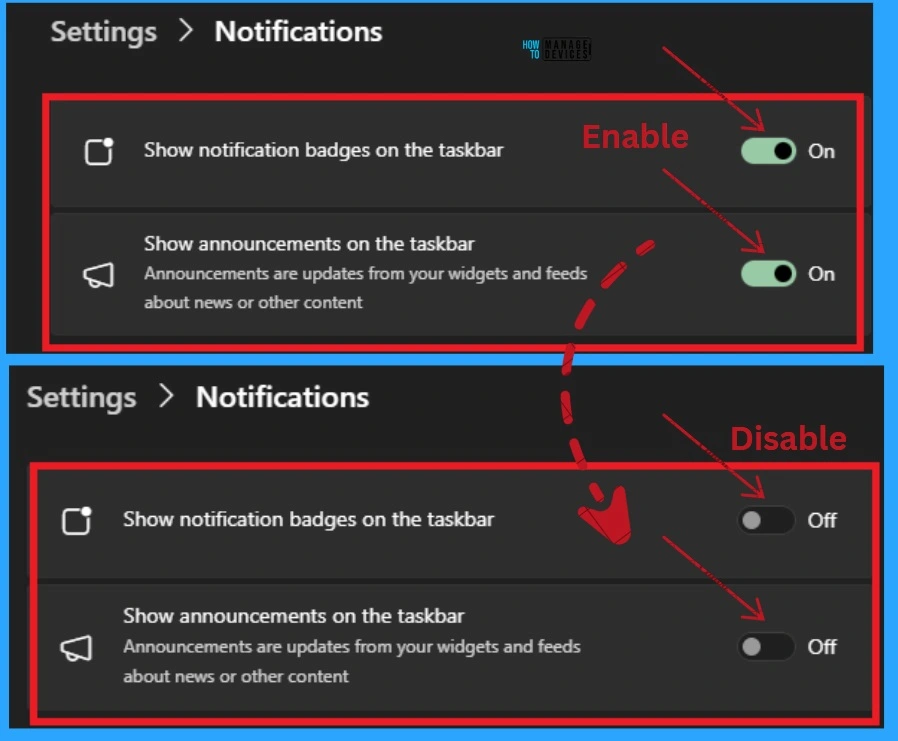
In the Notification window, you can see the 2 options: Show notifications badge on the taskbar and Show Announcement on the toolbar. You can disable these options to disable notification badges and announcements on the taskbar.
- To disable these options, toggle the pane to the left, as shown in the screenshot below
- Pin or Unpin Copilot Side Pane on Desktop in Windows 11
- How to Remove Start Backup in File Explorer of Windows11
2. Disabling the Widget Board on Hover
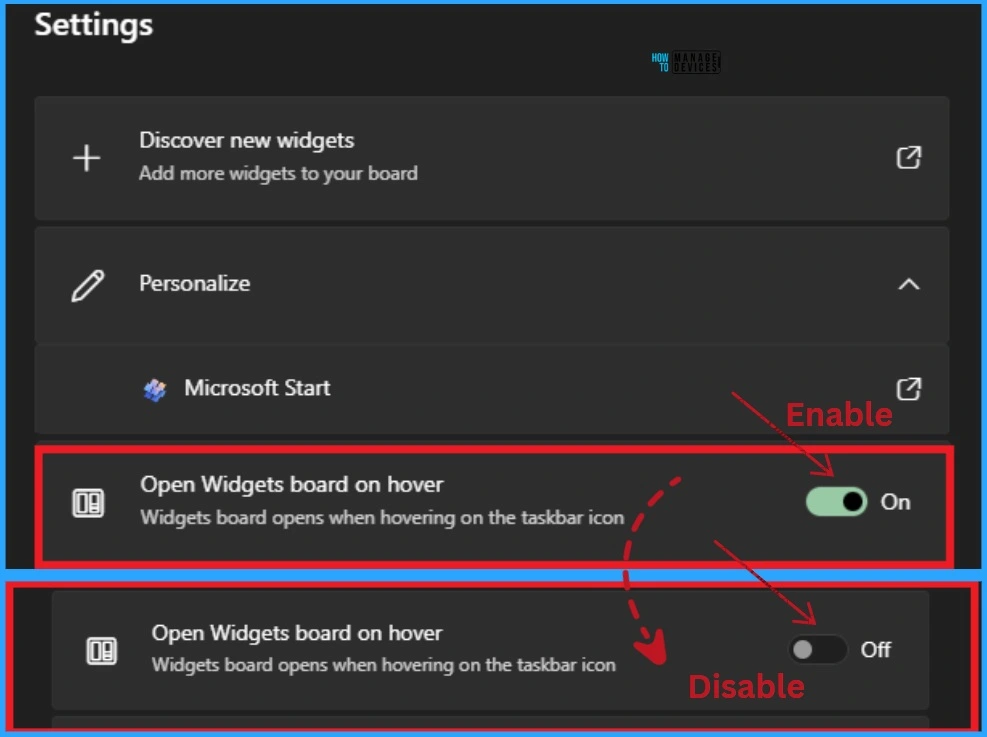
Disabling the Widget Board on Hover is the second update on the Widget board. The widget Board on Hover option opens the Widget board when hovering on the taskbar icon. After disabling these options, the Widget board will not open when hovering on the taskbar icon.
- To disable the Widget Board on Hover, toggle the pane to the left, as shown in the screenshot below
3. Disabling Show or Hide Feeds
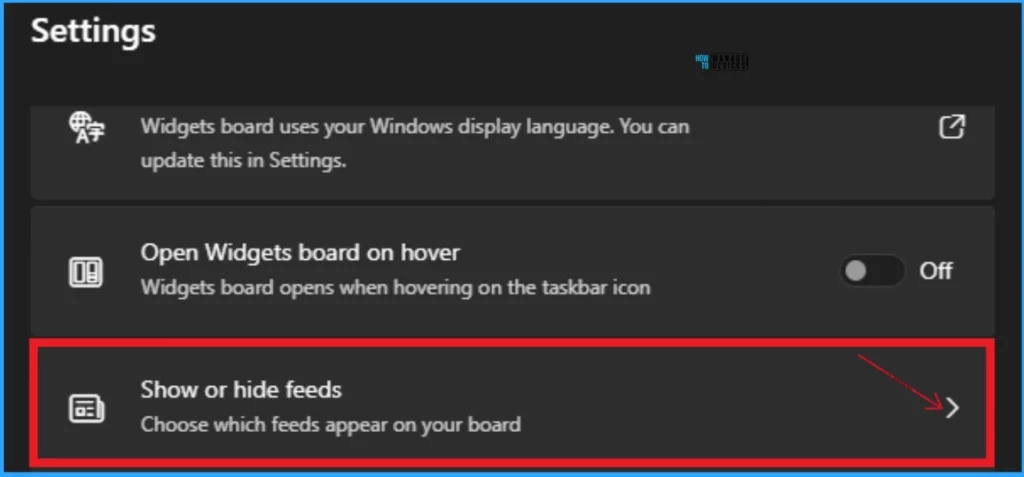
Here, you can find a list of Widgets news feeds. Most users will see just the Microsoft Start fees. This option allows you to choose which feeds appear on your board.
- Widgets board > Settings.
- From Settings, select “Show or hide feeds“
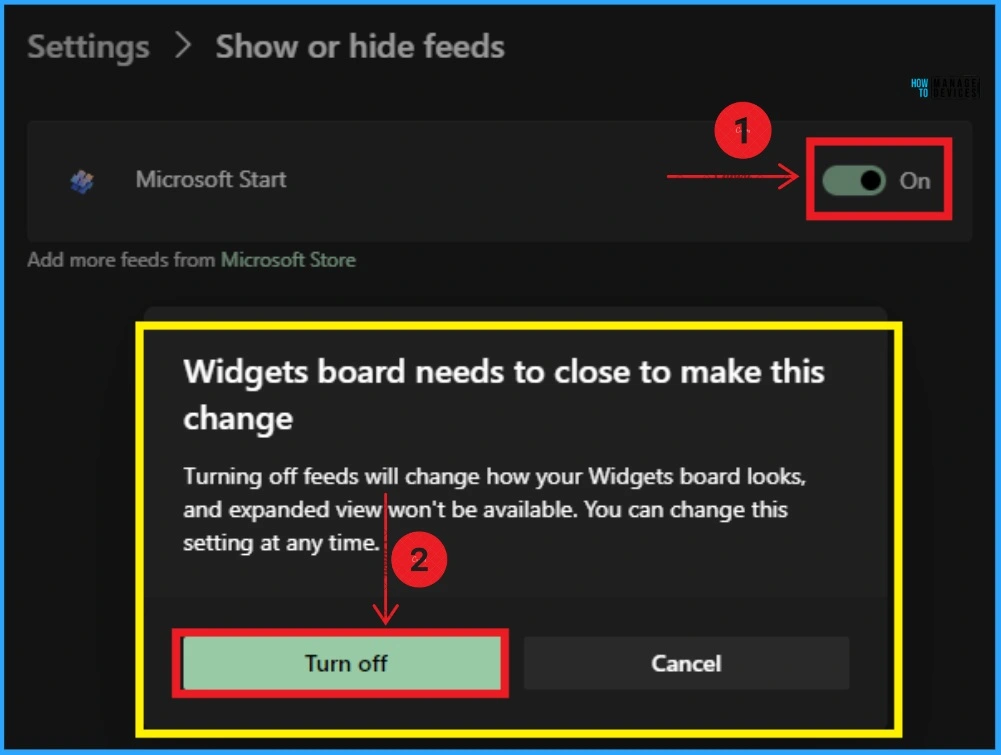
After selecting Show or Hide feeds, you can see the Microsoft Start option. You can turn off this option to change feeds on the Widget board, which will also change the appearance of your Widget board.
After turning off the Microsoft Start, a new window will appear. It shows a message that ” Widgets board needs to close to make this change”. This feature turns off the Widget board expanded view.
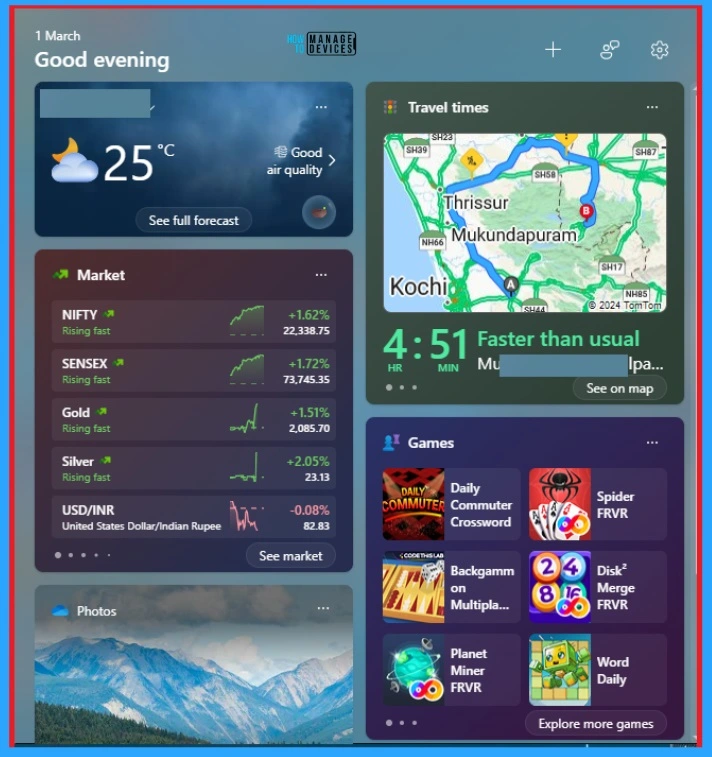
After disabling this option, you can see changes on the Widget board. It will get news from the Widget board. After it relaunches, you will only see widgets with no news. The full-screen (expanded) view and refresh option will be unavailable.
4. Adding 3rd Party News Feeds to the Widget Boards
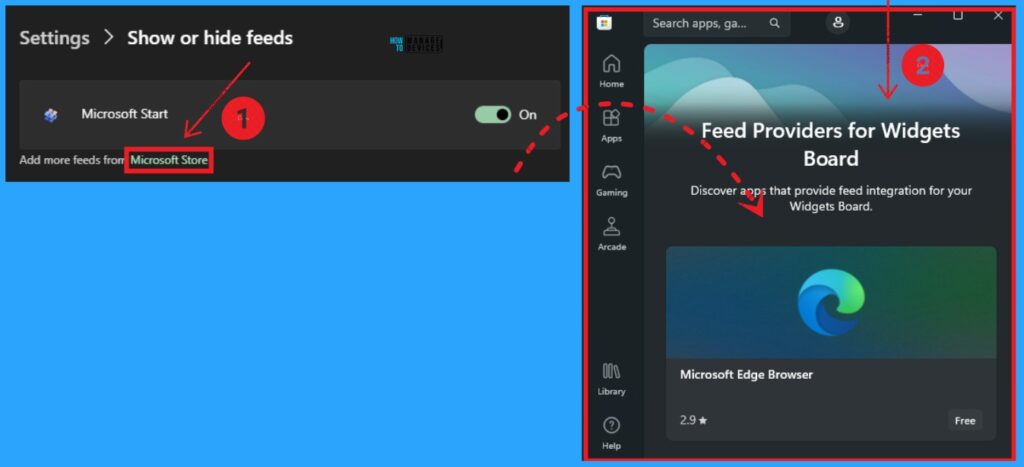
European Economic Area (EEA) users can add 3rd Party news feeds to the Widget boards. A dedicated page for these will be available in the Microsoft Store.
You can see the options to add more feeds from the Microsoft Store in the Show or Hide feeds. To add more feeds, click on the Microsoft Option, and it will open the Microsoft Store directly.
We are on WhatsApp. To get the latest step-by-step guides and news updates, Join our Channel. Click here –HTMD WhatsApp.
Author
Gopika S Nair is a computer enthusiast. She loves writing on Windows 11 and related technologies. She is here to share quick tips and tricks with Windows 11 or Windows 10 users. She is Post Graduate Diploma Holder in Computer Science.




Discussion