






New Windows 11 Policy to Manage Quality Updates During OOBE in 2025
Let’s discuss the New Windows 11 Policy to Manage Quality Updates During OOBE in 2025. Quality updates for Windows 11 devices can be enabled during the out-of-box experience (OOBE), which is coming soon.
Microsoft will introduce a new policy in mid-2025 to control whether devices in your organization receive quality updates during the Out-of-Box Experience (OOBE). This will let you decide if new Windows 11 devices on version 22H2 or higher get the latest quality update during setup.
You can adjust this setting using Windows Autopilot and Windows Autopilot device preparation, which gives you clear control over updates during OOBE. If you are not using Microsoft Intune’s Autopilot, you can disable quality updates during OOBE by setting a Group Policy, which is available as both MDM and traditional Group Policy.
Your existing quality update configuration, including deferral periods and pause policies, will be automatically applied when setting up new devices. This ensures that only the latest approved security update is offered, keeping all devices on the same managed version.

Note: This policy doesn’t affect Zero Day Package (ZDP) updates during OOBE.
Table of Contents
What are the Benefits of Experiencing an OOBE?
New Windows 11 Policy to Manage Quality Updates During OOBE in 2025
Windows devices enrolled via MDM will soon get quality updates automatically during setup (OOBE). These updates are released monthly and include security fixes, reliability improvements, and feature updates.
- Generic Windows 11 Product Keys to test | How to Retrieve Windows 11 Product keys
- Microsoft Products Reaching End of Support in 2025
- Keyboard Layout Prompt in Windows Autopilot OOBE Process
Out-of-box Experience of the User
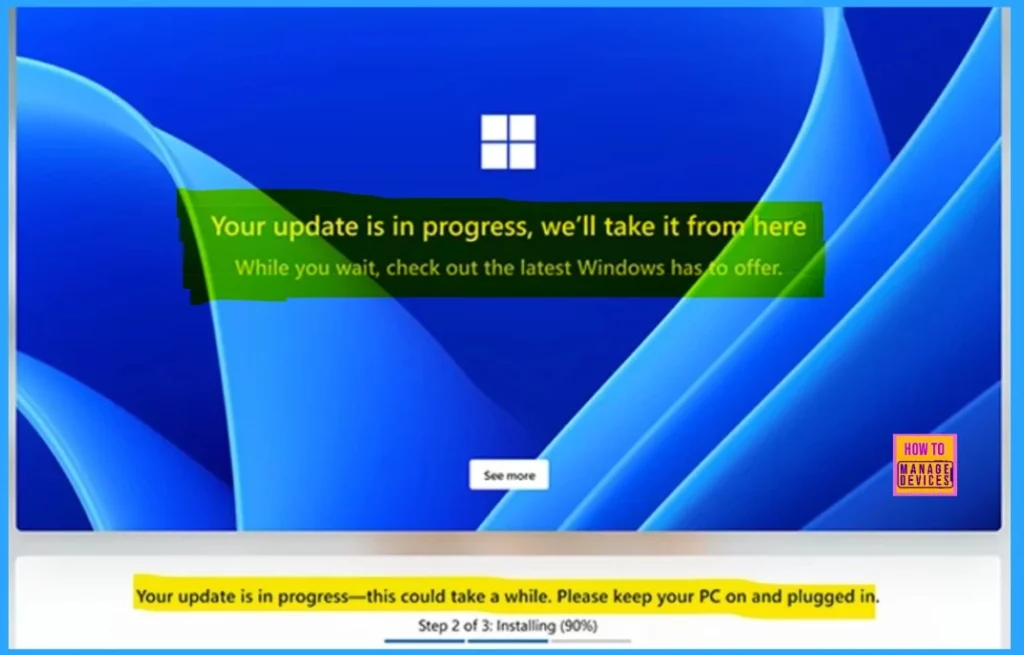
This change will help keep devices in your organization secure from the start. They will receive a quality update at the end of their out-of-box experience. The download usually takes about 20 minutes. Installation time depends on the size of the update, the user’s network conditions, and the device’s hardware.
Enrollment Process
First, the device connects to the internet and checks for updates. If any quality updates are available, a message will appear on the updates page saying that the updates are being installed. Next, the device will download and install the updates in the background and show the progress of the installation. After the updates are installed, the device will restart and go to the desktop. The user will then sign in, and the enrollment process will be completed.
Preparation Guidelines
You don’t need to take action now. Expect an update in mid-2025 when the policy launches and Autopilot changes go live. Stay informed by subscribing to the Windows IT Pro Blog or checking the Microsoft 365 admin center for news on the new policy.

Resources
Need Further Assistance or Have Technical Questions?
Join the LinkedIn Page and Telegram group to get the latest step-by-step guides and news updates. Join our Meetup Page to participate in User group meetings. Also, Join the WhatsApp Community to get the latest news on Microsoft Technologies. We are there on Reddit as well.
Author
Anoop C Nair has been Microsoft MVP for 10 consecutive years from 2015 onwards. He is a Workplace Solution Architect with more than 22+ years of experience in Workplace technologies. He is a Blogger, Speaker, and Local User Group Community leader. His primary focus is on Device Management technologies like SCCM and Intune. He writes about technologies like Intune, SCCM, Windows, Cloud PC, Windows, Entra, Microsoft Security, Career, etc.




Discussion