






How Good Notepad Spell Check for Regional Languages such as Malayalam
Exciting News! Notepad Spell Check is Now Available for Regional Languages Like Malayalam. Microsoft provides several new features to help us, and now they are introducing spell check in regional languages.
Notepad is a simple text editor that creates and edits plain-text documents. It is a commonly used application in daily life. Notepad always allows users to use the universal Language (English). Now, it will enable users to use regional languages and quickly check spelling.
The new Spell Check feature in Notepad allows you to identify misspelt words quickly in your regional language. Last month, Microsoft also introduced several new features in Notepad, such as Autosave and multi-tabs.
A notepad is an essential tool in Windows apps. This feature is user-friendly and free to use. In this blog post, I will help you learn more about Notepad Spell Check for Regional Languages such as Malayalam.


- How to Install and Use Notepad++ on Windows 11 PC | Detailed Review
- Microsoft Integrates Notepad with Copilot on Windows 11
What are the Features of Notepad?
1. It helps to find and replace text
2. The Autosave option helps to save files automatically
3. It helps to create essential documents
What are the Key Features of the Notepad Spell Check?
Let’s discuss the Key Features of the Notepad Spell Check. The list below helps you to understand the key features of the Notepad spell check feature.
1. The spell check feature employs advanced algorithms to detect and correct spelling errors accurately.
2. The feature provides grammar suggestions to enhance the quality of written content.
3. The interface is designed to be user-friendly
4. The feature allows users to navigate and make corrections as needed quickly.
5. Users can customize the spell check settings according to their preferences, ensuring a personalized writing experience.
How Good Notepad Spell Check for Regional Languages such as Malayalam
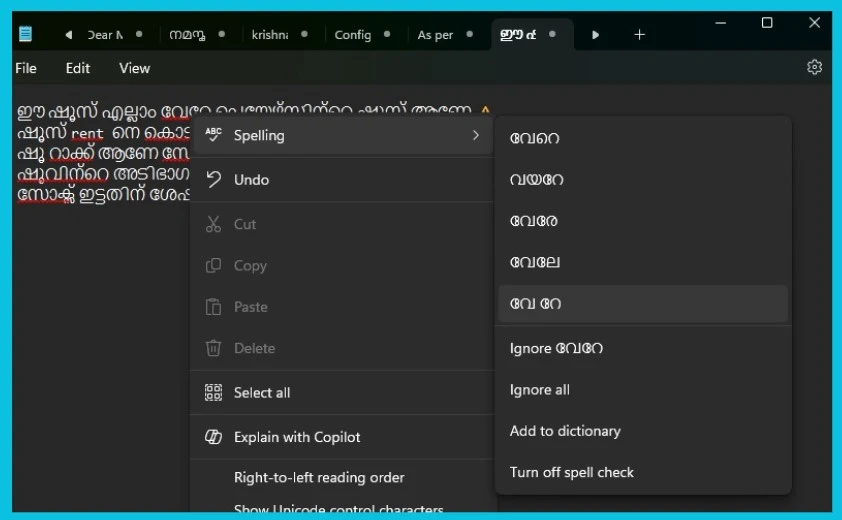
With this new update in Notepad, misspelt words are underlined in red. The great advantage of this feature is that many word suggestions related to the misspelt word are shown. So users can easily choose the suggested word, ignore it, add it to the dictionary, etc. You can quickly turn off this feature if you don’t want spell-check suggestions.
With the addition of regional language support in Notepad, users worldwide can now enjoy a more accessible and efficient writing experience, irrespective of their language. The screenshot below shows that the new spell check is used for Malayalam, a language widely spoken in the Indian state of Kerala.
- Ignore all – Ignores all instances of the word.
- Add to the dictionary – Adds the word to the dictionary to prevent further spelling checks.
- Turn off spell check – Disables the spell check feature.
| Features of Spell Check for Regional Languages |
|---|
| 1. Misspelled words underlined with red |
| 2. It shows many related word suggestions |
Please follow us on the HTMD Community and visit our website, HTMD Forum, if you like our content. We would love to hear your suggestions for improvements and know which topic you want us to explore next.
We are on WhatsApp now. To get the latest step-by-step guides, news, and updates, Join our Channel. Click here. HTMD WhatsApp.
Author
Sumitha was introduced to the world of computers when she was very young. She loves to help users with their Windows 11 and related queries. She is here to share quick news, tips and tricks with Windows security.




Discussion