






Outlook Desktop Blocks Printing to PDF if Mandatory Labeling is Enabled
Hi, Let’s discuss Outlook Desktop Blocks Printing to PDF if Mandatory Labeling is Enabled. This change began rolling out across all Microsoft 365 channels in January 2024. In today’s world, the security of sensitive information is critical. We are responsible for securing our information safely.
Organizational data are very important, so they choose many strategies for securing their confidential data. Mandatory labelling is essential in these cases; I think you all know about Mandatory labelling, a policy for all documents to be appropriately labelled to reflect data sensitivity.
When enabled, mandatory labels are crucial. They help prevent the accidental exposure of confidential data and ensure compliance with security policies. However, this feature can sometimes be inconvenient for many users.
In a recent update, Microsoft announced that the Print to PDF feature in Outlook Desktop will be blocked if Mandatory Labeling is enabled. In this blog post, we will share the details of the issues and a Workaround for these issues.

- Best Way to Automatically Configure Outlook Profile for Windows with Intune
- Enable Disable Conversation View in Outlook for Windows 11
- FIX Outlook Error Cannot Move the Items using OWA
Outlook Desktop Blocks Printing to PDF if Mandatory Labeling is Enabled
Printing a document in a PDF format lets you import the tags and hidden details, like sensitivity labels and accessibility information. If important details like labels are lost when a document is turned into a PDF, it could break the company’s rules and accidentally reveal private information that should be kept safe.
See more: Microsoft Outlook.com Connectivity Issue
Microsoft Information Protection Errors
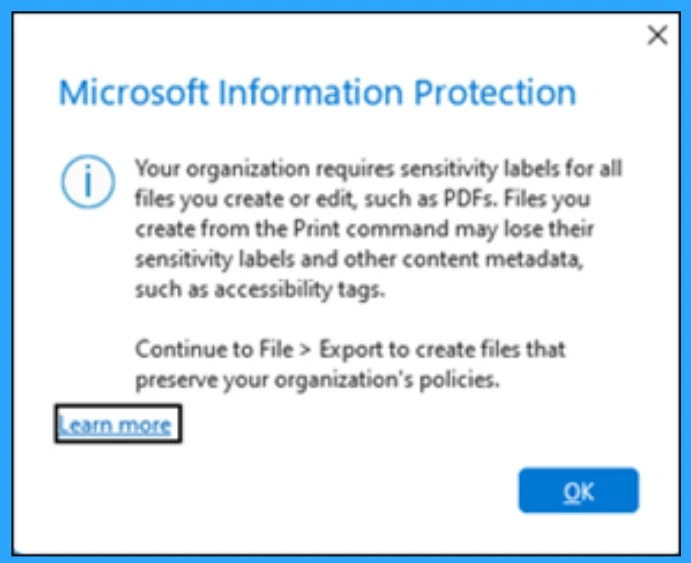
In Outlook, when a user is going to print a PDF, some Microsoft Information Protection errors are displayed. In that error, messages are trying to warn you by the message.
| Numbers | Error Message |
|---|---|
| 1 | ” Your organization requires sensitivity labels for all files you create or edit, such as PDFs. Files you create from the Print command may lose their sensitivity labels and other content metadata, such as accessibility tags.” Continue to File-> Export to create files that preserve your organization’s policies. |
| 2 | ”Files you create from the Print command may lose their sensitivity labels and other content metadata, such as accessibility tags” |
Note: This error message appears when a label is applied to the email, especially if the label applies encryption.
- FIX Spoofing Vulnerability with Outlook Image Blocking and Read-Only Meeting Body
- Cloud Attachment Option for Email Links in Outlook No Longer Support
- Install New Outlook for Windows with Microsoft Store App from Intune
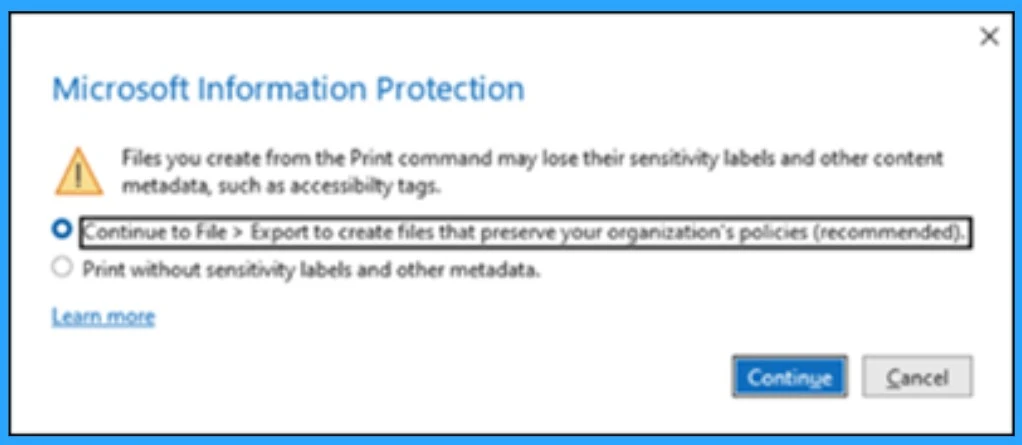
In the other error message shown ” Files you create from the Print command may lose their sensitivity labels and other content metadata, such as accessibility tags.” There are 2 options in that error message they are.
- Continue to File-> Export to create files that preserve your organization’s policies. ( Recommended)
- Print without sensitivity labels and Other Metadata
| Numbers | What We Have to Understand |
|---|---|
| 1 | This error can be misleading because Outlook Desktop does not support exporting files to PDF. Users have requested the Outlook team to make their warnings better and easier to understand. |
| 2 | Other Office applications like Word Can’t Print to PDF.but it has the capability to export. |
Workaround
Users can disable mandatory labeling and print in PDF format as a temporary method. Also, Outlook Desktop blocks the option for printing documents as PDFs because this is against the rule for mandatory labels. It is not preserved when you print an email to a PDF label.
Once Mandatory Labeling is disabled, Outlook users should no longer be prompted to apply labels, and the issue with printing to PDF should be resolved. However, remember that this change affects your organization’s security and compliance measures so ensure you understand the implications before proceeding.
Reference
Print to PDF is blocked if Mandatory Labeling is enabled
We are on WhatsApp. To get the latest step-by-step guides and news updates, Join our Channel. Click here –HTMD WhatsApp.
Author
Krishna. R is a computer enthusiast. She loves writing about Windows 11 and Intune-related technologies and sharing her knowledge, quick tips, and tricks about Windows 11 or 10 with the community.




what is the solution? you just simply copy paste the below Microsoft article
https://support.microsoft.com/en-us/office/print-to-pdf-is-blocked-if-mandatory-labeling-is-enabled-328c575c-9db9-4879-953b-a5e176f61e78