






Improved Email Recall Feature for Exchange Online | Outlook Microsoft 365
It improved the Email Recall Feature for Microsoft 365 Exchange Online. This is a useful option to recall or remove the emails you send as a mistake. You can recall the emails that the recipient already reads. The latest post with more details is available on How To Recall An Email in Outlook Microsoft 365.
This post is all about the new update by Microsoft 365 as Message Recall Exchange Online will be released in mid-November 2022. The outlook for Windows Message Recall features is most popular among the users; hence it’s not working properly every time.
There is an existing option to recall the emails from the Microsoft Outlook side. Since Outlook is a client application, the client-side recall (unsent) option of emails is limited. The issue is that the recall is client-based. So recall only happens if the recipient is also using Outlook.
Microsoft is testing the new version of Outlook client based on new technology. This Outlook comes with a similar experience as Outlook OWA. HTMD has a post about One Outlook – New Outlook For Windows Desktop App Features Walkthrough.

Video – Outlook Email Recall Feature and Reporting
It’s time to learn about Outlook Email Recall Feature and Reporting Expectations Vs Reality. It is a bad situation When you accidentally send an email with a typing error or the wrong information in an email. Fortunately, Outlook allows you to recall an email (in most cases) in case the recipient has not opened it.
Resend or Recall Option in Outlook
Let’s look at the basic recall email option available on the Outlook client side. This recall option works only if your account doesn’t have a MAPI or POP account.
First, you need to open the email you want to recall, and you can open this email from the Sent Items folder in Outlook. You can select or double-click the message, so it opens in another window. The following steps help you attempt to recall recipients’ messages (email).
- Select File > Info.
- Select Message Resend and Recall.
- From the two options, select Recall This Message.
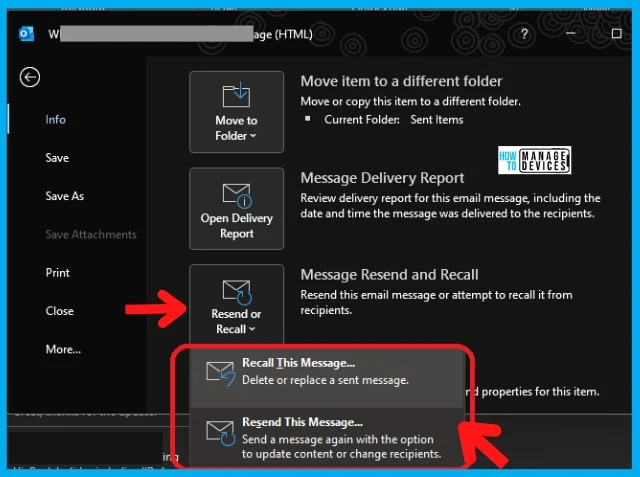
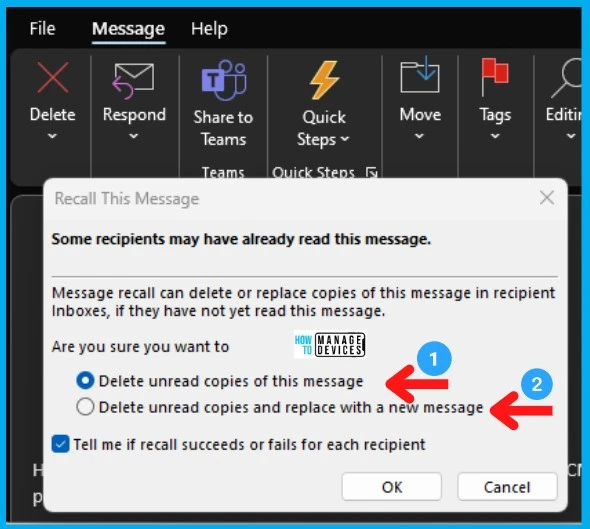
You can select one of the two options explained below to recall the emails from the recipient. This recall is only available on the client side. It can’t recall the emails from the Online Office 365 mailbox of the recipient.
NOTE! – The pop-up window clearly states that some recipients may have already read this message. The email message recall can delete or replace copies of this message in the recipient’s Inbox if they have not yet read this message.
- Select Delete unread copies of this message to recall the sent message.
- Select Delete unread copies and replace with a new message to replace the sent message with a new message.
You have the option to get the receipt of the action – Tell me if recall succeeds or fails for each recipient check box. You can click on the OK button to start the recall action from the client side.
- Outlook Web App OWA Instead of Outlook Desktop App 4 Months Experience
- New Outlook for Windows Desktop App Features Walkthrough
Improved Email Recall Feature Office 365 Mailbox
Millions of users with mailboxes in Office 365, Microsoft 365 can now improve that feature by performing the recall directly in the cloud in Office 365 mailboxes. It does not matter which email client the recipient uses.
Microsoft 365 plans to release a new email Message Recall for Exchange Online features that will recall messages flagged as “Read”. The classic Message Recall in Outlook doesn’t recall the read messages.
In this update, the tenant admins do not have the option to disable the recalling of reading messages for the organization; the recall takes place in their Office 365 mailbox, and when their client syncs their mail, the message is gone.
Email Recall Exchange Online Issues and Features
There are some conditions where the email recall still won’t happen (like the message being read by the recipient), but moving the recall to the cloud significantly improves the recall success rate.
Microsoft 365 Exchange Online now also offers an aggregate email message recall status report to make it simpler to see for whom the recall succeeded and for whom it failed. The message is associated with Microsoft 365 Roadmap ID 59438.
The new features of Message Recall will begin to roll out in Mid-November, and the ability to disable the recalling of reading messages for any organization is available now. The General Availability is expected to be January 2023.
| Feature ID | Product(s) | Cloud Instance(s) | Release Phase(s) | Improvements | Release Date |
|---|---|---|---|---|---|
| 59438 (email Recall) | Exchange, Outlook, Power Automate | GCC High, Worldwide (Standard Multi-Tenant) GCC, DoD | In Development | 1. Aggregate email message recall status report 2. Improves the recall success rate | GA by Jan 2023 |
Author
Alok is a Master of Computer Applications (MCA) graduate. He loves writing on Windows 11 and related technologies. He likes to share his knowledge, quick tips, and tricks with Windows 11 or Windows 10 with the community.




Discussion