






Outlook Teams Desktop Application Login Issues M365 Incident MO414814
Let’s check the updates on Outlook Teams Desktop Application Login Issues M365 Incident MO414814. A new incident was reported on 18th Aug because of issues with the authentication plug-in (Microsoft AAD Broker Plugin). Is this happening because of an Anti-virus update?
There is a new MS incident because of that issue; many users cannot connect to Exchange Online using the Outlook and Teams Desktop apps. Microsoft confirmed that “Some users may be unable to sign into M365 desktop applications and encounter errors.”
You will see the following message under Service Health if your organization is impacted. “Your organization is affected by this event, and some users attempting to sign in to Microsoft 365 desktop applications are impacted.” Many users have been reporting this issue on Twitter since 17th Aug 2022.
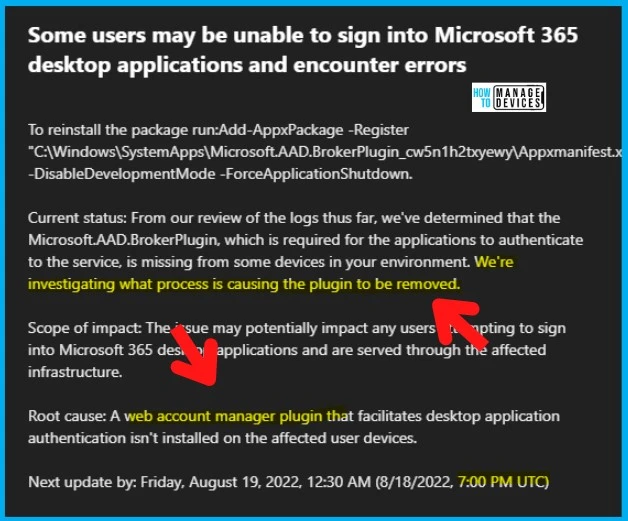
In the initial report from Microsoft – the web account manager plugin that facilitates Microsoft 365 desktop app authentication isn’t installed on the affected user devices. Following are the impacted applications.

- Microsoft Teams desktop app
- Microsoft Outlook desktop app
- OneDrive for Business desktop app
- Microsoft Excel desktop app
- Microsoft PowerPoint desktop app
- Microsoft Word desktop app

Read More on another issue – Outlook Crashes When Users Attempt To View Contact Card Information | Aug Office Patch Issue.
Outlook Teams Desktop Application Login Issues
We see an issue with Outlook and Teams Desktop Application Login Issues for many users. As per Microsoft, they are getting reports that Microsoft 365 apps (aka Office 365) are having problems because of a missing authentication plug-in.
Microsoft’s authentication plug-in missing from devices is Microsoft AAD Broker Plugin. Admins can check whether the plug-in is installed or not with the following command. If the app is not installed, nothing will be returned as a result.
Get-AppxPackage -Name "Microsoft.AAD.BrokerPlugin"Some customers have reported they were not running the Tenable plugin. However, in Microsoft’s investigation into this issue, affected customers have been running the Tenable/Nessus plugin identified in the article.

Microsoft is still working to resolve the issue of why the plug-in is not installed on some of the impacted devices. MS analyzes debug logs provided by some affected users to determine why the web account manager plugin that facilitates desktop app authentication isn’t installed on the affected user devices.
Workaround or Fix Outlook Teams Desktop Application Login Issues
Let’s see the options to Workaround the M365 desktop app login issue. As per Microsoft – “users can sign into the web, mobile, or both applications. Users can sign into the web, mobile, or both applications.”
Another workaround is to install Microsoft.AAD.BrokerPlugin using the following command with the admin’s help. The following table also gives a quick recap of the incident and root cause.
Update on 19th Aug 2022 6:20 AM UTC – The reinstall of the Authentication plug-in is not helping many users and they had to blow user profiles away to get them working again! Delete the User profile and restart + Login back.
Updated on 24 Aug 2022 – A web account manager plugin that facilitates desktop application authentication becomes uninstalled on the affected user devices as an unintended side-effect as described in the Tenable article.

Add-AppxPackage -Register "C:\Windows\SystemApps\Microsoft.AAD.BrokerPlugin_cw5n1h2txyewy\Appxmanifest.xml" -DisableDevelopmentMode -ForceApplicationShutdown.| User Impact | Current status | Scope of impact | Root Cause | Impacted Versions |
|---|---|---|---|---|
| Users may be unable to sign into Microsoft 365 desktop applications | Microsoft identified that the Plug-in Microsoft.AAD.BrokerPlugin is required for the applications to authenticate to the service but is missing from some devices. MS is investigating what process is causing the plugin to be removed. | The issue may impact any users attempting to sign into Microsoft 365 desktop applications and are served through the affected infrastructure. | A web account manager plugin that facilitates desktop application authentication isn’t installed on the affected user devices. | All the M365 Desktop applications |
Author
HTMD Admin Account to provide news and latest updates on the known issue from Microsoft world. We cover Windows, Intune, Azure, AVD, and Windows 365 news.




The problem returns for us even with a new profile.
Try disabling Nessus scanning, specifically look into plugin 85736, last updated 8/15/2022
Not specific to plugin 85736.. but problems go away after disabling Nessus for us 100%.
if (-not (Get-AppxPackage Microsoft.AAD.BrokerPlugin)) { Add-AppxPackage -Register “$env:windir\SystemApps\Microsoft.AAD.BrokerPlugin_cw5n1h2txyewy\Appxmanifest.xml” -DisableDevelopmentMode -ForceApplicationShutdown } Get-AppxPackage Microsoft.AAD.BrokerPlugin
Try this.
if (-not (Get-AppxPackage Microsoft.AAD.BrokerPlugin)) { Add-AppxPackage -Register “$env:windir\SystemApps\Microsoft.AAD.BrokerPlugin_cw5n1h2txyewy\Appxmanifest.xml” -DisableDevelopmentMode -ForceApplicationShutdown } Get-AppxPackage Microsoft.AAD.BrokerPlugin