






Override Intune GRS: Trigger IME to Retry Failed Win32 App Deployment
Let’s discuss Override Intune GRS: Trigger IME to Retry Failed Win32 App Deployment. In this blog post, I will explain how to overcome the GRS restriction.
GRS restriction limits IME to waiting 24 hours after 3 consecutive failed attempts before it can further process a Win32 App deployment.
Intune Management Extension (IME), a.k.a. Intune Sidecar, is instrumental in deploying Win32 apps and PowerShell scripts on managed Windows 10 endpoints.
While processing a Win32 app deployment, the IME agent on the endpoint is hardcoded to do three execution retries separated by a time gap of 5 minutes to get the app deployed on the endpoint.

Table of Contents
Intune Management Extension (IME)
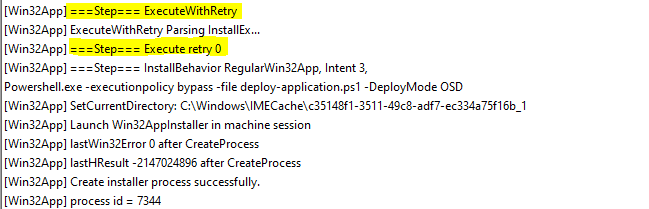
As such, while validating IME logs, you would see IME enters the Execution phase with a marked retry count.
- Intune Management Extension Level 3 Troubleshooting Guide
- Intune Management Extension Health Evaluation
- Intune Application Model Deployment Guide #1
IME creates the installer process during the execution phase to perform the app install using the install command with which the app was configured. If the app install succeeds in the subsequent attempt, it’s good.
However, if the app fails to install in all the 3 attempts, GRS (Global Reevaluation Scheme) kicks in, which makes IME ignore the app for further retries for the next 24 hours since the last failed attempt.

Even if you make any changes to the app in the Intune portal (like considering making a delta change to force Intune to redeploy or changing the detection/install/uninstall parameters) to try to fix the deployment issue, IME will continue to ignore the app for further execution until it is in GRS and will again process the app (again, 3 execution attempts) only once GRS expires.

You can understand that waiting 24 hours is not ideal when actively working on app packages to test deployment success; thus, if you find yourself in such a position, what will you do to override the IME GRS Restriction?
Override GRS: Trigger IME to retry failed Win32 App Deployment
- From the IME log, note the app ID that is currently being skipped due to GRS and head straight to Windows Registry (Regedit).\
- Navigate to HKEY_LOCAL_MACHINE\SOFTWARE\Microsoft\IntuneManagementExtension\Win32Apps\{SID}\{App GUID} where the App GUID matches with what is noted in the previous step.
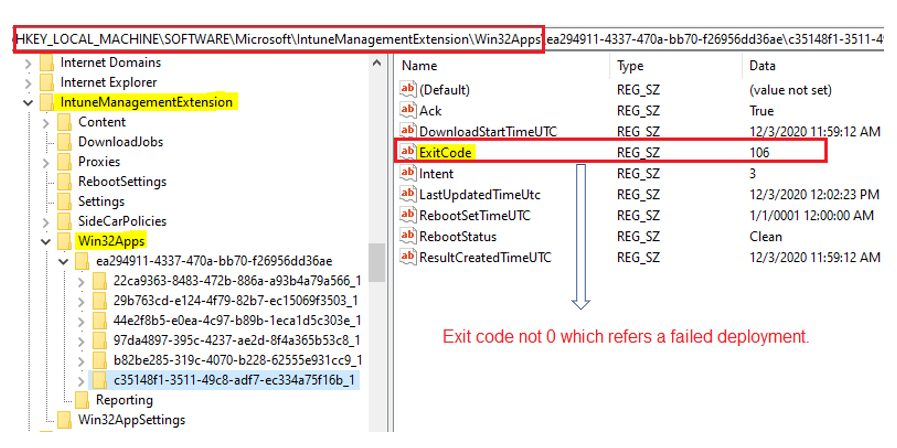
Note: Successful deployment will always show an ExitCode 0.
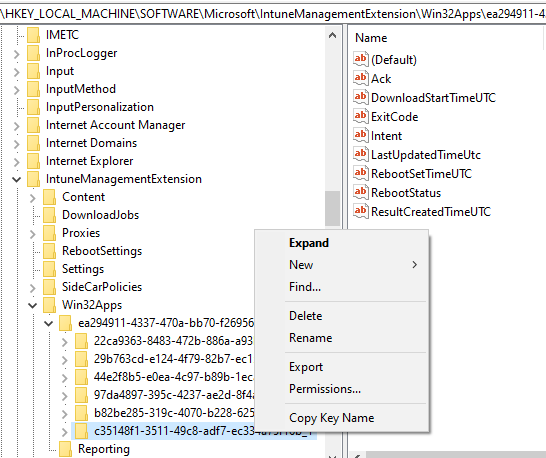
- Delete the subkey that corresponds to the app ID.
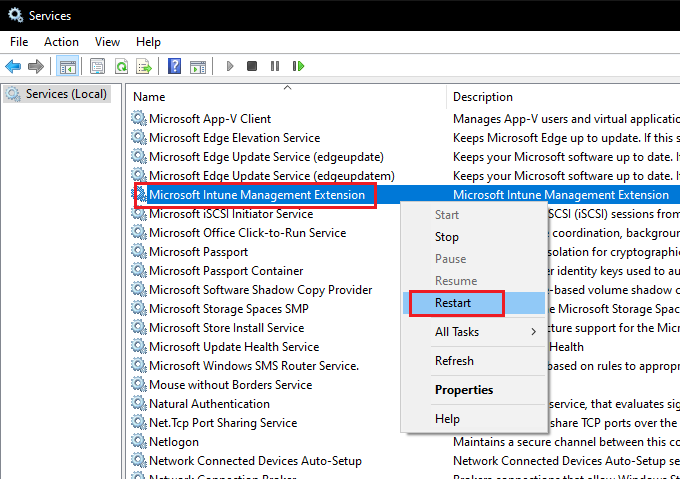
- Restart the IME service.
Initiating a Sync from the Company Portal app also triggers an IME sync. As Oliver Kieselbach explains in his blog post here, you can also use the simple run command to trigger an IME sync.
This resets the IME retry attempt counter and GRS limitations for the particular app, and you will see that IME will again start processing the app.
The End
Well, that was all for today. I wish you all a happy time working with Intune Win32 app deployments with IME.
If you want to learn more about how IME works and processes a Win32 app deployment on the endpoint, please check my deep-dive post on Intune Management Extension, which covers the Win32 app processing phases and troubleshooting tips. I also briefly shared this in my other blog post, Troubleshooting Intune app deployments using data retrieved from endpoints.
Starting 1st Jan 2021, I have started my blog site. You can find all my latest posts here at joymalyabasuroy.com
We are on WhatsApp. To get the latest step-by-step guides and news updates, Join our Channel. Click here –HTMD WhatsApp.
Author
Joymalya Basu Roy is an experienced IT service professional with almost 5 years of experience working with Microsft Intune. He is currently working as a Senior Consultant – Architect at Atos India. He is an ex-MSFT, where he worked as a Premiere Support Engineer for Microsoft Intune. He was also associated with Wipro and TCS in the early stages of his career. He was awarded the Microsoft MVP award for Enterprise Mobility in 2021. You can find all his latest posts on his blog site, MDM Tech Space, at https://joymalya.com


Seems like MS changed it since this blogpost was written as I don’t see a “ExitCode” regkey but thanks to your beautiful post I was able to find the new GRS markers.
Now there’s a new subkey under \Win32Apps\{SID}\ called “GRS” inside you’ll find different subkeys (not sure what the subkey names refer too) one of them had the app ID that I wanted to reset, I deleted the subkey that had the app ID.
Hello ,I Havel problem auth error 0x80070001
Any idea,palese?