






Patch Connect Plus Simplified Customized Deployment for SCCM
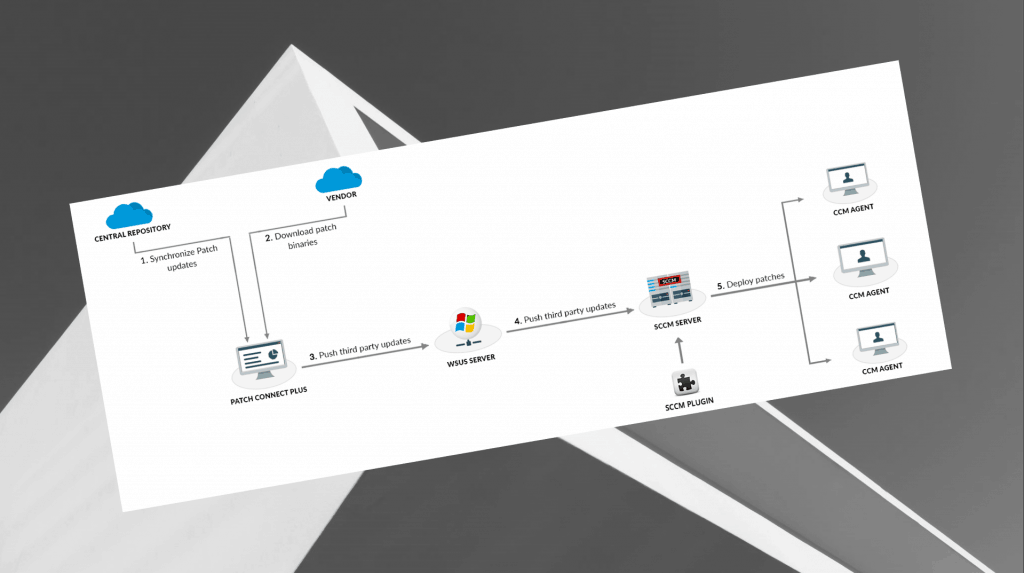
ManageEngine Patch Connect Plus (PCP) is an add-on that integrates with Microsoft SCCM to automate the patching of third-party applications.
In addition to patching, it also offers Application Management and Admin tools to create third-party applications in SCCM and manage client systems, respectively, thus streamlining your SCCM experience.
System Center Configuration Manager (SCCM) admins juggle multiple tasks and responsibilities. Keeping tabs on patch deployments can be a struggle regardless of an enterprise’s size. Data is a corporate asset, so sysadmins face a lot at stake. So, how do you secure your data from cyber-attacks?
With a comprehensive patching tool that patches Windows and third-party updates, you can more effectively prevent cyberattacks and eliminate system vulnerabilities. Automating your patch management process makes deployment hassle-free.

With Patch Connect Plus, you can automate patch management and customize the process using scripts to help efficiently execute crucial pre and post-deployment tasks. Let’s explain how to use pre and post-processing scripts for deployment.
- SCCM Third-Party Updates Step-by-Step Troubleshooting Process Guide
- Refine SCCM Management With Patch Connect Plus Right Click Tools
| Index |
|---|
| What are pre and post-processing scripts? |
| Uploading and using pre and post-processing scripts |
| More Details – Patch Connect Plus (PCP) |
What are pre and post-processing scripts?
- Pre-processing scripts run at the beginning of the import or installation process.
- Post-processing scripts run at the end of the import or installation process.
The system follows a specific sequence for both pre-processing and post-processing tasks. For pre-processing, it begins by applying a data transform, followed by executing an activity and then running automation. In the case of post-processing, it first triggers an automation, applies a data transform, and then carries out an activity.
You might, for example, want to schedule a pre-processing script to run before an application is installed to back up resource files.
After installation, you might also run a post-processing script to add a certificate to the store. This is when pre- and post-processing scripts come in handy.
Uploading and using pre and post-processing scripts
You can implement a “set and forget” policy using your hands, meaning you can automatically schedule system scans and patch deployments.
Plus, you can receive notifications about installed, missing, or failed patch installations. Follow these simple steps to upload and use the scripts of your choice to automate your deployment processes.
More Details – Patch Connect Plus (PCP)
Patch Connect Plus is an add-on to SCCM, supports patching for more than 330 third-party applications, and enhances your patching process with customized deployment templates.
To learn more, download a free, 30-day trial of Patch Connect Plus and enjoy a hassle-free patching experience!
Resources
- SCCM Third-Party Software Updates Setup Step-by-Step Guide Post 1
- Free SCCM Catalog List – SCCM Third-Party Updates Post 2
We are on WhatsApp. To get the latest step-by-step guides and news updates, Join our Channel. Click here –HTMD WhatsApp.
Author
Anoop C Nair is Microsoft MVP! He is a Device Management Admin with more than 20 years of experience (calculation done in 2021) in IT. He is a Blogger, Speaker, and Local User Group HTMD Community leader. His primary focus is Device Management technologies like SCCM 2012, Current Branch, and Intune. He writes about ConfigMgr, Windows 11, Windows 10, Azure AD, Microsoft Intune, Windows 365, AVD, etc.




Discussion