






Planned Maintenance for Windows 365 Cloud PC Service Today
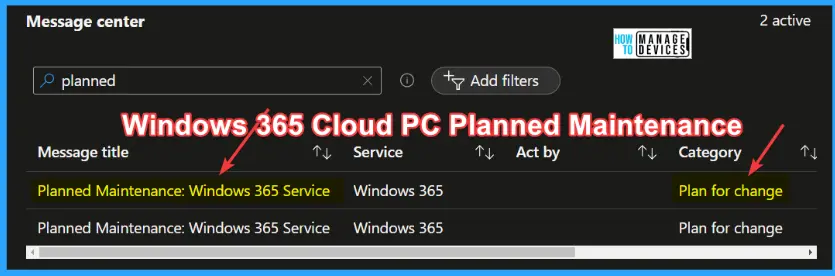
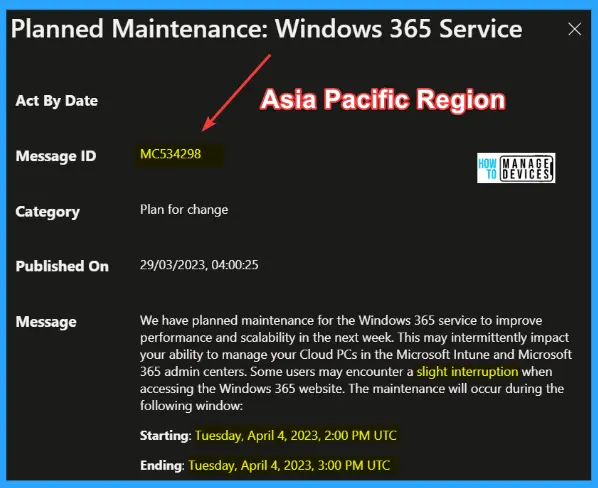
Microsoft has announced Planned Maintenance for Windows 365 Cloud PC service on 4th, April 2023. This is not a global maintenance window but only for all Windows 365 customers in the Asia Pacific Region.
There would be similar planned maintenance for other regions as well. The message ID for the APAC region is MC534298. As per Microsoft, they have planned maintenance for the Windows 365 service to improve performance and scalability.
Similar types of Message IDs would be available for EMEA and US regions as well. So take a look at Service Health and Message Center to get more details on Windows 365 Cloud PC planned maintenance for your tenant.
Did you miss this alert on these types of planned maintenance and outages? Well, it’s better to have an email alert or some other automated system to monitor and plan for your organization. More Details – Get Email Alerts For Intune Outages Microsoft 365 Services Advisory Status Change.

How to Prepare for the Change?
As per Microsoft, you need to review the information provided and plan accordingly for this upcoming maintenance. Cloud PC Admin and End-user communication for Cloud PC users is another point that Microsoft mentioned in the notification.
Also, notify your admin and users that their ability to manage and access their Cloud PCs may experience a slight delay, and, if they do, they will want to try reconnecting after a few minutes.
Planned Maintenance for Windows 365 Cloud PC Service Today
As per Microsoft, this maintenance activity intermittently impacts your ability to manage your Cloud PCs in the Microsoft Intune and Microsoft 365 admin centers. More details MC534298
- Some users may encounter a slight interruption when accessing the Windows 365 website. The maintenance will occur during the following window.
| Starting Time (Asia Region) | Ending Time (Asia Region) | Duration |
|---|---|---|
| Tuesday, April 4, 2023, 2:00 PM UTC | Tuesday, April 4, 2023, 3:00 PM UTC | 1 Hour |
Full List of Impact
Microsoft shared the following as part of Impact: For all Windows 365 customers in the Asia Pacific Region. The EMEA and US regions will follow after the ASIA region (as per normal update cadence).
Possible intermittent interruptions for admins accessing the Microsoft Intune admin center in the Windows 365 blade and the Microsoft 365 admin center for the duration of the planned maintenance period.
No interruption is expected for users in an active session on their Cloud PC. Minimal interruption may affect users attempting to log in to a new session on their Cloud PC from the Windows 365 website.
- In the unlikely event an admin or user encounters an issue, we recommend closing your browser and trying to connect again after a few minutes.
- If the problem persists for more than a few minutes, please open a support case.
Author
About Author – Vidya is a computer enthusiast. She is here to share quick tips and tricks with Windows 11 or Windows 10 users. She is also keen to find solutions to day-to-day tech problems and write about them.




Discussion