






Why Can’t You Change the Primary User of Mac Devices in Microsoft Intune
Today we are on a new topic Why Can’t You Change the Primary User of Mac Devices in Microsoft Intune . Devices with Microsoft Intune, assigning a Primary User to each device, helps make sure the right apps, policies, and settings are given to the right person.
This works well with Windows devices, but many IT admins run into a problem with Mac devices. A key feature in Intune is assigning or changing the Primary User of a device. This helps link the device to the right person, so policies, apps, and reports work properly. But for Mac devices, IT admins often see that this option is greyed out or can’t be clicked.
Recently many admins reported that Primary User on Device in Intune is Greyed Out and can’t be used is this a issue or misconfiguration? Microsoft Intune currently does not allow administrators to change or assign the Primary User on macOS devices, even when the devices are enrolled as corporate, and the admin has full Intune and Entra ID permissions.
However, when working with Mac devices, admins often find that they can’t change the Primary User the option is greyed out or not available. So let’s look why this grayed out and what are the reasons of this and what we have to know about that.

Table of Contents
Why Can’t You Change the Primary User of Mac Devices in Microsoft Intune
Above we mentioned about the issue of Primary User on Device in Intune is Greyed Out. This can be confusing, even for admins who have full permissions and can do this easily on Windows devices. But it is not possible for Mac Devices.
| Important things you have to Know |
|---|
| Primary user assignment have some limitations. Microsoft only allows setting or changing the Primary User on devices that are Entra ID Joined or Hybrid Joined. |
| Manually enrolled Mac devices usually appear as Entra Registered or Unknown, not Entra Joined or Hybrid Joined |
| It is not a Not a Configuration Error |
| Without a Primary User, it’s difficult to apply user-based policies, such as compliance rules or app deployments. |
| Works Normally for Windows |
- How to Allow or Block User-Level Native Messaging Hosts without Admin Permissions Policy using Intune
- How to Target Win32 Apps to ARM64 Devices using Intune
- Free Community Tool to Self Fix Intune Problems Issues
Find a Device’s Primary User
Find the primary user is very easy admins and the windows devices can change the primary users easily for Mac devices it is not possible. To finding the Primary user, first log in to the MS Intune Admin Center. Navigate through the Devices > All Devices and choose a device.
- On the Overview page, you can see the primary user.
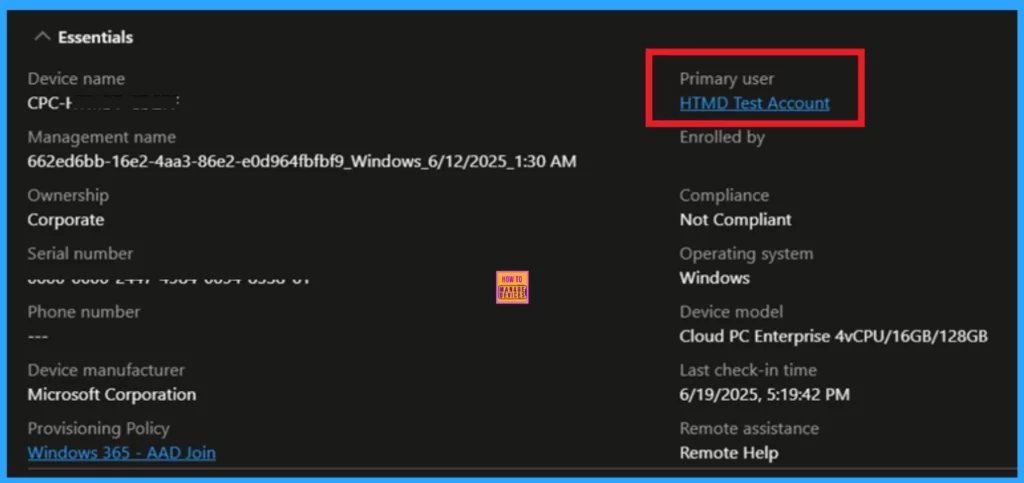
Primary user in Windows Device
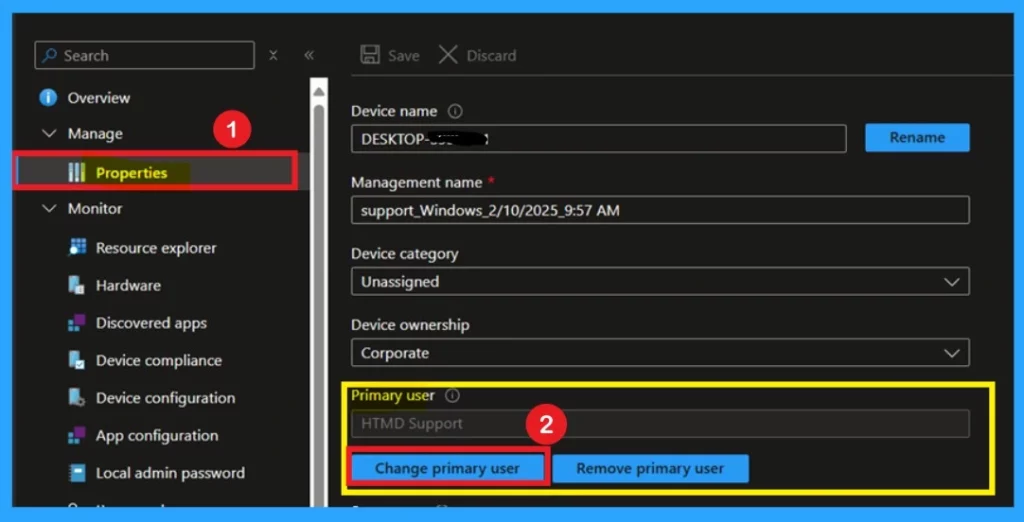
Changing the Primary User for a Windows device in Intune is easy, as long as the device is either Microsoft Entra ID Joined or Hybrid Azure AD Joined. This feature helps connect the device to the right person, so they get the correct apps, and policies.
- If you have the right permissions such as Intune Administrator or Global Administrator
- Then sign in to the Intune admin center.
- Choose Devices > All devices > choose a Windows device > Properties > Change primary user.
- Now you can Select a new user and choose Select.
Understand the Primary user in Mac Device
First we have to understand that it is not an issue it is designed like this. It is confirmed in official Microsoft documentations So we have to do some. As of now, Intune does not support Primary User assignment for macOS devices. There is no built-in way to fix this.
- These issues do not affect Windows devices that are properly joined to Entra ID or Hybrid Azure AD.
- In Mac, You cannot assign a Primary User to Intune, but you can manage and organize them using naming, tagging, groups.

Need Further Assistance or Have Technical Questions?
Join the LinkedIn Page and Telegram group to get the latest step-by-step guides and news updates. Join our Meetup Page to participate in User group meetings. Also, join the WhatsApp Community to get the latest news on Microsoft Technologies. We are there on Reddit as well.
Author
Anoop C Nair has been Microsoft MVP for 10 consecutive years from 2015 onwards. He is a Workplace Solution Architect with more than 22+ years of experience in Workplace technologies. He is a Blogger, Speaker, and Local User Group Community leader. His primary focus is on Device Management technologies like SCCM and Intune. He writes about technologies like Intune, SCCM, Windows, Cloud PC, Windows, Entra, Microsoft Security, Career, etc.


Discussion