






What is Queues App for Teams and How this Helps to Directly Interact with Customer Calls
Let’s Learn about the Queues App for Teams and how this app helps to interact directly with customer calls. IT departments can manage technical support calls effectively and solve employees’ issues quickly.
Sales, customer service, and admin teams can use Teams features to handle customer calls in the Queues app. This allows your team to work together smoothly to resolve customer problems without leaving Teams.
Microsoft Teams is a popular messaging and teamwork application that is part of the Microsoft 365 family of products. Microsoft always announces advanced features for Teams users, this time the most significant feature being the Queues app.
The Queues app allows organizations of all sizes to manage call queues effectively and affordably within Teams. In this post, I will explain the features of the Queues app and how this app works with a company for Teams.

Table of Contents
Queues App for Teams
Sales, customer service, and administrative teams can enhance collaboration by using Teams’ features while managing customer calls in the Queues app. This allows your team to work together efficiently and ensure rapid solutions to customer issues, all within the familiar environment of Teams.
- Top 83 Windows 11 Desktop Admin Interview Questions
- New Microsoft Teams Client Faster With Latest Architecture
Improved Productivity for Agents
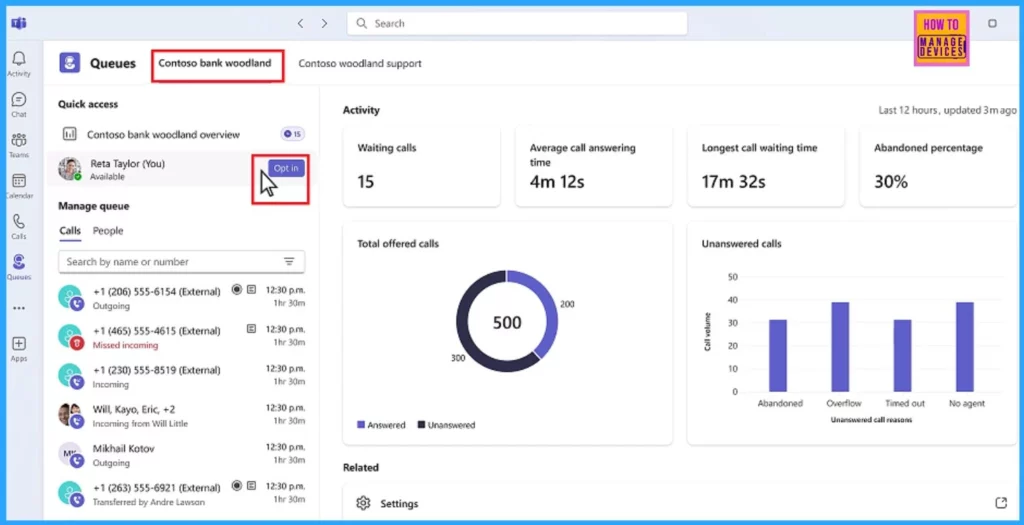
The Queues app helps agents quickly answer calls and assist customers. Agents can decide whether to take calls based on availability. If the admin sets it up, agents can access CRM records for incoming PSTN calls to improve service. Real-time analytics help agents optimize customer service by providing data on waiting calls, average wait time, and abandoned calls, allowing them to switch queues as needed.
With Copilot in Teams Phone:
- Agents can take notes and highlight key points
- They can capture unresolved issues before transferring calls
- Reducing delays and enhancing customer satisfaction
Enhanced Monitoring for Leads
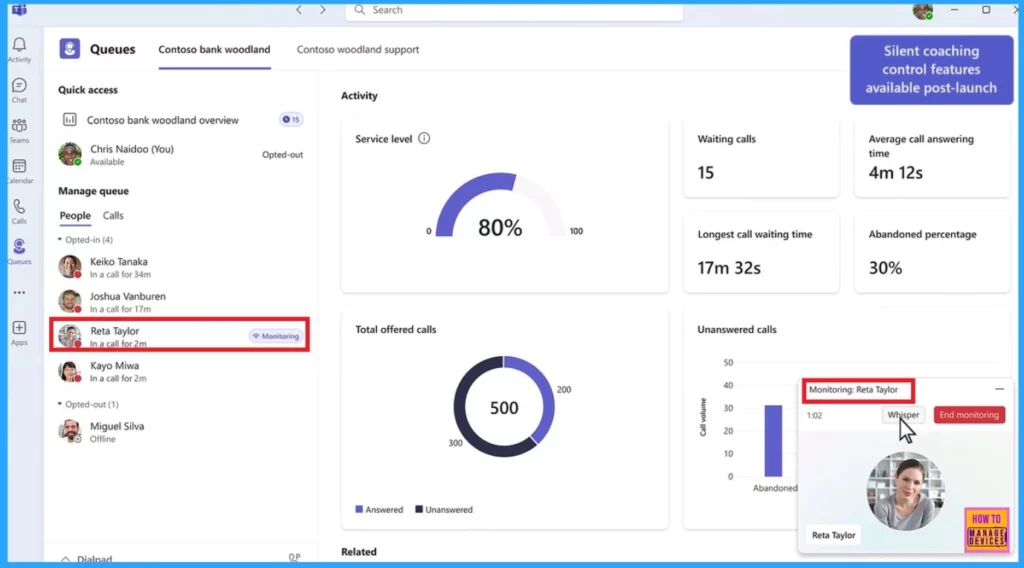
The Queues app is user-friendly for setting up and managing the team. Supervisors can assist using barge-in and take-over features. The app allows data to be exported to Excel for easy handling. The following table shows the Leads’ strengths, and this overview helps them ensure excellent service and make informed decisions.
| Strengths of the Leads |
|---|
| Leads can easily add or remove agents from queues based on their skills and accessibility. |
| Leads can guide agents on calls with whisper controls |
| Through monitoring tools, Leads can help to improve agents’ skills |
| Leads can access real-time analytics and reports to track performance and call volumes. |
Efficient Management for Administrators
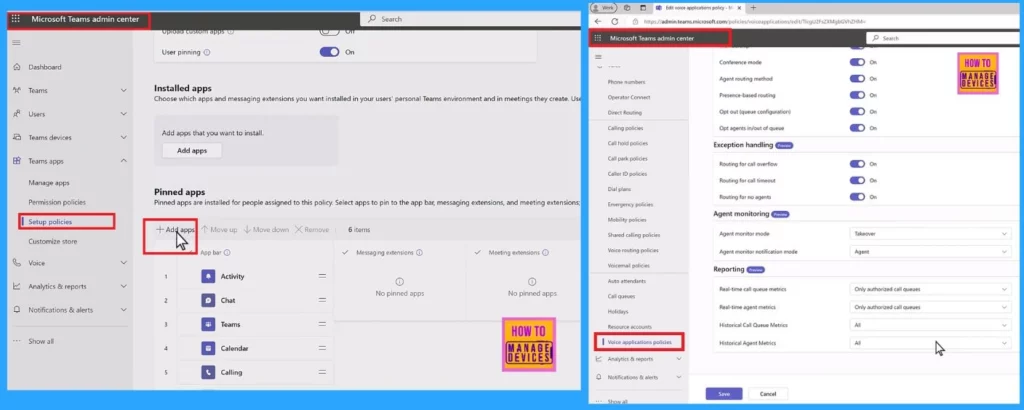
An Administrator can easily set up call queues and auto attendants and provide access levels for leads. Once assigned, these users can manage most settings directly in Teams, reducing the need to contact the helpdesk. This process updates administration and boosts efficiency for both leads and IT admins.
Improve customer engagement with the Queues app for Microsoft Teams, which is now available to all users with Teams Premium licensing. Key features include intelligent call recaps with essential points, action items, live translations, and captions for continuous communication across language barriers. These tools improve interaction efficiency and create a more inclusive service experience.
Resources
Connect with HTMD Community
Join the LinkedIn Page and Telegram group to get the latest step-by-step guides and news updates. Join our Meetup Page to participate in User group meetings. Also, Join the WhatsApp Community to get the latest news on Microsoft Technologies. We are there on Reddit as well.
Author
Anoop C Nair has been Microsoft MVP for 10 consecutive years from 2015 onwards. He is a Workplace Solution Architect with more than 22+ years of experience in Workplace technologies. He is a Blogger, Speaker, and Local User Group Community leader. His primary focus is on Device Management technologies like SCCM and Intune. He writes about technologies like Intune, SCCM, Windows, Cloud PC, Windows, Entra, Microsoft Security, Career, etc.




Discussion