






How to Raise Premier Support Case for Intune
Today, I will explain how to Raise Premier Support Case for Intune. Microsoft is moving the Premier Support case request for Intune into the Azure Portal.
If your organization has a premier support contract with Microsoft, you should log in to the Azure portal to raise a premier support case for Intune issues.
This post will teach you how to raise a Premier Support Case for Intune.
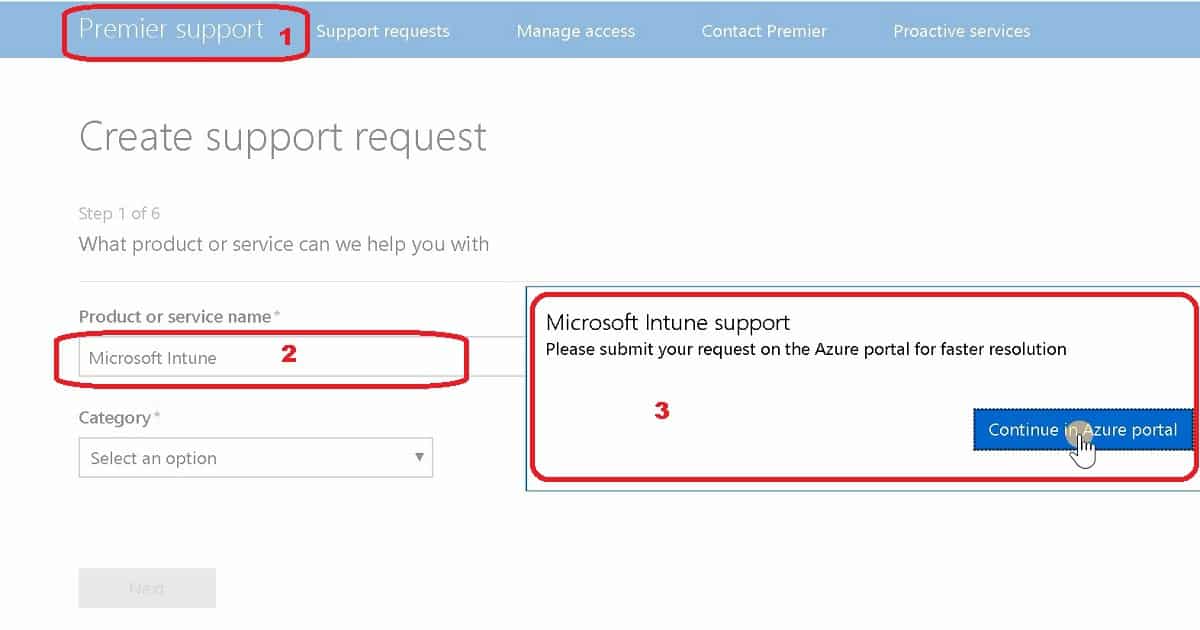
The current process to raise the Premier support case for Intune is to use the Premier support website (https://premier.microsoft.com).

Table of Contents
Raise Premier Support Case for Intune – Current Process
If you are a new Premier customer, sign in using a personal, work, or school account. Then, add the access ID and password your Microsoft technical account manager (TAM) provided under Manage Access.
- How to Segregate Work within Intune Team (Roles & Responsibilities)
- Intune MEM Endpoint Analytics with Joy | Learn and Discover #1
- Learn The Basic Concepts of PKI – Intune PKI Made Easy With Joy Part-1
Starting on December 3, 2018, if you are a Premier customer using Intune, you can create support requests only in Intune on Azure (portal.azure.com).
Video Tutorial – How to Raise Premier Support Case for Intune
Video Tutorial to explain how to raise Premier support case for Intune issues. The following steps will help you experience IT Pro when they raise the expertise of IT Pro and raise a premier support case from the Azure portal.
How to Raise Premier Support Case for Intune from Azure Portal
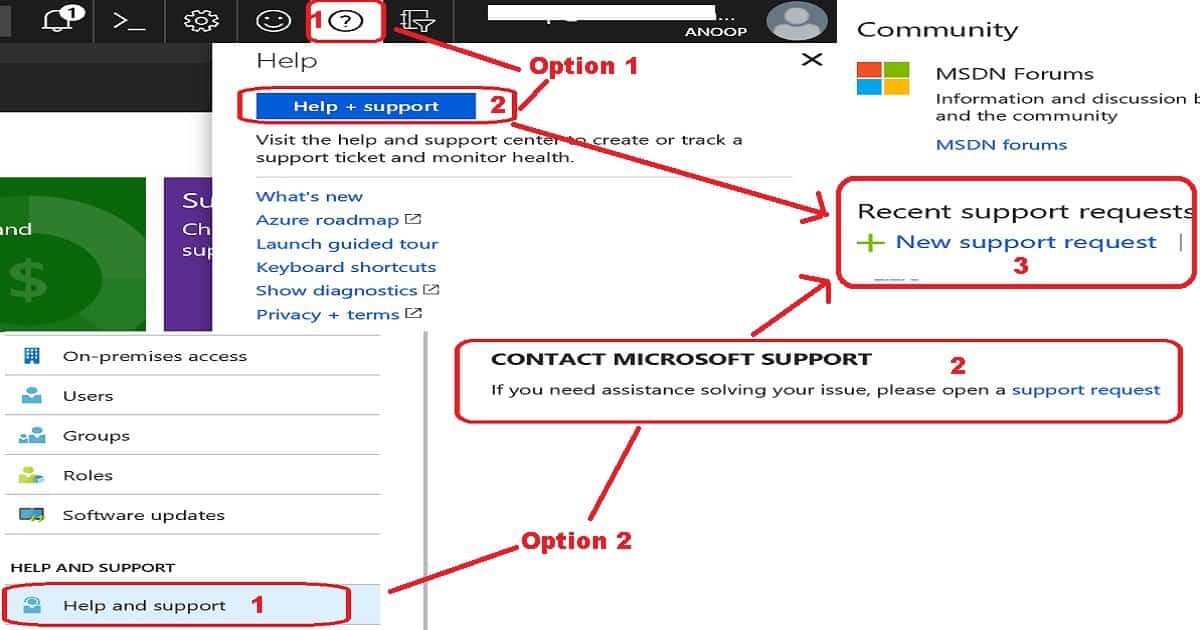
You have two(2) options to raise Premier support requests for Intune from the Azure portal. You can click on Help and Support from any blade in the Azure portal. Go to the? The icon is in the upper right-hand corner of the Azure portal.
In this video tutorial, I have explained how to raise an Intune Premier support case from the Azure portal.
Option#1. Go to the? The icon in the upper right-hand corner of the console > Help and Support > New support request.
Option#2. Click on Help and Support in any blade in Intune to see specific troubleshooting content and create a support request (see screenshot, for example).
How to Get Access to Raise Premier Support Case for Intune
You should provide the service support administrator access to the team that will raise Premier support cases for Intune. The Service Administrator role provides three(3) accesses, as mentioned below.
- Read-only access to the Azure portal
- Access to create and manage support requests
- Access to Office 365, as mentioned in the below sentence
Users with this service support role can open support requests with Microsoft for Azure and Office 365 services and view the service dashboard and message centre in the Azure portal and Office 365 admin portal.
Service Administrator Role Permissions
The following are the high-level permissions allocated to the service support administrator role so that a person can raise a Premier support case for Intune.
- Manage all aspects of the Azure Access service
- Read and configure Azure Service Health
- Create and manage Azure support tickets
- Read and configure Office 365 Service Health
- Create and manage Office 365 support tickets
Resources
- Service Support Administrator – Microsoft Documentation
- New Intune support experience for Premier customers – Microsoft blog post
We are on WhatsApp. To get the latest step-by-step guides and news updates, Join our Channel. Click here –HTMD WhatsApp.
Author
Anoop C Nair is Microsoft MVP! He is a Device Management Admin with more than 20 years of experience (calculation done in 2021) in IT. He is a Blogger, Speaker, and Local User Group HTMD Community leader. His primary focus is Device Management technologies like SCCM 2012, Current Branch, and Intune. He writes about ConfigMgr, Windows 11, Windows 10, Azure AD, Microsoft Intune, Windows 365, AVD, etc.


Discussion