






Microsoft acknowledged another issue with monthly service maintenance: Remote Action Buttons missing issue within Intune MEM Admin console. Intune admins use the remote action button to initiate the policy sync and many other remote actions.
The Remote Action Buttons are different for different types of devices in Intune portal. Fully managed Windows 11 devices have some additional remote action buttons if we compare them with iOS and Android devices. Remote action buttons are not visible within Intune MEM Admin console.
We have included the different Intune remote action buttons for some scenarios/platforms in the screenshot below. Intune admins and the helpdesk team use these remote action buttons very frequently.
It’s a huge impact on daily operational tasks if those buttons are missing from Intune portal. MS confirmed that “a monthly service maintenance update inadvertently caused an impact on the Microsoft Endpoint manager console.”

- Intune Advisory TPM Attestation Error 0x81039001 With Windows Autopilot
- Unable to Login with Microsoft Account to Windows 11 Issue
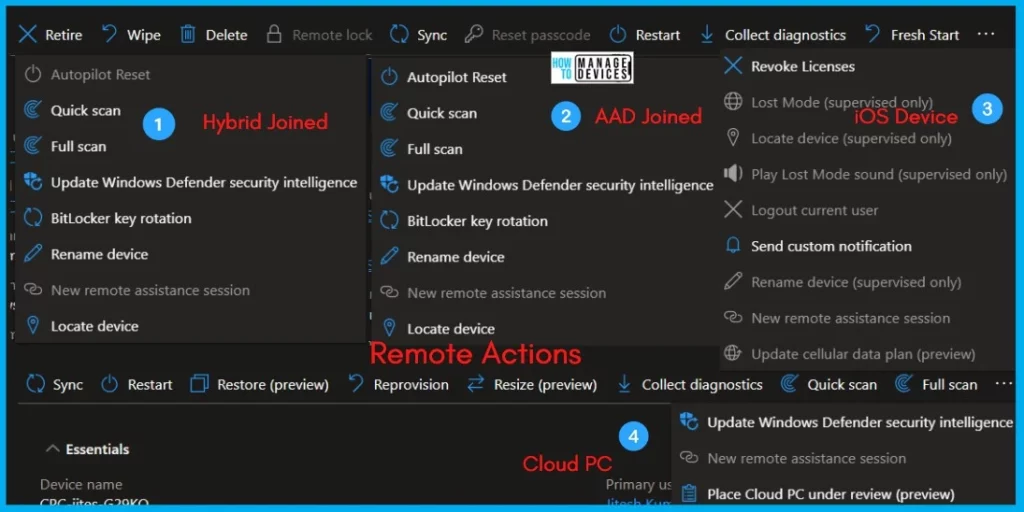
Different Intune Remote Action Buttons
You can check the remote action buttons from MEM Admin center portal. You need to open a device object from the portal to check and confirm whether the buttons are missing or not. But it’s a bit tricky because remote action buttons for iOS platforms differ from those available for Windows platforms.
The screenshot (Fig 1) gives you an idea about the different remote action buttons available within the MEM admin center portal. In the recent incident (IT434983), Microsoft confirmed that Admins are unable to see Remote action buttons in the Microsoft Endpoint manager console issue.
Admin IMPACT! – Due to the Remote Action Buttons missing an issue, admins may have been unable to perform Wipe or any other Remote actions.
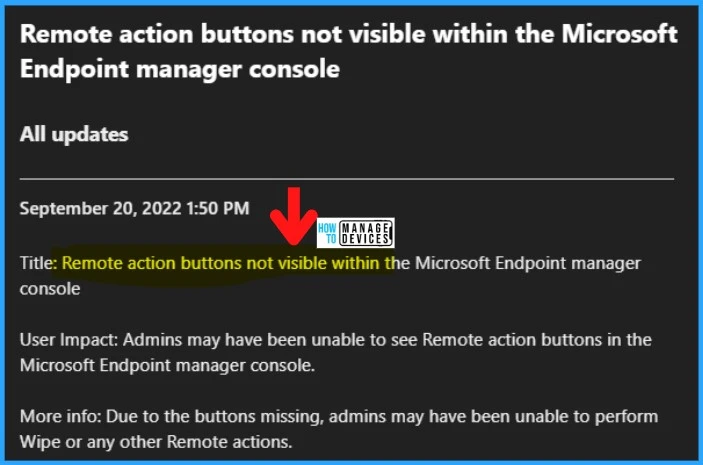
- Intune Service Health Status Message in MEM Admin Center
- How To Start Troubleshooting Intune Issues | Fix Intune Issues With Easy Steps
FIX – Remote Action Buttons missing issue from Intune Portal
Microsoft already fixed remote action buttons missing issue from Intune portal. This issue impacted only the Intune Tenants in the ASIA Pacific region. So, this is one of the reasons monthly service maintenance updates are rolled out in phases.
- 1st Phase of Rollout: ASIA Pacific Region
- 2nd Phase of Rollout: EUROPE Region
- 3rd Phase of Rollout: US Region
Microsoft identified that a recent change which was part of a monthly service maintenance update (Intune 2209?), inadvertently caused an impact. They reverted this problematic change, and that remediated impact.
| Admin Impact | Final Status | Scope of Impact | Impacted Service | Root Cause |
|---|---|---|---|---|
| Admins may have been unable to see Remote action buttons in the Microsoft Endpoint manager console. | The Issue is fixed by reverting the problematic change implemented as part of the 2209 Intune monthly service maintenance update. | Due to the missing Remote Action buttons, admins could not perform Wipe or any other actions. | Microsoft Intune | A Problematic change implemented part of 2209 Intune monthly service maintenance update. |
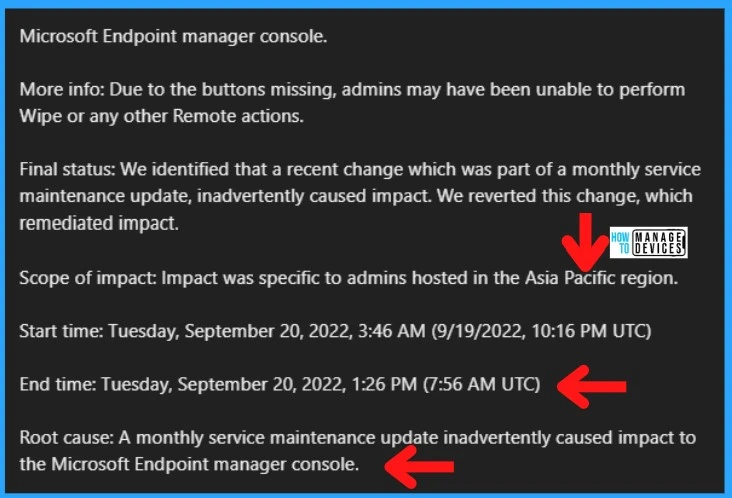
NOTE! – The following is the Start time: Tuesday, September 19, 2022, 10:16 PM UTC of this Intune Remote Action Buttons missing issue. And as per Microsoft, the End time is Tuesday, September 20, 2022, 7:56 AM UTC.
- Final Action from Microsoft: Microsoft is reviewing its standard update procedures to prevent this issue from happening again.
You can check the remote management Windows 365 Cloud PC device actions using Intune, aka Endpoint Manager. You can restart Windows 365 Cloud PC, resize, reprovision, and more by using remote actions from the Intune portal.
Author
HTMD Admin Account to provide news and latest updates on the known issue from Microsoft world. We cover Windows, Intune, Azure, AVD, and Windows 365 news.


Great Initiative