






Remove Domain from Office 365 Best Method How to Guide
Let’s have a quick look at options to remove domain from Office 365. The custom domains are normally added to Office 365 to get business email access via Office 365 mailbox. You will need to have Office 365 E3 or any similar subscription to configure a custom domain for email.
There could be many scenarios where you want to remove the custom domain from Office 365. I tried to delete the domain from Office 365 and then add the same domain into a different Office 365 subscription. For help migrating your data, you can use the free tool Microsoft Mover.
You need to ensure you have all types of backups for all the services before deleting the domain and canceling the Office 365 subscription. You will have to take extra care and plan it very well before performing this kind of activity.
Removal of Domain from Office 365
It’s time to look into the steps to remove the custom domain from Office 365 subscription. I think you need the global admin permissions to perform this removal domain activity.

- Launch Microsoft Admin portal https://admin.microsoft.com/Adminportal/Home#/Domains
- Click on Show All button to explore all the options.
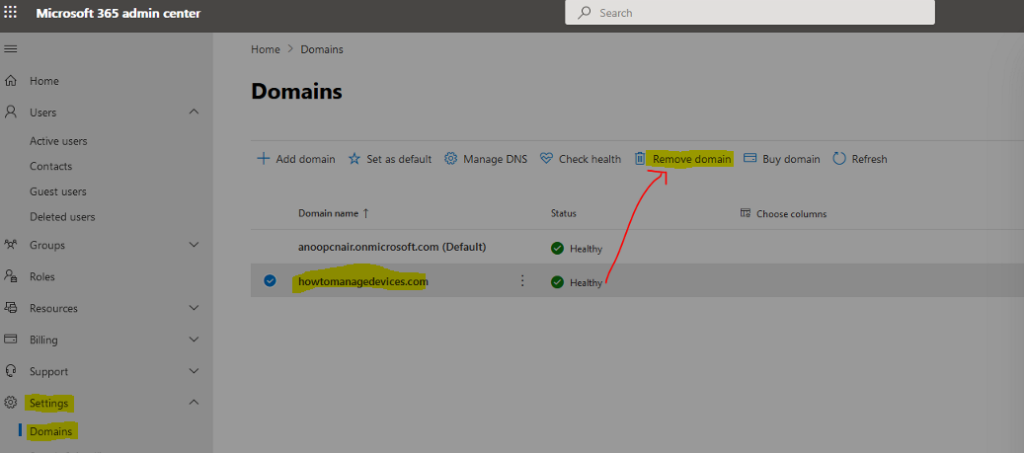
- Navigate to Settings -> Domains.
- Select the Domain you want to remove.
- Click on Remove Domain button.
NOTE! – You can’t remove the default “.onmicrosoft.com” domain from your account. When you remove a custom domain, user accounts will revert to the “.onmicrosoft.com” address as the Primary SMTP/UserprincipalName.
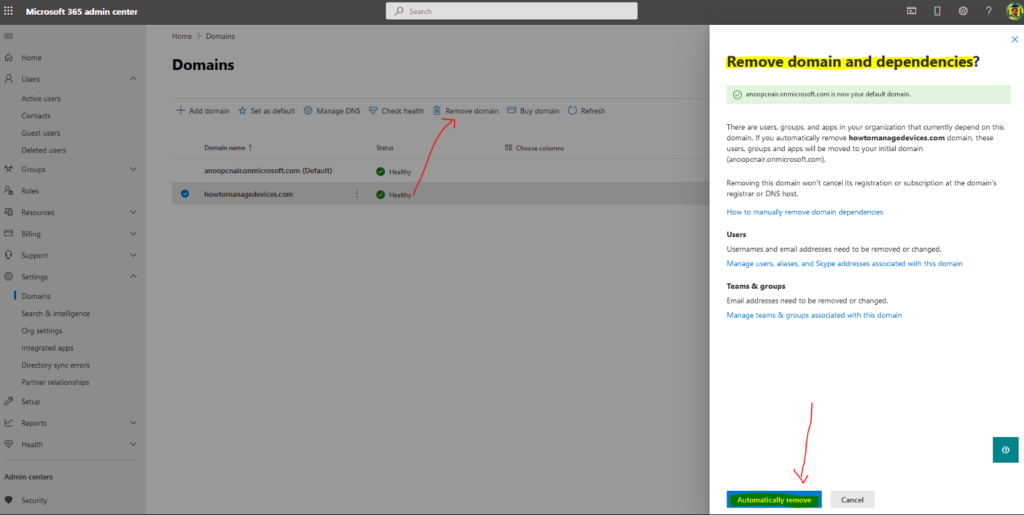
Microsoft gives us two or more warnings whenever we try to remove the domain from Office 365. So you need to be very, very careful before you remove the domain from Office 365.
- There are users, groups, and apps in your organization that currently depend on this domain.
- If you automatically remove the htmd.com domain, these users, groups, and apps will be moved to your initial domain (anoopcnair.onmicrosoft.com).
- Removing this domain won’t cancel its registration or subscription at the domain’s registrar or DNS host.
You need to mainly manage three objects before removing the domain from Office 365. You need to change or remove the Usernames and email addresses associated with this domain. This includes managing users, aliases, and Skype addresses associated with this domain.
Another task is to clean up Teams & groups related to this domain. The email addresses need to be removed or changed. Also, manage teams & groups associated with this domain. And you will need to remove the groups related to this domain.
- You can click on Automatically remove button to remove domain from Office 365 from Remove domain and Dependencies blade.
Well, the Automatically Remove option didn’t work. What is the reason? It seems I didn’t follow the steps mentioned above about managing users and groups, etc… I got the following error. The point is I’m using the same domain user name to remove the domain 🙂 Don’t forget to Move yourself out of the domain.
We couldn't remove this domain because it's currently used in your username, anoop at htmd.com.
I have to follow the steps mentioned below to remove the domain from Office 365.
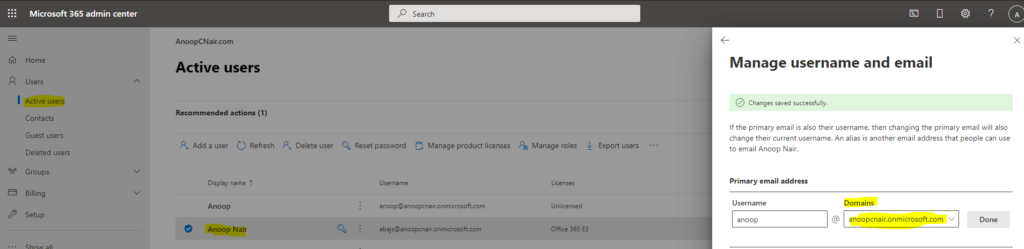
- Go to Active Users to change the domain in your username.
- Sign out of the admin center.
- Sign back in with your new username.
- Go back to Domains tab.
- Remove HTMD Domain by clicking on Automatically remove button.
Results
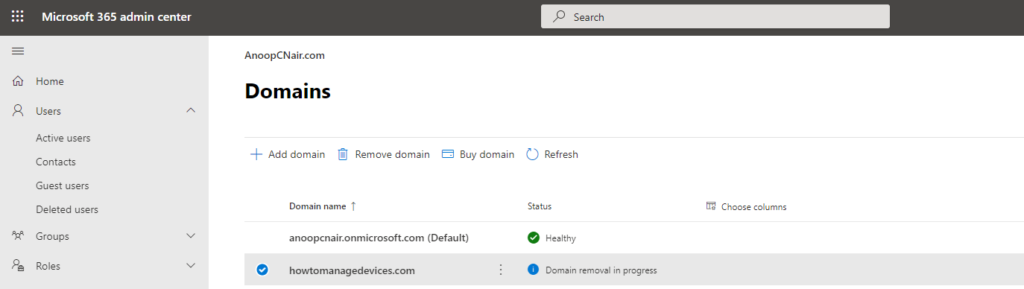
The steps mentioned will automatically remove the dependencies of the domain and update records. You can see the following status from the domain status in the Microsoft Admin Center portal. In my experience, the entire process got completed within 5 minutes. The custom domain from Office 365 will get removed.
- The status just before the removal of domain – Domain Removal in progress.
- Custom domain record will automatically get removed from Domains node.
Resources
- How to manually remove domain dependencies
- How to migrate mailboxes from one Microsoft 365 tenant to another
- Using PowerShell to perform a staged migration to Office 365




I struggled removing a domain from a Tenant and after hours of researching & playing I found it was because the users in question had “Microsoft Stream Trial” licenses which somehow kept listing the users under the domain when trying to remove them. After removing the licenses 90% disappeared from the list and the remaining few just had to have Stream trial added again and then they disappeared. Cost me 5 hours of my life
Will removing a domain delete any data (emails)?
I get the one error not documented anywhere, “Cannot force delete a domain owned by a partner”