






Renew Secret Keys Using SCCM Console Configuration Manager
Let’s Renew Secret Keys using SCCM Console—a guide to renewing One or more Azure AD App Secrets used by cloud services. Let’s understand the meaning of the Configuration Manager notification message: One or more Azure AD app secrets used by Cloud Services will expire soon and Renew to avoid service disruption.
We will also see how to fix it. When the app’s security key expires, you must renew all the security keys if you have more than one.
Azure AD applications are used for many cloud-connected functions within Configuration Manager. ConfigMgr is connected to the cloud and uses different Azure services that require distinct configurations. Azure AD apps are created for each of these services.
Can’t Delete or Remove Azure AD Apps (used for Cloud Services) from SCCM Console? Here is the guide to removing those from MEMCM using WMI | WBEMTEST Remove Azure AD Apps From SCCM Console Using WMI HTMD Blog (anoopcnair.com).

The Azure AD apps are required for services like Azure AD User Discovery, Cloud Management Gateway, Tenant Attach, Co-Management, etc… You can use a single or distinct Azure AD application(s) for multiple services.
Table of Contents
Video Tutorial – Renew Secret Keys Using SCCM Console
The following video will teach you how to renew Secrete Keys, which are close to expiring, using the SCCM console Configuration Manager.
- SCCM Console Beginners Guide | ConfigMgr
- Download Latest SCCM Installation Media | Baseline Version | ConfigMgr
- Remove Azure AD Apps from SCCM Console using WMI
Renew Secret Key Using SCCM Console
First, don’t get confused about the Azure AD App security and secret keys. Both refer to the same thing.
Recently, I received a notification about “Renew Azure AD app secrets.” Let’s go through the process of renewing the secret keys for Azure AD Applications.
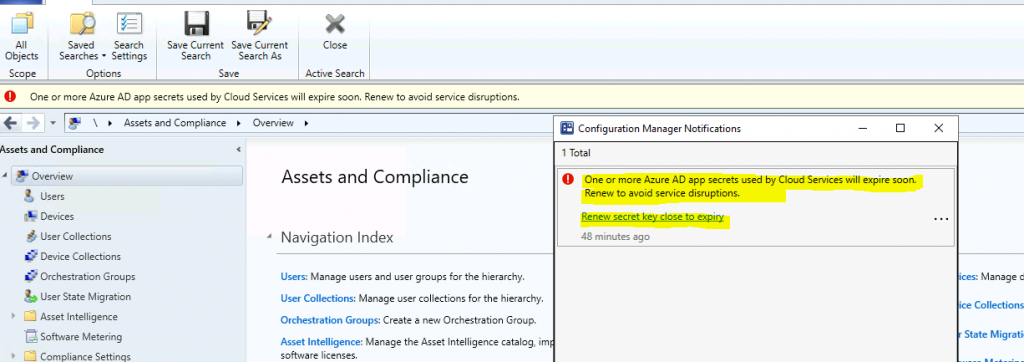
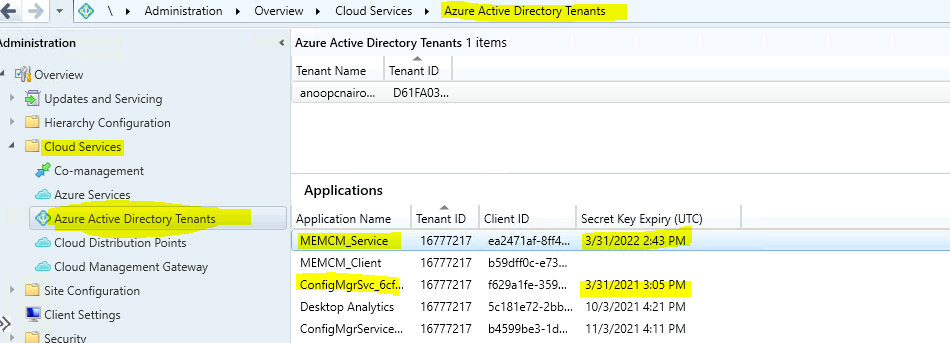
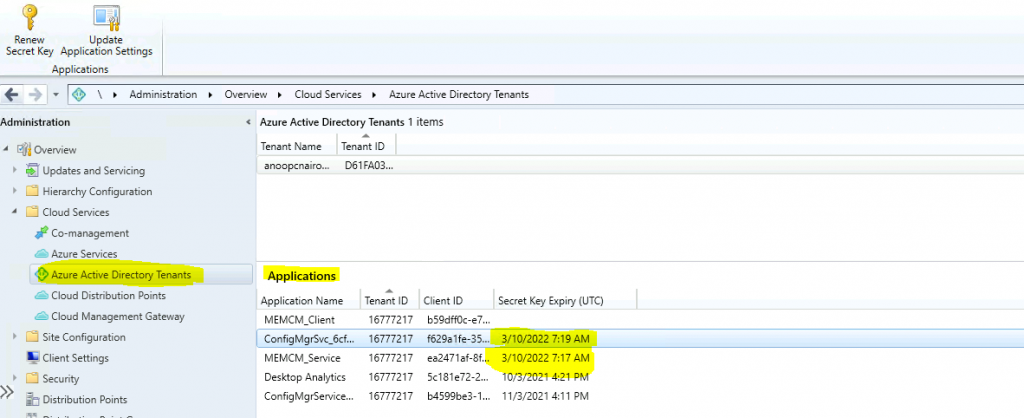
The following are the two secrets that are of immediate concern (expires in a month). These secret keys (highlighted in yellow) must be renewed to avoid service disturbance.
- Click on the Hyperlink ( Renew secret key close to expiry) in the Console notification alert or
- Navigate to \Administration\Overview\Cloud Services\Azure Active Directory Tenants – Applications.
- Find out which apps are going to expire soon.
- For the expiration date, check the column Secret Key Expiry (UTC).
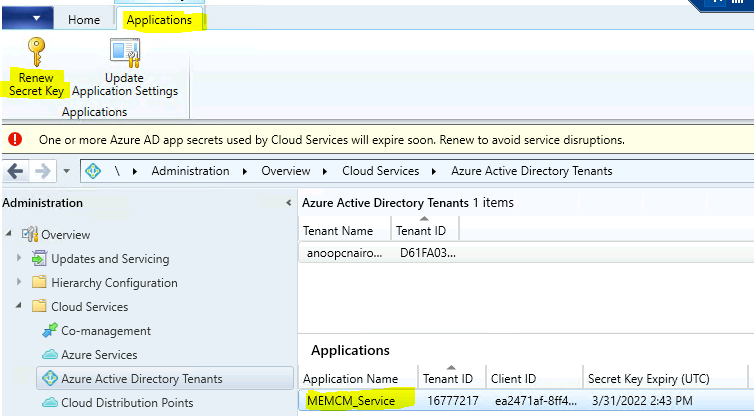
Click on the application you want to renew (the secret key is close to expiry). Click the Renew Secret Key button from the Ribbon – Applications tab.
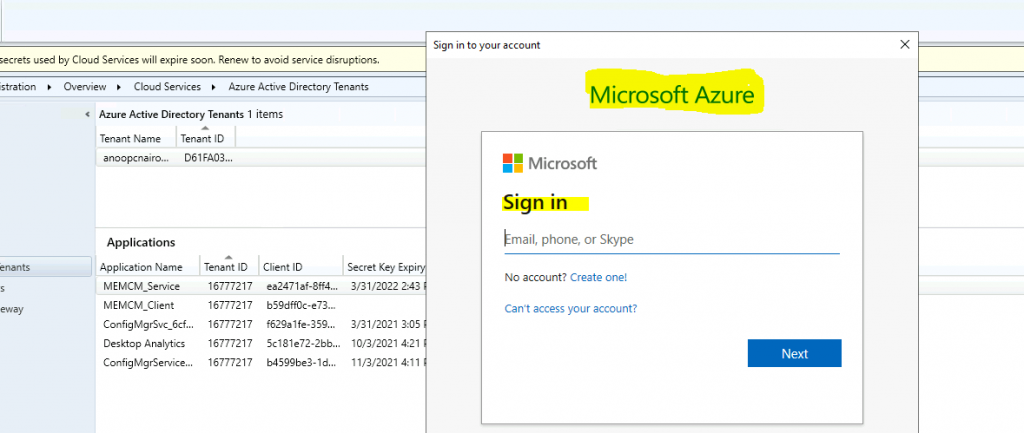
Sign in to Azure AD with appropriate permissions on Azure AD tenant (Azure AD Apps) – https://docs.microsoft.com/en-us/mem/configmgr/core/servers/deploy/configure/azure-services-wizard#about-azure-ad-apps.
NOTE! – For more information about each service’s required app permissions and configurations, see the relevant SCCM article in Available Services (Microsoft Docs). https://docs.microsoft.com/en-us/mem/configmgr/core/servers/deploy/configure/azure-services-wizard#available-services
The Secret key was successfully renewed for the Azure AD User discovery option.
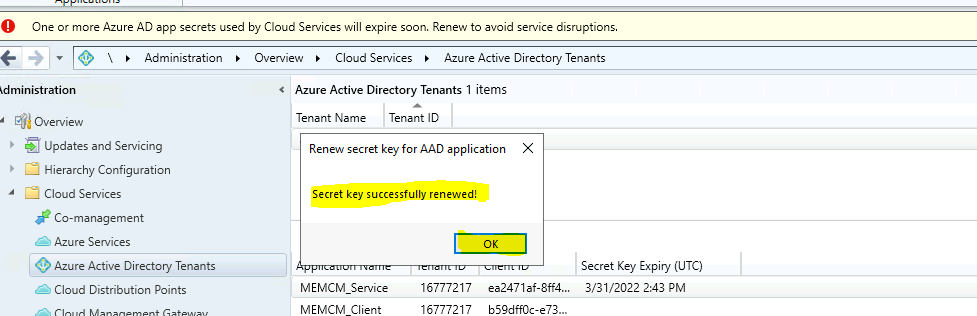
Results
Once the Azure AD App secret keys/Security keys are renewed successfully, you can confirm the extended secret key expiry date. Also, verify the ConfigMgr services are working fine after renewing the secret key.
Resources
We are on WhatsApp now. To get the latest step-by-step guides, news, and updates, Join our Channel. Click here – HTMD WhatsApp
Author
Anoop C Nair has been Microsoft MVP for 10 consecutive years from 2015 onwards. He is a Workplace Solution Architect with more than 22+ years of experience in Workplace technologies. He is a Blogger, Speaker, and Local User Group Community leader. His primary focus is on Device Management technologies like SCCM and Intune. He writes about technologies like Intune, SCCM, Windows, Cloud PC, Windows, Entra, Microsoft Security, Career, etc.




When I try to renew secret key for two app I have this error:
“Failed to renew the secret key for AAD server application. Failed to get server app”
This because I have deleted these apps from Azure.
Now, how can I delete also from SCCM to hide expired secret key notification on top of console?
Thank you.
StaffI have created a blog for you Can’t Delete or Remove Azure AD Apps (used for Cloud Services) from SCCM Console? Here is the guide to remove those from MEMCM using WMI | WBEMTEST https://www.anoopcnair.com/remove-azure-ad-apps-from-sccm-using-wmi-delete/
after renewing the secret key in SCCM, i see the updated key in SCCM. In Azure, I see the new key (identified by the new expiry date.) But I also see the old key. is this normal? can i safely remove the old key?
StaffIf the old key is expired then it’s of no use I preseume.
What do you do if the key already expired? I can’t seem to renew it now.
Failed to renew the secret key for AAD Server application. Failed to get server app
Hi
I have similar to Carl lee, “after renewing the secret key in SCCM, i see the updated key in SCCM. In Azure, I see the new key (identified by the new expiry date.) But I also see the old key. is this normal? can i safely remove the old key?”
The Entry within SCCM, Client ID of the SCCM Entry is now renewed , but in Azure a New key has been added automatically with a different Client ID, but the old key with the same as SCCM client ID is still showing with the old expire date.
Has anyone else had this?? and is this renewed ?? even if the client ID of the new Azure key being different
When I click on Renew Secret Key, the login window pops up. I log in successfullly. Then nothing happens. No message and the key is not renewed. Any thoughts?
Having the same issues as Mark. Anyone else seeing this?
I have the same issue, when I click on renew secret key nothing pop up. It’s resolved by upgrading my role as global admin. I tried again and “Secret key successfully renewed!”.
Hi Anoop/All,
This is what i see when i try to RENEW secret key. any idea on this.
Not HTTPS Url Redirect is not supported in web view.