






SCCM Troubleshooting Tips on Reporting Server SSRS Issues ConfigMgr
SCCM Troubleshooting Tips on Reporting Server SSRS Issues ConfigMgr. SCCM 2012 SSRS reports are not working? How to start the troubleshooting?
First, I would check SSRS functionality as “Reporting Services Configuration”.
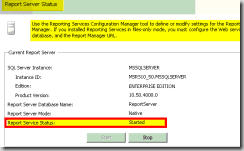
Launch the Reporting Services Configuration from Click Start, point to Programs, point to Microsoft SQL Server 2008/ 2012, and point to Configuration Tools. Once it’s launched, check the status of the “reporting server service” status.
You can refer to the details of the SQL installation and SQL reporting service role installation from the previous blog posts: 1. SQL Server—Installation 2. SQL Server Database Migration.

Table of Contents
SCCM Troubleshooting Tips on Reporting Server SSRS Issues
For SCCM SSRS reports to work properly, the Reporting Server Status must be “Started”. How do you locate and start reporting services tools (SSRS)? Refer to the following MSDN article (here) for the details. I’ve seen some other problems with SSRS and explained them here.
- Fix SCCM Report Server Cannot Open A Connection Error
- Upgrade SSRS SQL Server Reporting Services to 2019 for SCCM Infrastructure
- Free ConfigMgr Training Part 2 | 20 Hours of Technical | SCCM
SCCM CB Update:- Can you please check out the step-by-step instructions in the following post and video https://www.anoopcnair.com/setup-configure-sccm-cb-reporting-services-point/
Today, I saw a blog post on TechNet that was very helpful in troubleshooting SSRS-related issues. The blog posts discuss STATMSG: ID=7403—Failures reported during periodic health check by the SRS Server, HTTP Error 404.0—Not Found, and The resource you are looking for has been removed, had its name changed, or is temporarily unavailable issues.
NOTE! – You will need to make sure the SQL server DB configurations are optimal. It’s always better to take a snapshot of the SSRS server before the in-place upgrade. Also, need to ensure the Reporting Server and Log file backups are in place. In some of the scenarios, you might even need to detach the reporting server-related DBs using SSMS.
Reporting Server SSRS Issues ConfigMgr Endpoint Manager
Following are the basic troubleshooting steps we need to follow as per the blog post.
1. Check SQL server reporting services.
2. Check the Configuration of DB.
3. Check the server. If none of the reports is deployed to the report server, browsing to a working report server URL should show the reporting services version (e.g. if it’s SSRS 2008 R2 RTM, the version displayed would be 10.50.1600.1)
4. If you get any errors while browsing the report server URL, the report manager URL will likely also fail. If this is the case, the first thing to do is verify the SSRS settings from the SSRS configuration manager. This would include verifying things such as the service account, ports used, connectivity to the SSRS database from the SSRS configuration manager, URL reservation, etc.
5. Log files located in your SQL installation directory will also help troubleshoot this issue. Location: /Reporting Services/LogFiles
We are on WhatsApp now. To get the latest step-by-step guides, news, and updates, Join our Channel. Click here – HTMD WhatsApp.
Author
Anoop C Nair is Microsoft MVP! He is a Device Management Admin with more than 20 years of experience (calculation done in 2021) in IT. He is a Blogger, Speaker, and Local User Group HTMD Community leader. His primary focus is Device Management technologies like SCCM 2012, Current Branch, and Intune. He writes about ConfigMgr, Windows 11, Windows 10, Azure AD, Microsoft Intune, Windows 365, AVD, etc.




what do I check when SCCM reports are incomplete. the results I get I know I have more resources that meet the criteria or that have the software installed that I’m querying for
StaffGo and open up SQL management studio and try to run the detailed query using views
Hi Anoop – I am looking for some explaination on setting up of unattended report subscription in sccm 2012. I found few blogs on this but most of them were related to sccm 2007 r2. I am looking for information on using a generic account for report subscriptions in sccm 2012.
Hi Anoop. I tried to install Reporting Services Point on SCCM 2016 Current Branch and SQL Server Reporting Services 2017. I am able to install the role but Reports doesn’t show up neither on SCCM Console nor Web. I get Error 7402. Failed to Monitor SQL SErver Reporting
StaffCan you please checkout the steps in the following post and video https://www.anoopcnair.com/setup-configure-sccm-cb-reporting-services-point/
Hopefully this will help