






How to Restrict Microsoft 365 Azure VPN from High-Risk Entra ID Joined Devices using Intune
Let’s discuss How to Restrict Microsoft 365 Azure VPN from High-Risk Entra ID Joined Devices using Intune. Some of the Intune admins identified some Intune enrolled, Entra ID joined devices that may be security risks (malware).
The Admins like to restrict these devices from accessing things like M365 apps, Azure VPN etc etc. By identifying security risks in Intune enrolled, Entra ID joined devices, organization security is questioned.
Due to this malware, unrestricted access to cloud resources may occurred by Compromised devices may continue accessing Microsoft 365 apps, Azure VPN, and sensitive data. Organizations may breach internal or regulatory compliance standards.
Users on risky devices may face unexpected blocks or degraded performance once policies are enforced reactively. To avoid such issues admins seeking resolution to restrict Microsoft 365, Azure VPN from High-Risk Entra ID Joined Devices.

Table of Contents
How to Restrict Microsoft 365 Azure VPN from High-Risk Entra ID Joined Devices using Intune
Due to malware attacks, admins want to immediately restrict the Microsoft 365 Azure VPN etc. They are thinking the best way to resolve the issue is Conditional Access and target a group with the devices as members. The below table shows the methos to avoid this issue.
| Methods |
|---|
| Enroll Devices in Microsoft Defender for Endpoint |
| Use Conditional Access with Device Filters |
| Test Policies Before Enforcement |
- How To Force Entra ID Devices With UPN Name Hints Policy To Find On-Prem AD DCs Using Intune
- Fix Devices Missing From WUfB Reports After Intune Autopatch And Log Analytics Configuration
- Create Custom Compliance Policies for Linux Devices in Intune
- 5 Easy Steps to Secure your Microsoft 365 or Entra Tenant
- Fix Issue with Entra Hybrid Joined Devices Unjoined and Rejoined after Intune Enrollment
Workarounds for this Issue
There are some possible workarounds are suggested by other admins to resolve the issue. If you are facing this issue, you can follow this workarounds according to the organizations preferences.
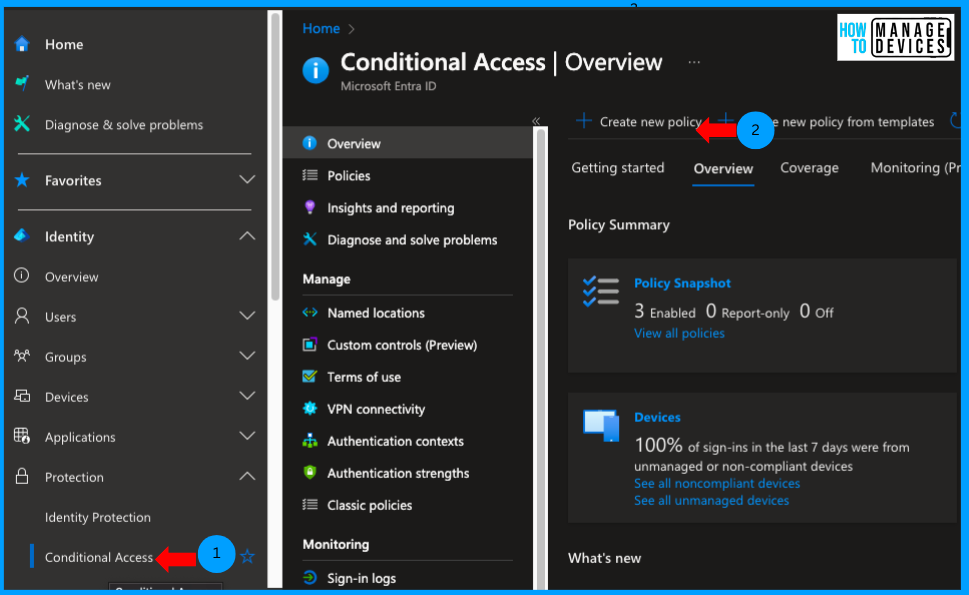
Conditional Access (CA) Policies
Use CA to block access based on device filters. Example: Create a policy targeting all users and resources, then block access for specific DeviceIDs using the “Include filtered devices” option.
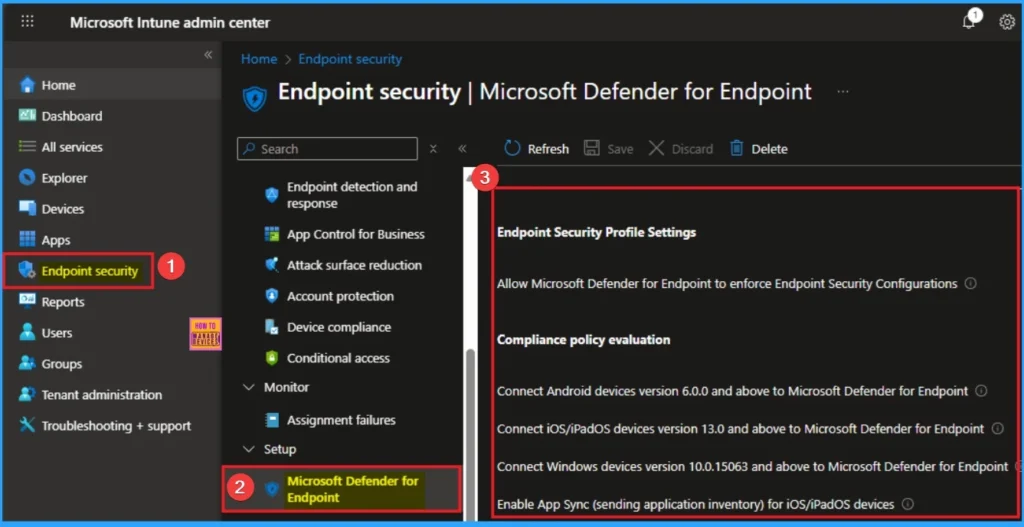
Defender for Endpoint Integration
If devices are enrolled in Microsoft Defender for Endpoint (MDE), use the risk score in Intune compliance policies. Combine MDE risk score with CA policies to block non-compliant devices.
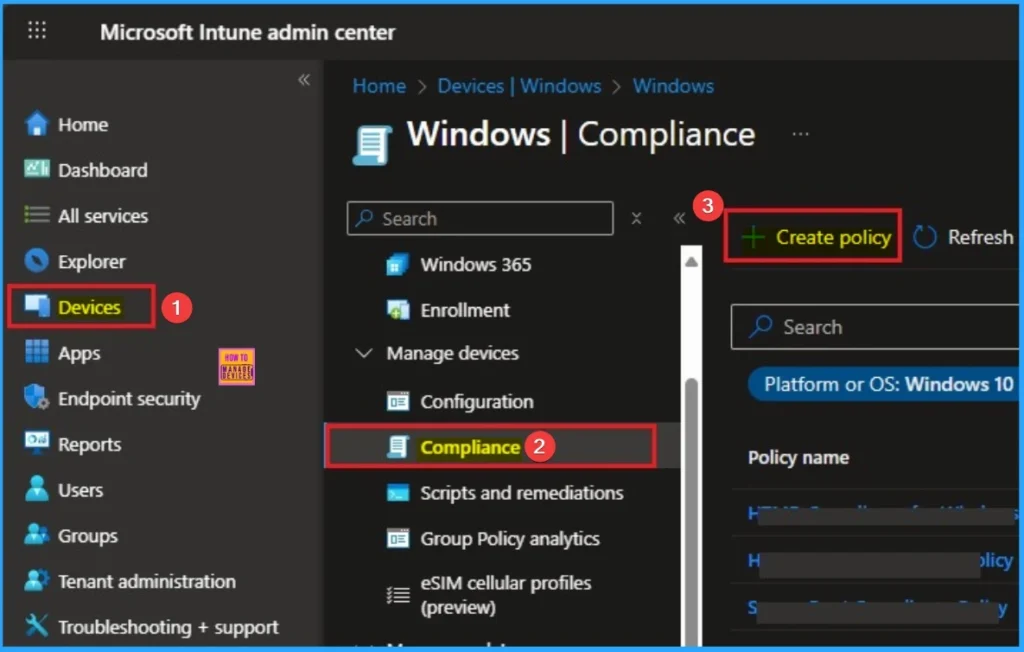
Custom Compliance Policies
For non-Defender environments, use scripts to evaluate device health/status. Apply custom compliance policies based on attributes like logs or client version.
Need Further Assistance or Have Technical Questions?
Join the LinkedIn Page and Telegram group to get the latest step-by-step guides and news updates. Join our Meetup Page to participate in User group meetings. Also, join the WhatsApp Community to get the latest news on Microsoft Technologies. We are there on Reddit as well.
Author
Anoop C Nair has been Microsoft MVP for 10 consecutive years from 2015 onwards. He is a Workplace Solution Architect with more than 22+ years of experience in Workplace technologies. He is a Blogger, Speaker, and Local User Group Community leader. His primary focus is on Device Management technologies like SCCM and Intune. He writes about technologies like Intune, SCCM, Windows, Cloud PC, Windows, Entra, Microsoft Security, Career, etc.


Discussion