






SCCM 1805 ConfigMgr Generated Certificate for HTTP Communication
Let us learn about the SCCM 1805 ConfigMgr Generated Certificate for HTTP Communication. I have upgraded the SCCM technical preview lab to 1805. SCCM 1804 is the baseline version of the SCCM technical preview.
If you still don’t have SCCM TP lab, you can download SCCM 1804 from the evaluation portal and start playing around with new SCCM features. Stay ahead of other SCCM admins!
In this post, we will see the upgrade walk-through and overview of SCCM 1805 new features.
Upgrade to SCCM 1805 using the Updates & Servicing console. The preview version offers new or improved features and precedes the next production version of SCCM CB 1806.

Table of Contents
- How to Create Deploy New Software Update Patch Package Using SCCM | ConfigMgr
- End-User Experience of Windows 10 Co-Management
- FIX Teams Public Live Event Option Disabled or Grayed Out Issue
Download SCCM 1805 and Upgrade
SCCM 1805 download and upgrade is completed via the Updates & Servicing console. There are 17 new or enhanced features available in the SCCM 1805 preview version. SCCM 1805 preview version is very important as this is the preview version just before the next production version of SCCM CB 1806.
If you look at the previous releases of SCCM, 80% of the new features of the 1805 version will be available in the next production version, 1806.
Video Tutorial – SCCM 1805 Upgrade & Overview of New Features
The following video will provide you with the upgrade walk-through and overview of SCCM 1805 new features.
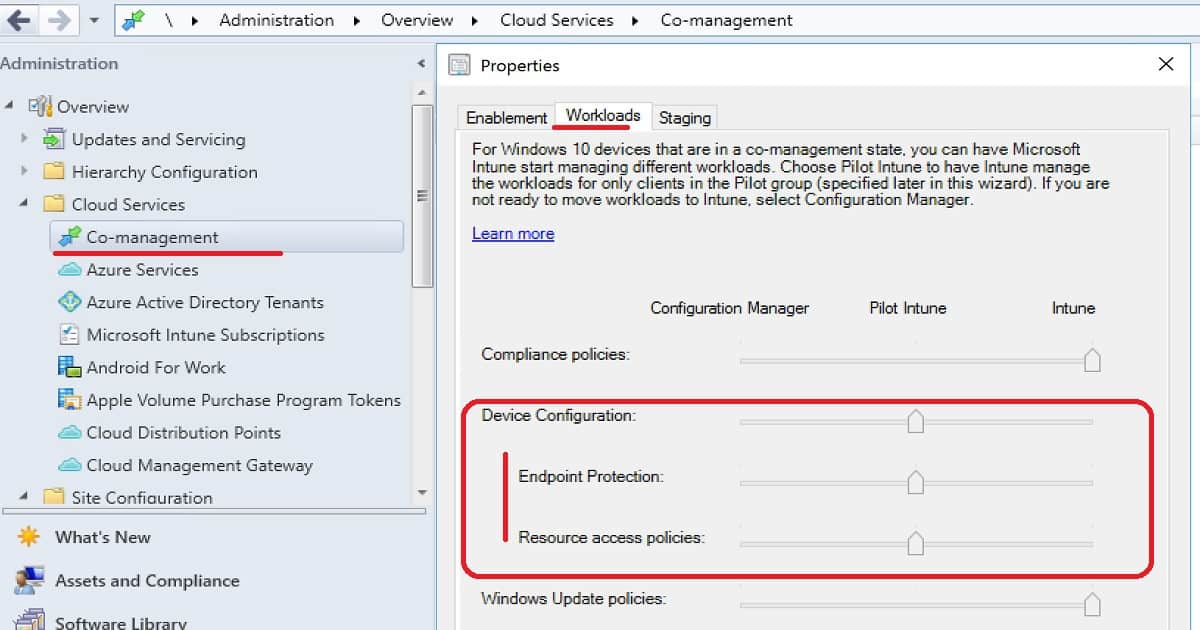
Co-Management Device configuration workload transition
You can have Intune deploy MDM policies while using SCCM for Win32 app deployment and configuration baselines on exception bases for co-managed devices.
Once you move the Configuration policies workload to Intune, the Resource Access and Endpoint Protection workloads will automatically move. This is because those two(2) workloads are a subset of the device configuration workload.
- Move the slider of Device Configuration to Pilot
- Create a configuration baseline and select “Always apply this baseline for co-managed clients”
- #2 will help you to give priority to SCCM-based device configuration policies over Intune-based configuration policies
SCCM Console Path – \Administration\Overview\Cloud Services\Co-management
Add or Remove Phases in Phased deployments via Task Sequences
You can now add more than two phases in a phased deployment and rearrange or remove phases. I have explained phased deployment options in the video tutorial.
To add or remove phases on existing phased deployment, edit phased deployment
To add or remove multiple phases, use the phased deployment wizard on the task sequence
Client Tools – CMTrace is part of the Client Setup
CMTrace tool is now installed by default by client setup. CMTrace is not automatically registered with Windows to open the .log file extension. cmtrace.exe can be found in the client installation directory:-
- (%WINDIR%\CCM\cmtrace.exe) – Client Machine
- C:\Program Files\SMS_CCM\cmtrace.exe (Client on Site Server)
Cloud DP support for Azure Resource Manager (ARM)
Azure Resource Manager is a modern platform for managing all resources as a single resource group; Azure AD authenticates and creates cloud resources with this deployment method.
It doesn’t require the Azure management certificate. ARM support is already available for Cloud Management Gateway in the production version of SCCM 1802.
- Onboard the site with Azure AD.
- Select ARM deployment in the Create Cloud DP Wizard and enter the subscription details.
- Select ARM deployment in the Create Cloud DP Wizard and enter the subscription details.
SCCM 1805 ConfigMgr Server Generated Certificate for HTTP Communication
Improvements to how clients communicate with site systems. This includes improvements for cloud domain joined (AAD) clients.
Using HTTPS communication is recommended for all Configuration Manager communication paths but can be challenging for some customers due to the overhead of managing PKI certificates.
Introducing Azure Active Directory (Azure AD) integration reduces some but not all of the certificate requirements. This release includes improvements to how clients communicate with site systems. There are two primary goals for these improvements:
You can secure client communication without the need for PKI server authentication certificatesClients can securely access content from distribution points without the need for a network access account to the Administration workspace in
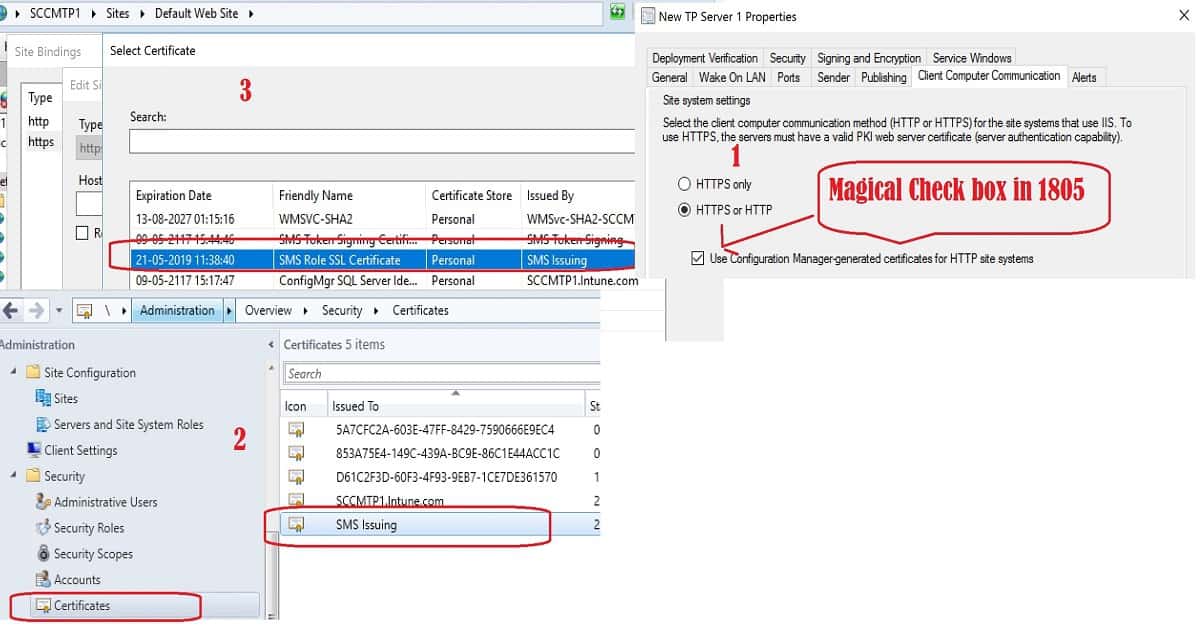
- In the Configuration Manager contact, expand Site Configuration, and select Sites. Select the site and click Properties in the ribbon.
- Switch to the Client Computer Communication tab. Select HTTPS or HTTP and then enable the new option to Use Configuration Manager-generated certificates for HTTP site systems.
Open the IIS admin console on the site’s HTTP mode management and distribution points. See the generated certificate binding for the HTTPS protocol.
- Friendly name of the cert – > SMS Role SSL Certificate
Issued by -> SMS Issuing - SCCM Console – \Administration\Overview\Security\Certificates
- DP/MP – IIS Binding – View SSL Cert
More details are available in the video tutorial.
Cloud management troubleshooting Improvements
The new cloud management dashboard provides a centralized view for cloud management gateway usage. When onboarded with Azure AD, the site also displays data about cloud users and devices.
This feature also includes the CMG connection analyzer for real-time verification to aid troubleshooting.
CMPivot Introduction via Fast Channel
It allows access to your environment’s real-time state of devices via fast channel communication. We plan to publish a dedicated post for CMPivot in the SCCM in-console tool.
Quickly assess the state of your devices so you can take immediate action. Currently, logged-on user information is shown in the console and available to the IT Admin for communication and troubleshooting with the end-user.
Enable Third-Party Software Update Support for Clients
You can now configure the ‘Allow signed updates from an intranet Microsoft update service location’ policy and install the Windows Server Update Services code signing certificate for clients.
Enable third-party software updates in Software Update Point top-level site component configuration
Allow Configuration Manager to configure WSUS to automatically generate self-signed certificates for signing third-party software updates.
Configure (default) Software Updates client agent settings to enable third-party software updates on clients
Deploy custom Software Updates client agent setting to enable third-party software updates on clients
Successfully import a third-party software update signing certificate from Windows Software Update Services.
Enable Windows LEDBAT for Distribution Points
Enabling the Windows LEDBAT feature allows you to adjust the download speed between SCCM DPs and clients to use unused network bandwidth. In the future, this will replace the use of BITs for SCCM client and DP communication. Will LEDBAT replace BITs?
Enable Windows LEDBAT setting on a SCCM DP site system properties
Improved WSUS maintenance SCCM 1805
The WSUS cleanup wizard now declines expired updates according to the supersedence rules defined in the software update point component properties.
Scenarios: Enable the option to Run the WSUS cleanup wizard on the Supersedence Rules tab of the software update point component properties
Management insights Improvements – SCCM 1805
Now, you can directly take action after viewing the details of a specific insight.
Scenarios: Run a management insight rule and observe which corresponding rule needs action. Then, take action on the rule.
Resources
- New Capabilities of SCCM 1805 https://docs.microsoft.com/en-us/sccm/core/get-started/capabilities-in-technical-preview-1805




Discussion