






List of SCCM 1806 Hotfixes – Fast and Slow Ring
Let’s discuss the List of SCCM 1806 Hotfixes – Fast and Slow Ring. Microsoft released hotfixes for SCCM 1806 fast and slow rings. SCCM slow ring is an opt-in option to upgrade your SCCM CB infra and client.
SCCM 1806 is an in-console update for SCCM 1706, 1710, or 1802 production versions of SCCM. You will see more details about SCCM 1806 Hotfixes in this post.
There are two(2) releases of SCCM 1806. SCCM 1806 fast ring and SCCM 1806 slow ring. I have installed SCCM 1806 fast ring version in the lab environment.
So I have a hotfix KB 4346645 available in the updates and servicing node of SCCM 1806 (Fast Ring).

List of SCCM 1806 Hotfixes
SCCM 1806 slow ring version is available for all SCCM 1706, 1710, or 1802. This 1806 slow ring version will be available for all the SCCM infra where service connection point is online.
Table of Contents
The hotfix KB 4459354 is available for SCCM 1806 slow ring.
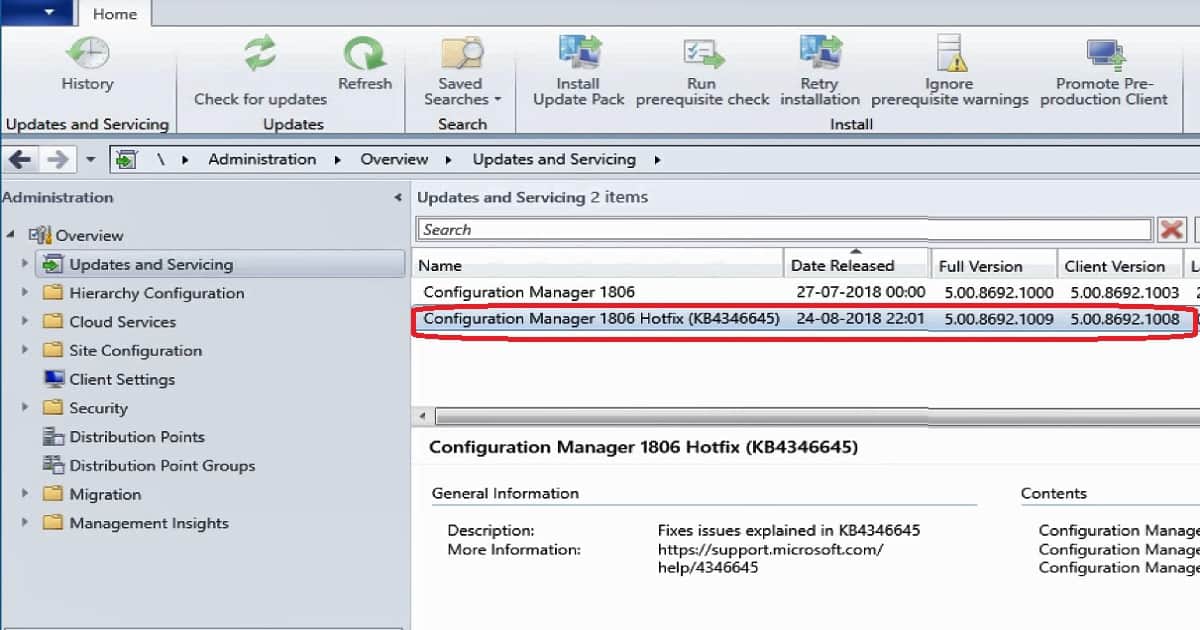
SCCM 1806 Fast Ring Hotfix – KB 4346645
An update is available to administrators who opted in through a PowerShell script to the first wave (early update ring) deployment for SCCM’s current branch, version 1806.
You can access the update in the Updates and Servicing node of the SCCM console. There are separate SCCM 1806 Hotfixes available for slow and fast rings.
This update KB 4346645 does not apply to sites that downloaded version 1806 on August 10, 2018, or later.
SCCM 1806 Slow Ring Hotfix – KB 4459354
An update is available to address important upgrade-related issues for SCCM’s current branch, version 1806. The problems described in this article apply only to sites that upgraded to version 1806 before August 24, 2018.
Video Tutorial – SCCM 1806 Hotfix Installation Experience
In the below video, you will experience SCCM 1806 hotfix KB 4346645.
Hotfixes SCCM Full and Client Version Details
Once you have installed KB 4346645, SCCM 1806 full version is 5.00.8692.1009, and the client is 5.00.8692.1008.
| Version Number | Client Number |
|---|---|
| 5.00.8692.1009 | 5.00.8692.1008. |
Check out the SCCM Full and client version details of SCCM slow and fast rings. I have marked respective SCCM 1806 hotfixes in red for slow and fast rings.
SCCM 1806 Fast Ring (opt-in) – Full Version is 5.00.8692.1000 and client version is 5.00.8692.1003 = KB 4346645
SCCM 1806 SLOW RING – Full Version is 5.00.8692.1000 and client version is 5.00.8692.1007 = KB 4459354
| SCCM 1806 | Full Version Number | Client Number | KB |
|---|---|---|---|
| Fast Ring | 5.00.8692.1000 | 5.00.8692.1003 | 4346645 |
| Slow Ring | 5.00.8692.1000 | 5.00.8692.1007 | 4459354 |
Once you have installed KB 4459354, SCCM 1806 full version is 5.00.8692.1010, and the client is 5.00.8692.1008. There are separate SCCM 1806 Hotfixes available for slow and fast rings.
We are on WhatsApp. To get the latest step-by-step guides and news updates, Join our Channel. Click here –HTMD WhatsApp.
Author
Anoop C Nair is Microsoft MVP! He is a Device Management Admin with more than 20 years of experience (calculation done in 2021) in IT. He is a Blogger, Speaker, and Local User Group HTMD Community leader. His primary focus is Device Management technologies like SCCM 2012, Current Branch, and Intune. He writes about ConfigMgr, Windows 11, Windows 10, Azure AD, Microsoft Intune, Windows 365, AVD, etc.




Anoop, I don’t know how you get so much done, but I am sure glad that you can. And most importantly share with us all. You truly are an MVP!
StaffYes sure thing. Thank you for the support!
February 6, 2019 at 12:59 am
Hi Sir ,
We need your help or suggestions post installation of wsus role getting event I’d 507 and we are using SQL 2016 express versions on getting error
A network-related or instance-specific error occurred while establishing a connection to SQL Server. The server was not found or was not accessible. … The server was not found or was not accessible. Verify that the instance name is correct and that SQL Server is configured to allow remote connections.
Name pipe provided error 40 could not open SQL connention server
Please suggest for resolution if you contact us it’s great help us..
Sccm Client version 1806
StaffI think you might even need to perform WSUS cleanup as explained https://www.anoopcnair.com/sccm-wsus-maintenance-cleanup-tasks/
Wsus post configuration not happening . It is showing above given error.and at same time w3svc services is getting stopped automatically.
When we try to start manually it is getting started.
Windows internal database services is in stop mode and not getting started even we trying to start forcefully
Please suggest resolution
This is secondary. Server we are using SQL express 2016 currently working on TLS 1.0 Protocol. I need solution for SQL work with TLS 1.2
What is solution to make SQL express 2016 server to work in Native mode to work applications on TLS 1.2
On Sccm primary server SQL enterprise 2016 this is SQL cluster & native client 11.00 version
Please suggest and help to process SQL express 2016 for SQL native client installation and impact details
Please help and suggest
Thanks
Dinesh Gore
HI Anoop,
what is the reason for Microsoft patches installation is very slow from SCCM
StaffIt could be because of size of the catalog. I would try https://www.anoopcnair.com/sccm-wsus-maintenance-cleanup-tasks/ regularly