






SCCM 2002 Known Issues Bugs Fixes | ConfigMgr
In this post, you will learn more about SCCM 2002 known issues. ConfigMgr 2002 is generally available, and all SCCM infrastructure has an online Service Connection Point. You should also have any of the following versions of ConfigMgr: 1902, 1906, or 1910.
If your current SCCM version is 1806 or later, you can upgrade to Configuration Manager 2002. To initiate the upgrade, navigate to the Updates and Servicing node within the console. Once you have upgraded to ConfigMgr 2002, you’ll be able to make use of the new features.
Related Posts
| Index |
|---|
| ConfigMgr 2002 Hotfix – KB Articles |
| Introduction to SCCM 2002 Known Issues |
| ConfigMgr 2002 Known Issues |
ConfigMgr 2002 Hotfix – KB Articles – SCCM 2002 Known Issues
Following are the ConfigMgr hotfix KB articles available for version 2002:

- Application blade times out in Microsoft SCCM 2002 Out of Box KB 4576782
- The KB4560496 Update Rollup for SCCM 2002.
- Offline Service Connection Point – “The underlying connection was closed” – Pls refer to KB4561945
- The KB4567007 to FIX the PXE Task Sequence Slowness issue.
- The KB4563473 shall only be available in the Configuration Manager console if the TENANT ATTACH is configured.
- The Hotfix KB4553501 Early version of ConfigMgr 2002.
- The KB4564442 – Hotfix for MDT build 8456 and for Windows 10, version 2004
Introduction to SCCM 2002 Known Issues
This post is to help SCCM admins easily go through a list of SCCM 2002 Known Issues production versions.
Most of the highlighted issues are collected via social media channels and Microsoft documentation.
NOTE! – These issues are not blockers for the SCCM 2002 production upgrade.
NOTE! If you have SCCM DPs and PXE servers running on Windows Server 2008 R2, you need to plan to upgrade them to the latest supported version before upgrading to the ConfigMgr 2002 version of the current branch. Server 2008 R2 DP and PXE are not supported anymore. More details are here.
ConfigMgr 2002 Known Issues
These known issues are collected from various social media platforms. I have not tested or reproduced any of these issues. If you face any of the following issues, I strongly recommend raising a support case with Microsoft.
- PXE Boot Issues – Task Sequence Slow Issue with ConfigMgr 2002 – More details Resolving Task Sequence dependency issue.
- Task sequences can’t run over CMG
- Task sequences can’t run on a device that communicates via a cloud management gateway (CMG):
- More Details – Microsoft Docs.
- An extended security update for Windows 7 causes them to show as Unable to enrol in Desktop Analytics. More details Microsoft Docs.
- SQL 2019 Known issue with ConfigMgr 2002 – More details about the fix are here.
- SCCM BitLocker Management is not supported on virtual machines (VMs) or server operating systems. For more details, see here.
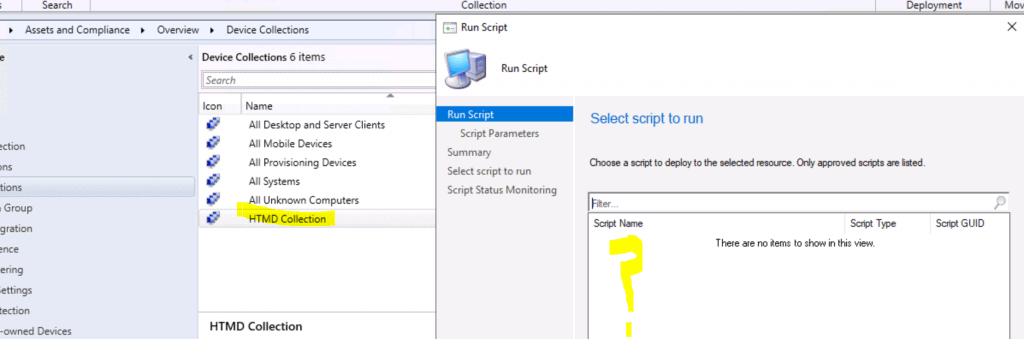
- Even after approval, none of the approved ConfigMgr Scripts are available to select. You can’t run the script against a device collection with the SCCM 2002 version.
Resources
- SCCM 2002 Installation Step-by-Step Guide | MEMCM | ConfigMgr
- New Features of Configuration Manager (A.K.A SCCM) 2002 version is given in the following post – https://www.anoopcnair.com/configmgr-2002-list-of-new-features-enhancements-memcm-sccm/
We are on WhatsApp. To get the latest step-by-step guides and news updates, Join our Channel. Click here –HTMD WhatsApp.
Author
Anoop C Nair is Microsoft MVP! He is a Device Management Admin with more than 20 years of experience (calculation done in 2021) in IT. He is a Blogger, Speaker, and Local User Group HTMD Community leader. His main focus is on Device Management technologies like SCCM 2012, Current Branch, and Intune. He writes about ConfigMgr, Windows 11, Windows 10, Azure AD, Microsoft Intune, Windows 365, AVD, etc.




Did you ever saw this bug ?
after the upgrade to CB2002, the local Default Website bindings was changed to
“HTTPS 80” (or “HTTPS 8181” for us, as we have a custom HTTP port)
“HTTPS 443”
It should be (and was before the upgrade) “HTTP 80”
The Management Point doesn’t work anymore.
StaffSorry no. I have not seen this issue yet
Hi Phil B,
The problem it’s resolved? How to workaround?
Thanks
Hello Ronny,
i might have found a workaround:
https://www.reddit.com/r/SCCM/comments/hzf228/sccm_update_2002_causes_iis_bindings_to_change/
Hope it helps you
I have the exact same issue
Hi Phil B,
The problem it’s resolved? How to workaround?
Thanks