






SCCM 2302 Technical Preview New Features
This post summarizes the new features of SCCM 2302 Technical Preview. It’s important to note that this is the second Technical Preview Version that has been released since the announcement of SCCM 2211 Production Version.
SCCM 2302 Technical Preview includes an extension of the dark theme to the Secondary Site Delete Wizard, among other features. It’s worth noting that the policy controlling Windows features will be released in the latter part of 2023.
Technical Previews are pre-release builds that are made available early. While features from previous versions of the technical preview may remain in later versions, a technical preview installation does not offer the option to upgrade to a current branch installation, nor does it receive updates from the current branch release.
The technical preview branch of Configuration Manager is not designed or supported for use in a production environment, as it is intended solely for use in lab environments and is licensed accordingly.

Upon reviewing the SCCM Technical Preview that was released earlier, it becomes evident that these are the few additional features that have been introduced subsequent to the production release of Configuration Manager 2211.
- SCCM 2301 Technical Preview – The Configuration Manager Technical Preview 2302 added branding to change to Microsoft Configuration Manager, and the Update to the default value of supersedence age in months for software updates.
Download SCCM Technical Preview Baseline Version
When you install a new technical preview site, use the latest baseline version 2302. After installing a baseline version, use in-console updates to bring your installation up to date with the most recent SCCM Technical preview version.
Update 2302 for Technical Preview Branch is available in the Microsoft Configuration Manager Technical Preview console. For new installations, the 2302 baseline version of the Microsoft Endpoint Configuration Manager Technical Preview Branch is available on the link: CM2302TP-Baseline or from Eval center.
Build SCCM Technical Preview LAB, How to Build Configuration Manager Technical Preview LAB | SCCM
New Features in SCCM 2302 Technical Preview Version
Let’s explore the new features and enhancements available in the SCCM 2302 technical preview version. With the release of Configuration Manager version 2302, you can now take advantage of a range of new features and improvements.
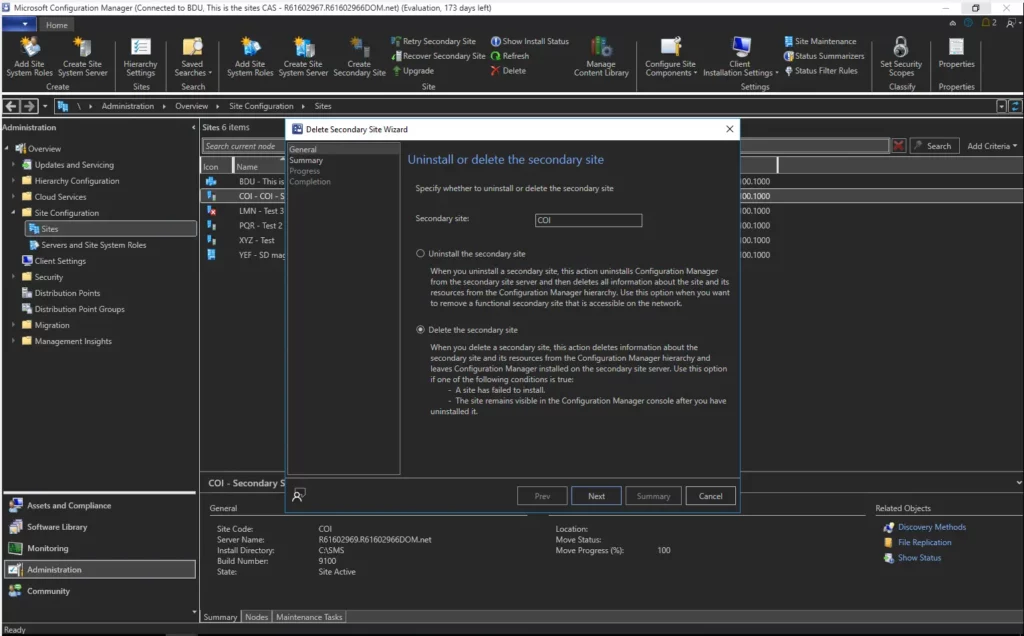
Dark Theme Extended to Delete Secondary Site Wizard
The dark theme has been available as a pre-release feature since SCCM 2203. The technical preview 2302 release extended the dark theme to additional components deleting secondary site.
This delete secondary site wizard will also have a new look for the normal theme. This is part of the ongoing effort to make the dark theme and overall admin console experience better.
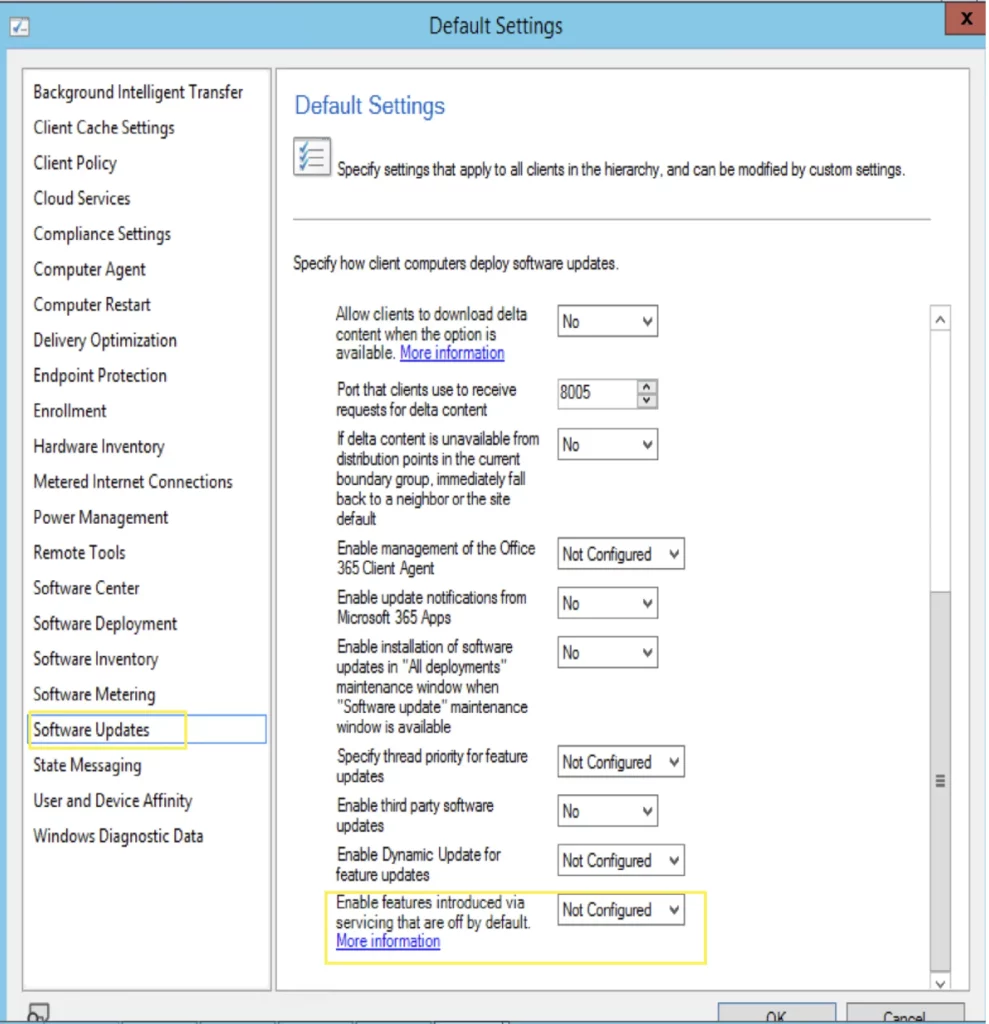
Enable Windows features Introduced via Windows Servicing
The setting for the policy Enable Windows features introduced via Windows servicing that is off by default is now integrated with the SCCM 2302 Technical Preview.
Here in the Default settings, under software updates. You will be able to see the option Enable Windows features introduced via Windows servicing that is off by default, set to Not Configured.
Important! The Windows features that the policy will control will be released in the later part of 2023. This ConfigMgr Technical Preview feature is for awareness and not for testing in February 2023.
Author
About Author – Jitesh, Microsoft MVP, has over six years of working experience in the IT Industry. He writes and shares his experiences related to Microsoft device management technologies and IT Infrastructure management. His primary focus is Windows 10/11 Deployment solution with Configuration Manager, Microsoft Deployment Toolkit (MDT), and Microsoft Intune.




Discussion