






SCCM 2305 Technical Preview New Features
This post brief you about SCCM 2305 Technical Preview new features. It’s important to note that this is the first Technical Preview version that has been released since the release-cadence changes for Microsoft Configuration Manager, and the announcement of the SCCM 2303 Production Version.
Technical Previews are pre-release builds that are made available early. While features from previous versions of the technical preview may remain in later versions, a technical preview installation does not offer the option to upgrade to a current branch installation, nor does it receive updates from the current branch release.
The technical preview branch of Configuration Manager is not designed or supported for use in a production environment, as it is intended solely for use in lab environments and is licensed accordingly.
Microsoft plans to release updates for SCCM current branch a few times per year. SCCM CB production release has changed 2 versions per year in March (xx03) and September (xx09). SCCM Technical Preview version cadence will also get changed from 12 releases to 4 versions per year.

Download SCCM Technical Preview Baseline Version
When you install a new technical preview site, use the latest baseline version 2302. After installing a baseline version, use in-console updates to bring your installation up to date with the most recent SCCM Technical preview version.
There will be four TP releases per year. Two will be released before each production current branch release, and one of the Technical Preview releases will be a baseline release. Technical Preview Baseline is 180 days evaluation.
Update 2302 for Technical Preview Branch is available in the Configuration Manager Technical Preview console. For new installations, the 2302 baseline version of the Microsoft Configuration Manager Technical Preview Branch is available on the link: CM2302TP-Baseline or from the Eval center.
Here’s how you can build SCCM Technical Preview LAB by following the guide, How to Build Configuration Manager Technical Preview LAB | SCCM.
You can also read, Past releases in the what’s new to get more information about what new features SCCM Technical preview updates were released.
| Technical Preview Release | What’s New in SCCM Technical Preview |
|---|---|
| SCCM Technical Preview 2303 | SCCM Technical Preview 2303 New Features |
| SCCM Technical Preview 2302 | SCCM 2302 Technical Preview New Features |
New Features in SCCM 2305 Technical Preview Version
Let’s check the new features to try out in SCCM 2305 technical preview version. Starting with Microsoft Configuration Manager version 2305, You will experience the addition of new features and improvements.
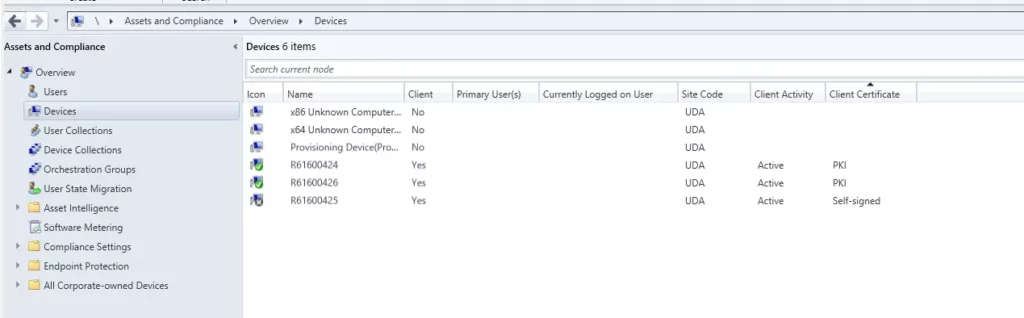
Client Certificate State in Console (self-signed) to Match State in Control Panel (PKI)
Starting with SCCM 2305 technical preview, The Configuration Manager console and client control panel Client certificate will be in sync and shows the same state.
For clients that have a PKI certificate, the Configuration Manager console displays the Client certificate property as self-signed. The client control panel Client certificate property shows PKI.
Enable BitLocker through ProvisionTS
ProvisionTS is the task sequence that is executed at the time of provisioning the device. Escrowing recovery key to Config Manager Database is now supported using ProvisionTS. As a result, a device can escrow the key to Config Manager Database instantly.
Offset for reoccuring Monthly Maintenance Window Schedules
Starting with SCCM Technical Preview 2305, you can now offset monthly maintenance window schedules to better align deployments with the release of monthly security updates. For example, using an offset of two days after the second Tuesday of the month, sets the maintenance window for Thursday.
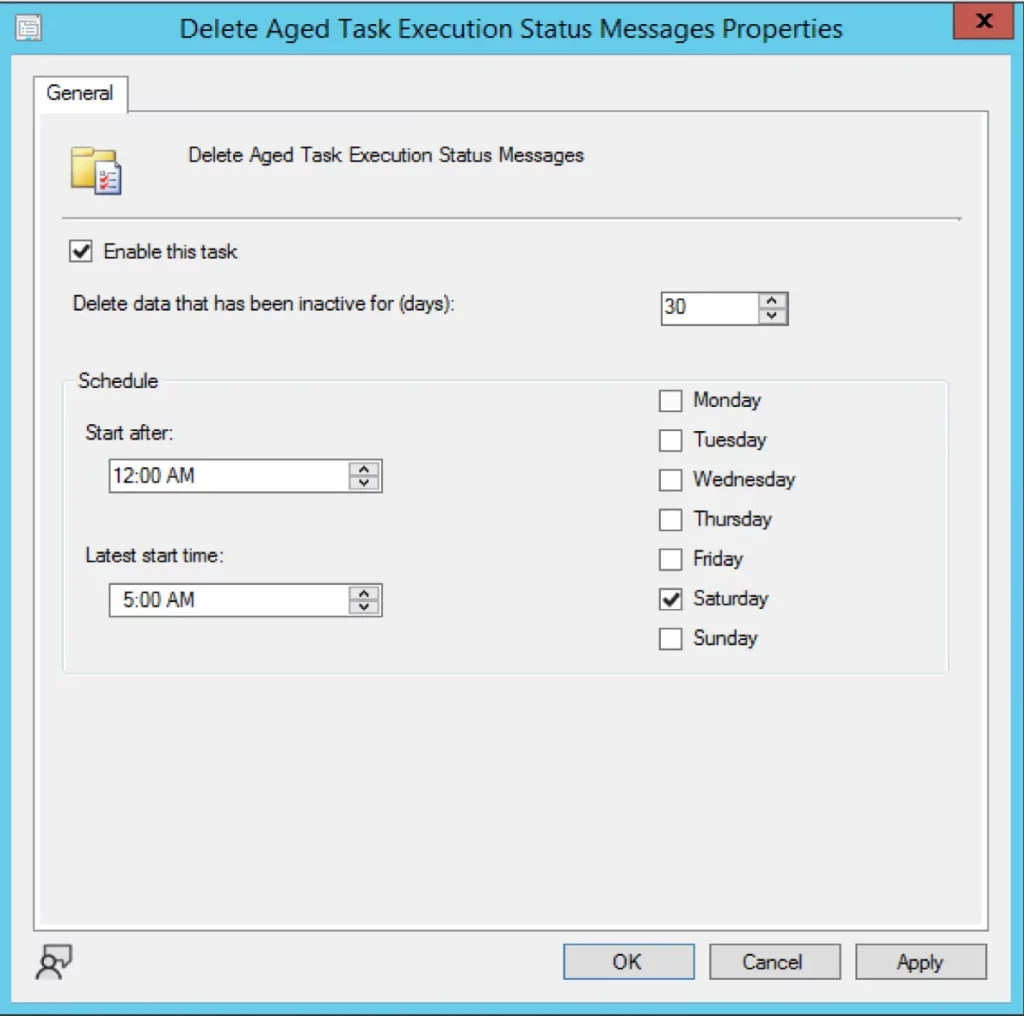
New Site Maintenance Task Delete Aged Task Execution Status Messages is now available
You can enable this feature by utilizing the Site Maintenance Window or using PowerShell Commandlet. By default, it has been set to run on Saturday and delete the data older than 30 days. It does so by cleaning up [dbo].TaskExecutionStatus Table.
Improvements to Cloud Management Gateway (CMG) Workflow
You can now approve the application workflow through email. For the application approvals through email, manually add the CMG URL in the Azure Active Directory app as single page application redirect URI.
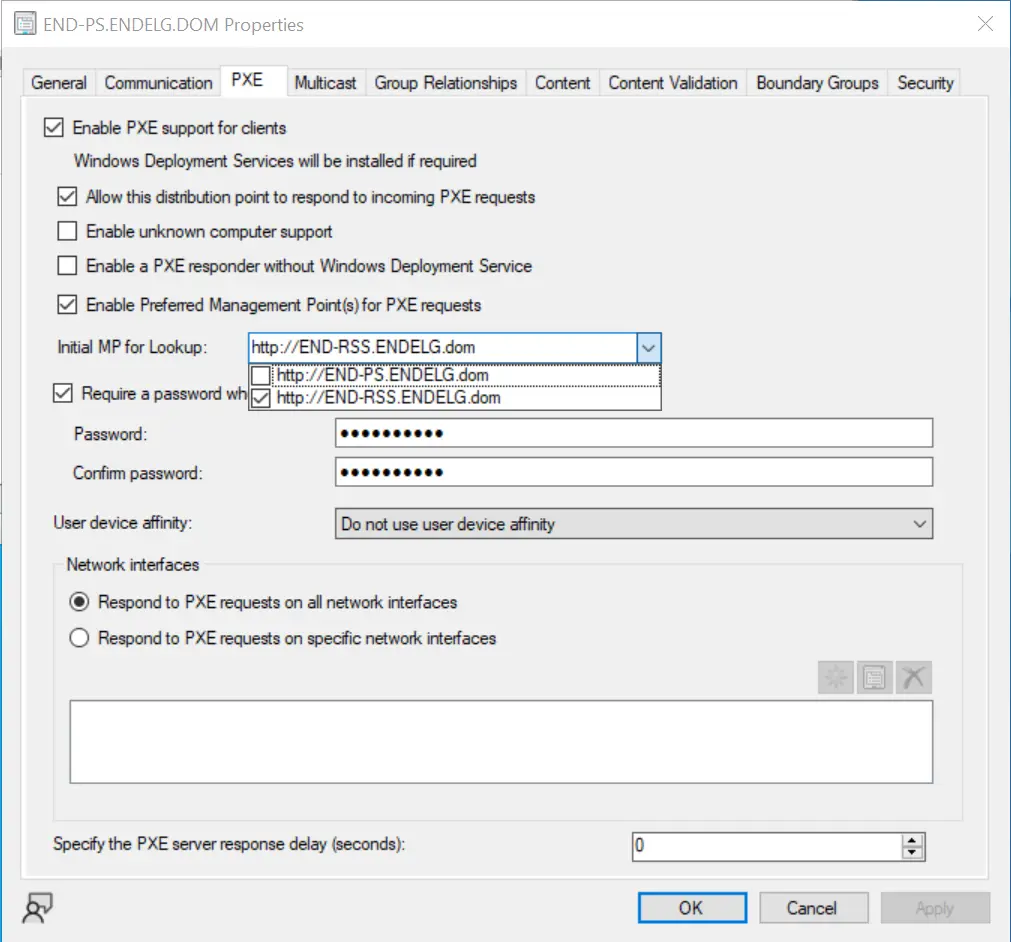
OSD Preferred MP Option for PXE Boot Scenario
The preferred Management Point (MP) option will now allow PXE clients to communicate to an initial lookup MP and receive the list of MP(s) to be used for further communication. When the option is enabled, it allows an MP to redirect the PXE client to another MP, based on the client location in the site boundaries.
Script Execution Timeout for Compliance Settings
You can now define a Script Execution Timeout (seconds) when configuring client settings for compliance settings. The timeout value can be set from a minimum of 60 seconds to a maximum of 600 seconds. This new setting allows you more flexibility for configuration items when you need to run scripts that may exceed the default of 60 seconds.
Author
About Author – Jitesh, Microsoft MVP, has over six years of working experience in the IT Industry. He writes and shares his experiences related to Microsoft device management technologies and IT Infrastructure management. His primary focus is Windows 10/11 Deployment solution with Configuration Manager, Microsoft Deployment Toolkit (MDT), and Microsoft Intune.




Discussion