






FIX SCCM Agent Installation Error 0x80200010
This article will explain the immediate Fix for SCCM Agent Installation Error 0x80200010. You may encounter this error when you install the SCCM client on workstation operating systems.
Last week, I set up an SCCM lab for training purposes. My trainees asked me to create different operating system client boxes to study various client behaviours. I was glad to assist them in creating a learning platform. However, I encountered an error when installing the SCCM agent using the client push method on a Windows 11 machine.
In most circumstances, the standard procedure would involve inspecting the firewall settings on the client machine or considering whether an anti-virus program might inhibit the installation. Nevertheless, error 0x80200010 can be readily resolved with a simple fix.
Let’s begin by delving into the ccmsetup.log file to understand more about errors. Before we start the troubleshooting, I will briefly explain the SCCM client installation on a Windows 11 machine. Please feel free to skip ahead if you already have sufficient knowledge about the SCCM client installation.

SCCM Client Installation on Windows 11 Machine
SCCM 2107 supports all Windows 11 PC device management scenarios, including OS deployment, domain join, application deployment, patch deployment, and Configuration Policy deployments. It will help you deploy Windows and third-party application patches and all applications to Windows 11 PCs. SCCM is the best device management solution for Windows 11.
As you may know, there are multiple client installation methods. You could install the SCCM client on any Windows 11 machine using any of these methods. My all-time favourite method is the client push installation method from the SCCM console. Ensure Client Push firewall ports and defender settings are ok before installing.
| Client Installation Methods |
|---|
| Client push installation |
| Software update point-based installation |
| Group policy installation |
| Logon script installation |
| Manual installation |
| Microsoft Intune MDM installation |
| OSD Task Sequence |
| Package and program installation from SCCM console |
Read More: How to Install SCCM Client on Windows 11 PC
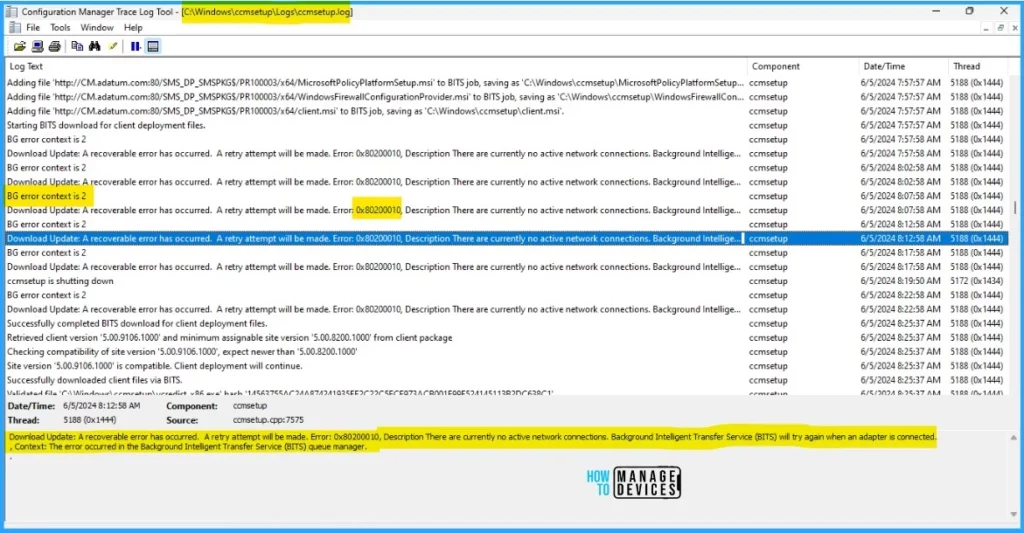
On a Windows 11 system, the log files for the client agent are situated in the C:\Windows\ccmsetup\Logs directory. Within this location, the file named ccmsetup.log details the installation process of the client agent. It is imperative to verify that all necessary prerequisites are in place for the successful installation of the client
- Create Windows 11 SCCM Device Collection Process
- Enable Windows 11 Patching Using SCCM WSUS
- Deploy Windows 10 Feature Update Using SCCM Task Sequence
- Install SCCM Client Manually Using Command Line #1
SCCM Client Agent Install Error 0x80200010
Let’s learn how to fix error 0x80200010 during the SCCM client agent install. You must check the ccmsetup.log using CMtrace. CMTrace is one of the Configuration Manager tools. It allows you to view and monitor log files. In addition to the 0x80200010 error, you may see the information below as well in ccmsetup.log.
- Overview Of Client Online Status In SCCM Console
- SCCM 2303 Upgrade Step-By-Step Guide | New Features
BG error context is 2

Download update: A recoverable error has occurred. A retry attempt will be made. Error 0x80200010. Description There are currently no active network connections. Background Intelligent Transfer Service (BITS) will try again when an adapter is connected
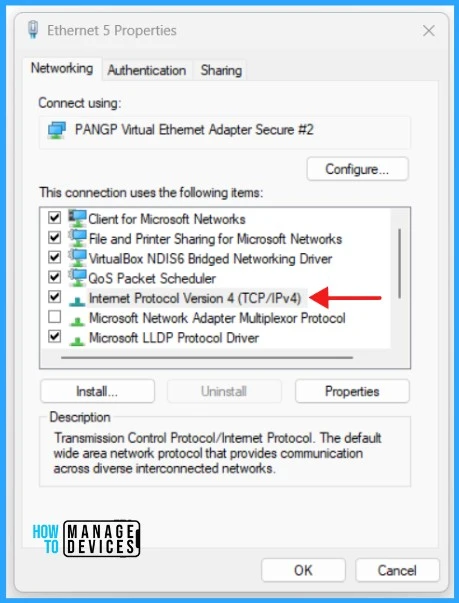
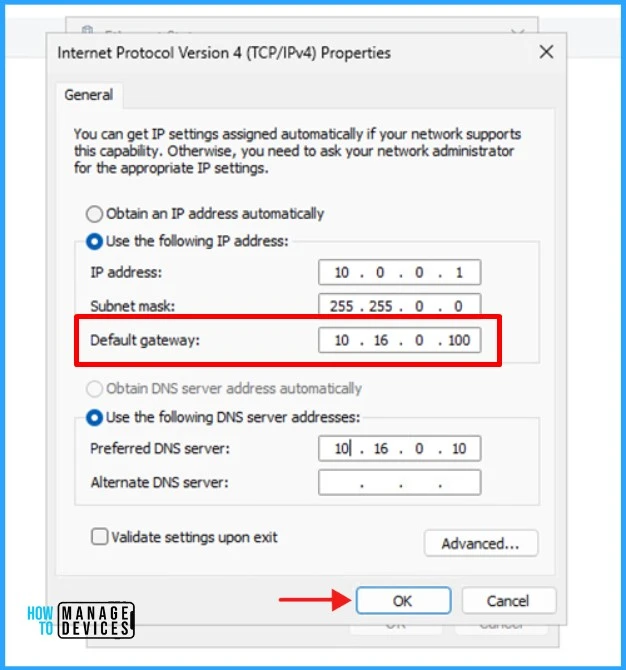
- On your Windows 11 computer, right-click Start > Run. Type ncpa.cpl to access Network Connections. Right-click the Ethernet adapter and click Properties.
- Select the Internet Protocol version 4 TCP/IPv4 item and click Properties.
It has come to my attention that the default gateway setting is absent in my case, with no specified gateway address. This likely accounts for the indication in the ccmsetup.log file stating, There are currently no active network connections.
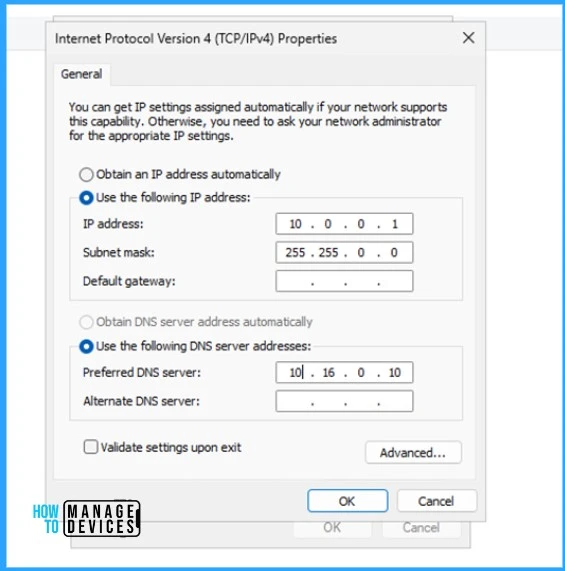
To proceed, enter the Default gateway and click OK. Also, click OK on the Ethernet adapter properties.
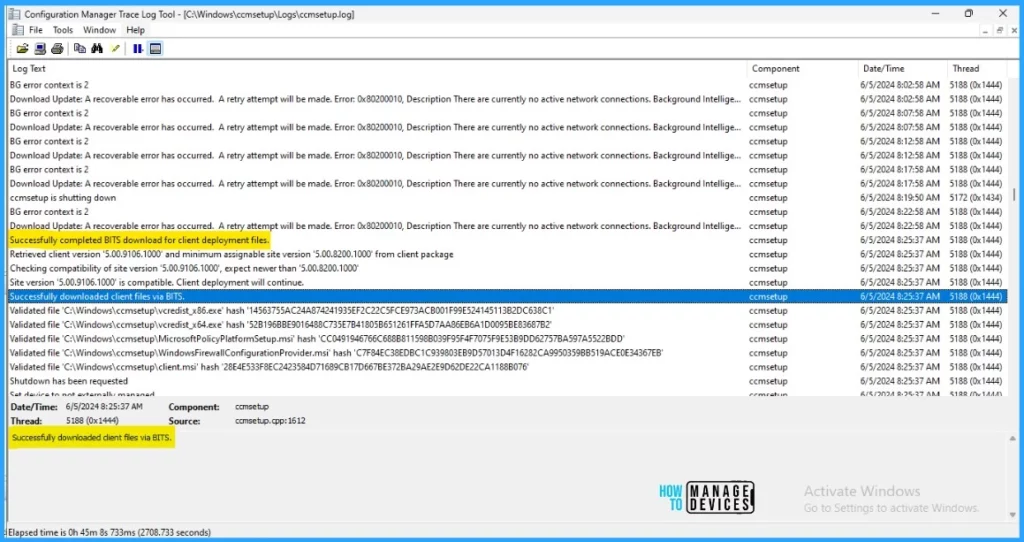
The client installation must now resume without encountering any errors. It is advisable to reinitiate the client installation from the SCCM console and subsequently examine the ccmsetup.log file to confirm the successful download of files by the client agent through BITS. Within a few seconds, you can see that the client agent has Successfully downloaded the files via BITS. The client agent installation is happening now
- FIX SCCM Client Issues Using Automation Client Health
- FIX SCCM Client Inactive Issue after the Upgrade SCCM Notification Server Component Issue
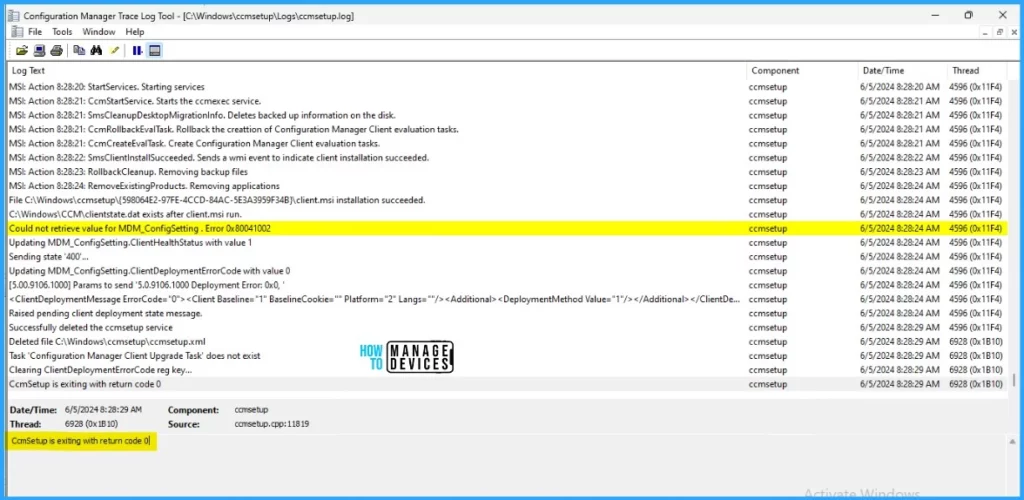
Client installation may take a few minutes to complete. Keep monitoring the ccmsetup.log to see the installation status. Once the installation is done, the message CcmSetup exits with return code 0 in the log file.
Well, we have fixed the SCCM Agent Installation Error 0x80200010. I trust that this article will greatly benefit you and your organization. Thank you for being so patient in reading this post. I look forward to seeing you in the next post. Keep supporting the HTMD Community.
We are on WhatsApp now. To get the latest step-by-step guides, news, and updates, Join our Channel. Click here. HTMD WhatsApp.
Author
About the Author – Sujin Nelladath has over 10 years of experience in SCCM device management and Automation solutions. He writes and shares his experiences with Microsoft device management technologies, Azure, and PowerShell automation.




Discussion