






SCCM and Microsoft Connected Cache Integration to Help with Bandwidth Issues
In this article, I will explore using SCCM and Microsoft connected Cache Integration to address bandwidth usage challenges. The focus will be on exploring the various SCCM and Microsoft-connected cache integration options, specifically understanding how Delivery Optimization (DO) plays a crucial role in optimizing content delivery.
The cache server operates as an on-demand transparent cache that stores content downloaded by Delivery Optimization. By configuring client settings, you can restrict access to this server so that it is only available to members of the local Configuration Manager boundary group.
It’s important to note that this cache is separate from Configuration Manager’s distribution point content, providing an added layer of versatility for content management within your network.
All the screenshots are taken from Andy Rivas’s and Narkis Engler’s Ignite session demo. The section below this post provides more details about the session and recording.

Ignite 2019 Coverage
- Microsoft Endpoint Management SCCM Intune Windows Updates
- Microsoft Endpoint Manager is the future of SCCM Intune MEMMI MEMCM
- iOS Android macOS Mobile Enrollment Options with Intune
- Basics of Windows Dynamic Update Explained Update Management
- WVD End User Experience Availability Updates
- MSIX Updates from Ignite Reliability Network Disk-space
- Microsoft Learning Certification Exams Updates
- Intune Reporting Strategies Advanced Reporting
- Intune Endpoint Security Policies Enhancements
- Intune Policy Sets Collection of Workflows
- Windows Autopilot Updates Timelines
- Microsoft Connected Cache Container Instances in Azure via Intune
- SCCM and Microsoft Connected Cache Integration
SCCM and Microsoft Connected Cache Integration to Help with Bandwidth Issues
Microsoft’s solution to network bandwidth issues in the modern workplace combines Microsoft Connected Cache, Delivery Optimization, and Microsoft Endpoint Manager. This post will focus on a hybrid solution closely integrated with SCCM investments, specifically on the EDGE.
Microsoft Connected Cache can seamlessly integrate with Microsoft Endpoint Manager solutions like SCCM/MEMCM.
The Microsoft-connected cache with DO solution is based on IIS and Application Request Routing (ARR) and the Windows Server native toolset. This Windows solution helps deliver the Microsoft-connected cache solution with DO and SCCM (MEMCM).
| Features | Description |
|---|---|
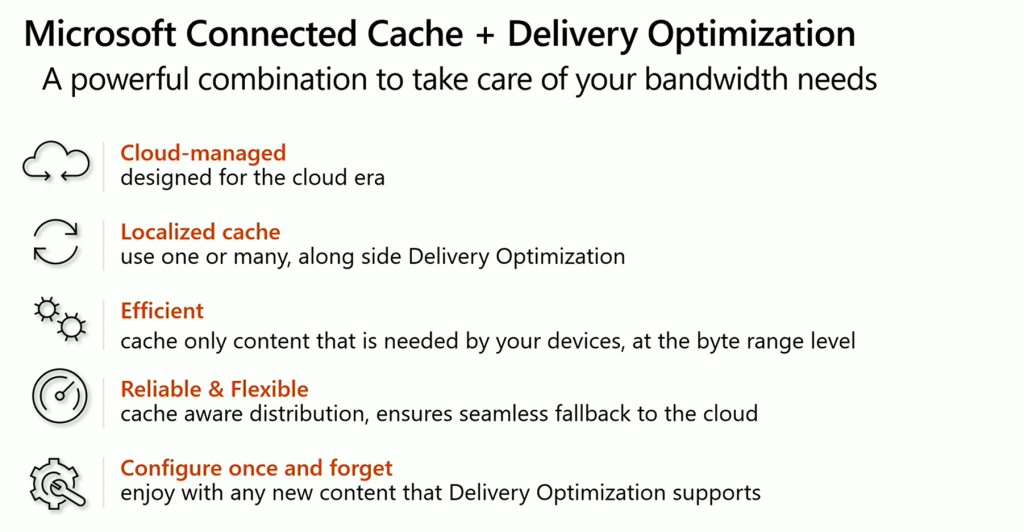
| Cloud Managed | Microsoft Connected Cache is designed for the cloud era |
| Localized Cache | Use one or many alongside Delivery Optimization |
| Efficient | Cache only content that is needed by your devices at the byte range level |
| Reliable & Flexible | Cache-aware distribution ensures seamless fallback to the cloud |
| Configure once and forget | enjoy with any new content that Delivery Optimization supports |
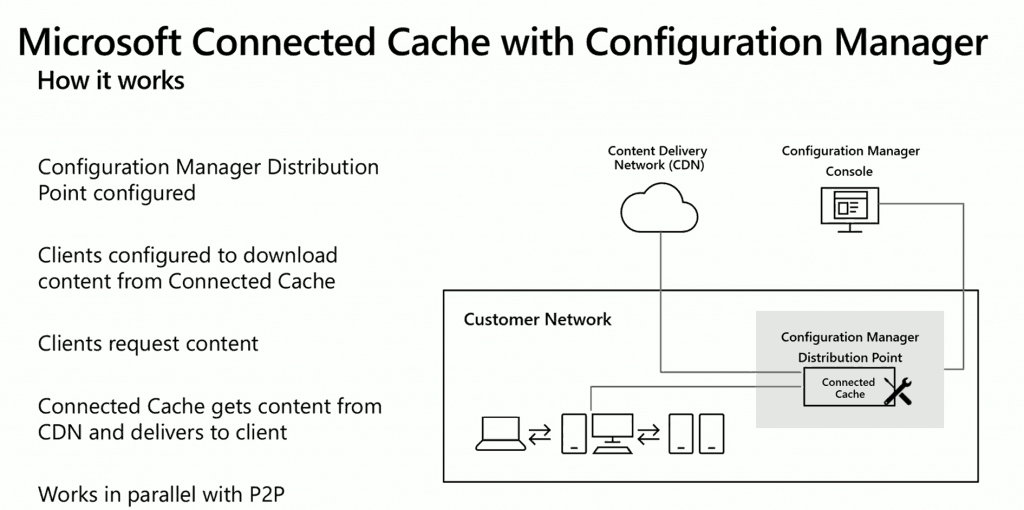
Architecture Flow Diagram
The Microsoft Connected Cache service can use Configuration Manager/SCCM or MEMCM DP as its connected Cache content location. SCCM clients can also get the content from the Connected Cache Container.
- SCCM DP configured to enable Connected Cache service so that it can download the content from Microsoft CDN on client request
- Clients configured with Connected Cache enablement policies
- Client requests for Connected cache-supported content
- Connected Cache container gets content from CDN and delivers it to the client
- The client uses Delivery Optimization (DO) to share this content with other client devices
SCCM and Connected Cache Integration
You can fully unitize the existing investment with SCCM and Microsoft Connected Cache. The integration experience will be seamless for SCCM admins.
NOTE! The blog post explains more details on setting up and configuring Microsoft Connected Cache Containers and nodes.

SCCM Server Side Configuration for Microsoft Connected Cache
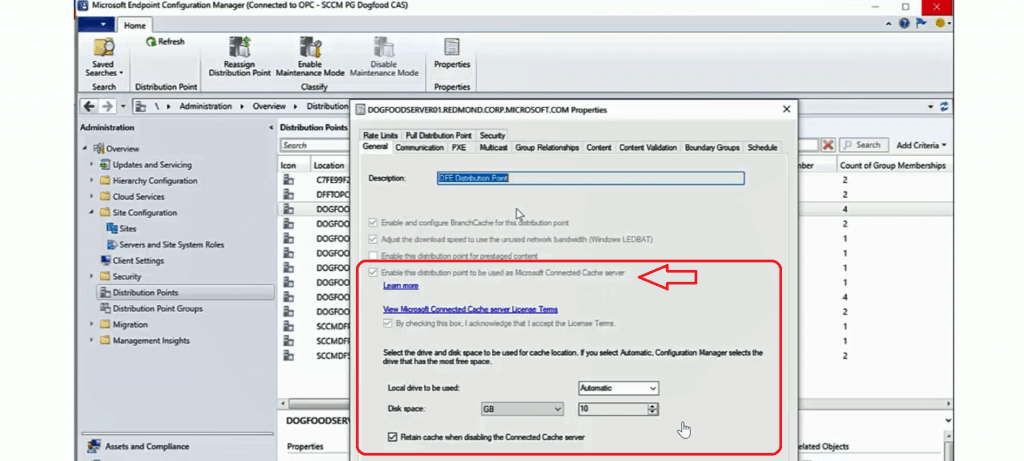
- You can configure Microsoft Connection Cache from the SCCM console -> Distribution Point Properties.
- Select the option – Enable Distribution Points to be used as Microsoft Connected Server.
SCCM Client-Side Policies for Microsoft Connected Server
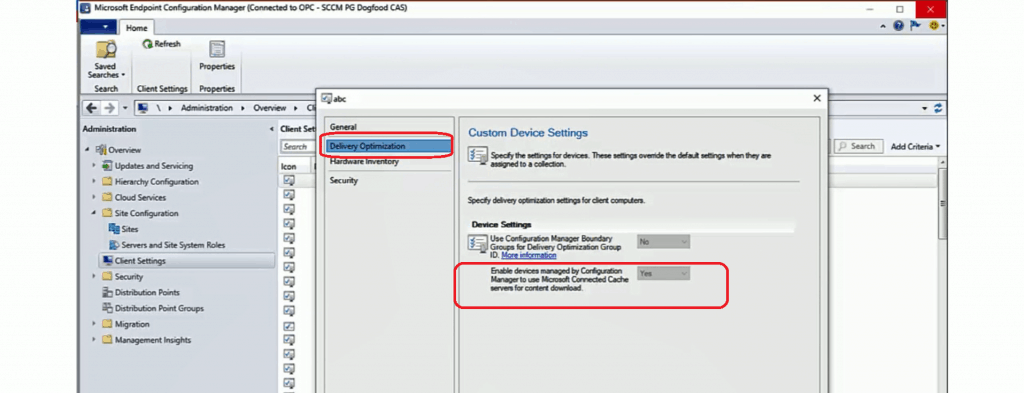
You can configure the SCCM client policies from Client Agent policies.
- Client Agent Policies – Delivery Optimization
- Select YES for the configuration “Enable Devices Managed by Configuration Manager to use Microsoft Connected Cache servers for content download.“
Real-World Story – SCCM and Microsoft Connected Cache Integration
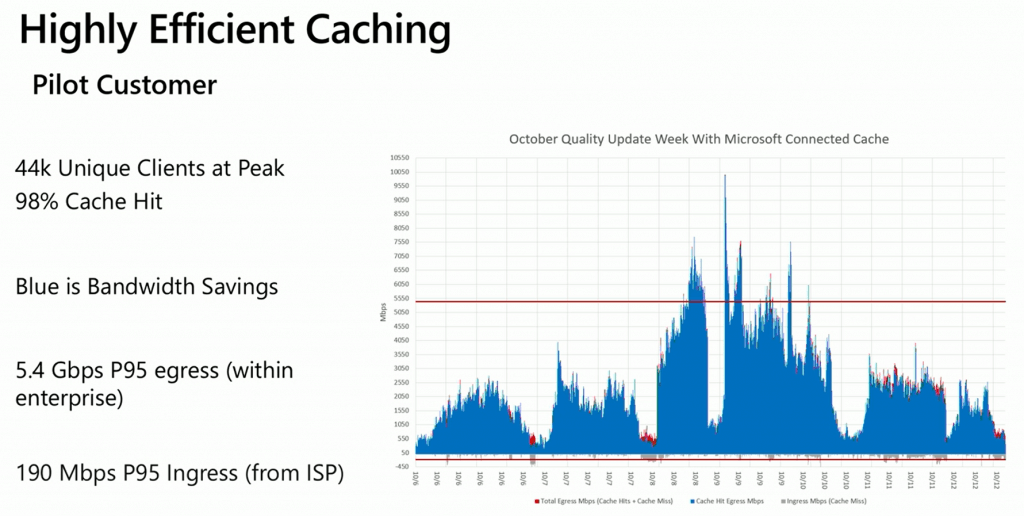
This SCCM + Connected Cache is the example provided in the Microsoft Ignite session. Highly efficient caching – the pilot customer.
Session
Stay current while minimizing network traffic: The power of Delivery Optimization—session Recording by Andy Rivas & Narkis Engler.
Resources
- Introducing Microsoft Connected Cache: Microsoft’s cloud-managed cache solution
- How to Handle SCCM Bandwidth Issues with Branch Cache Vs. Peer Cache
We are on WhatsApp. To get the latest step-by-step guides and news updates, Join our Channel. Click here –HTMD WhatsApp.
Author
Anoop C Nair is Microsoft MVP! He is a Device Management Admin with more than 20 years of experience (calculation done in 2021) in IT. He is a Blogger, Speaker, and leader of the Local User Group HTMD Community. His main focus is Device Management technologies like SCCM 2012, Current Branch, and Intune. He writes about ConfigMgr, Windows 11, Windows 10, Azure AD, Microsoft Intune, Windows 365, AVD, etc.




Quries
Will SCCM 1806 or 1906 capable to track daily patching deployments ?
Will I get to know where is the patching delays while in deployments ??
How delays can be track or monitor ?
Please advice.
reg
DJ
StaffHow about checking this https://www.anoopcnair.com/powershell-script-patch-installation-status/
No Does not much helps
How do we monitor which DP or SE doing slow Deployments or CLients.
Any solutions ??
Staff??? Use SCOM https://www.anoopcnair.com/sccm-scom-alerts-fine-tune-alerts/
Can connected cache be installed on a server core distribution point?
StaffYou mean Windows server core OS … I have not seen that support statement yet.
The server core installation of the following server OS versions are supported for use as a distribution point:
StaffMore detail https://docs.microsoft.com/en-us/mem/configmgr/core/plan-design/configs/supported-operating-systems-for-site-system-servers#bkmk_core
“Connected Cache doesn’t support content that Configuration Manager manages, like software updates with an integrated software update point.”
https://docs.microsoft.com/en-us/mem/configmgr/core/plan-design/hierarchy/microsoft-connected-cache#supported-scenarios
Does this mean I cannot used connected cache for updates deploying using a traditional ADR even if there is no content package?