






FIX: SCCM Application Installation Failed 0x87D00324
Let’s see how you can FIX SCCM Application Installation Failed 0x87D00324. The error 0x87D00324 (-2016410844) prompt when you attempted to install an application from the SCCM software center.
The error 0x87D00324 Translate SCCM Error Codes to Error Messages “The application was not detected after installation completed.”
Application Model is used these days extensively for Software Distribution from SCCM. However, troubleshooting Application deployment using this model is not easy due to the number of components involved.
The client-side flow for the application deployment post will help you to perform troubleshooting for failed deployment.

Issue Summary
The error Application Installation Failed 0x87D00324(-2016410844) was received while installing an application from Software Center. The application appeared with Status Failed.
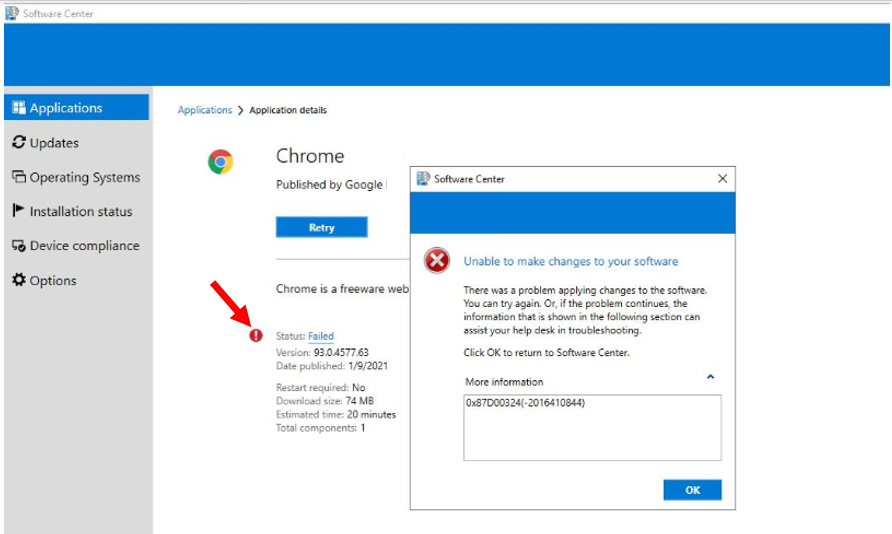
Application evaluation is performed during the InvokingSdmMethod phase of a CI Agent job. This phase is where the client evaluates the detection method defined for the application to determine if the application is installed on the device.
This activity can be tracked in AppDiscovery.log using the Deployment Type Unique ID or Deployment Type Name.
Next, the client evaluates the desired state of the application based on the Deployment Purpose. This step also involves detecting whether the application has any dependencies or supersedence rules that should be honored for the application. This activity can be tracked in AppIntentEval.log using the Application and Deployment Type Unique ID.
After reviewing the AppEnforce.log to track the installation, You might see the application exit code 0 represents, Application installation is completed successfully.
The appropriate detection method is used to check if the application is installed using alternate detection methods.
FIX – SCCM Application Installation Failed 0x87D00324
Let’s check the possible solutions to FIX SCCM Application Installation Failed 0x87D00324. It could be different based on the details you get into logs –
- In the Configuration Manager console, go to the Software Library workspace, expand Application Management, and select the Applications node.
- Select an application from the appeared list and select Deployment Types tab. Right-click on the existing deployment type and select Properties.
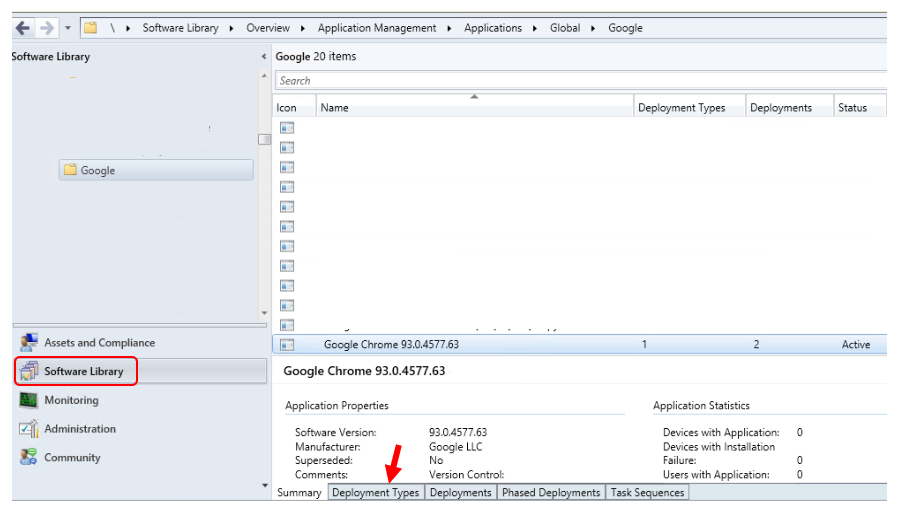
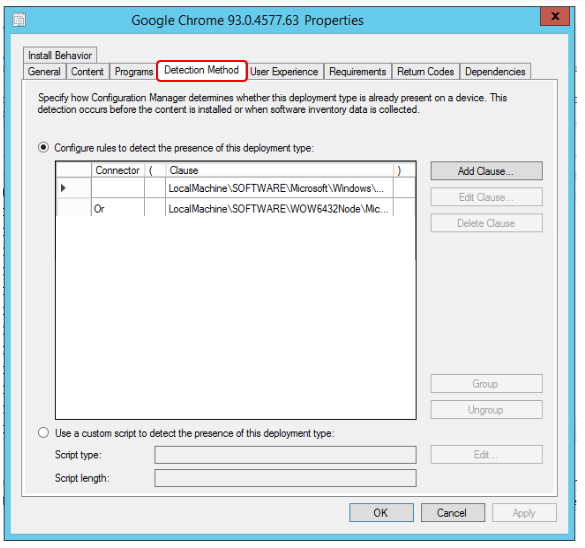
Under Application Properties, Switch to the Detection Method tab. Validate the specified detection, Make sure you refering to correct path, GUID in the detection clause based on detection method you using.
Here you can see, it shows detection for an MSI application where the detection is done by checking if the Registry key is exist on the device.
Once you corrected the detection, Refresh the deployment. As Applications always use binary differential replication. When files in the source content change, It resends only the new or changed content instead of sending the entire set of content source files each time you change those files.
On the client machine, Open Configuration Manager properties from the control panel. Under the Action tab, Run the Machine Policy Request & Evaluation Cycle.
As soon as the machine received the new policy, you can retry the deployment from the software center and the application will install without an issue. This time status message will update from Failed to Installed.
About Author, -> Jitesh has over 5 years of working experience in the IT Industry. He writes and shares his experiences related to Microsoft device management technologies and IT Infrastructure management. His primary focus area is Windows 10 Deployment solution with Configuration Manager, Microsoft Deployment Toolkit (MDT), and Microsoft Intune.
Resources
- Fix the SCCM Software Center cannot be loaded Issue with ConfigMgr
- FIX Software Center Crash Error SCNotification Has Stopped Working | SCCM | ConfigMgr
- Fix DCM Compliance Rules Error 0x87d00320 with ConfigMgr | SCCM
- HTMD Blog #2 SCCM Archieve




How about when same error coming from Windows cumulative update with SCCM? You can not fix the detection rule for windows updates.
SFC or DISM does not find any system corruption.
I’m Having the same issue on windows 2016 CU Update thru SCCM.
I am having the same issue with Windows Server 2016 CU update thru SCCM, has anyone been able to fix this?