






How to Fix SCCM Application Package Download Issue Configuration Manager ConfigMgr
How do I fix the SCCM Application Package Download Issue in Configuration Manager ConfigMgr? I installed the newest SCCM/ConfigMgr 1511 Technical Preview version, version 4.
Microsoft announced that this is the last version of the preview before the SCCM/ConfigMgr 1511 production release. I have been testing the previous SCCM/ConfigMgr vNext TP versions.
In SCCM TP version 4, the CM client (5.00.8325.1000) could not download the application package. Initially, the sccm client could not get into an approved state because of the firewall application on the SCCM/ConfigMgr vNext TP 4 server.
I disabled the Firewall on the SCCM Server and client, and the approval issue was resolved. However, this didn’t help to resolve the download package issue on the client side. CAS.log and DataTransferService.log gave me more details about the client download issues.

Table of Contents
- Differences between SCCM Applications and Packages Workloads
- Deep Dive SCCM Application Model Client End Troubleshooting
- SCCM Application Model Server-Side Troubleshooting
- Best Place to Find Package IDs for SCCM Application
How to Fix SCCM Application Package Download Issue
If you want to download SCCM vNext TP4, use the following link here. Following are the snippets of CAS and DataTransferService log files…The main error was the Error in sending the DAV request. HTTP code 401, status ‘Unauthorized’. This was primarily due to authentication failure in the IIS.
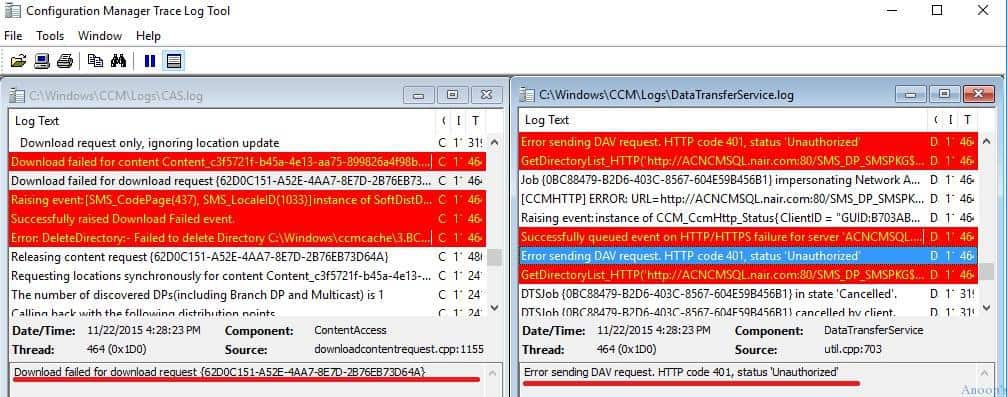
CAS.log – How to Fix SCCM Application Package Download Issue
Let’s discuss the CAS.log – How to Fix SCCM Application Package Download Issue. The CAS.log details are explained below.
<![LOG[Download failed for content Content_c3f5721f-b45a-4e13-aa75-899826a4f98b.1 under context System, error 0x80070005]LOG]!><time="16:28:23.482-330" date="11-22-2015" component="ContentAccess" context="" type="2" thread="464" file="contentaccessservice.cpp:2485">
<![LOG[Download failed for download request {62D0C151-A52E-4AA7-8E7D-2B76EB73D64A}]LOG]!><time="16:28:23.482-330" date="11-22-2015" component="ContentAccess" context="" type="2" thread="464" file="downloadcontentrequest.cpp:1155">
<![LOG[Raising event:
[SMS_CodePage(437), SMS_LocaleID(1033)]
instance of SoftDistDownloadFailedEvent
{
 ClientID = "GUID:B703ABEE-82F9-4BBA-BCE3-79C71FD9D1FD";
 DateTime = "20151122105823.491000+000";
 MachineName = "WINDOWS101511";
 PackageId = "Content_c3f5721f-b45a-4e13-aa75-899826a4f98b";
 PackageName = "Content_c3f5721f-b45a-4e13-aa75-899826a4f98b";
 PackageVersion = "1";
 ProcessID = 4416;
 SiteCode = "P12";
 ThreadID = 464;
};
]LOG]!><time="16:28:23.506-330" date="11-22-2015" component="ContentAccess" context="" type="1" thread="464" file="event.cpp:717">
<![LOG[Successfully raised Download Failed event.]LOG]!><time="16:28:23.522-330" date="11-22-2015" component="ContentAccess" context="" type="1" thread="464" file="downloadmanager.cpp:1064">
<![LOG[Error: DeleteDirectory:- Failed to delete Directory C:\Windows\ccmcache\3.BCWork with Error 0x00000002.]LOG]!><time="16:28:23.523-330" date="11-22-2015" component="ContentAccess" context="" type="3" thread="464" file="delpath.cpp:22">
<![LOG[Releasing content request {62D0C151-A52E-4AA7-8E7D-2B76EB73D64A}]LOG]!><time="16:28:24.011-330" date="11-22-2015" component="ContentAccess" context="" type="1" thread="4868" file="contentaccessservice.cpp:1861">
<![LOG[Requesting locations synchronously for content Content_c3f5721f-b45a-4e13-aa75-899826a4f98b.1 with priority Foreground]LOG]!><time="16:33:52.521-330" date="11-22-2015" component="ContentAccess" context="" type="1" thread="2412" file="contentaccessservice.cpp:1317">
DataTransferService.log – How to Fix SCCM Application Package Download Issue
The DataTransferService.log is a log file in Microsoft SCCM that records all Background Intelligent Transfer Service (BITS) communication activities related to policy or package access on client computers.
<![LOG[Raising event:instance of CCM_CcmHttp_Status
{
 ClientID = "GUID:B703ABEE-82F9-4BBA-BCE3-79C71FD9D1FD";
 DateTime = "20151122105823.190000+000";
 HostName = "ACNCMSQL.nair.com";
 HRESULT = "0x87d0027e";
 ProcessID = 4416;
 StatusCode = 401;
 ThreadID = 464;
};
]LOG]!><time="16:28:23.191-330" date="11-22-2015" component="DataTransferService" context="" type="1" thread="464" file="event.cpp:717">
<![LOG[Successfully queued event on HTTP/HTTPS failure for server 'ACNCMSQL.nair.com'.]LOG]!><time="16:28:23.213-330" date="11-22-2015" component="DataTransferService" context="" type="1" thread="464" file="ccmhttperror.cpp:357">
<![LOG[Error sending DAV request. HTTP code 401, status 'Unauthorized']LOG]!><time="16:28:23.213-330" date="11-22-2015" component="DataTransferService" context="" type="3" thread="464" file="util.cpp:703">
<![LOG[GetDirectoryList_HTTP('http://ACNCMSQL.nair.com:80/SMS_DP_SMSPKG$/Content_c3f5721f-b45a-4e13-aa75-899826a4f98b.1') failed with code 0x80070005.]LOG]!><time="16:28:23.213-330" date="11-22-2015" component="DataTransferService" context="" type="3" thread="464" file="util.cpp:770">
<![LOG[Job {0BC88479-B2D6-403C-8567-604E59B456B1} impersonating Network Access Account.]LOG]!><time="16:28:23.307-330" date="11-22-2015" component="DataTransferService" context="" type="1" thread="464" file="netaccessaccount.cpp:666">
<![LOG[[CCMHTTP] ERROR: URL=http://ACNCMSQL.nair.com:80/SMS_DP_SMSPKG$/Content_c3f5721f-b45a-4e13-aa75-899826a4f98b.1, Port=80, Options=224, Code=0, Text=CCM_E_BAD_HTTP_STATUS_CODE]LOG]!><time="16:28:23.392-330" date="11-22-2015" component="DataTransferService" context="" type="1" thread="464" file="ccmhttperror.cpp:291">
<![LOG[Raising event:instance of CCM_CcmHttp_Status
{
 ClientID = "GUID:B703ABEE-82F9-4BBA-BCE3-79C71FD9D1FD";
 DateTime = "20151122105823.406000+000";
 HostName = "ACNCMSQL.nair.com";
 HRESULT = "0x87d0027e";
 ProcessID = 4416;
 StatusCode = 401;
 ThreadID = 464;
};
]LOG]!><time="16:28:23.406-330" date="11-22-2015" component="DataTransferService" context="" type="1" thread="464" file="event.cpp:717">
Fix – How to Fix SCCM Application Package Download Issue Configuration Manager ConfigMgr
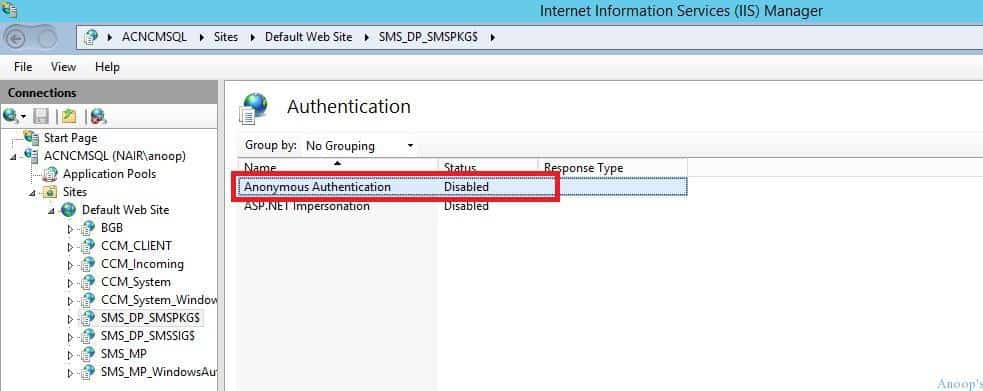
As mentioned above, this error is related to IIS. I checked the IIS authentication-related setting for the following website http://ACNCMSQL.nair.com:80/SMS_DP_SMSPKG$/. It seems IIS anonymous authentication is in a disabled state by default.
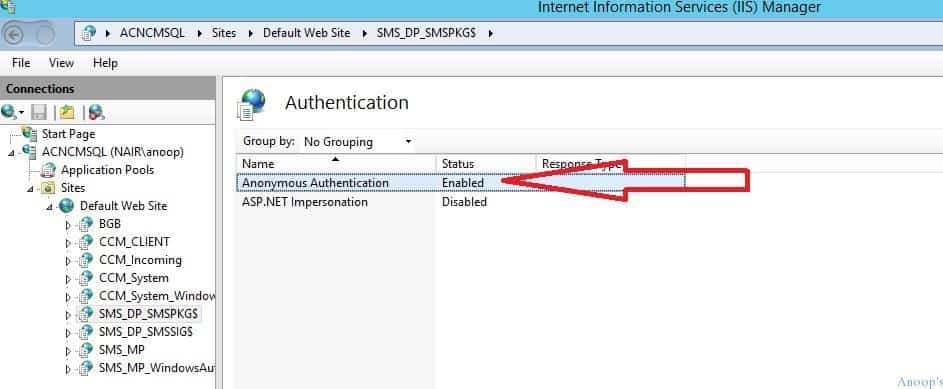
I changed the Anonymous Authentication settings to Enabled for Default Web site SMS_DP_SMSPKG$.
The IIS anonymous authentication settings change worked well for me. The application was downloaded, and the installation was successful. I have included the CAS.log and DataTransferService.log entries for your reference. How to Fix SCCM Application Package Download Issue.
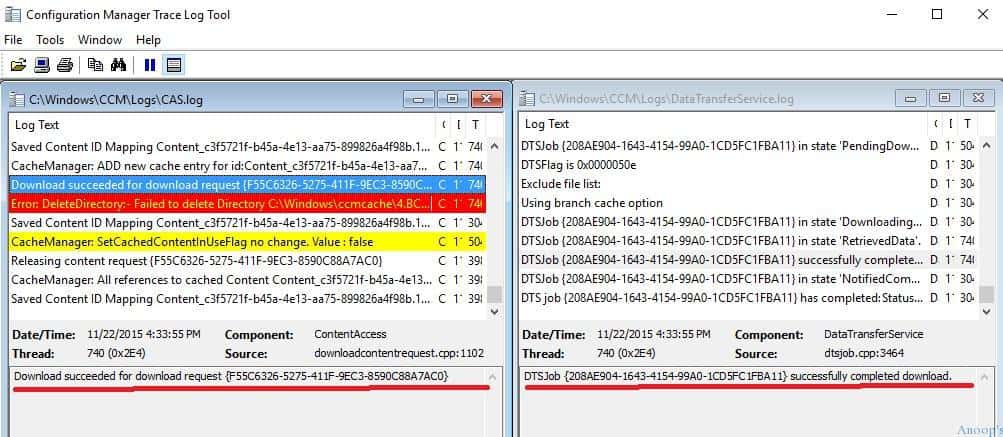
CAS.log
The CAS.log file pertains to the Content Access service in Microsoft SCCM. This service manages the local package cache on client computers. It tracks the downloading and maintaining of software packages and updates from SCCM distribution points to ensure clients have access to the required content for installation and updates.
<![LOG[Submitted CTM job {1F7E192B-6EA0-426D-9AB8-BECE18D3FCF6} to download Content Content_c3f5721f-b45a-4e13-aa75-899826a4f98b.1 under context System]LOG]!><time="16:33:52.972-330" date="11-22-2015" component="ContentAccess" context="" type="1" thread="2412" file="downloadmanager.cpp:611">
<![LOG[Successfully created download  request {F55C6326-5275-411F-9EC3-8590C88A7AC0} for content Content_c3f5721f-b45a-4e13-aa75-899826a4f98b.1]LOG]!><time="16:33:52.978-330" date="11-22-2015" component="ContentAccess" context="" type="1" thread="2412" file="downloadcontentrequest.cpp:832">
<![LOG[Download started for content Content_c3f5721f-b45a-4e13-aa75-899826a4f98b.1]LOG]!><time="16:33:53.165-330" date="11-22-2015" component="ContentAccess" context="" type="1" thread="740" file="downloadmanager.cpp:1110">
<![LOG[Location update from CTM for content Content_c3f5721f-b45a-4e13-aa75-899826a4f98b.1 and request {F55C6326-5275-411F-9EC3-8590C88A7AC0}]LOG]!><time="16:33:53.389-330" date="11-22-2015" component="ContentAccess" context="" type="1" thread="3984" file="downloadcontentrequest.cpp:1022">
<![LOG[   Download location found 0 - http://ACNCMSQL.nair.com/SMS_DP_SMSPKG$/Content_c3f5721f-b45a-4e13-aa75-899826a4f98b.1]LOG]!><time="16:33:53.389-330" date="11-22-2015" component="ContentAccess" context="" type="1" thread="3984" file="downloadcontentrequest.cpp:1033">
<![LOG[   Download request only, ignoring location update]LOG]!><time="16:33:53.389-330" date="11-22-2015" component="ContentAccess" context="" type="1" thread="3984" file="downloadcontentrequest.cpp:1039">
<![LOG[Download completed for content Content_c3f5721f-b45a-4e13-aa75-899826a4f98b.1 under context System]LOG]!><time="16:33:55.130-330" date="11-22-2015" component="ContentAccess" context="" type="1" thread="740" file="contentaccessservice.cpp:1937">
<![LOG[Computed hash: 79CE1ED025829E28582C131C527EB52597E7C1C944B01893CD8DD16A3F80346E]LOG]!><time="16:33:55.819-330" date="11-22-2015" component="ContentAccess" context="" type="1" thread="740" file="newhashdir.cpp:817">
<![LOG[Hash verification succeeded for content Content_c3f5721f-b45a-4e13-aa75-899826a4f98b.1 downloaded under context System]LOG]!><time="16:33:55.819-330" date="11-22-2015" component="ContentAccess" context="" type="1" thread="740" file="contentaccessservice.cpp:2288">
<![LOG[Saved Content ID Mapping Content_c3f5721f-b45a-4e13-aa75-899826a4f98b.1, C:\Windows\ccmcache\4]LOG]!><time="16:33:55.832-330" date="11-22-2015" component="ContentAccess" context="" type="1" thread="740" file="cachedcontentinfo.cpp:188">
<![LOG[CacheManager: ADD new cache entry for id:Content_c3f5721f-b45a-4e13-aa75-899826a4f98b Version : 1 Size : 59719K RefCount:1 LastRef Minutes : 0 State : ACTIVE PinDuration : 0 Location : C:\Windows\ccmcache\4]LOG]!><time="16:33:55.843-330" date="11-22-2015" component="ContentAccess" context="" type="1" thread="740" file="cachemanager.cpp:787">
<![LOG[Download succeeded for download request {F55C6326-5275-411F-9EC3-8590C88A7AC0}]LOG]!><time="16:33:55.843-330" date="11-22-2015" component="ContentAccess" context="" type="1" thread="740" file="downloadcontentrequest.cpp:1102">
<![LOG[Error: DeleteDirectory:- Failed to delete Directory C:\Windows\ccmcache\4.BCWork with Error 0x00000002.]LOG]!><time="16:33:55.848-330" date="11-22-2015" component="ContentAccess" context="" type="3" thread="740" file="delpath.cpp:22">
<![LOG[Saved Content ID Mapping Content_c3f5721f-b45a-4e13-aa75-899826a4f98b.1, C:\Windows\ccmcache\4]LOG]!><time="16:33:56.019-330" date="11-22-2015" component="ContentAccess" context="" type="1" thread="3040" file="cachedcontentinfo.cpp:188">
<![LOG[CacheManager: SetCachedContentInUseFlag no change. Value : false]LOG]!><time="16:34:36.024-330" date="11-22-2015" component="ContentAccess" context="" type="2" thread="5044" file="cachemanager.cpp:2387">
<![LOG[Releasing content request {F55C6326-5275-411F-9EC3-8590C88A7AC0}]LOG]!><time="16:34:36.381-330" date="11-22-2015" component="ContentAccess" context="" type="1" thread="3984" file="contentaccessservice.cpp:1861">
<![LOG[CacheManager: All references to cached Content Content_c3f5721f-b45a-4e13-aa75-899826a4f98b.1 have been removed, content is tombstoned and may be removed during future grooming operations.]LOG]!><time="16:34:36.381-330" date="11-22-2015" component="ContentAccess" context="" type="1" thread="3984" file="cachemanager.cpp:832">
<![LOG[Saved Content ID Mapping Content_c3f5721f-b45a-4e13-aa75-899826a4f98b.1, C:\Windows\ccmcache\4]LOG]!><time="16:34:36.387-330" date="11-22-2015" component="ContentAccess" context="" type="1" thread="3984" file="cachedcontentinfo.cpp:188">
DataTransferService.log
How to Fix SCCM Application Package Download Issue Configuration Manager ConfigMgr using the DataTransferService log.
<![LOG[DTSJob {208AE904-1643-4154-99A0-1CD5FC1FBA11} created to download from 'http://ACNCMSQL.nair.com:80/SMS_DP_SMSPKG$/Content_c3f5721f-b45a-4e13-aa75-899826a4f98b.1' to 'C:\Windows\ccmcache\4'.]LOG]!><time="16:33:53.426-330" date="11-22-2015" component="DataTransferService" context="" type="1" thread="2412" file="datatransferservice.cpp:200">
<![LOG[DTSJob {208AE904-1643-4154-99A0-1CD5FC1FBA11} in state 'DownloadingManifest'.]LOG]!><time="16:33:53.427-330" date="11-22-2015" component="DataTransferService" context="" type="1" thread="3984" file="dtsjob.h:176">
<![LOG[Raising event:instance of CCM_CcmHttp_Status
{
 ClientID = "GUID:B703ABEE-82F9-4BBA-BCE3-79C71FD9D1FD";
 DateTime = "20151122110353.538000+000";
 HostName = "ACNCMSQL.nair.com";
 HRESULT = "0x00000000";
 ProcessID = 4416;
 StatusCode = 0;
 ThreadID = 3040;
};
]LOG]!><time="16:33:53.538-330" date="11-22-2015" component="DataTransferService" context="" type="1" thread="3040" file="event.cpp:717">
<![LOG[UpdateURLWithTransportSettings(): OLD URL - http://acncmsql.nair.com/SMS_DP_SMSPKG$/sccm?/Content_c3f5721f-b45a-4e13-aa75-899826a4f98b.1/]LOG]!><time="16:33:53.554-330" date="11-22-2015" component="DataTransferService" context="" type="1" thread="3040" file="ccmutillib.cpp:3196">
<![LOG[UpdateURLWithTransportSettings(): NEW URL - http://acncmsql.nair.com:80/SMS_DP_SMSPKG$/sccm?/Content_c3f5721f-b45a-4e13-aa75-899826a4f98b.1/]LOG]!><time="16:33:53.554-330" date="11-22-2015" component="DataTransferService" context="" type="1" thread="3040" file="ccmutillib.cpp:3208">
<![LOG[UpdateURLWithTransportSettings(): OLD URL - http://acncmsql.nair.com/SMS_DP_SMSPKG$/Content_c3f5721f-b45a-4e13-aa75-899826a4f98b.1/sccm?/FirefoxESR-24.6.0-ach.msi]LOG]!><time="16:33:53.556-330" date="11-22-2015" component="DataTransferService" context="" type="1" thread="3040" file="ccmutillib.cpp:3196">
<![LOG[UpdateURLWithTransportSettings(): NEW URL - http://acncmsql.nair.com:80/SMS_DP_SMSPKG$/Content_c3f5721f-b45a-4e13-aa75-899826a4f98b.1/sccm?/FirefoxESR-24.6.0-ach.msi]LOG]!><time="16:33:53.556-330" date="11-22-2015" component="DataTransferService" context="" type="1" thread="3040" file="ccmutillib.cpp:3208">
<![LOG[UpdateURLWithTransportSettings(): OLD URL - http://acncmsql.nair.com/SMS_DP_SMSPKG$/Content_c3f5721f-b45a-4e13-aa75-899826a4f98b.1/sccm?/MBCASetup64.msi]LOG]!><time="16:33:53.556-330" date="11-22-2015" component="DataTransferService" context="" type="1" thread="3040" file="ccmutillib.cpp:3196">
<![LOG[UpdateURLWithTransportSettings(): NEW URL - http://acncmsql.nair.com:80/SMS_DP_SMSPKG$/Content_c3f5721f-b45a-4e13-aa75-899826a4f98b.1/sccm?/MBCASetup64.msi]LOG]!><time="16:33:53.556-330" date="11-22-2015" component="DataTransferService" context="" type="1" thread="3040" file="ccmutillib.cpp:3208">
<![LOG[UpdateURLWithTransportSettings(): OLD URL - http://acncmsql.nair.com/SMS_DP_SMSPKG$/Content_c3f5721f-b45a-4e13-aa75-899826a4f98b.1/sccm?/Mplus Version 7.2 Demo (64-bit).msi]LOG]!><time="16:33:53.556-330" date="11-22-2015" component="DataTransferService" context="" type="1" thread="3040" file="ccmutillib.cpp:3196">
<![LOG[UpdateURLWithTransportSettings(): NEW URL - http://acncmsql.nair.com:80/SMS_DP_SMSPKG$/Content_c3f5721f-b45a-4e13-aa75-899826a4f98b.1/sccm?/Mplus Version 7.2 Demo (64-bit).msi]LOG]!><time="16:33:53.556-330" date="11-22-2015" component="DataTransferService" context="" type="1" thread="3040" file="ccmutillib.cpp:3208">
<![LOG[UpdateURLWithTransportSettings(): OLD URL - http://acncmsql.nair.com/SMS_DP_SMSPKG$/Content_c3f5721f-b45a-4e13-aa75-899826a4f98b.1/sccm?/RDCMan.msi]LOG]!><time="16:33:53.556-330" date="11-22-2015" component="DataTransferService" context="" type="1" thread="3040" file="ccmutillib.cpp:3196">
<![LOG[UpdateURLWithTransportSettings(): NEW URL - http://acncmsql.nair.com:80/SMS_DP_SMSPKG$/Content_c3f5721f-b45a-4e13-aa75-899826a4f98b.1/sccm?/RDCMan.msi]LOG]!><time="16:33:53.557-330" date="11-22-2015" component="DataTransferService" context="" type="1" thread="3040" file="ccmutillib.cpp:3208">
<![LOG[UpdateURLWithTransportSettings(): OLD URL - http://acncmsql.nair.com/SMS_DP_SMSPKG$/Content_c3f5721f-b45a-4e13-aa75-899826a4f98b.1/sccm?/SCCM2007-SP2-KB977384-ICP2.msi]LOG]!><time="16:33:53.557-330" date="11-22-2015" component="DataTransferService" context="" type="1" thread="3040" file="ccmutillib.cpp:3196">
<![LOG[UpdateURLWithTransportSettings(): NEW URL - http://acncmsql.nair.com:80/SMS_DP_SMSPKG$/Content_c3f5721f-b45a-4e13-aa75-899826a4f98b.1/sccm?/SCCM2007-SP2-KB977384-ICP2.msi]LOG]!><time="16:33:53.557-330" date="11-22-2015" component="DataTransferService" context="" type="1" thread="3040" file="ccmutillib.cpp:3208">
<![LOG[DTSJob {208AE904-1643-4154-99A0-1CD5FC1FBA11} in state 'RetrievedManifest'.]LOG]!><time="16:33:53.579-330" date="11-22-2015" component="DataTransferService" context="" type="1" thread="3040" file="dtsjob.h:176">
<![LOG[DTSJob {208AE904-1643-4154-99A0-1CD5FC1FBA11} in state 'PendingDownload'.]LOG]!><time="16:33:53.581-330" date="11-22-2015" component="DataTransferService" context="" type="1" thread="5044" file="dtsjob.h:176">
<![LOG[DTSFlag is 0x0000050e]LOG]!><time="16:33:53.607-330" date="11-22-2015" component="DataTransferService" context="" type="1" thread="3040" file="bitshelper.cpp:375">
<![LOG[Exclude file list: ]LOG]!><time="16:33:53.607-330" date="11-22-2015" component="DataTransferService" context="" type="1" thread="3040" file="bitshelper.cpp:387">
<![LOG[Using branch cache option]LOG]!><time="16:33:53.627-330" date="11-22-2015" component="DataTransferService" context="" type="1" thread="3040" file="bitshelper.cpp:407">
<![LOG[DTSJob {208AE904-1643-4154-99A0-1CD5FC1FBA11} in state 'DownloadingData'.]LOG]!><time="16:33:53.812-330" date="11-22-2015" component="DataTransferService" context="" type="1" thread="3040" file="dtsjob.h:176">
<![LOG[DTSJob {208AE904-1643-4154-99A0-1CD5FC1FBA11} in state 'RetrievedData'.]LOG]!><time="16:33:55.091-330" date="11-22-2015" component="DataTransferService" context="" type="1" thread="740" file="dtsjob.h:176">
<![LOG[DTSJob {208AE904-1643-4154-99A0-1CD5FC1FBA11} successfully completed download.]LOG]!><time="16:33:55.092-330" date="11-22-2015" component="DataTransferService" context="" type="1" thread="740" file="dtsjob.cpp:3464">
<![LOG[DTSJob {208AE904-1643-4154-99A0-1CD5FC1FBA11} in state 'NotifiedComplete'.]LOG]!><time="16:33:55.100-330" date="11-22-2015" component="DataTransferService" context="" type="1" thread="3040" file="dtsjob.h:176">
<![LOG[DTS job {208AE904-1643-4154-99A0-1CD5FC1FBA11} has completed: Status : SUCCESS,
 Start time : 11/22/2015 16:33:53,
 Completion time : 11/22/2015 16:33:55,
 Elapsed time : 1 seconds]LOG]!><time="16:33:55.101-330" date="11-22-2015" component="DataTransferService" context="" type="1" thread="3040" file="util.cpp:2691">
Resources
SCCM Related Posts Real World Experiences Of SCCM Admins (anoopcnair.com)
SCCM Video Tutorials For IT Pros – HTMD Blog #2 (howtomanagedevices.com)
We are on WhatsApp now. To get the latest step-by-step guides, news, and updates, Join our Channel. Click here. HTMD WhatsApp.
Author
Anoop C Nair is Microsoft MVP! He is a Device Management Admin with more than 20 years of experience (calculation done in 2021) in IT. He is a Blogger, Speaker, and Local User Group HTMD Community leader. His main focus is on Device Management technologies like SCCM 2012, Current Branch, and Intune. He writes about ConfigMgr, Windows 11, Windows 10, Azure AD, Microsoft Intune, Windows 365, AVD, etc.




Though i think i have a differnt issue..still i’m posting it here to seek some help..
I followed below steps as suggested by a forum to deploy a hotfix on windows 7 machines
1. Create a task sequence
2. Instead of adding Install Software, Add Run Command Line
3. Type the commnand e.g “wusa.exe Windows6.1- Windows6.1-KB3050265-x86.msu /quiet /norestart”
4. select the package you created (making sure package status is “Installed” on your DP)
5. In the options tab select Continue on error, and MAKE SURE “0 3010” is entered into the Success codes, as this will result in RebootRequired exit code 3010 being a success and the TS will continue
6. Advertise the TS to your collection
So far it is completed on just Three machines and for rest of the machines it says status as “in Progress”. it is being two days..
However it seem most of the machines have recieved this patch but SCCM status doesn’t change at all..
for me i solved it, when found Windows Authentication missing in the iis list in DP.
If your IIS installation does not contain Windows Authentication by default, you need to install it:
Go to Control Panel -> Programs and Features -> Turn windows features on or off.
Expand Internet Information Services -> World Wide Web Services.
Under Security, select the Windows Authentication check box.
Click OK to finish the configuration.
Windows Authentication appears as an option in IIS website authentication settings.