






An Easy Method to Use SCCM Application Supersedence | ConfigMgr
Hello, Folks. In this blog post, we will learn the easy method of using SCCM Application Supersedence. This Application Supersedence will help the SCCM admin uninstall or replace a particular application and deploy a new one according to the requirement.
You don’t need to create another deployment for application uninstallation. Before creating the application supersedence, you have to decide whether you want to upgrade or uninstall the superseded application before the client installs it.
I used here the uninstall method before installing the superseding application. You can use multiple applications for supersedence relationships for the dependent application. ConfigMgr will install the highest dependent application from the supersedence chain.
You must deploy the dependent applications to the device where the main application is installed; otherwise, the configuration manager will not install the dependent application.

Table of Contents
What is Application Supersedence?
In ConfigMgr (A.K.A. SCCM), application management allows SCCM admin to upgrade or replace existing applications using application supersedence. To supersede an application, you have to create a new deployment type to replace the deployment type of the superseded application.
Before superseding an application, an admin can decide whether to upgrade or uninstall the superseded application.
- SCCM Application User Experience Options | Deployment Type
- Update SCCM Application Content on Distribution Points
- Easily Export SCCM Application from Staging to Prod Environment
How to use Application Supersedence in ConfigMgr
Let’s follow the below process to use Application Supersedence in ConfigMgr.
Go to the Configuration Manager console > Software Library > Overview > Application Management > Applications. Then select the application you want to use for supersedence. Otherwise, you can create a new application according to your requirements.
For Example, I was required to uninstall the 7Zip application on a system and Install the Notepad ++ 8.0 version. So, I created a Notepad++ application and used 7Zip as a supersedence to uninstall it from the system. So, here, we do not need to make any additional deployment for uninstallation.
Select the application you want to deploy, right-click, and go to the Properties > Supersedence tab. Click on the ‘Add’ button to use another application for supersedence.
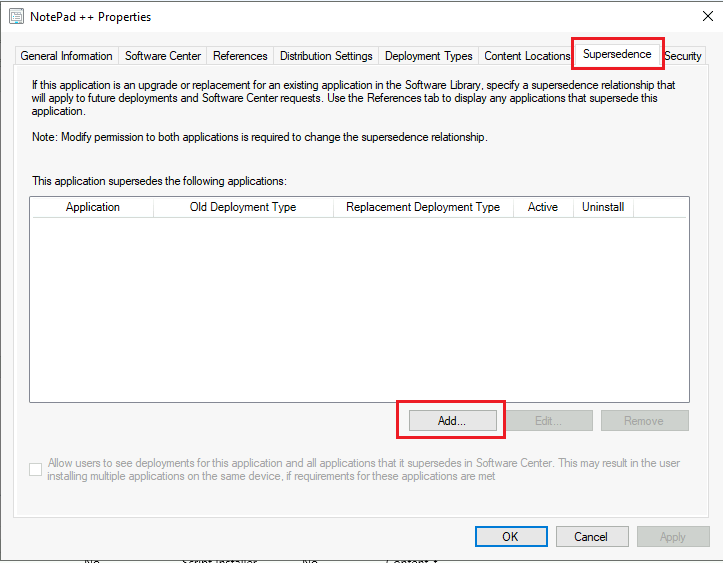
‘Browse’ the application you want to uninstall before installation. In ‘New Deployment Type’ choose the application for uninstallation. Check the Uninstallation box.
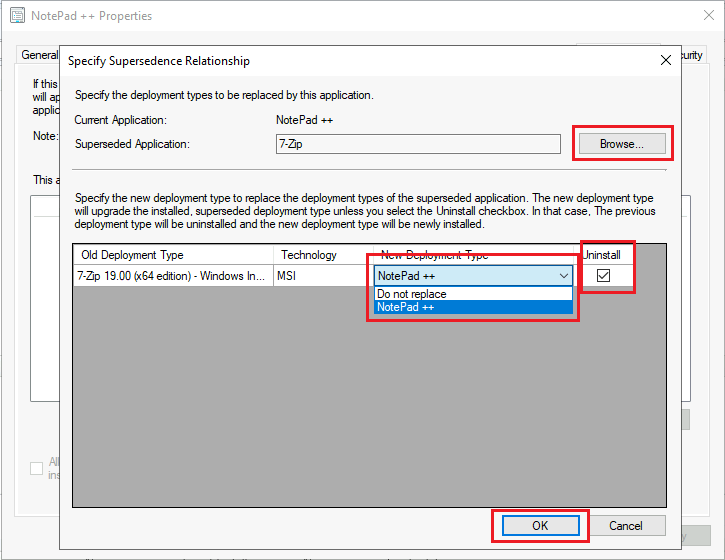
After selecting the application, check the box ‘Allow users to see the deployments for this application that it supersedes in Software Center. If the requirements for these applications are met, the user may install multiple applications on the same device.’
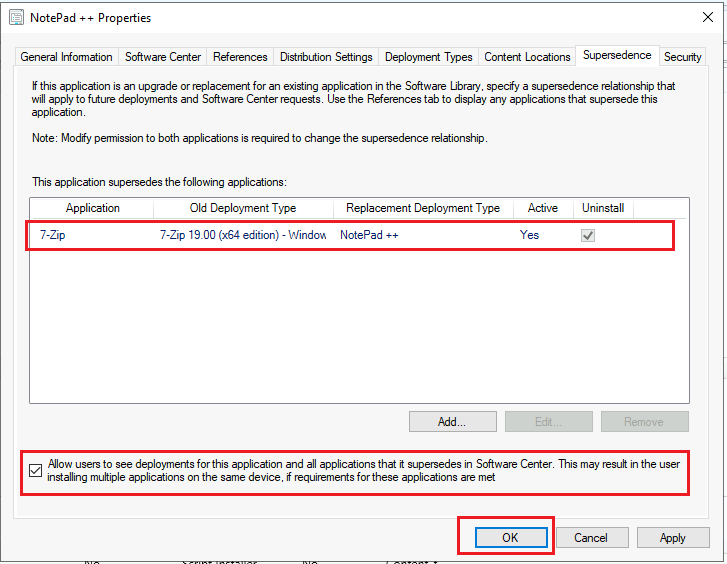
Once you have everything set, just click ‘Apply’ and ‘Ok‘ to save the application. Then, distribute the application to the respective Distribution Point before deployment. When you see the distribution is completed, go ahead and schedule the deployment.
For more details on troubleshooting distribution, you can refer to this ConfigMgr Redistribute Content to Distribution Point | SCCM | Package | Best Way | Configuration Manager
Result – Supersedence
Let us see in the section below the outcome of the supersedence deployment. As we discussed above, we will uninstall the 7Zip application before installing the superseding application Notepad++ on the device.
I have gathered the AppEnforce.log to show you the result of a device’s supersedence application deployment status. The logs say that you uninstalled the 7Zip application from the device.
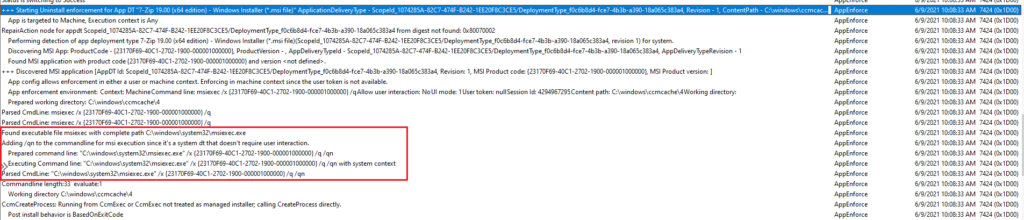
+++ Starting Uninstall enforcement for App DT "7-Zip 19.00 (x64 edition) - Windows Installer (.msi file)" ApplicationDeliveryType - ScopeId_1074285A-82C7-474F-B242-1EE20F8C3CE5/DeploymentType_f0c6b8d4-fce7-4b3b-a390-18a065c383a4, Revision - 1, ContentPath - C:\windows\ccmcache\4, Execution Context - Any AppEnforce 6/9/2021 10:08:33 AM 7424 (0x1D00) App is targeted to Machine, Execution context is Any AppEnforce 6/9/2021 10:08:33 AM 7424 (0x1D00) RepairAction node for appdt ScopeId_1074285A-82C7-474F-B242-1EE20F8C3CE5/DeploymentType_f0c6b8d4-fce7-4b3b-a390-18a065c383a4 from digest not found: 0x80070002 AppEnforce 6/9/2021 10:08:33 AM 7424 (0x1D00) Performing detection of app deployment type 7-Zip 19.00 (x64 edition) - Windows Installer (.msi file)(ScopeId_1074285A-82C7-474F-B242-1EE20F8C3CE5/DeploymentType_f0c6b8d4-fce7-4b3b-a390-18a065c383a4, revision 1) for system. AppEnforce 6/9/2021 10:08:33 AM 7424 (0x1D00)
Discovering MSI App: ProductCode - {23170F69-40C1-2702-1900-000001000000}, ProductVersion - , AppDeliveryTypeId - ScopeId_1074285A-82C7-474F-B242-1EE20F8C3CE5/DeploymentType_f0c6b8d4-fce7-4b3b-a390-18a065c383a4, AppDeliveryTypeRevision - 1 AppEnforce 6/9/2021 10:08:33 AM 7424 (0x1D00)
Found MSI application with product code {23170F69-40C1-2702-1900-000001000000} and version . AppEnforce 6/9/2021 10:08:33 AM 7424 (0x1D00)
+++ Discovered MSI application [AppDT Id: ScopeId_1074285A-82C7-474F-B242-1EE20F8C3CE5/DeploymentType_f0c6b8d4-fce7-4b3b-a390-18a065c383a4, Revision: 1, MSI Product code: {23170F69-40C1-2702-1900-000001000000}, MSI Product version: ] AppEnforce 6/9/2021 10:08:33 AM 7424 (0x1D00)
App config allows enforcement in either a user or machine context. Enforcing in machine context since the user token is not available. AppEnforce 6/9/2021 10:08:33 AM 7424 (0x1D00)
App enforcement environment:
Context: Machine
Command line: msiexec /x {23170F69-40C1-2702-1900-000001000000} /q
Allow user interaction: No
UI mode: 1
User token: null
Session Id: 4294967295
Content path: C:\windows\ccmcache\4
Working directory: AppEnforce 6/9/2021 10:08:33 AM 7424 (0x1D00)
Prepared working directory: C:\windows\ccmcache\4 AppEnforce 6/9/2021 10:08:33 AM 7424 (0x1D00)
Parsed CmdLine: msiexec /x {23170F69-40C1-2702-1900-000001000000} /q AppEnforce 6/9/2021 10:08:33 AM 7424 (0x1D00)
Parsed CmdLine: msiexec /x {23170F69-40C1-2702-1900-000001000000} /q AppEnforce 6/9/2021 10:08:33 AM 7424 (0x1D00)
Found executable file msiexec with complete path C:\windows\system32\msiexec.exe AppEnforce 6/9/2021 10:08:33 AM 7424 (0x1D00)
Adding /qn to the commandline for msi execution since it's a system dt that doesn't require user interaction. AppEnforce 6/9/2021 10:08:33 AM 7424 (0x1D00)
Prepared command line: "C:\windows\system32\msiexec.exe" /x {23170F69-40C1-2702-1900-000001000000} /q /qn AppEnforce 6/9/2021 10:08:33 AM 7424 (0x1D00)
Executing Command line: "C:\windows\system32\msiexec.exe" /x {23170F69-40C1-2702-1900-000001000000} /q /qn with system context AppEnforce 6/9/2021 10:08:33 AM 7424 (0x1D00)
Parsed CmdLine: "C:\windows\system32\msiexec.exe" /x {23170F69-40C1-2702-1900-000001000000} /q /qn AppEnforce 6/9/2021 10:08:33 AM 7424 (0x1D00)
Commandline length:33 evaluate:1 AppEnforce 6/9/2021 10:08:33 AM 7424 (0x1D00)
Working directory C:\windows\ccmcache\4 AppEnforce 6/9/2021 10:08:33 AM 7424 (0x1D00)
CcmCreateProcess: Running from CcmExec or CcmExec not treated as managed installer; calling CreateProcess directly. AppEnforce 6/9/2021 10:08:33 AM 7424 (0x1D00)
Post install behavior is BasedOnExitCode AppEnforce 6/9/2021 10:08:33 AM 7424 (0x1D00)
From the below logs you can see you installed the Notepad++ application on the device.
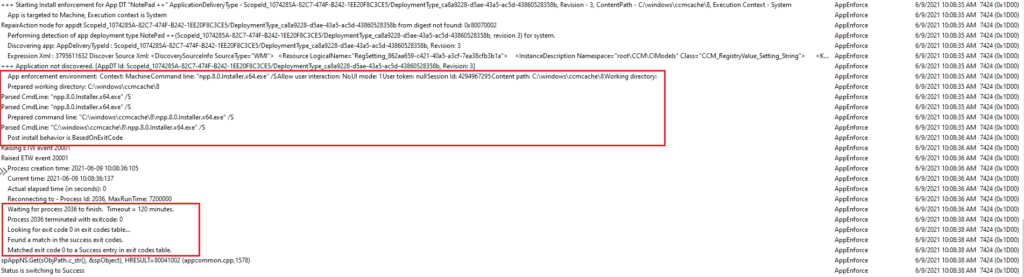
+++ Starting Install enforcement for App DT "NotePad ++" ApplicationDeliveryType - ScopeId_1074285A-82C7-474F-B242-1EE20F8C3CE5/DeploymentType_ca8a9228-d5ae-43a5-ac5d-43860528358b, Revision - 3, ContentPath - C:\windows\ccmcache\8, Execution Context - System AppEnforce 6/9/2021 10:08:35 AM 7424 (0x1D00)
App is targeted to Machine, Execution context is System AppEnforce 6/9/2021 10:08:35 AM 7424 (0x1D00)
RepairAction node for appdt ScopeId_1074285A-82C7-474F-B242-1EE20F8C3CE5/DeploymentType_ca8a9228-d5ae-43a5-ac5d-43860528358b from digest not found: 0x80070002 AppEnforce 6/9/2021 10:08:35 AM 7424 (0x1D00)
Performing detection of app deployment type NotePad ++(ScopeId_1074285A-82C7-474F-B242-1EE20F8C3CE5/DeploymentType_ca8a9228-d5ae-43a5-ac5d-43860528358b, revision 3) for system. AppEnforce 6/9/2021 10:08:35 AM 7424 (0x1D00)
Discovering app: AppDeliveryTypeId : ScopeId_1074285A-82C7-474F-B242-1EE20F8C3CE5/DeploymentType_ca8a9228-d5ae-43a5-ac5d-43860528358b, Revision: 3 AppEnforce 6/9/2021 10:08:35 AM 7424 (0x1D00)
Expression Xml : 3795611632 Discover Source Xml: 1 SOFTWARE\Microsoft\Windows\CurrentVersion\Uninstall\Notepad++ DisplayVersion 1 AppEnforce 6/9/2021 10:08:35 AM 7424 (0x1D00)
+++ Application not discovered. [AppDT Id: ScopeId_1074285A-82C7-474F-B242-1EE20F8C3CE5/DeploymentType_ca8a9228-d5ae-43a5-ac5d-43860528358b, Revision: 3] AppEnforce 6/9/2021 10:08:35 AM 7424 (0x1D00)
App enforcement environment:
Context: Machine
Command line: "npp.8.0.Installer.x64.exe" /S
Allow user interaction: No
UI mode: 1
User token: null
Session Id: 4294967295
Content path: C:\windows\ccmcache\8
Working directory: AppEnforce 6/9/2021 10:08:35 AM 7424 (0x1D00)
Prepared working directory: C:\windows\ccmcache\8 AppEnforce 6/9/2021 10:08:35 AM 7424 (0x1D00)
Parsed CmdLine: "npp.8.0.Installer.x64.exe" /S AppEnforce 6/9/2021 10:08:35 AM 7424 (0x1D00)
Parsed CmdLine: "npp.8.0.Installer.x64.exe" /S AppEnforce 6/9/2021 10:08:35 AM 7424 (0x1D00)
Prepared command line: "C:\windows\ccmcache\8\npp.8.0.Installer.x64.exe" /S AppEnforce 6/9/2021 10:08:35 AM 7424 (0x1D00)
Parsed CmdLine: "C:\windows\ccmcache\8\npp.8.0.Installer.x64.exe" /S AppEnforce 6/9/2021 10:08:35 AM 7424 (0x1D00)
Post install behavior is BasedOnExitCode AppEnforce 6/9/2021 10:08:36 AM 7424 (0x1D00)
Raising ETW event 20001 AppEnforce 6/9/2021 10:08:36 AM 7424 (0x1D00)
Raised ETW event 20001 AppEnforce 6/9/2021 10:08:36 AM 7424 (0x1D00)
Process creation time: 2021-06-09 10:08:36:105 AppEnforce 6/9/2021 10:08:36 AM 7424 (0x1D00)
Current time: 2021-06-09 10:08:36:137 AppEnforce 6/9/2021 10:08:36 AM 7424 (0x1D00)
Actual elapsed time (in seconds): 0 AppEnforce 6/9/2021 10:08:36 AM 7424 (0x1D00)
Reconnecting to - Process Id: 2036, MaxRunTime: 7200000 AppEnforce 6/9/2021 10:08:36 AM 7424 (0x1D00)
Waiting for process 2036 to finish. Timeout = 120 minutes. AppEnforce 6/9/2021 10:08:36 AM 7424 (0x1D00)
Process 2036 terminated with exitcode: 0 AppEnforce 6/9/2021 10:08:38 AM 7424 (0x1D00)
Looking for exit code 0 in exit codes table… AppEnforce 6/9/2021 10:08:38 AM 7424 (0x1D00)
Found a match in the success exit codes. AppEnforce 6/9/2021 10:08:38 AM 7424 (0x1D00)
Matched exit code 0 to a Success entry in exit codes table. AppEnforce 6/9/2021 10:08:38 AM 7424 (0x1D00)
spAppNS.Get(sObjPath.c_str(), &spObject), HRESULT=80041002 (appcommon.cpp,1578) AppEnforce 6/9/2021 10:08:38 AM 7424 (0x1D00)
Status is switching to Success AppEnforce 6/9/2021 10:08:38 AM 7424 (0x1D00)
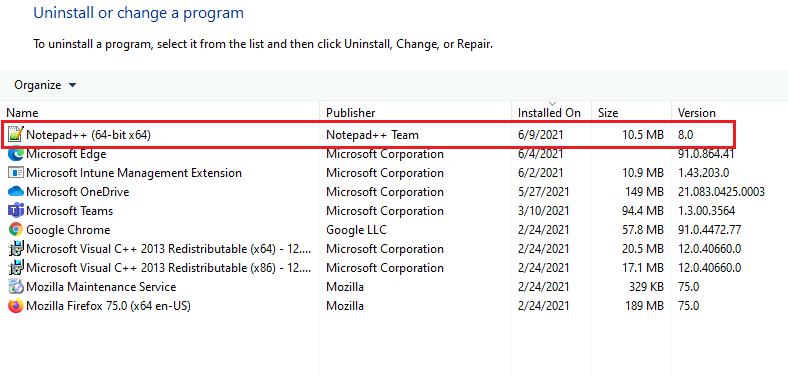
Also, you can verify the application installation and uninstallation status from the ‘Program and Features‘ section.
Resources
- Revise and supersede applications in Configuration Manager https://docs.microsoft.com/en-us/mem/configmgr/apps/deploy-use/revise-and-supersede-applications
- SCCM Install New Distribution Point Role | ConfigMgr
We are on WhatsApp. To get the latest step-by-step guides and news updates, Join our Channel. Click here –HTMD WhatsApp.
Author
Debabrata Pati has more than 8+ years of experience in IT. Skilled in MEMCM, Azure, and Powershell. More than Six (6) years of experience in MEMCM (SCCM) administration, OSD, and Troubleshooting for the environment with more than 100K client devices.




What if I need to uninstall softwares that haven’t been installed via SCCM? Deploying them in SCCM is enough, or they must have been installed to supersedence to work?
Sorry, I am new to this so please bear with me. I have followed the above steps, up to the point where you should tick the ‘uninstall’ tick box however, when I click on it, nothing happens (no tick appears). Any idea why I am being prevented from doing this please?
If the “New Deployment Type” is still on “Do Not Replace” then the “Uninstall” button will do nothing and nothing will be added.
Yes the detection method will be important on the app you want to remove. Since all deployments start with detection. If you made an application for the older version you want to remove, just be sure the detection will be positive when SCCM checks.