






SCCM CB 1803 Review of Upgrade and Features Configuration Manager ConfigMgr
The SCCM CB 1803 preview version was released a few weeks ago. I was busy with SCCM CB 1802 production posts, so I couldn’t get time to install it. In this post, we will review my SCCM CB 1803 upgrade experience.
What is the SCCM CB Preview Version? If you have not installed the SCCM preview version in the lab, I recommend downloading and installing the latest preview baseline version, SCCM CB 1711. The above download link should be used ONLY when you want to test the Preview version in your lab environment.
What is the SCCM CB Preview Version? The SCCM CB Preview version is valid only for 90 days or 3 months. It should NOT be installed in the production environment. The SCCM preview version supports a maximum of TEN(10) clients.
I have created a video tutorial to provide a real experience of the SCCM CB 1803 upgrade process.

Table of Contents
SCCM CB 1803 Video Tutorial
This video tutorial also gives a real-life experience of the new features included in the 1803 preview version of SCCM CB. Subscribe to the YouTube channel for updates on the latest SCCM/Intune video tutorial.
- Watch the SCCM 1803 step-by-step upgrade video and features review
- Download SCCM eBooks for Free Intune Windows 10
- Windows Updates Ramblings SSU WUA UUP CU WaaS SCCM Many More
SCCM CB 1803 – List of Features
Microsoft’s SCCM team was busy during the 1802 production release. The preview version 1803 doesn’t have as many new features as expected.
I could see only 21 features available under the SCCM 1803 console “\Administration\Overview\Updates and Servicing\Features.”
- Add a passive primary site server.
- Approve Application requests for Users per Device
- Client Peer Cache
- Cloud Management Gateway
- Conditional Access for Managed PCs
- Create and Run Scripts
- Data Warehouse Service Point
- Device Health Attestation assessment for compliance
- Enable third (3rd) party update support for clients
- OMS Connector
- Passport for Work
- PFX Create
- Phased Deployments
- Run Task Sequence Step
- Server Groups
- Support for Cisco AnyConnect 4.0..7x and later for iOS
- Surface Driver Updates
- Task Sequence Content Pre-Caching
- VPN for Windows
- Windows Defender Application Control
- Windows Defender Exploit Guard Policy
High-Level Description of New Features – Custom Tab for Web Page in Software Center
Once you have upgraded the SCCM client and Server to 1803, you can now create a customized tab to open a web page in the Software Center.
- Create Custom Tab in SCCM Software Center – In Client Settings, select the Software Center group. Specify a tab name and content URL for the customized tab.
- Upgrade the SCCM CB client to 1803 and launch the Software center.
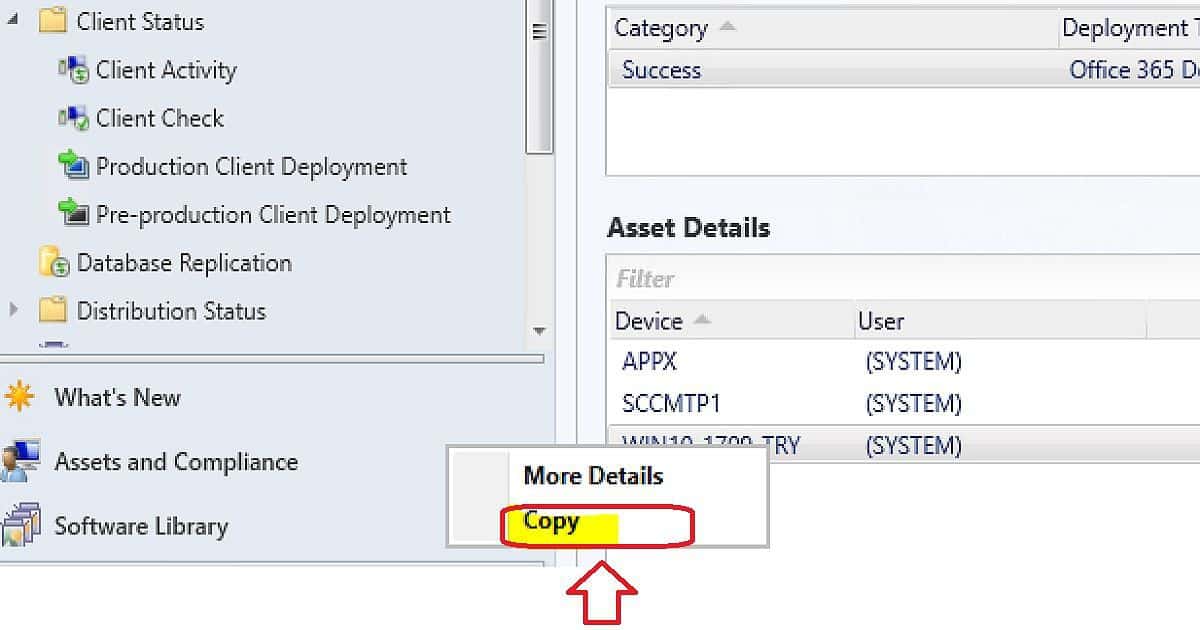
| Enable copy/paste of asset details from SCCM Monitoring WorkSpace |
|---|
| Enable copy/paste functionality in the asset details pane in deployment and distribution status monitoring views. |
Enable 3rd software update support on SCCM CB clients
You can now enable the configuration of the ‘Allow signed updates from an intranet Microsoft update service location policy and installation of Windows Server Update Services code signing certificate on clients.
I have posted about this feature. I would recommend reading that post-SCCM CB 1802 Enable Third-Party Software Update Support.
- Enable third-party software updates in Software Update Point top-level site component configuration
- Configure (default) Software Updates client agent settings to enable third-party software updates on clients
- Deploy custom Software Updates client agent setting to enable third-party software updates on clients
- Successfully import third-party software updates signing certificate from Windows Software Update Services.
Improvements to PXE-enabled distribution points
The WDS requirement is removed from PXE-enabled DPs. This is possible if you are NOT using the multicast feature. Configure a PXE-enabled distribution point to use a PXE responder service that supports IPv6 and does not require Windows Deployment Services (WDS).
- On the PXE tab of the distribution point properties, check “Enable a PXE responder without Windows Deployment Service” and click OK.
Maintenance windows Details in Software Center
The client machine’s software center displays maintenance Windows details, which is useful for troubleshooting scenarios for the help desk.
- Software Center displays the next scheduled maintenance window on the Installation Status tab.
Partial download support in client peer cache to reduce WAN utilization
SCCM Client Peer cache is improving with every release of SCCM CB. Client peer cache sources can now divide content into parts. These parts minimize the network transfer to reduce WAN utilization.
Pull DP support Cloud DPs as a source.
You can set a cloud distribution point as a source for a pull distribution point.
Management Insights – SCEP for Mac and Unix Depreciation
I could see a new management insight option in the SCCM 1803 console: “\Administration\ Overview \ Management Insights\All Insights\MacOS and Unix.” It seems that SCEP for Mac and Unix will be depreciated by the last release of SCCM CB in 2018.
Resources
We are on WhatsApp now. To get the latest step-by-step guides, news, and updates, Join our Channel. Click here. HTMD WhatsApp.
Author
Anoop C Nair is Microsoft MVP from 2015 onwards for consecutive 10 years! He is a Workplace Solution Architect with more than 22+ years of experience in Workplace technologies. He is a Blogger, Speaker, and Local User Group Community leader. His main focus is on Device Management technologies like SCCM and Intune. He writes about technologies like Intune, SCCM, Windows, Cloud PC, Windows, Entra, Microsoft Security, Career etc…




Discussion