






SCCM Client Push Installation Status Using SQL Query | ConfigMgr
Let’s check the SCCM Client Push Installation Status Using SQL Query. You can use different methods to install the ConfigMgr client software. I have an article that describes client push installation status using SQL query.
Client push installation is one of the easiest methods to install the SCCM client on a Windows 10 device. The Client installation process is explained via superflow in the article Troubleshoot SCCM Issues with SuperFlow. Learn how to install the SCCM client manually on a Windows 10 machine.
Learn more about Client push installation in the “Install ConfigMgr Client Using Client Push Installation Method” post.
- SCCM Application Deployment Status using SQL Query Custom Report
- SCCM Client Version Dashboard SQL Query Custom Report
- SQL Query All SCCM Applications with no Deployments | ConfigMgr
NOTE! Configuration Manager tries to install the client on all discovered resources and retries any failures for up to seven days.

| Index |
|---|
| SQL Query |
| Results – SCCM Client Push Installation Status Using SQL Query |
| Stored Procedure for Client Push Method |
| Video Recording |
SQL Query
Once you have initiated the client push installation method, you can track its status using the following query.
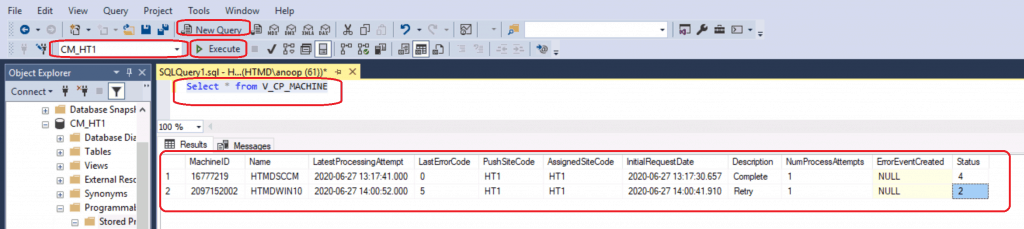
First, Open the SQL Management Studio and click the New Query button. Then, select the CM_MEM database from the drop-down menu. MEM is the ConfigMgr site code.
- Copy the following SQL query to find the client push status.
- Click on the Execute button.
Select * from V_CP_MACHINE
Results – SCCM Client Push Installation Status Using SQL Query
Following is the result of the SQL query to find out the status of the client Push Installation! The columns highlighted in the first table are important for understanding the retry.
| Machine ID | Name | Latest Processing Attempt | Last Error Code | Push Site Code | Assigned Site Code | Initial Request Date | Description | Number of Attempts | Error Event Created | Status |
|---|---|---|---|---|---|---|---|---|---|---|
| 16777219 | HTMDSCCM | 17:41.0 | 0 | HT1 | HT1 | 17:30.7 | Complete | 1 | NULL | 4 |
| 2097152002 | HTMDWIN10 | 00:52.0 | 5 | HT1 | HT1 | 00:41.9 | Retry | 1 | NULL | 2 |
Stored Procedure for Client Push Method
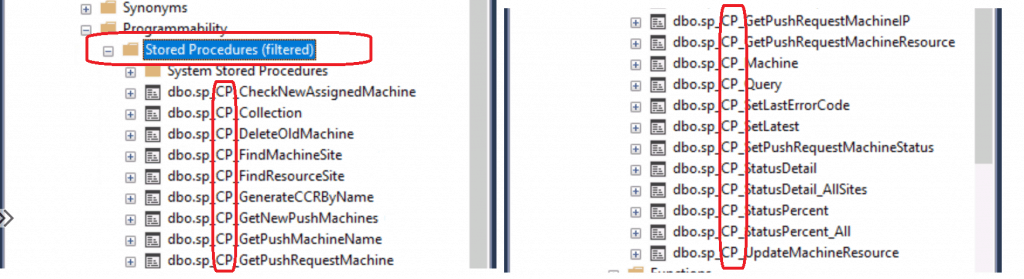
Let’s understand the stored procedures that are used as part of the ConfigMgr client push installation method. The following is the list of stored procedures associated with the client push installation method.
- sp_CP_CheckNewAssignedMachine
- sp_CP_Collection
- sp_CP_DeleteOldMachine
- sp_CP_FindMachineSite
- sp_CP_FindResourceSite
- sp_CP_GenerateCCRByName
- sp_CP_GetNewPushMachines
- sp_CP_GetPushMachineName
- sp_CP_GetPushRequestMachine
- sp_CP_GetPushRequestMachineIP
- sp_CP_GetPushRequestMachineResource
- sp_CP_Machine
- sp_CP_Query
- sp_CP_SetLastErrorCode sp_CP_SetLatest
- sp_CP_SetPushRequestMachineStatus
- sp_CP_StatusDetail
- sp_CP_StatusDetail_AllSites
- sp_CP_StatusPercent
- sp_CP_StatusPercent_All
- sp_CP_UpdateMachineResource
Video Recording
The video below provides a step-by-step tutorial on installing clients.
Resources
- How to Perform SCCM AD Discovery Install SCCM Client
- Windows Firewall and port settings for clients in Configuration Manager
- ConfigMgr Client push installation
We are on WhatsApp. To get the latest step-by-step guides and news updates, Join our Channel. Click here –HTMD WhatsApp.
Author
Anoop C Nair is Microsoft MVP! He is a Device Management Admin with more than 20 years of experience (calculation done in 2021) in IT. He is a Blogger, Speaker, and Local User Group HTMD Community leader. His primary focus is Device Management technologies like SCCM 2012, Current Branch, and Intune. He writes about ConfigMgr, Windows 11, Windows 10, Azure AD, Microsoft Intune, Windows 365, AVD, etc.




Hi Anoop,
i required all SCCM from basic Videos for a fresher as well as experience
Thanks
StaffIt’s already there isn’t it Free SCCM Training – Episodes – HTMD Community https://www.youtube.com/playlist?list=PL67vGzo-INWMBo3KlARUHIU2kPyRc1gw1 via @YouTube
Hi!
With your query i saw someone pushed the installation on 3860 Clients 🙁
This was a mistake…
Do you know how i can find out, who it was 🙂
THX
TIM