This is the one-stop shop for Intune security policies. Step-by-step guides for Intune policies. If you’re looking for the latest and oldest Intune cloud policies, this is your one-stop shop.
HTMD Community provides the results of each policy as well in these stp by step guides. This is going to help you in troubleshooting these policies.
There are legacy and deprecated policies as well, listed by Microsoft and those types of policies are explained in the below step-by-step guide as well.
This is the category page for Intune Apps. The Enterprise App catalogue and Microsoft Store app step-by-step guides have been shared in this section of the blog.
SCCM Client Push is connecting to the client and assigned to another primary configuration manager, ConfigMgr. Client push is still confusing when you have an SCCM hierarchy with CAS and Primary servers.
Neil Peterson discussed the Standalone primary server-client push scenario in his post here. However, when you’ve hierarchy with SCCM 2012 CAS and Primaries, the SCCM client push scenario is slightly different.
I stumbled across a scenario where we’ve enabled the client push on an SCCM primary server, and as per the CCM.log, it was trying to connect to the sccm client in another primary site.
In this post, you will get all the details of the SCCM Client Push, which connects the client assigned to Another Primary site. Several factors could be at play when encountering the issue of SCCM Client Push connecting to a client assigned to another primary site.
SCCM Client Push is Connecting to the Client Assigned to Another Primary?
Is this normal behavior? How is the ConfigMgr client push enabled in a primary site trying to install a client assigned to another primary site in the hierarchy?
The scenario is “Discovery and the site-wide client push installationmethod enabled on primary site; however, Site-wide Client push is disabled on other primary sites.”
SCCM Client Push is Connecting to the Client Assigned to Another Primary Configuration Manager ConfigMgr – Fig.1
SCCM client push has been enabled on a specific primary server, and the client push account specified in that primary site is trying to connect all the machines listed in the view called “V_CP_Machine“.
V_CP_Machine contains all the discovered resources assigned to the site that do not have a client installed. Client push installation starts and tracks the client’s installation using the Configuration Manager database and no longer creates individual CCR files.
Why is My Primary Server Trying to Connect to the Clients Assigned to Other Primary Sites?
As mentioned above, in SCCM 2012, client push is not based on individual CCR files. Rather, it is based on the SQL DB view V_CP_Machine. When I checked the V_CP_Machine in my primary server DB, it showed the list of machines (clients) assigned to other primary sites in my hierarchy.
Hence, my primary server is trying to connect to the machines listed in V_CP_Machine.
Why Does the V_CP_Machine View Contain All Machines in the SCCM Hierarchy?
The V_CP_Machine SQL view is related to a table called “ClientPushMachine_G.” This table (Article Name) is part of the Global data replication pattern, and the replication group name is Configuration Data.
You must know that GLOBAL data is replicated all over the hierarchy, so that is why having the same list of machines in V_CP_Machine view all around the SQL DBs(Primary servers and CAS server).
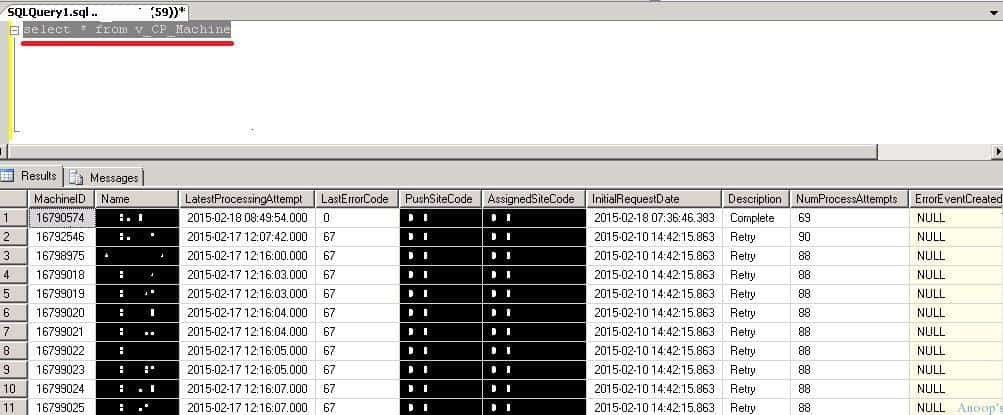
The table below (SCCM view) shows the “Last Error Code” detail against each client record. These details could be beneficial for troubleshooting SCCM client Push issues.
SCCM client push error codes are nothing but Windows Error codes. Details of Windows error codes are available in the TechNet documentation here.
SCCM Client Push is Connecting to the Client Assigned to Another Primary Configuration Manager ConfigMgr – Fig.2
How Do I Delete the Client Records from the Client Push Method "V_CP_Machine"?
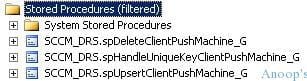
As mentioned above, the V_CP_Machine SQL view is related to a table called ClientPushMachine_G. You can delete the records from the table if you're in a critical situation. However, directly editing the SCCM SQL DB is not supported. I can see 3 DRS Stored procedures in SQL related to client push.
I hope one is to delete the Client Push Machines, another is to Handle the Unique Key of client push machines, and the third is to upgrade client Push Machines. So, what is DRS? Data replication Service.
We are on WhatsApp now. To get the latest step-by-step guides, news, and updates, Join our Channel. Click here. HTMD WhatsApp.
Author
Anoop C Nair is Microsoft MVP! He is a Device Management Admin with more than 20 years of experience (calculation done in 2021) in IT. He is a Blogger, Speaker, and Local User Group HTMD Community leader. His main focus is on Device Management technologies like SCCM 2012, Current Branch, and Intune. He writes about ConfigMgr, Windows 11, Windows 10, Azure AD, Microsoft Intune, Windows 365, AVD, etc.
Anoop C Nair is Workplace Technology solution architect with 25+ years of experience in global enterprise organizations such as JP Morgan, Capgemini, etc. Microsoft Certified Trainer. Microsoft MVP from 2015 onwards for consecutive 11+ years!
He also conducts Intune and modern workplace tech training for enterprise organizations.
He is Blogger, Speaker, and Founder of HTMD Community and HTMD Conference. His main focus is on Device Management technologies like Intune, Windows, Cloud PC.
He writes about technologies like Intune, SCCM, Windows, Cloud PC, Windows, Entra, Microsoft Security.
Key Takeaways Windows 11 KB5101650 KB5099414 July 2026 Patch and 3 Zero Day Vulnerabilities and 570 Flaws! In the July 2026 Patch, Microsoft introduced new features designed to improve the overall Windows experience. The update adds enhancements to Windows Update for more flexible update management and introduces Point-in-Time Restore, providing an additional recovery option for […]
Key Takeaways 2026 June KB5094126 KB5093998 Windows 11 Patch | 3 Zero Day Vulnerabilities and 200 Flaws! The June 2026 Windows 11 Patch Tuesday update brings several improvements to File Explorer. It adds support for additional archive formats, including UU, CPIO, XAR, and NuGet Packages (NUPKG). The update also preserves View and Sort preferences in […]
Key Takeaways The Windows 11 May 2026 Patch KB5089549 KB5087420 Update brings important security fixes, performance improvements, and reliability enhancements across the operating system. The update introduces new features such as Xbox Mode for gaming, File Explorer improvements, enhanced input and sharing experiences, better taskbar and Windows Hello reliability, and additional enterprise management capabilities for […]
Key Takeaways In this post we are discussing the ConfigMgr 2603 Introduces New Early Update Enrollment Process. Microsoft has officially released Configuration Manager version 2603 to the Early Update Ring, giving organizations an opportunity to test upcoming improvements before the global production rollout. The release is targeted at enterprises running ConfigMgr version 2409 or later […]












Discussion