






List of SCCM clients with latest Hardware Inventory in last 7 days
Let’s check the list of SCCM clients with latest hardware inventory. The SCCM hardware inventory should be enabled for this option to work. The list of SCCM clients with the latest hardware inventory gives you more confidence about the SCCM client health of these PCs.
You can also use the same logic to create dynamic device collections using a WQL query. You can get some dynamic collection queries from the Easiest Method To Create SCCM WQL Queries For Collection. In this post, you will learn how to create a custom report using SQL query to get a list of SCCM clients with the latest Hardware Inventory information.
There are a lot of SCCM default reports available to help SCCM admins to get more data. I recommend going through the list of ConfigMgr default reports before creating a custom SQL report similar to the one explained in this post. I have also shared tips and important points to remember when using SQL query with the datepart option.
SCCM Hardware Inventory Detais
Let’s understand a bit more about SCCM hardware inventory. Once you enable Asset Intelligence Hardware Inventory from client settings, the clients start collecting the application and other information from the Windows 10 or Windows 11 client PC.

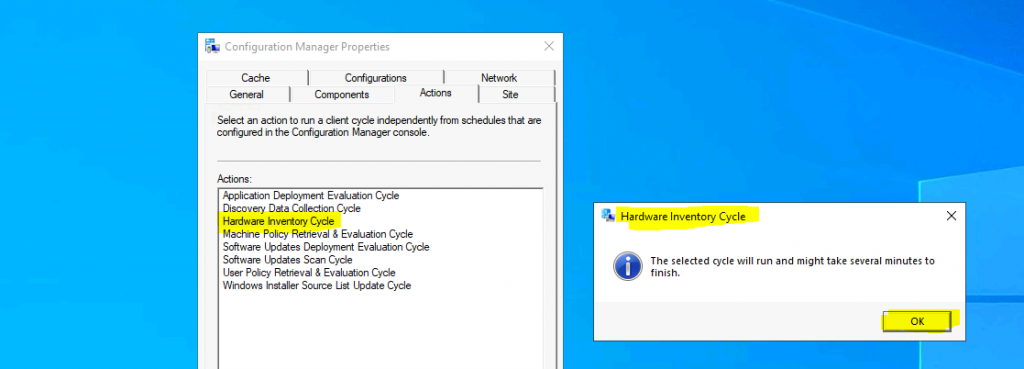
You can also verify whether the hardware inventory from the client-side is working or not using the following post. ConfigMgr Client Action Hardware Inventory Collection Cycle.
You can use the LastHWScan column from the v_GS_WORKSTATION_STATUS view to get the hardware inventory custom report for SCCM clients. This report intern helps to understand the healthy clients.
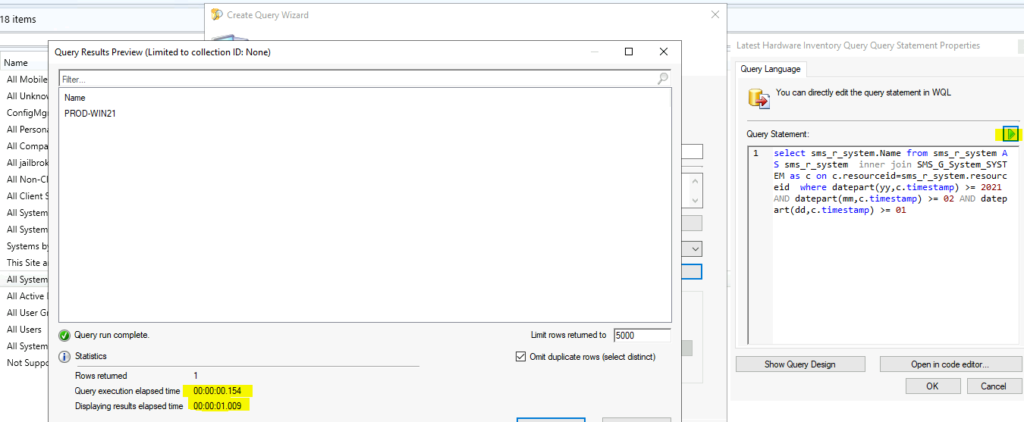
Create Device Collection with Latest Hardware Inventory Data
Using the following WQL query to create a dynamic device collection to group devices with the latest hardware inventory information. You can change the following parameters as per your requirement. The query helps group all the devices that sent hardware inventory after the date mentioned in the query.
- Year (yyyy) -> 2021
- Month (mm) -> 09
- Date (dd) -> 11
select sms_r_system.Name from sms_r_system AS sms_r_system inner join SMS_G_System_SYSTEM as c on c.resourceid=sms_r_system.resourceid where datepart(yyyy,c.timestamp) >= 2021 AND datepart(mm,c.timestamp) >= 09 AND datepart(dd,c.timestamp) >= 11NOTE! – You need to be careful about separating date, month, and year properties with the datepart option. This doesn’t imply it will check for a particular date. All these properties are treated and checked as independent properties.
List of SCCM clients with latest Hardware Inventory in last 7 days
It’s time to look into the SQL query to get the list of SCCM clients with latest hardware inventory information within this week. There are a couple of ways to find out this information. It would be best if you were very clear about the requirement here.
- List of Windows PCs with latest hardware inventory in last 7 days.
- The list should not contain the devices that sent inventory before 7 days.
You can use the following SQL query to produce the list of devices that sent hardware inventory details within the last seven (7) days. However, I think this is one of the options to get this list of devices. It seems to me that the SQL query in the next section has some logical issues, which are explained below.
select  h.ResourceID, h.Netbios_name0,
   t.LastHWScan FROM v_R_System h INNER JOIN v_GS_WORKSTATION_STATUS t ON h.ResourceID = t.ResourceID
   where t.LastHWScan <= Dateadd(day, -1, getdate()) and t.LastHWScan > Dateadd(day, -7, getdate())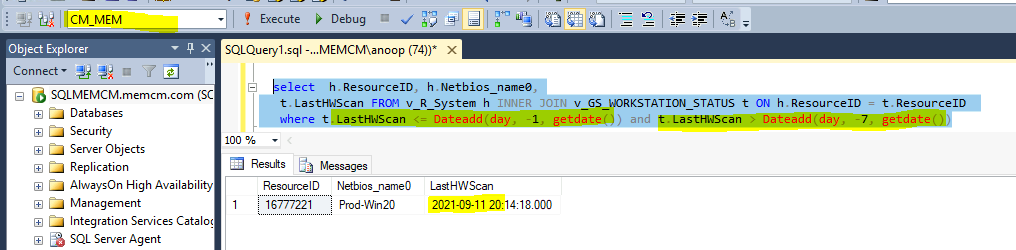
List of SCCM devices that sent Hardware Inventory after a particular date
This is another option to get the list of SCCM devices based on the hardware inventory date (well, it does not date more details below). The above query was based on the number of days. I don’t think the following query is very reliable if you want to collect the information from the last couple of years.
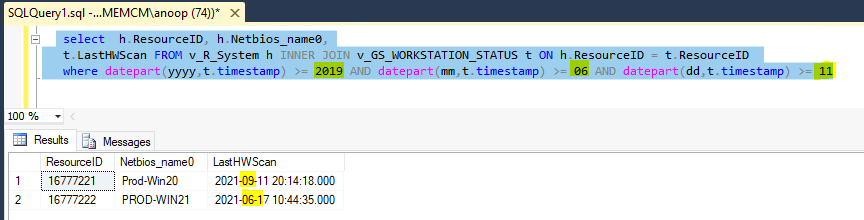
I tried to change the year to 2019 and kept the month and date the same. Ideally, the SQL query should return two records from the lab environment. However, it returned only one device because (I think) the query treats all the following properties independently and not as a date.
- Year (yyyy) -> 2019
- Month (mm) -> 09
- Date (dd) -> 11
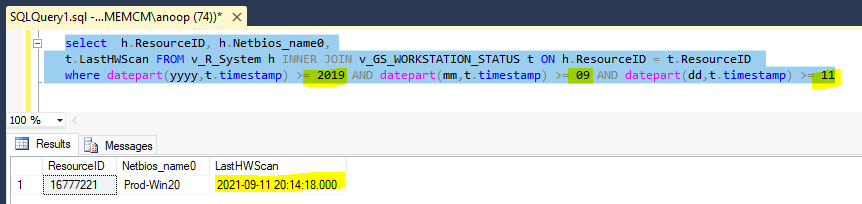
When I changed the month to 06 and kept everything the same, I got a different result, as you can see below. This is a bit weird but probably expected from SQL query. Hence I don’t think it’s worth using this query to find out the list of devices.
select  h.ResourceID, h.Netbios_name0,
   t.LastHWScan FROM v_R_System h INNER JOIN v_GS_WORKSTATION_STATUS t ON h.ResourceID = t.ResourceID
   where datepart(yyyy,t.timestamp) >= 2019 AND datepart(mm,t.timestamp) >= 06 AND datepart(dd,t.timestamp) >= 11
NOTE! – You need to be careful about separating date, month, and year properties with the datepart option. This doesn’t imply it will check for a particular date. All these properties are treated and checked as independent properties.
Author
Anoop is Microsoft MVP! He is a Solution Architect in enterprise client management with over 17 years of experience (calculation done in 2018). He is Blogger, Speaker, and Local User Group HTMD Community leader. His main focus is on Device Management technologies like SCCM 2012, Current Branch, and Intune. He writes about ConfigMgr, Windows 11, Windows 10, Azure AD, Microsoft Intune, Windows 365, AVD, etc…..…




Anoop, in your WQL query, the datepart for the year is listed as (yyyy,c.timestamp). It should be (yy,c.timestamp) which is shown correctly in your screenshot
StaffYes, I tried that as well but the same results.