






SCCM CMPivot Browser Related Queries Default List of Browsers
Let’s find out the SCCM CMPivot browser-related queries default list of browsers installed on a device. ConfigMgr CMPivot Browser Related Queries discussed in the post are – Find Default Browser and List of Browsers Installed. The Configuration Manager CMPivot helps to get real-time data from online devices.
The ConfigMgr CMPivot provides real-time data based on fast-channel architecture. ConfigMgr CMPivot tool allows us to assess the state of devices quickly. This CMPivot query can run only against online devices.
CMPivot allows you to promptly evaluate the current state of devices within your environment and take immediate action. By executing real-time queries across all connected devices in a specific collection, this tool enables you to gain valuable insight and make informed decisions.
The following blog post provides details on CMPivot troubleshooting and log files, as well as on CMPivot architecture and communication: SCCM CMPivot Architecture Fast Channel Making | ConfigMgr.

| Index |
|---|
| Start CMPivot Tool |
| Browsers Installed on the Device |
| Default Browser Using CMPivot |
Start CMPivot Tool
Navigate to the device collection against which you want to run the CMPivot query.
- Select All Systems device collection.
NOTE: I don’t recommend using the All System collection in a production environment with more than many devices. Instead, use the collection with fewer devices to try out the query.
- Right-click on the All Systems collection.
- Select Start CMPivot.
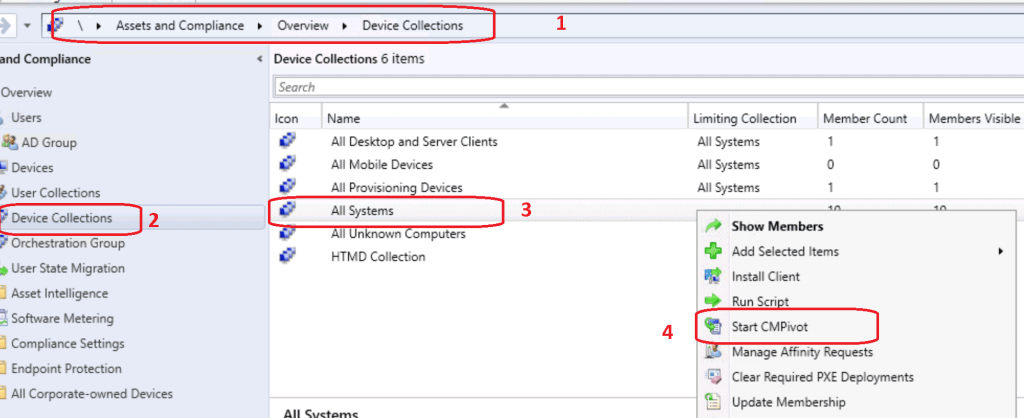
- CMPivot Query tool was launched.
- Get familiarized with new query language and CMPivot tool.
- Copy any of the following queries as required.
- Check out the Run Query button from the SCCM CMPivot tool.
Browsers Installed on the Device
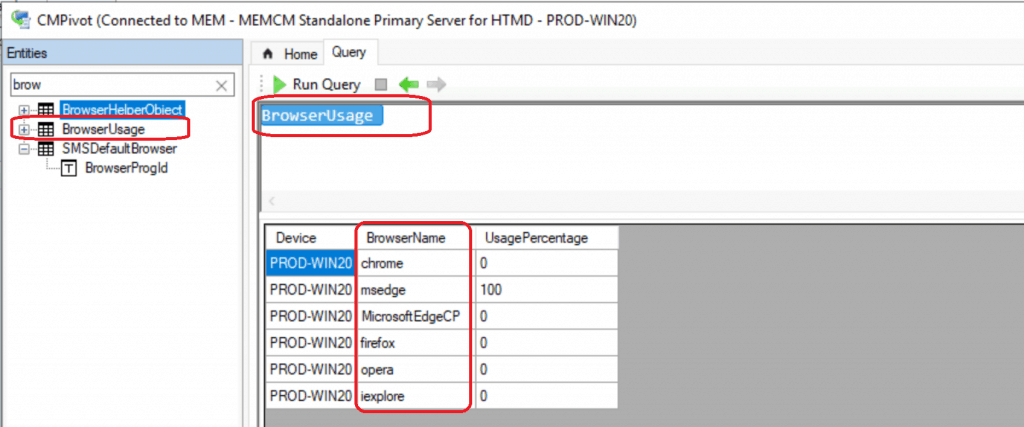
The SMSDefaultBrowser is the primary entity used in the query to discover the browser applications installed on the Windows 10 device. The following are browser apps installed on the device PROD-WIN20.
Chrome
Msedge
MicrosoftEdgeCP
Firefox
Opera
iExplore
Default Browser Using CMPivot
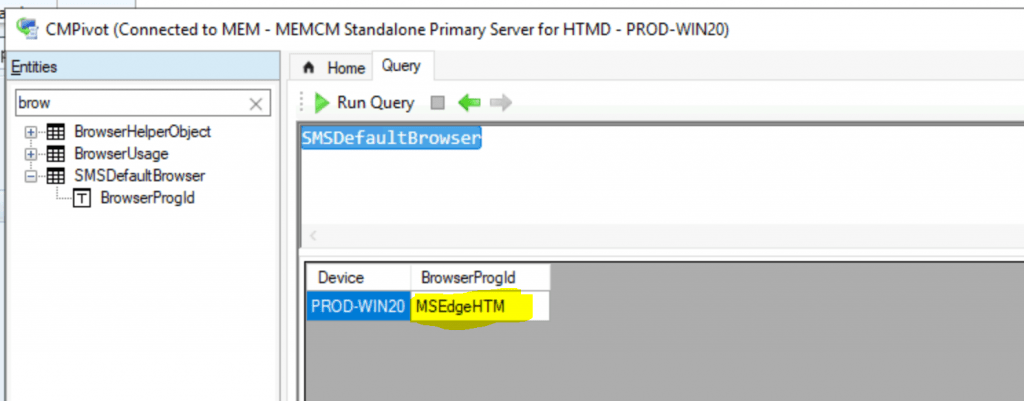
Let’s find out the default browser using the CMPivot entity SMSDefaultBrowser. As you can see below in the screen capture, the default browser on my Windows 10 device is MSEdgeHTM (Microsoft New Edge).
Resources
- CMPivot for real-time data in Configuration Manager
- ConfigMgr Microsoft Edge Chromium SQL Query | Custom Report | SCCM
- SCCM CMPivot Query Patches Installed in Last 90 Days | ConfigMgr https://www.anoopcnair.com/sccm-cmpivot-query-patches-installed-in-last-90-days-configmgr/
We are on WhatsApp. To get the latest step-by-step guides and news updates, Join our Channel. Click here –HTMD WhatsApp.
Author
Anoop C Nair is Microsoft MVP! He is a Device Management Admin with more than 20 years of experience (calculation done in 2021) in IT. He is a Blogger, Speaker, and Local User Group HTMD Community leader. His primary focus is Device Management technologies like SCCM 2012, Current Branch, and Intune. He writes about ConfigMgr, Windows 11, Windows 10, Azure AD, Microsoft Intune, Windows 365, AVD, etc.




Nice article. Do you know if MS has any plans to support this feature for Intune only devices?
StaffI have no clue about that … if there is a strong business case … my suggestion would be to raise a user voice
Hello,
I did a CMPivot on SMSDefaultBrowser for a collection of 38,000 machines and the event 4104 became a threat on the security console passing from millions to billions… Any idea what is going on?
Is the collection too big?
Any restrictions on CMPivot SMSDefaulBrowser?
Thanks,
DOm