






SCCM CMPivot Query for Out-of-Support Office 365 ProPlus
Let’s build a ConfigMgr CMPivot Query for out-of-support Office 365 ProPlus semi-annual and monthly channels. ConfigMgr can help you find the out-of-support versions of Office 365 Pro Plus (a.k.a. Microsoft 365 App) installed devices in your environment.
CMPivot provides a fast and efficient way to assess the status of devices in your environment and execute real-time queries on all connected devices within the chosen collection.
The CMPivot query gives you the real-time value of these versions in your environment. The following blog posts use the SQL query to provide details on Office 365 ProPlus out-of-support devices.
- Out-of-Support Versions of Office 365 Semi-Annual Channel.
- Out-of-Support Versions of Microsoft 365 Apps Monthly Enterprise Channel.
- Quickly Check Registry Values using SCCM CMPivot Query
- SCCM CMPivot Standalone App Installation Guide | ConfigMgr
| Index |
|---|
| Launching CMPivot Query Window |
| Semi-Annual Office 365 ProPlus Out-of-Support CMPivot Query |
| Other Option |
| Monthly Office 365 ProPlus Out-of-Support CMPivot Query |
| Other Option |
NOTE! – CMPivot can return on the results of ONLINE devices when running the query. So, this might not make much sense if you want to get a report on all the devices of a global organization.

Launching CMPivot Query Window
- Navigate to the device collection against which you want to run the CMPivot query.
- Select All Systems device collection.
NOTE! – In a production environment with more than many devices, I don’t recommend to use All System collection. Instead, use the collection with a smaller number of devices to try out the query.
- Right-click on the All Systems collection.
- Select Start CMPivot.
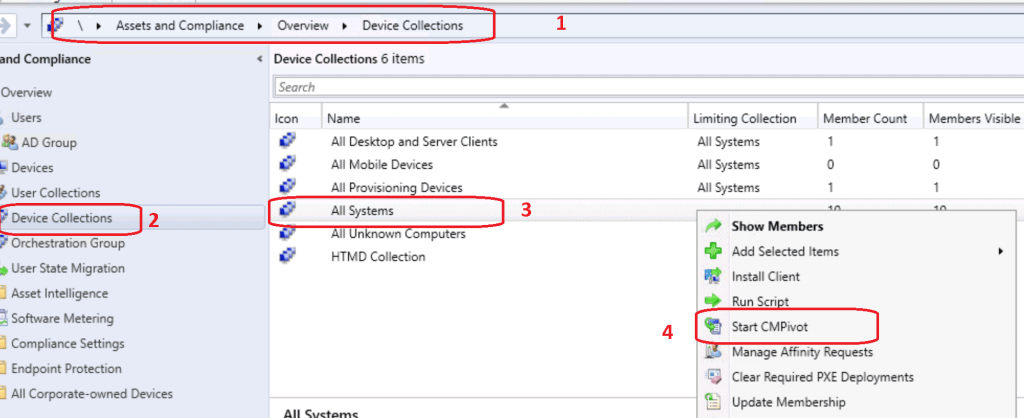
- CMPivot Query tool was launched.
- Get familiarized with new query language and CMPivot tool.
- Copy any of the following queries (monthly and semi-annual) as required.
- Check out the Run Query button from the SCCM CMPivot tool.
Semi-Annual Office 365 ProPlus Out-of-Support CMPivot Query
Copy the following CMPivot query to get the list of ONLINE devices for the Out-of-Support Office 365 ProPlus semi-annual channel. More details about the version and CDN Update channel are explained in the previous post.
NOTE! – I don’t think the last part of the build number is significant while checking out the support scenarios. So, in the above example, version number 1902 = build number 11328. You can just use 11328 in the following scenarios.
Office365ProPlusConfigurations | where VersionToReport < '16.0.11328.20644' and cfgUpdateChannel == 'http://officecdn.microsoft.com/pr/7ffbc6bf-bc32-4f92-8982-f9dd17fd3114'
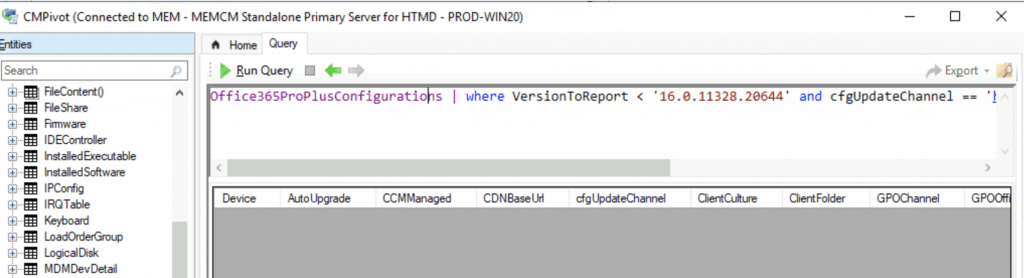
Other Option
OfficeProductInfo | where Channel == 'Semi-Annual Enterprise Channel' and ProductName > '16.0.11929.20648'
Monthly Office 365 ProPlus Out-of-Support CMPivot Query
Copy the following CMPivot query to get the list of ONLINE devices for the out-of-support Office 365 ProPlus Monthly channel. More details about the version and CDN Update channel are explained in the previous post.
Office365ProPlusConfigurations | where VersionToReport < '16.0.12827.20656' and cfgUpdateChannel == 'http://officecdn.microsoft.com/pr/55336b82-a18d-4dd6-b5f6-9e5095c314a6'
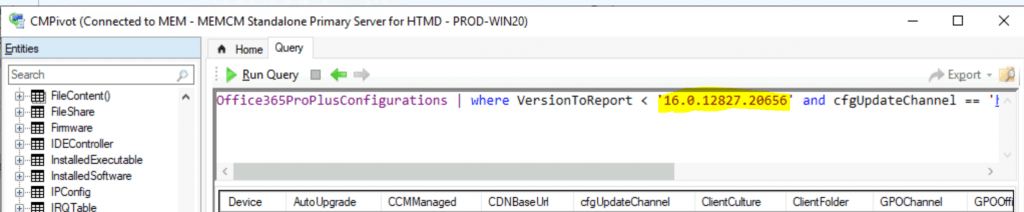
Other Option
OfficeProductInfo | where Channel == 'Monthly Enterprise Channel' and ProductName > '16.0.12827.20656'
Resources
- ConfigMgr CMPivot Architecture – https://www.anoopcnair.com/sccm-cmpivot-guide/
We are on WhatsApp. To get the latest step-by-step guides and news updates, Join our Channel. Click here –HTMD WhatsApp.




Discussion