






Use SCCM CMPivot to Perform Security Audits Created New Local User Account | Tried to Reset Password
Learn how to use SCCM CMPivot to perform security audits. The CMPivot can help to perform a quick round of security audits on Windows devices. CMPivot can scan Security Audit events and produce some results.
SCCM is not a security audit tool! This is the first point that you must remember! So don’t expect everything that Azure Sentinel or any other SIEM Solution. However, if you are looking for a quick security audit on a particular Windows device, SCCM CMPivot would be helpful!
You can check security audit events from Windows devices to analyze the security risk of a device. The events include checking whether a new Local account has been created or someone tried to reset the password of a local account.
SCCM CMPivot helps you to use the existing investment to get the real data that you want from SCCM clients for a quick security audit. Modern cloud/hybrid SIEM solutions need event logs to be sent to log analytics or some other storage and analyzed from there. In this CMPivot scenario, we access the logs directly from Windows devices.

SCCM CMPivot provides almost real-time data from all the SCCM Online clients. The query used in CMPivot is similar to KQL queries. CMPIvot query language is the subset of KQL query language used in Azure log analytics workspace.
Video Explanation of Windows 11 Security Audit Options using SCCM
Video Explanation of Windows 11 Security Audit Options using SCCM.
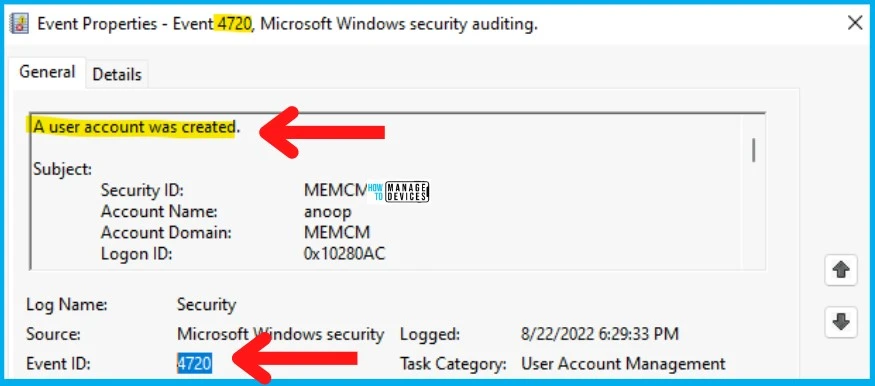
Event ID 4720 for New Local User Account
You can check the Event ID 4720 to check whether there is any New Local User Account has been created or not. The source of the event log is Microsoft Windows security.
The task category of the Event ID 4720 is User Account Management. You can catch all this information from SCCM CMPivot using either the admin console or MEM Admin portal.
| Log Name | Event ID | Task Category | Description |
|---|---|---|---|
| Security | 4720 | User Account Management | A user account was created. |
- Windows 10 English Language Devices
- Find Devices Missing Patches
- Devices with Greater than 15 GB Free Disk Space
Created New Local User Account – Use SCCM CMPivot to Perform Security Audits
Let’s see who created the new Local User Account using SCCM CMPivot to Perform Security Audits. You can run a CMPivot query against a device collection using the Event ID 4720.
You can launch the CMPivot using any of the following options. For this post, I’m using the MEM Admin center portal, which can be used only when you have enabled the SCCM Cloud Attach feature. Otherwise, use the SCCM Admin console to run the following CMPivot query.
- CMPivot from the SCCM admin console.
- CMPivot using Standalone Tool.
- CMPivot query from Endpoint Manager portal (Intune portal).
Follow the steps to run the CMPivot query from the MEM Admin center portal:
- Login to the MEM Admin Center Portal – endpoint.microsoft.com
- Navigate to Devices – Select a Device managed by SCCM or Co-managed.
- Click on the CMPivot page on the left-side navigation menu.
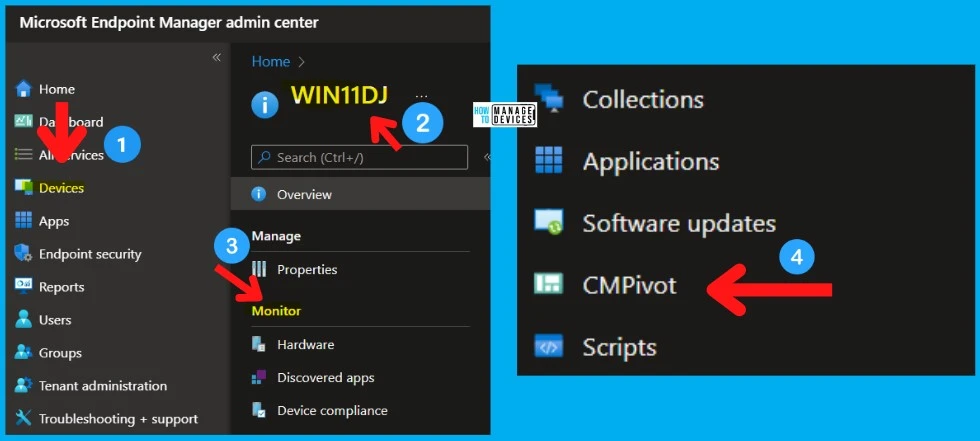
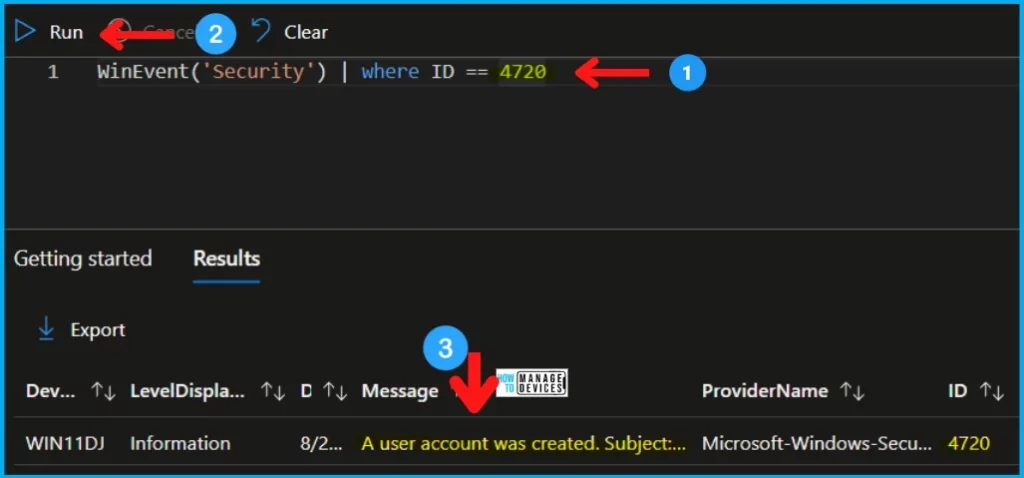
Once the CMPivot query page is launched from the MEM admin (Intune) portal, you copy the following query to check the event ID 4720 details on that particular Windows device. The second query is scoped for the last 2 hours.
WinEvent('Security') | where ID == 4720
WinEvent('Security', 2h) | where ID == 4720| DEVICE | LEVELDISPLAYNAME | DATETIME | MESSAGE | PROVIDERNAME | Event ID |
|---|---|---|---|---|---|
| WIN11DJ | Information | 22-08-2022 18:29 | A user account was created.Subject: Security ID: S-1-5-21-500 Account Name: anoop Account Domain: MEMCM Logon ID: 0x10280AC New Account: Security ID: S-1-5-21-1001 Account Name: HTMDLU Account Domain: Win11DJ Attributes: SAM Account Name: HTMDLU Display Name: | Microsoft-Windows-Security-Auditing | 4720 |
You have an option to export the results of the CMPivot query from the MEM admin center portal, as you can see in the screenshot below.
Event ID 4724 – An attempt was made to reset Password
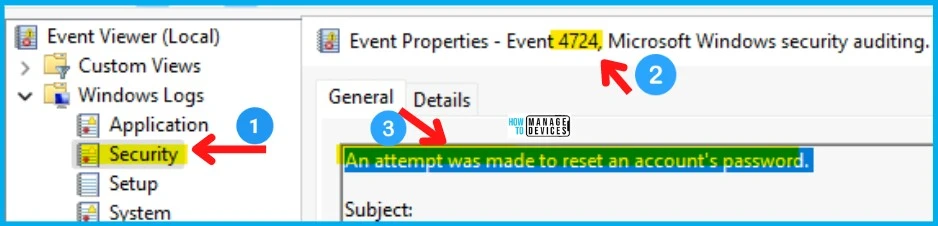
You can use the event ID 4724 to check whether there was an attempt was made to reset an account’s password. You can use the CMPivot query to perform a quick security audit on Windows devices.
The source of this event ID on Windows 11 devices is Microsoft Windows Security. The Task category is User Account Management. You can get all this security audit related information using CMPivot.
| Log Name | Event ID | Task Category | Description |
|---|---|---|---|
| Security | 4724 | User Account Management | An attempt was made to reset an account’s password |
| Security | 4738 | User Account Management | A user account was changed |
| Security | 4798 | User Account Management | A user’s local group membership was enumerated |
| Security | 4722 | User Account Management | A user account was enabled |
Use SCCM CMPivot to Perform Security Audits
Let’s see how to check the security audit logs using SCCM CMPivot quickly. There are different methods to run the CMPivot query, as explained in the above section.
You can get the details of events similar to “An attempt was made to reset an account’s password” or “A user account was changed.” Use the following CMPivot query to fetch the details of Security Audit logs from Windows devices.
WinEvent('Security') |
where ID == 4724
or ID == 4738
or ID == 4798
or ID == 4722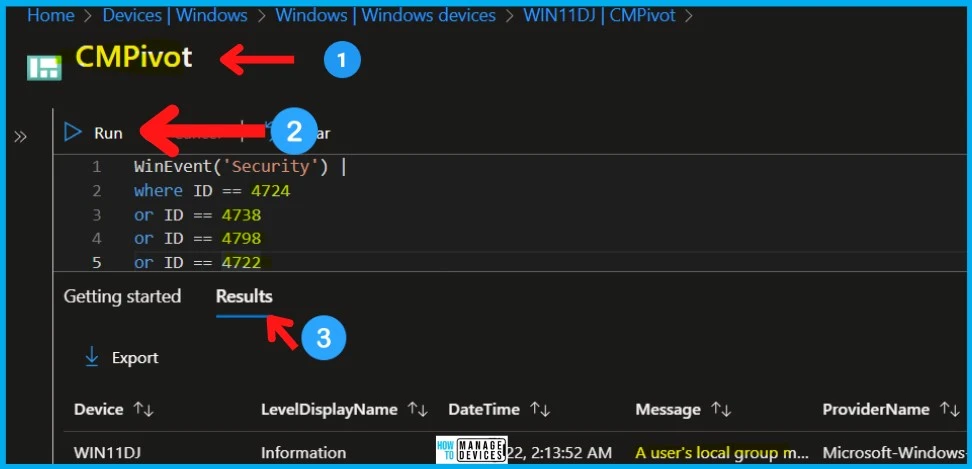
Find Details of Devices with an attempt was made to reset an account’s password Events
Let’s find out the count of devices with “an attempt was made to reset an account’s password” events. The count of devices can help you to understand the impact of the situation if you have any security breach.
Once you have the count, you can make a decision to dive deep into some of the Windows devices. You can use any of the CMPivot queries mentioned below to start working on more forensic analysis.
WinEvent('Security') |
summarize countif( (Message contains 'An attempt was made to reset an account's password') ) by Device |
where (countif_ > 0)
Resource -> CMPivot for real-time data – Configuration Manager | Microsoft Docs
Author
Anoop C Nair is Microsoft MVP! He is a Device Management Admin with more than 20 years of experience (calculation done in 2021) in IT. He is Blogger, Speaker, and Local User Group HTMD Community leader. His main focus is on Device Management technologies like SCCM 2012, Current Branch, and Intune. He writes about ConfigMgr, Windows 11, Windows 10, Azure AD, Microsoft Intune, Windows 365, AVD, etc.




Discussion