






SCCM Community Hub Explained Scripts Reports and Documentation
SCCM Community Hub is the central location within your SCCM console where you can share useful SCCM objects with other admins. It is released in the SCCM 1902 Production version with limited capabilities.
SCCM Community has developed a lot of useful tools to help admins. These solutions are spread across many locations/blogs. The SCCM Community hub allows access to all these solutions directly from the SCCM console.
The community hub helps to avoid recreating CMPivot queries, Scripts, Console extensions, and Reports from scratch. Microsoft built a community hub in Configuration Manager where SCCM Admins can share.
The Community hub that uses GitHub already has industry-wide processes and tools built for sharing. The Community hub helps leverage those tools directly in the SCCM Manager console.

NOTE: Microsoft has deprecated the SCCM Community hub. The SCCM Unsupported Features post provides more details on deprecated features.
The production version of the SCCM Community Hub could change. A video tutorial about it is available.
https://howtomanagedevices.com/sccm/810/download-community-scripts-reports-from-sccm-console/
What is the SCCM Community Hub
The Community Hub is a centralized location for sharing useful SCCM objects like scripts and custom reports.
There is a community workspace in the SCCM Console. There are two (2) nodes under the Community workspace.
- Documentation
- Community Hub
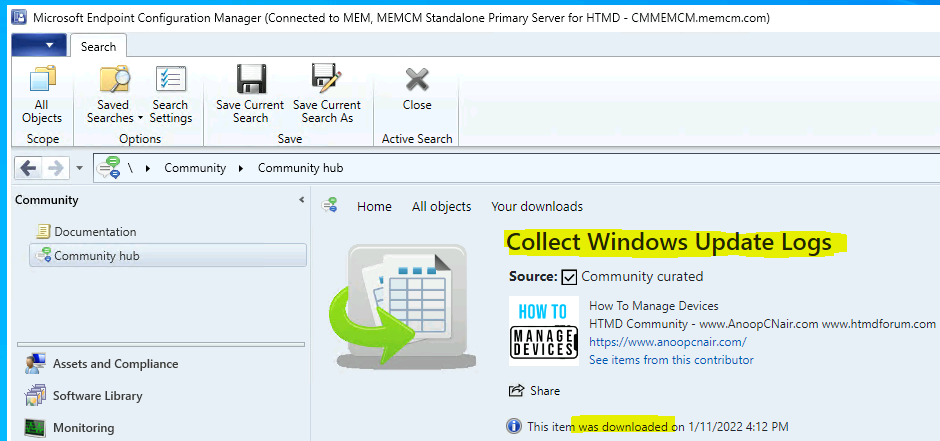
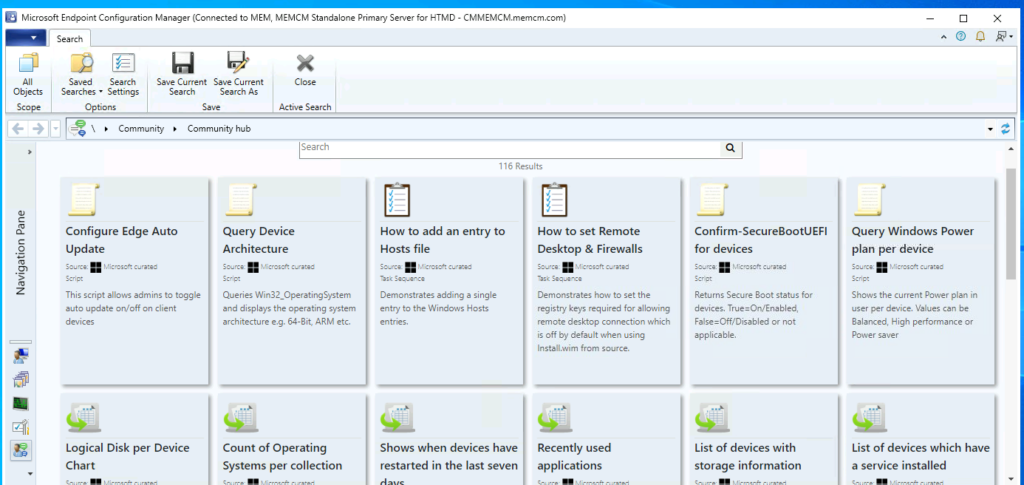
Navigate to \Community\Community hub. Use the Community Hub to download the following types of SCCM objects:
- PowerShell Scripts
- Configuration items
- Reports
- Applications
- CMPivot Queries
- Console Extensions
- Task sequences
- Baselines
Prerequisite SCCM Community Hub
The device running the SCCM console used to access the Community hub needs the following items:
.NET Framework version 4.6 or later
.NET Framework version 4.6.2 or after is required starting in Configuration Manager 2010
Starting in version 2107, the console requires .NET version 4.6.2, and version 4.8 is recommended. For more information
The administration service in SCCM needs to be set up and functional. Use the SCCM console on a client OS. Alternatively but not recommended: Disable Internet Explorer: Enhanced Security Configuration on a server OS.
The computer with the SCCM console requires internet access and connectivity to the following sites via proxy servers:
https://aka.ms
https://comfigmgr-hub.azurewebsites.net
https://configmgronline.visualstudio.com
How to Download Script/Reports from the SCCM Community Hub
As I mentioned above, the Community workspace in the SCCM console will help you download the scripts and reports. The following steps will help to download Scripts and Reports:
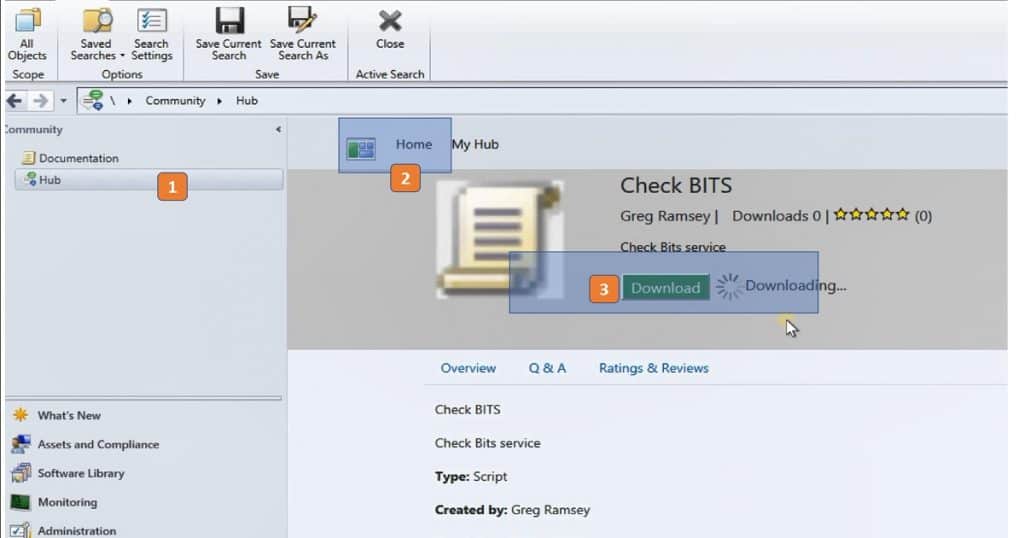
- Navigate to the Community workspace in the SCCM console, and select the Hub node
- Click on the Home button and click on the Script or Report that you want to download from the below list
- Click the Download button to download the script or report
- Confirm whether Download is completed successfully or not from the same place mentioned in the above step
Where will SCCM Community Hub Scripts Get Downloaded?
You learned how to download the script from the community hub in the above section. Now, you will know where these community hub scripts will get stored. The following steps will help to find out the scripts downloaded from the community hub:
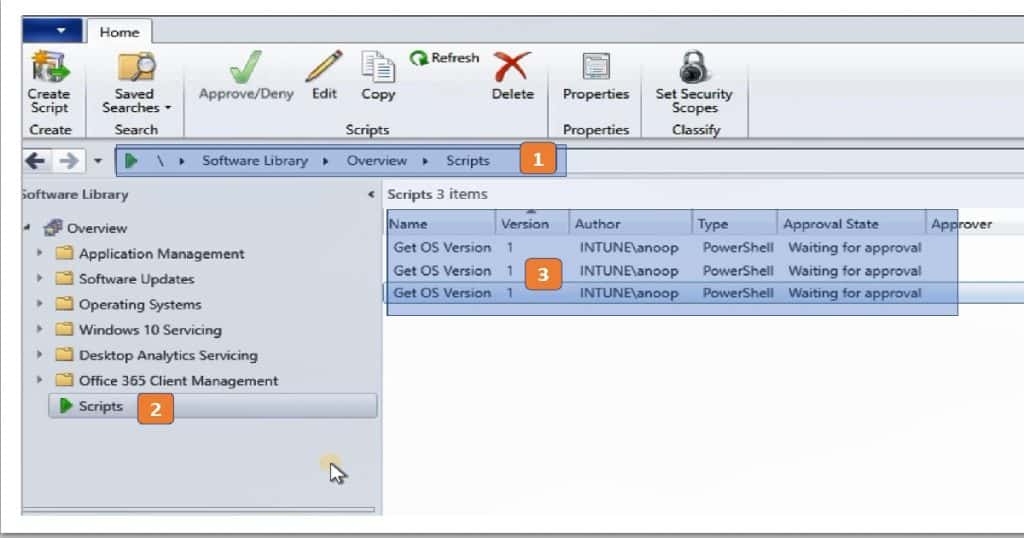
- Navigate to \Software Library\Overview\Scripts from the SCCM console
- Check out whether the downloaded hands are available in the Scripts node
Video SCCM Community Hub
Joining the SCCM Community Hub using your GitHub account is easy, and there’s a video tutorial available to help you get started. Try it out today and start exploring the benefits of the SCCM Community Hub!
Resources
- Community Hub from Microsoft SCCM Preview
- SCCM Download reports from the Community Hub
- My blog Download Scripts & Reports from Community Hub
We are on WhatsApp. To get the latest step-by-step guides and news updates, Join our Channel. Click here –HTMD WhatsApp.
Author
Anoop C Nair is Microsoft MVP! He is a Device Management Admin with more than 20 years of experience (calculation done in 2021) in IT. He is a Blogger, Speaker, and Local User Group HTMD Community leader. His main focus is on Device Management technologies like SCCM 2012, Current Branch, and Intune. He writes about ConfigMgr, Windows 11, Windows 10, Azure AD, Microsoft Intune, Windows 365, AVD, etc.




Where is this community hub in the console. I have 1810 and I don’t see it anywhere? How do you install it
StaffAs I mentioned in the first paragraph – SCCM community hub is still in preview version.More details https://howtomanagedevices.com/sccm/784/sccm-1902-2-top-4-features/
Hi,
Thank you so much for giving this valuable information.