






SCCM ConfigMgr MP Deinstallation Failed Client Registration Issues ConfigMgr
SCCM ConfigMgr MP Deinstallation failed Client Registration Issues ConfigMgr. In ConfigMgr/SCCM, Management Point issues are common. It was interesting when we had a client registration issue after completing the Task Sequence.
The other functionalities of MP, like delivering new policies to the existing clients, were working fine, so the only issue was client registration. The client completed the Task Sequence successfully but was not registered to ConfigMgr Management Point.
I’m not an expert in the OSD/TS part of SCCM / ConfigMgr, so I assumed the client would register with SCCM 2012 MP during TS. However, it seems this is not true. The SCCM client is registered with MP only after completing the Task Sequence.
To prove this, I checked SmsTs.log, AppEnforce.log, and ClientIDManagerStartup.log. In the ClientIDManagerStartup.log, I could see the following entries.

- SCCM Upgrade Resulting in MP Issue
- Install A New SCCM Management Point Role | ConfigMgr HTMD
- Free SCCM Training Part 1 | 17 Hours Of Latest Technical Content | ConfigMgr Lab
- FIX SCCM Management Point Issues Internal Server Error 500
- SMS_MP_Control_Manager

SCCM ConfigMgr MP Deinstallation Failed Client Registration Issues
Then, I tried to read around to learn about the background process of client registration and policy retrieval during Task Sequence. During an SCCM OSD Task Sequence, the SCCM client is placed in provisioning mode. So, what is the provisioning mode?
[RegTask] - Client registration is pending. Sending confirmation request for GUID:6CE6E0PC-4584-4DA1-BE52-D3EBFB29E4C0 ...
[RegTask] - Sleeping for 1920 seconds ...
Client Registration Issues ConfigMgr
The client does not pick up policy from the MP in provisioning mode. This is done so that advertised programs, software updates, and tasks targeted to existing client PCs do not run until the Task Sequence is completed. So, until the client is in provisioning mode, it won’t register with SCCM Management Point.
More details on provisioning mode http://blogs.technet.com/b/configurationmgr/archive/2010/09/13/solution-after-a-configmgr-2007-osd-task-sequence-completes-the-client-may-not-automatically-pull-down-policy.aspx
So, back to the original issue: the SCCM ConfigMgr client is not getting registered with MP. I tried checking the following logs at the remote MP Site System.
MP_ClientID.log – Nothing much related to the problematic client :
Parse a client ID request Send reply message to the client
SMS_UniqueIdentifier0=GUID:441C77F7-3097-4FE9-8BB1-3863D87EB719, LastPXEAdvertisementID=, LastPXEAdvertisementTime=, OfferID=PK020024, OfferIDTime=2/20/2014 11:32:00 AM, PkgID=CAS001SE, PackageVersion=, PackagePath=http://acncmrs.configmgr.com/SMS_DP_SMSPKG$/CAS001PC, BootImageID=CAS001PC, Mandatory=0, Known=1
MP_CliReg.log : The Following Entries are There in the Log File
None of the new clients are getting registered. Everything looked fine when we checked MPcontrol.log and MP communication with existing clients. While checking MPSetup.log, we found that MP was reinstalled 2 days before. After that, this issue started popping up. So what next?
| MP_CliReg.log : The Following Entries are There in the Log File |
|---|
| SMS MP Registration Manager stopped. |
| SMS MP Registration Manager started. |
| Could not load logging configuration for component MP_RegistrationManager. Using default values. |
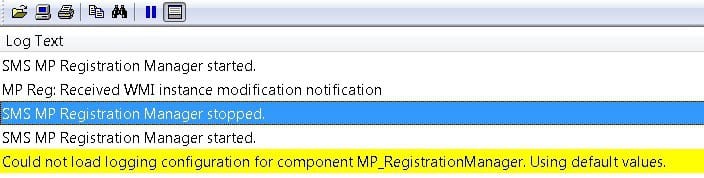
SMS MP Registration Manager stopped.
SMS MP Registration Manager started.
Could not load logging configuration for component MP_RegistrationManager. Using default values.
MP_RegistrationManager.log: The following entries are in the log file.
MP Reg: Did not find client(GUID:5B942C7F-A352-4940-B668-B45BA1515976) public key. This may be because the client has not registered yet. MP Reg: Processing completed. Completion state = 0
SCCM ConfigMgr MP Deinstallation Failed Client Registration Issues ConfigMgr
One option is to remove the MP role and add it back. We removed MP. However, the remote SCCM MP deinstall was not successful. It failed. The Sitecomp.log file gave some hints about the issue. SCCM ConfigMgr MP Deinstallation failed, and Client Registration Issues ConfigMgr.
Cannot delete registry key HKEY_LOCAL_MACHINE\SOFTWARE\Microsoft\SMS\SMS_EXECUTIVE\Threads\SMS_COMPONENT_MONITOR on server acncmrs.configmgr.com . The operating system reported error 997: Overlapped I/O operation is in progress.
Deinstallation failed and will be retried in the next polling cycle.
We’ve checked the registry entry on the remote MP and confirmed that the Role Install account has full access to the registry entry. So what next? Taken the backup of the registry entry “HKEY_LOCAL_MACHINE\SOFTWARE\Microsoft\SMS\SMS_EXECUTIVE\Threads\SMS_COMPONENT_MONITOR” and deleted the registry entry given in the above log snippet from remote ConfigMgr SCCM Management Point.
Great, that did the trick. Sitecomp.log at the primary site indicated that SCCM MP was deinstalled or removed successfully. Also, I confirmed this with the MPSETUP.log file at the remote MP site system server. I added the MP site system role back to the remote site system. I performed a test build, and the client can register with MP. Issue resolved 😉
Quite easy. So what I learned from this issue is provisioning and client registration process post Task Sequence completion !!
Resources
SCCM Related Posts Real World Experiences Of SCCM Admins
We are on WhatsApp now. To get the latest step-by-step guides, news, and updates, Join our Channel. Click here. HTMD WhatsApp.
Author
Anoop C Nair is Microsoft MVP from 2015 onwards for consecutive 10 years! He is a Workplace Solution Architect with more than 22+ years of experience in Workplace technologies. He is a Blogger, Speaker, and Local User Group Community leader. His main focus is on Device Management technologies like SCCM and Intune. He writes about technologies like Intune, SCCM, Windows, Cloud PC, Windows, Entra, Microsoft Security, Career, etc…




Anoop, so what i understand is that remote SCCM MP deinstall was not successful and that is the cause behind this issue… Right..? and what you did, you took back of the registry and delete the registry from remote SCCM MP… Right..?
It’s really nice information as far as sequencing of log is concern, Thanks for sharing it. But please let me know the answer about above Question Marks.
Thanks
StaffHi Raman ! – Yes, I read the post again and it was not very clear. Sorry for the confusion. And thank you for asking this question. When I wrote this post I wanted to make a point (give more importance) on client registration flow and troubleshooting rather than MP de install SCCM MP issue. After started writing this I found deinstall would also be useful. 🙂
Coming back to your question(s),MP was working fine except new client registration. While troubleshooting, we had noticed that SCCM MP got reinstalled (automatically) few days back and that Re installation was successfull as per logs. Then we found that only registration was issue. So we decided to remove SCCM MP and install it again. While trying to remove SCCM remote MP, we had noticed that the primary server couldn’t access or delete the registry keys on remote MP.
Regards
Anoop