






SCCM Delta Download is Enabled Ignoring Client Policy A Feature Change
Let’s SCCM Delta download is enabled ignoring the client policy. The client is always listening to port 8005. I have noticed a lot of chatter on this Delta Download topic after SCCM 2203 upgrade.
As per Sean Pierce, After updating to 2203, we noticed that our clients were ignoring client policy – specifically, software updates. Even though we have delta download disabled, the agents are ignoring it. Many others are having a similar issue.
It seems to be a change at the Windows or Windows Update Agent (WUA) level (?) to Always turn on the delta download endpoint if the OS version allows, regardless if express is enabled or not.
The Delta download decreases the content size that clients download from these distribution points (DPs). The SCCM Clients only download the bits they require (deltas) but not the full update.

What is SCCM Delta Download, and How does this work?
Let’s understand more about the Delta download mechanism that SCCM uses with the help of the WUA (Windows Update Agent). More details are available as part of the MS docs.
The component-based servicing (CBS) feature uses the stub (CAB file) to do a local inventory, comparing the deltas of the file on the Windows 11/10 device with what is needed to get to the latest version of the file being offered.
The following are the important SCCM and Windows log files associated with Windows updates and servicing.
- C:\Windows\Logs\CBS\CBS.log
- DeltaDownload.log
- DeltaDownloadController.log
- DeltaDownloadServiceShutdown.log
- DeltaDownloadServiceStartup.log
SCCM Client Settings to Disable Delta Download
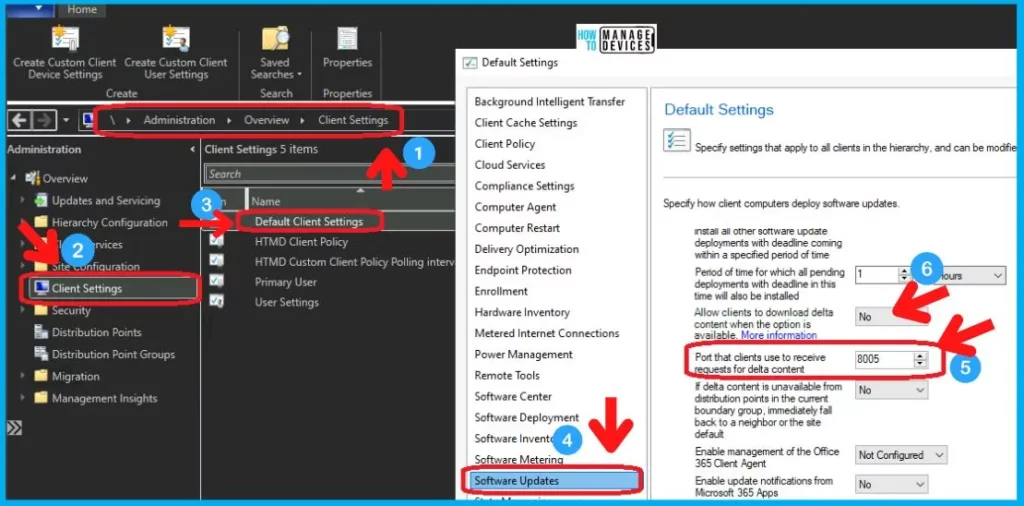
You have an option in SCCM Client settings policies to disable the delta download under the software updates tab (section). As per the client settings policy, the Delta Download is Disabled.
- Navigate \Administration\Overview\Client Settings
- Open the Client Settings policy (or Default Client Settings)
- Scroll down to the Software Updates tab.
- Check the settings
- Allow Clients to Download Delta Content when the option is available -> No
- Port that clients use to receive requests for data content -> 8005
Delta Download Before SCCM 2203 Upgrade
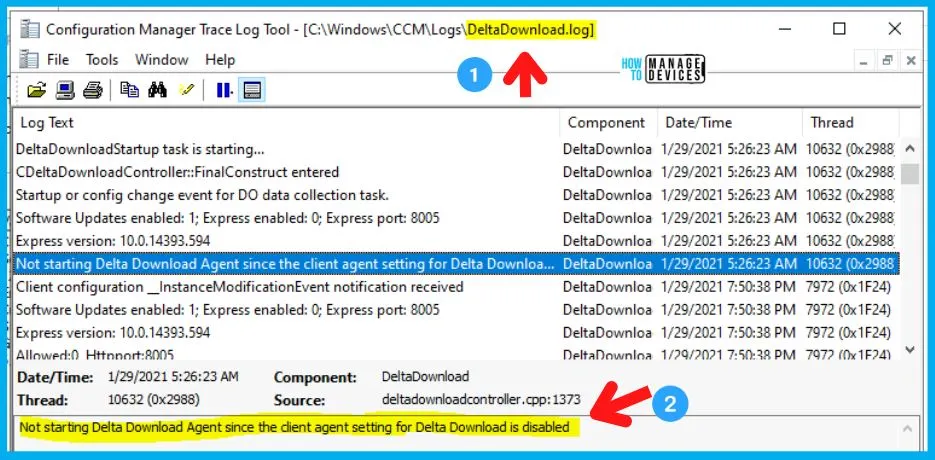
Let’s check the Delta Download Before SCCM 2203 Upgrade. I have checked the DeltaDownload.log file from C:\Windows\CCM\Logs to confirm the behavior before the 2203 upgrade. As per the following log file entry, the Delta Download agent is not started because the client agent setting is disabled.
DeltaDownload.log Entry ->Not starting Delta Download Agent since the client agent setting for Delta Download is disabled.
SCCM Delta Download is Enabled Ignoring Client Policy
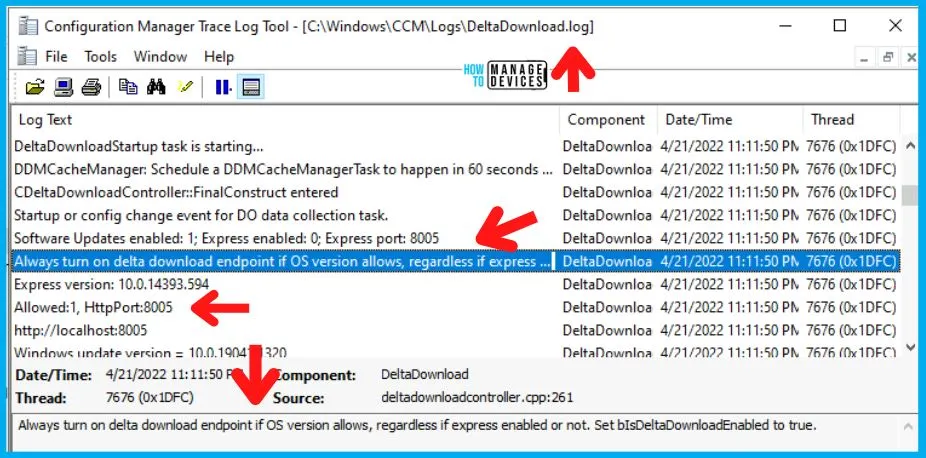
After SCCM 2203 upgrade, SCCM Delta Download has Enabled Ignoring Client Policy even if it’s set to DISABLE. I have not changed the client settings, but the delta download policy behavior is changed, as shown in the log (DeltaDownload.log) entries below.
Software Updates enabled: 1; Express enabled: 0; Express port: 8005
Always turn on delta download endpoint if OS version allows, regardless if express enabled or not. Set bIsDeltaDownloadEnabled to true.
Express version: 10.0.14393.594
Allowed:1, HttpPort:8005
http://localhost:8005
Windows update version = 10.0.19041.1320
Successfully set UpdateServiceUrlAlternate
Successfully set PopulateEmptyContentUrls
Existing WUA Managed server was already set (http://localhost:8005), skipping Group Policy registration.
DeltaDownloadController main thread has started.
Listening for requests on the following url: http://localhost:8005/
DeltaDownloadListener: Listener created with 960 threads
Rob B mentioned in the comments that Microsoft support confirmed this was not necessarily a bug or an issue but part of a ‘feature change’ introduced in 2203 and that there may be either an update or documentation noting this at later date.
I know the feature change argument is a bit strange message from MS Support to introduce the important and impactful changes into a production system such as Configuration Manager. I still think it’s more to do with Windows core or WUA changes, along with some SCCM changes that caused this “feature change.”
What is the Problem with Port 8005 and SCCM Delta Download
The port 8005 is used by the client for downloading express/delta updates. The default port conflicts with systems running Apache Tomcat. There is a documentation issue raised on this topic long back, but it was not for Delta download, though.
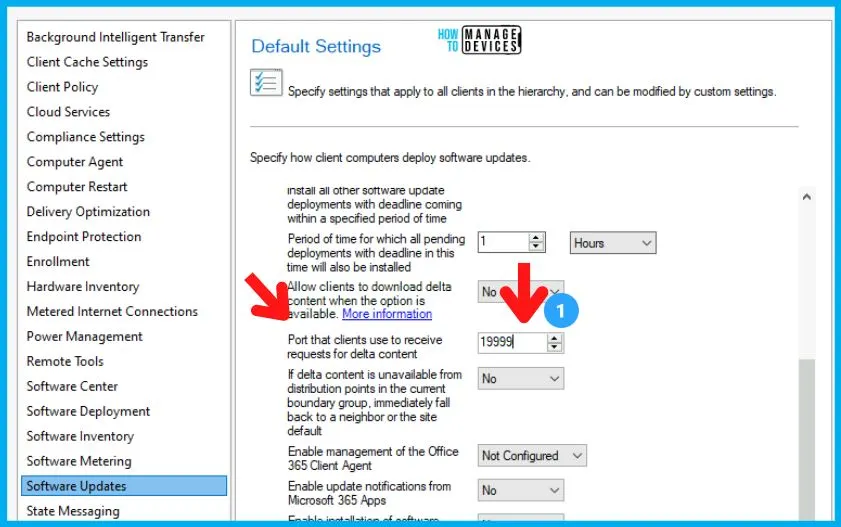
So if you have a conflict with Apache Tomcat and this delta download listening port 8005, you can change the port numbers from Client Settings. I have changed the SCCM Delta Download HTTP Listening ports to 19999 as an example from the SCCM client settings policy.
Author
Anoop is Microsoft MVP! He is a Device Management Admin with more than 21 years of experience (calculation done in 2022) in IT. He is Blogger, Speaker, and Local User Group HTMD Community leader. His main focus is on Device Management technologies like SCCM 2012, Current Branch, and Intune. He writes about ConfigMgr, Windows 11, Windows 10, Azure AD, Microsoft Intune, Windows 365, AVD, etc.




Thank you so very very much for this article. It helped us figure out what happened this month to a few of our boxes.
Thank you Anoop. Helpful article to explain the situation. Wish there was a solution as this is causing issues with half of our old servers that are being FW that dont allow to download via the localhost:8005 as its alternate source. This is in turn causing issues with Defender as its AM patches are not downloading correctly 🙁
Why go through all this trouble when the server.xml on the Apache Tomcat server can be changed so easily?
Anyone report to MSFT yet? It’s reproducible at MCM 2303 5.2303.1087.1000 Site version 5.0.9104.1000
Would you be able to reproduce the same in CM2303 GA version build 9106 instead of 9104?
have you tried the RTM version build 5.0.9106.1000, wondering if that issue was resolved actually
Same issue on 2211, are there any fixes or workarounds?
StaffAs per Hugo – Have you tried the SCCM 2303 RTM version build 5.0.9106.1000, wondering if that issue was resolved actually. But I’m not aware of any workarounds.
I began experiencing this problem when w11 22h2 implemented the UUP updates on 28 March for the windows cumulative update. All the other updates work fine but the Windows 11 22h2 Cumulative monthly update since then have been troublesome. Some clients work fine. Some sort themselves out after a few days or a week.. but it’s really caused a problem with our deployment of w11 since the imaging team has to essentially hand them out while they are failing to apply the Windows 11 cumulative update. If we get a 0 day we could really be in trouble.
I have had a case open with Microsoft for a month with no result. They seem to be perplexed… which makes some sense if the Win11 team decided to change the way DO operates.
When this problem began (April) we were on ConfigMgr build 2207 as were all clients, 5.00.9088.1007.
In June we upgraded to build 2303 and all clients were upgraded in July. 5.00.9106.1000.
I see they have released an update rollup for 2303, client ver 5.0.9106.1015 but it is not yet generally available.
similar topic with 2303, but still different. delta did no work at all, finally when I read your post I changed the port from 8005 to a different one, stopped ccmexec, restartet wuauserv, restarted ccmexec – and? Here we go, it sudenly works. So I think there’s some glitch in Client Settings (policies) and it needed a change of the port to enable it initially.