






SCCM In-Place OS Upgrade on McAfee Encrypted Machines Configuration Manager ConfigMgr. SCCM manages Bitlocker encryption natively during OS upgrades. However, upgrading the OS on disks with third-party encryption drivers is always a challenge.
I have seen IT Admins decrypt the disk before the OS Upgrade and then re-enable encryption after the in-place OS upgrade. This requires huge effort and time and impacts the end-user experience.
This post describes the Windows 10 upgrade task sequence configuration for McAfee Encrypted Machines. This configuration allows IT to perform a successful OS upgrade while keeping the McAfee encryption intact.
Starting with Windows 10 1607, Microsoft provided the command-line switch “/ReflectDrivers. ” This switch allows drivers to be added to the OS image during the setup and installation phase. The Windows 10 upgrade starts by running setup.exe on the client.

Table of Contents
SCCM In-Place OS Upgrade on McAfee Encrypted Machines Configuration Manager ConfigMgr
As shown below, we need to add the switch “/ReflectDrivers ” along with the path to a folder that contains McAfee encryption drivers. For more details, refer to the Windows setup command line.
Example
Setup.exe /ReflectDrivers “%programfiles%\McAfee\Endpoint Encryption\OSUpgrade” .
OR
Setup.exe /ReflectDrivers “C:\Program Files\McAfee\Endpoint Encryption\OSUpgrade”

- SCCM Server In-place OS Upgrade to Server 2022 Guide
- In-place OS upgrade of SCCM CAS Primary Sites a Real-world Experience
- SCCM CB Upgrade of CAS and Primary Sites: A Real-world Experience
- Enable Patching for Server 2022 using SCCM
- SCCM Server In-place OS Upgrade To Server 2022 Guide HTMD Blog (anoopcnair.com)
The folder below contains McAfee encryption drivers. Now that we know the command-line switch, we will see how it can be incorporated into the SCCM task sequence. As shown below, the task sequence doesn’t allow adding the additional OS upgrade switch in the GUI.
Note: if /the ReflectDrivers switch is not used during the OS upgrade, the computer will fail to boot.
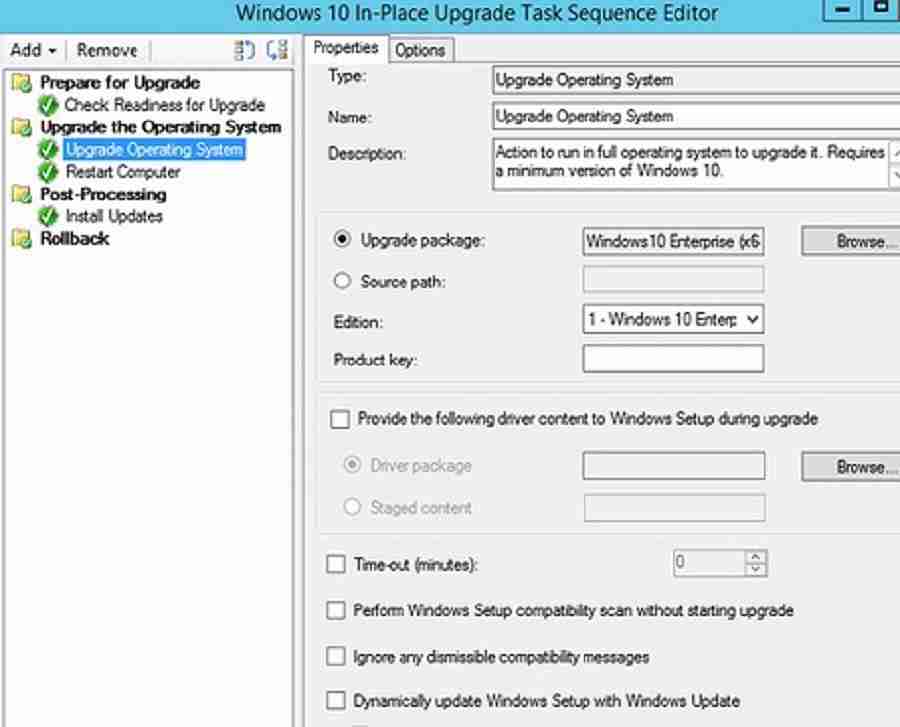
Hence, to append an additional Windows setup command-line switch, we need to use the variable “OSDSetupAdditionalUpgradeOptions.” As mentioned in the Niall Brady post, we can also use this variable for other purposes.
| Type | Name |
|---|---|
| Set Task Sequence Variable | Modify Setup Command Line |
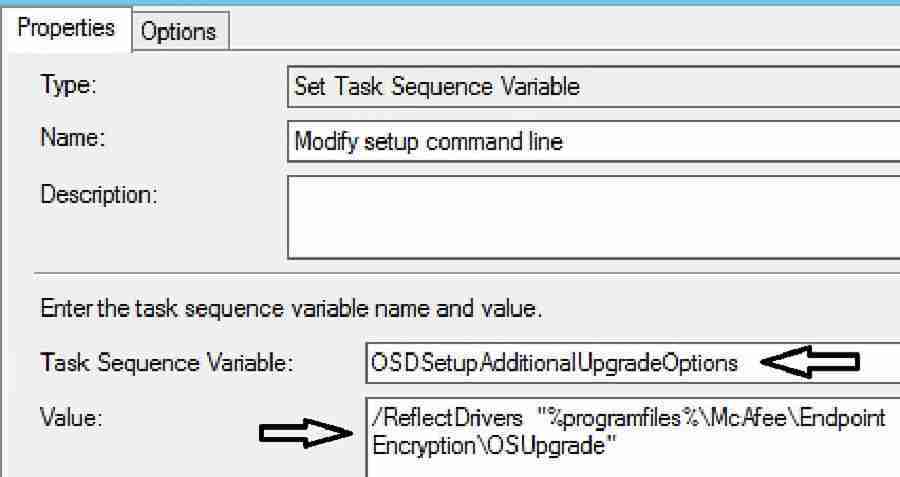
Result
Before updating task-sequence variable “OSDSetupAdditionalUpgradeOptions”
Set command line: “C:\WINDOWS\ccmcache\XX\SETUP.EXE” /ImageIndex 3 /auto Upgrade
/quiet /noreboot /postoobe “C:\WINDOWS\SMSTSPostUpgrade\SetupComplete.cmd”
/postrollback “C:\WINDOWS\SMSTSPostUpgrade\SetupRollback.cmd” /installdrivers
“C:\WINDOWS\ccmcache\XX” /DynamicUpdate Disable

After updating the task-sequence variable “OSDSetupAdditionalUpgradeOptions”, the final Windows installation command line will look like the below from SCCM
Executing command line: “C:_SMSTaskSequence\Packages\XXXXXXXX\SETUP.EXE” /ImageIndex 1
/auto Upgrade /quiet /noreboot /postoobe “C:\WINDOWS\SMSTSPostUpgrade\SetupComplete.cmd”
/postrollback “C:\WINDOWS\SMSTSPostUpgrade\SetupRollback.cmd” /installdrivers
“C:_SMSTaskSequence\Packages\XXXXXXXX” /DynamicUpdate Disable /ReflectDrivers
“C:\Program Files\McAfee\Endpoint Encryption\OSUpgrade”
Note: The use of the MBR2GPT.exe tool is currently unsupported with McAfee Drive Encryption. So, you cannot switch from legacy BIOS to UEFI. This capability is still in the proof of concept form and expected to be added in planned future Mcafee releases.
References
- Microsoft. Task sequence action variables in System Center Configuration Manager
- Mcafee. Upgrade OS with drive encryption
We are on WhatsApp now. To get the latest step-by-step guides, news, and updates, Join our Channel. Click here. HTMD WhatsApp.
Author
Vimal has more than 10 years of experience in SCCM device management solutions. His main focus is Device Management technologies like Microsoft Intune, ConfigMgr (SCCM), OS Deployment, and Patch Management. He writes about technologies like SCCM, Windows 10, Microsoft Intune and MDT.




Excellent all the Best regards Vimal
StaffThank you
Good article.
One question thought, based on the last line “Note : The use of MBR2GPT.exe tool is currently unsupported with McAfee Drive Encryption. So, you cannot switch from legacy BIOS to UEFI..”
Based on that, if I needed to do in-place upgrade from 7 to 10 on McAfee encrypted disk AND BIOS to UEFI conversion, that is not possible?
StaffIt does work for sure. But Microsoft and McAfee are not tested and approved it.
StaffThank you Dyltone,
I think there is a catch here..mbr2gpt.exe will re-partition the hard disk layout.The hard disk partition layout for UEFI based machine is different from BIOS based machine.
Mcafee encryption should support this which i think is not the case now.Towards end of the below forum it mentioned mbr2gpt.exe capability on Mcafee encrypted computer is in still in POC stage.
https://www51.v1ideas.com/IntelIdeas/ISecGForum/Idea/Detail/57703 ( Note : I am not sure about the authenticity of the site)
Good stuff. I’m about to start testing upgrading in a Symantec environment. We have some issues with 1607 we hope to get rid of with a newer version. Only our laptops are encrypted but that’s still half of our systems.
StaffThank you Brian, I didn’t tested this with Symantec encryption. A per below link Symantec provide scripts to support in place upgrade.
https://support.symantec.com/en_US/article.HOWTO125875.html
StaffWill this method work for Symantec encryption solution? It could work, I don’t think Vimal tested it. Can you try this and let us know ?
Oh yeah thanks. I’m aware the process is different. I didn’t mean for my comment to sound like I would be following the McAfee process.
Great article! Would this TS work in an environment where systems on which DP is installed have client OS and not server OS. (Because for OSD, DP’s need to be installed on a server OS).
Hi all, just to clarify, what is the variable to use with MDT so I can use the reflectdrivers switch? Also how or where in the task sequence do I put or does it go in the customsettings.ini?
Hi Zay, I dont know where to put this variable in the TS either. Did you ever find this out? This has been a huge struggle for our organization. Thank you!
That covers starting the upgrade with McAfee disk encryption and ending the upgrade with it still intact.
What if we want to REMOVE McAfee disk encryption at the start of the upgrade task sequence, on Windows 7, then upgrade to Windows 10, run MBR2GPT and at the end deploy MBAM & Bitlocker?
Can the /reflectdrivers switch be used to disable McAfee disk encryption, clearing the way for the McAfee disk encryption agent and client to be uninstalled?
Thats our current challenge.
Hello,
What variable should I use in order to have the Task Sequence detect if the device is really encrypted? I did a non elegant way which was to loof for the “C:\Program Files\McAfee\Endpoint Encryption” to exist, but I’ve detected that some devices have it installed, but are not encrypted, so the TS loads the “/ReflectDrivers” Switch and causes a system hang (luckily a force shutdown takes the machine back to previous OS, I’m upgradint 1703 to 1803.
Thanks!
StaffIn that case , instead of folder please use registry value to detect if device is encrypted or not.
HKEY_LOCAL_MACHINE\SOFTWARE\McAfee EndPoint Encryption\MfeEpePC\Status
Nice article and I have followed the same. I have created SCCM TS with Windows 10 1809 OS Package and I am deploying it on Laptop where McAfee Drive Encryption is enabled. Now as per this article, I have added TS Variable OSDSetupAdditionalUpgradeOptions with value “Setup.exe /ReflectDrivers “C:\Program Files\McAfee\Endpoint Encryption\OSUpgrade”
OS In place upgrade is started using Software Center, but what I am wondering is that my Laptop drive encryption is not compatible with Windows 10 1809 version, then how come OS Upgrade started…? It should have failed?
Staffhow did you checked drive encryption is not compatible with win 10 1809 ?