






SCCM Mac Management – A Good Idea?
Let us check SCCM Mac Management – A Good Idea? Devices should be managed in an enterprise environment. How do you want to manage Mac devices?
How many IT admins are familiar with Mac support skills? Is SCCM Mac Management good for an enterprise environment? Read on for more details!
Mac Management in SCCM involves deploying and maintaining the Configuration Manager client on Macs. This blog post explains more about SCCM Mac Management.
I will explain my experience with SCCM Mac Management – A Good Idea?

| Index |
|---|
| Lite Vs. Full SCCM Mac Management |
| Basic or Lite Management of MacOS with SCCM |
| Full Management of Mac Device Life Cycle with SCCM |
| Lite SCCM Mac Management |
| Full SCCM Mac Management |
| SCCM or Intune? |
What are the Methods for Managing Mac Devices using SCCM?
1. Basic Feature – Lite Management
2. Advanced Features – Full Management
Lite Vs. Full SCCM Mac Management
Do you want to manage a Mac device with basic features or advanced features? If you answer the above question, you can easily decide between Lite and Full SCCM Mac Management.
- Basic Feature – Lite Management
- Advanced Features – Full Management
SCCM natively offers basic MacOS management features. However, if you need end-to-end life cycle management support for MacOS devices, you should look for Full SCCM management solutions. Moreover, your decision should not impact the existing support model in the enterprise.
Is there a separate team to manage Mac OS devices in your organization? Or is it an ” all-in-one” group to support Windows and Mac devices? Selecting either option is better if you want a single pane of glass experience to bring operation teams up to speed with Mac device management.
Basic or Lite Management of MacOS with SCCM
If you want to manage Mac OS devices with SCCM without any additional plugins, you will only get the following capabilities of SCCM Mac management. Also, it requires some overheads like PKI infrastructure or certificate deployments. More details are available in the Microsoft documentation.
- Discovery – Discovers Mac OS X system in Active Directory and through network discovery.
- Hardware Inventory – Provides hardware inventory and auditing of Mac OS X computers, including a list of installed software similar to add/remove programs for Windows systems.
- Settings Management – Ensures computers running Mac OS X comply with company policies using scripts and preference list management.
- Application Deployment – Distributes required software via app model.
- Software Updates Management – Distributes patches utilizing Software Distribution and Settings management features.
Full Management of Mac Device Life Cycle with SCCM
If you need to have the following management capabilities for Mac devices in your enterprise, you need to go with Full Management of Mac Devices with SCCM.
- Automatic Client push installation for Mac Devices
- Operating system deployment
- Native Software updates ( OS X patch management )
- Advanced controls on Application deployment and other features
- Remote control
- Client status client check and remediation
- Enrollment via Apple DEP
- Software metering for Mac devices
- Report logged-on users on Mac Devices
- Remote wipe of Mac devices from SCCM console
- Deploy OS X configuration profile
- Enable FileVault® 2 encryption
- Escrow and retrieve FileVault 2 personal keys
Lite SCCM Mac Management
If you decide to manage Mac devices lightly with minimum capabilities, set up the SCCM environment for Mac management and download and install the SCCM client for Mac OS. Once your SCCM environment is ready and the client is installed, you can manage Mac devices with limited capabilities.
- Also, I have not seen SCCM adding new capabilities to their Mac management feature set in the latest SCCM 1810.
Full SCCM Mac Management
You must purchase Parallels, a third-party plugin for Full Management of Mac devices with SCCM. The plugin has a separate license, but I think it’s worth spending that license amount on your Mac devices instead of investing resources in manual efforts.
With Parallel’s plugin, you will get Full Mac management capabilities within the SCCM console, so SCCM admins won’t have to undergo a steep learning curve. Moreover, your IT admins can use a single console for managing Windows and Mac devices.
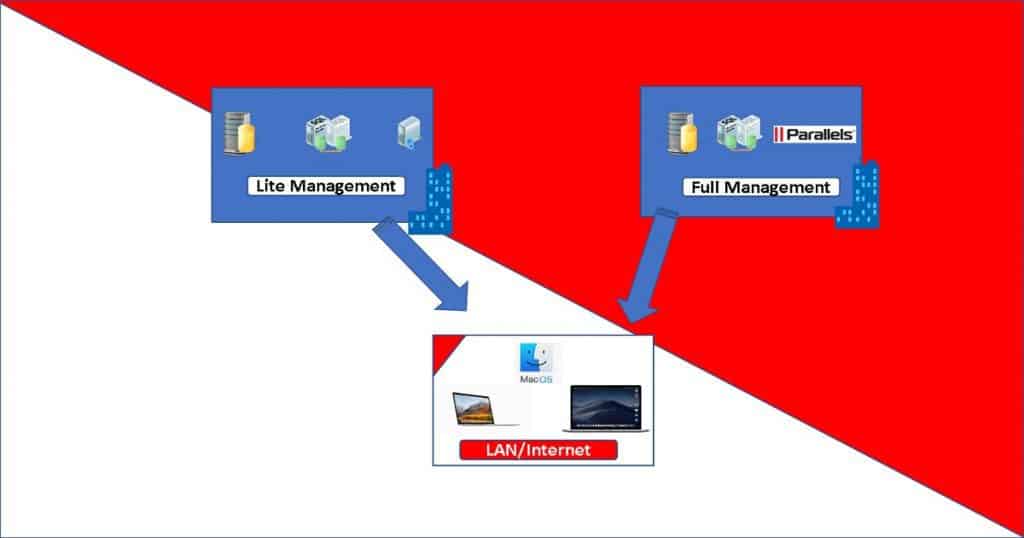
So, in a nutshell – The following are the two options to manage Mac Devices with SCCM (SCCM Mac Management Options).
- Lite Management of Mac Devices – SCCM without any plugins
- Full Management of Mac Devices – SCCM with Parallels plug-in
SCCM or Intune?
Deciding between SCCM and Intune is another blog post topic. I will try to cover the comparison between Intune and SCCM Mac Management topics in a different blog post. I have a similar blog post related “SCCM Intune Architecture Decision Making Tips and Sample Diagram.”
Resources
- Planning for client deployment to Mac computers
- Prepare to deploy client software to Macs with SCCM
- Supported Mac OS versions with SCCM lite management
- Download Mac SCCM Client
- Manage your Mac with Microsoft SCCM the same way as Windows PCs
- MAC Device Management with SCCM Vs Intune
We are on WhatsApp. To get the latest step-by-step guides and news updates, Join our Channel. Click here –HTMD WhatsApp.
Author
Anoop C Nair is Microsoft MVP! He is a Device Management Admin with more than 20 years of experience (calculation done in 2021) in IT. He is a Blogger, Speaker, and Local User Group HTMD Community leader. His main focus is on Device Management technologies like SCCM 2012, Current Branch, and Intune. He writes about ConfigMgr, Windows 11, Windows 10, Azure AD, Microsoft Intune, Windows 365, AVD, etc.




Discussion