






Enable SCCM Maintenance Mode for Distribution Point DPs Clients Primary Server
Let’s see how to enable Enable SCCM Maintenance Mode for Distribution Point (a.k.a DP). The disable and enable SCCM maintenance mode is useful for many scenarios. I hope we have maintenance mode options for other site systems servers.
The maintenance mode is a service window where the admins can perform the maintenance activities. There is another maintenance option available in SCCM called maintenance windows. This maintenance mode for client devices.
Well, there is one more maintenance mode option for SCCM primary servers. This is called a service windows and is helpful to avoid any SCCM in-console updates during production hours.
SCCM Distribution Point maintenance mode is the feature available from the 1902 version of the MEMCM. You can enable maintenance mode for the DP when making hardware changes to the DP server or some DR/BCP activities in the data center.

- SCCM Audit Status Messages Track Who Deleted Modified Changed Settings
- SCCM Audit Reports Who Initiated CMPivot Query | ConfigMgr
- SCCM Secondary Server Installation Guide | Step by Step | ConfigMgr
Maintenance Windows for Collections
You can control the client configuration changes for the following workloads using the Maintenance Windows configuration of the collection.
The supported workloads for maintenance windows are Application and package deployments, Software update deployments, Compliance settings deployment and evaluation, and OS and custom task sequence deployments.
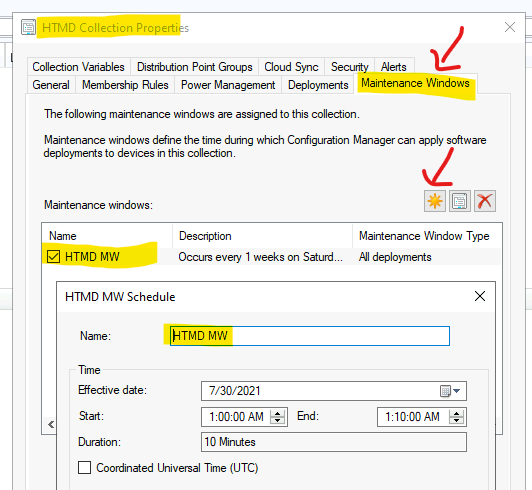
You can follow the steps mentioned below to configure Maintenance Windows for the client devices using device collection properties.
- Launch SCCM Admin Console
- Navigate to \Assets and Compliance\Overview\Device Collections
- Select the collection and right-click go to Properties.
- Click on Maintenance Windows tab.
- Click on * button to configure new maintanance windows.
SCCM Service Windows for Primary Servers
Let’s check how to configure SCCM Service Windows for Primary Servers. I have used SCCM service windows settings to block in-console SCCM updates during the production hours for child primary servers. This helps to control when in-console updates can install.
You can configure service windows add service windows at the central administration site (CAS) and primary sites. The service windows help to schedule the in-console upgrade tasks for primary servers.
Let’s check how to create a Service Windows for the primary server.
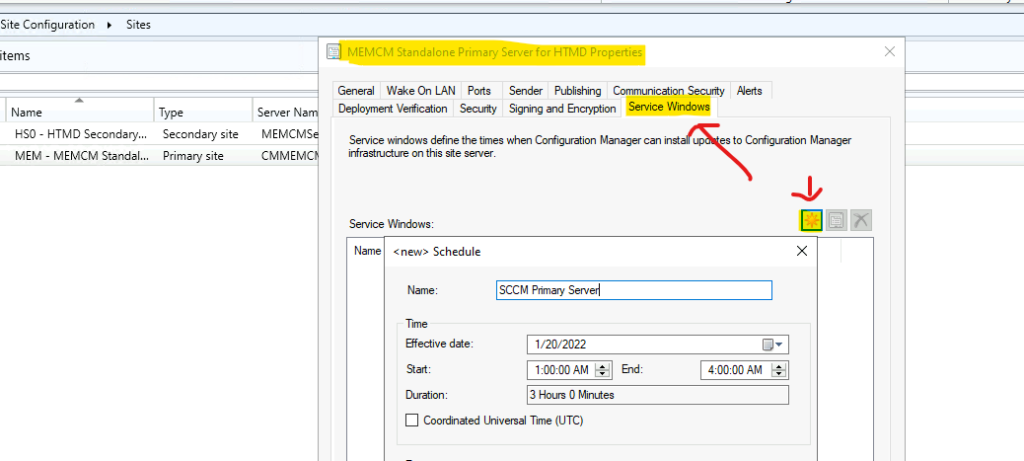
- Navigate to \Administration\Overview\Site Configuration\Sites.
- Select the primary server and go to properties.
- Click on Service Windows tab to create a schedule.
- Click on the * icon to create a new service window for the primary server.
NOTE! – The service Windows option is not available for secondary servers.
Enable SCCM Maintenance Mode for Distribution Point
Let’s first understand the impacts of enabling the SCCM maintenance mode for the distribution points (enable maintenance mode for SCCM Distribution Point). The site server doesn’t distribute any content to the DP. The MPs (Management Points) don’t return the location details of the DP to the clients.
Let’s check some other important points about the SCCM DP maintenance mode. A DP in maintenance mode will get updated even though it’s in maintenance mode when you update the site. The content validation task will still run during the maintenance mode of the DP.
However, you won’t be able to change any properties of the Distribution Point while it’s in maintenance mode. You will need to take the DP out of the maintenance mode to perform these activities.
Let’s now enable the SCCM DP maintenance mode from the admin console. You can enable this using the following steps.
- Launch SCCM Admin console.
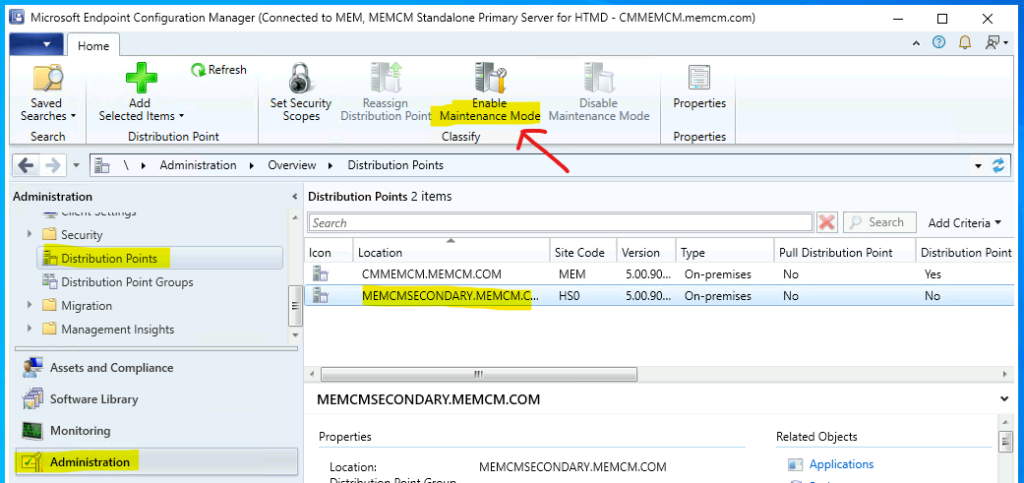
- Navigate to \Administration\Overview\Distribution Points.
- Select the Distribution Point that you want put it in maintenance mode.
- Click on Enable Maintenance Mode button from the ribbon menu.
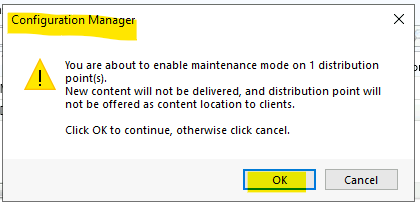
You can complete the process – enable maintenance mode for SCCM Distribution Point after the following step. You can click the OK button on the warning message box.
NOTE! – You are about to enable maintenance mode on 1 DP. The new content will not be delivered, and the distribution point will not be offered as the content location to clients. Click OK to continue. Otherwise Cancel.
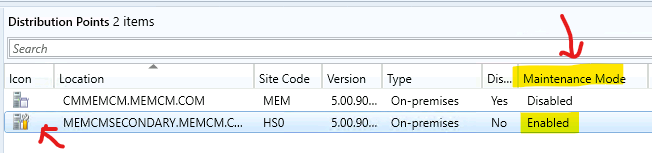
You can confirm whether the maintenance mode is enabled for DP or not using the two methods mentioned below.
- Console Column: Maintenance Mode – You will need to add an additional console column to know the status of DP maintenance mode.
- Maintenance Icon on the DP.
Log Files Related to SCCM Maintenance Mode for DPs
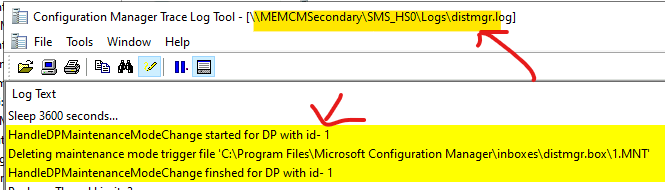
The SCCM log files are always useful, and now I have started liking Intune logs and event logs. To find out more details about the SCCM maintenance mode for DP, you will need to check the DistrMgr.log file from the site server (primary or secondary servers).
NOTE! – I have enabled the SCCM DP maintenance mode for a secondary server DP. You will need to check the DistMgr.log file on the secondary server to find more details. You won’t find any details about maintenance mode in the primary serve distrmgr.log.
You will need to check the DistMgr.log log file on the primary or secondary server, respectively, if you are putting the remote DP into maintenance mode.
HandleDPMaintenanceModeChange started for DP with id- 1
Deleting maintenance mode trigger file ‘C:\Program Files\Microsoft Configuration Manager\inboxes\distmgr.box\1.MNT’
HandleDPMaintenanceModeChange finshed for DP with id- 1
Skipping distribution point [“Display=\MEMCMSecondary.memcm.com\”]MSWNET:[“SMS_SITE=HS0”]\MEMCMSecondary.memcm.com\ since its in maintenance mode
Audit Status Messages Related to SCCM Maintenance Mode
Let’s have a look into Audit Status Messages Related to SCCM Maintenance Mode. You can check the SCCM audit messages related to the SCCM DP maintenance mode from the admin console. This helps admins find out who enabled or disabled the SCCM maintenance mode for DP.
- Message ID 40411: Enabled Maintenance Mode for DP.
- Message ID 40412: Disable Maintenance Mode for DP.
To find the audit status, you can use \Monitoring\Overview\System Status\Status Message Queries – All Audit Status Messages for a specific site query.
Severity Type Site code Date / Time System Component Message ID Description
Information Audit MEM 1/20/2022 7:58:55 PM CMMEMCM.memcm.com Microsoft.ConfigurationManagement.exe 40411 User “MEMCM\anoop” enabled maintenance mode for distribution point “[“Display=\MEMCMSecondary.memcm.com\”]MSWNET:[“SMS_SITE=HS0″]\MEMCMSecondary.memcm.com\”.

How to Disable SCCM Distribution Point Maintenance Mode
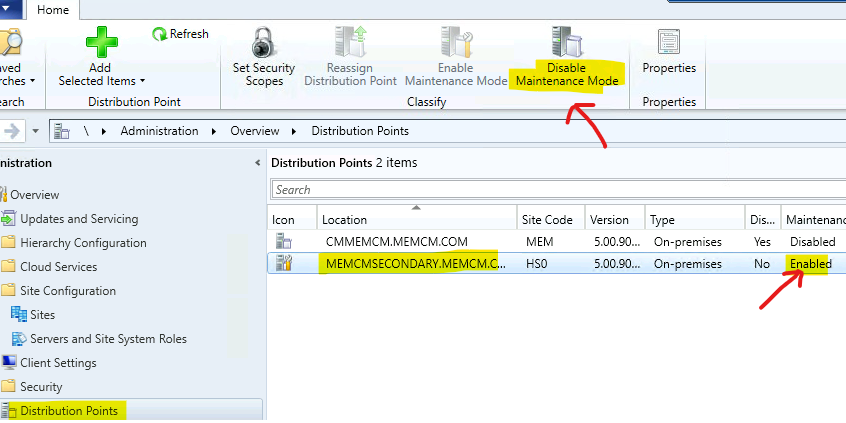
Let’s now learn How to Disable SCCM Distribution Point Maintenance Mode. Once the maintenance or service activities of the SCCM Distribution Point are completed, you can disable the SCCM DP maintenance mode. You can follow the below steps to disable maintenance mode.
- Navigate to \Administration\Overview\Distribution Points.
- Select the Distribution Point that you want put it in maintenance mode.
- Click on Disable Maintenance Mode button from the ribbon menu.
- Click OK button from the warning window.
SCCM Predefined Maintenance Tasks
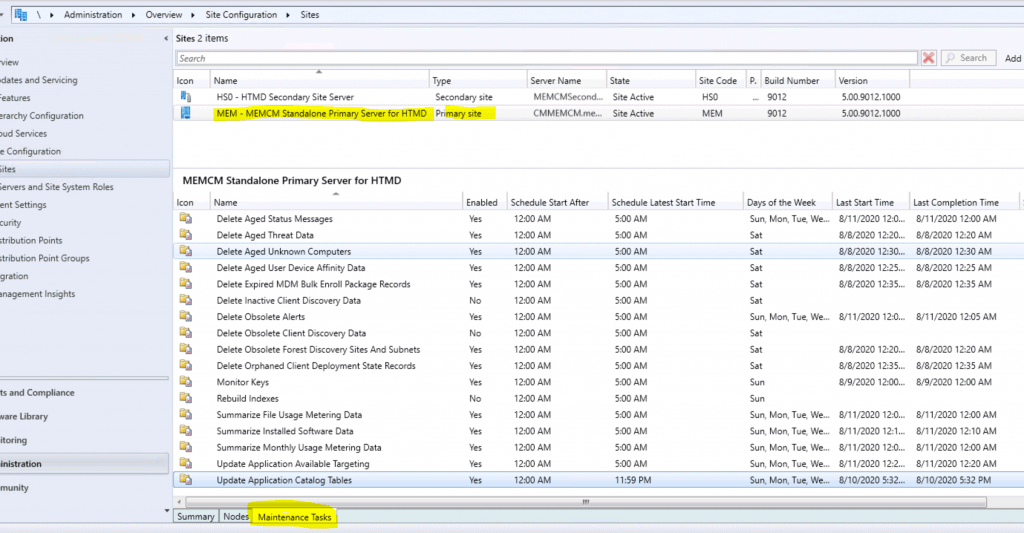
There are many other pre-defined maintenance tasks available in SCCM. The predefined maintenance tasks are the clean-up tasks that help ConfigMgr DB to remove unwanted or obsolete data from the SQL Database.
You have an option to configure or schedule the maintenance tasks based on your requirement. More details SCCM Maintenance Tasks List Secondary Primary Site Server.
Author
Anoop is Microsoft MVP! He is a Solution Architect in enterprise client management with more than 20 years of experience (calculation done in 2021) in IT. He is Blogger, Speaker, and Local User Group HTMD Community leader. His main focus is on Device Management technologies like SCCM 2012, Current Branch, and Intune. He writes about ConfigMgr, Windows 11, Windows 10, Azure AD, Microsoft Intune, Windows 365, AVD, etc……………




Discussion