






SCCM Management Insights Configuration Manager ConfigMgr Details
Let’s discuss the SCCM Management Insights Configuration Manager ConfigMgr Details. SCCM team introduced a new feature called Management Insights with SCCM CB 1708 preview version.
I mentioned the management insights feature in my previous post, “SCCM CB 1708 Preview Upgrade Video Guide and New Features”. In this post, we will look at the details of management insights, and you will get some ideas about SCCM CB Management insights. Video tutorial here.
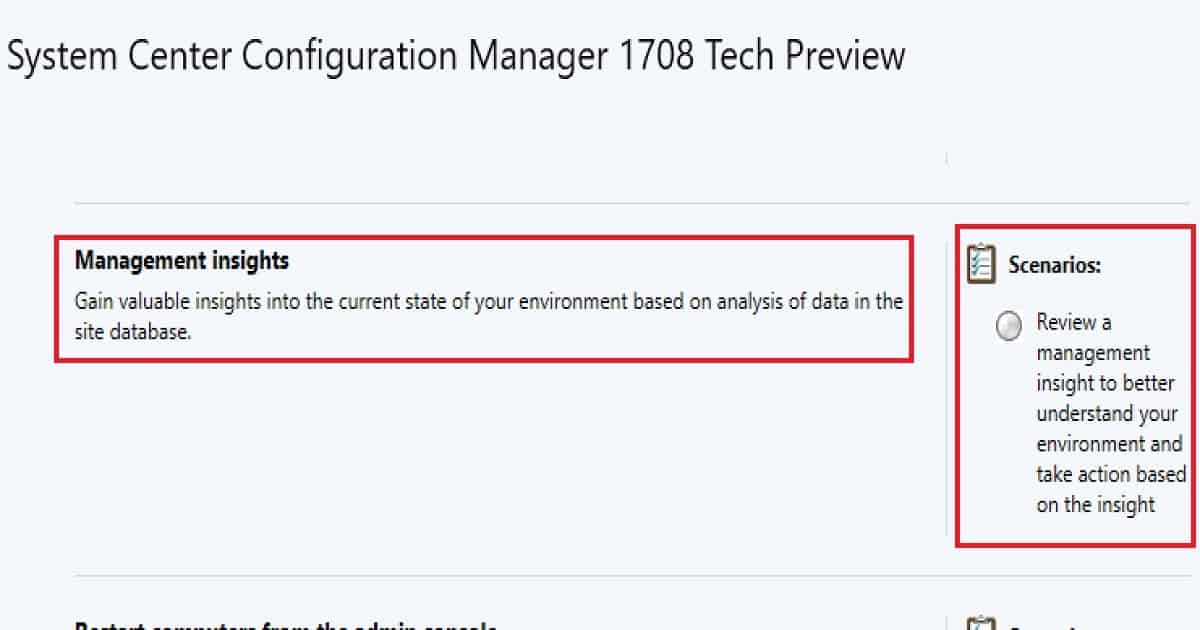
Management Insights will help you gain valuable insights into the current state of the SCCM CB environment based on data analysis in the site database.
One of the scenarios in the management insight would be useful for better understanding your environment and taking action based on that insight.

Table of Contents
- SCCM 2403 New Key Features and Improvements
- New Key Features of SCCM 2309 | Top Improvements
- Download SCCM 2309 Early Ring Version using PowerShell Script
- SCCM Versions Build Numbers Client Console Site
- End of Support Dates for SCCM CB Current Branch | ConfigMgr | SCCM End of Life
- SCCM Unsupported Deprecated or Removed Features
What are SCCM ConfigMgr CB Management Insights? – SCCM Management Insights Configuration Manager ConfigMgr Details
SCCM CB Management Insights will provide the details of EMPTY collections & applications without any deployments in your SCCM environment.
[New Post – Read this post to get the latest details about SCCM Management Insights]
I hope the SCCM team will include loads of other data or details into management insights in future releases of SCCM CB. You don’t have to dig into the SQL Database and run SQL queries to find out these details anymore!
Where Can You Find the Node for SCCM CB Management Insights?
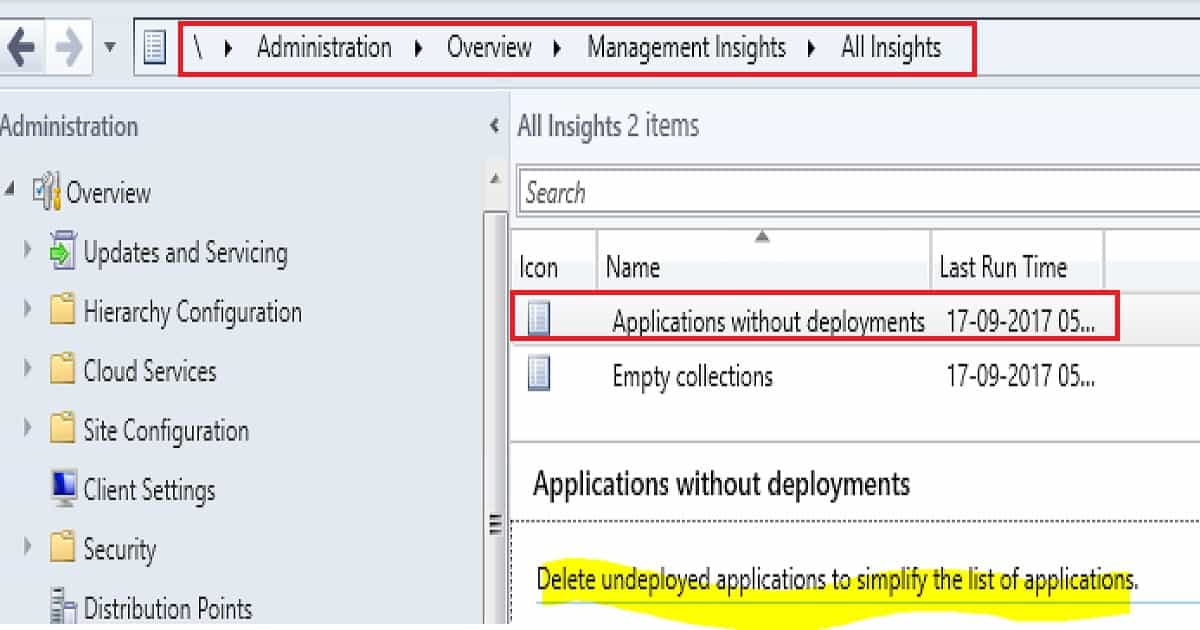
Navigate through SCCM CB 1708 preview console – \Administration\Overview\Management Insights\All Insights. I have explained this in the video tutorial here.
How Do We Find Applications without Deployments in the SCCM CB Environment?
You can find the details or list of applications without deployments from the SCCM CB console. This is under \Administration\Overview\Management Insights\All Insights – Application without deployments node.
I have explained the scenario in the video tutorial here. From the Application without the deployment node, you will get an option to delete the application directly.
You don’t have to go to the Software Library—Applications node to delete a particular application without deployment.
The last run time tab will tell you the last time the rule ran against your SCCM CB site database. To simplify the list of applications, we can find the list of undeployed applications.
| How to Find Out Applications without Deployments in the SCCM CB Environment? |
|---|
| Administration |
| Overview |
| Management Insights |
| All Insights |
How Do You Find Empty Collections in the SCCM CB Environment?
The details or list of Empty collections can be found in the SCCM CB console. This is beneficial information, as you no longer need to dig into SQL DB and run SQL queries to find these details.
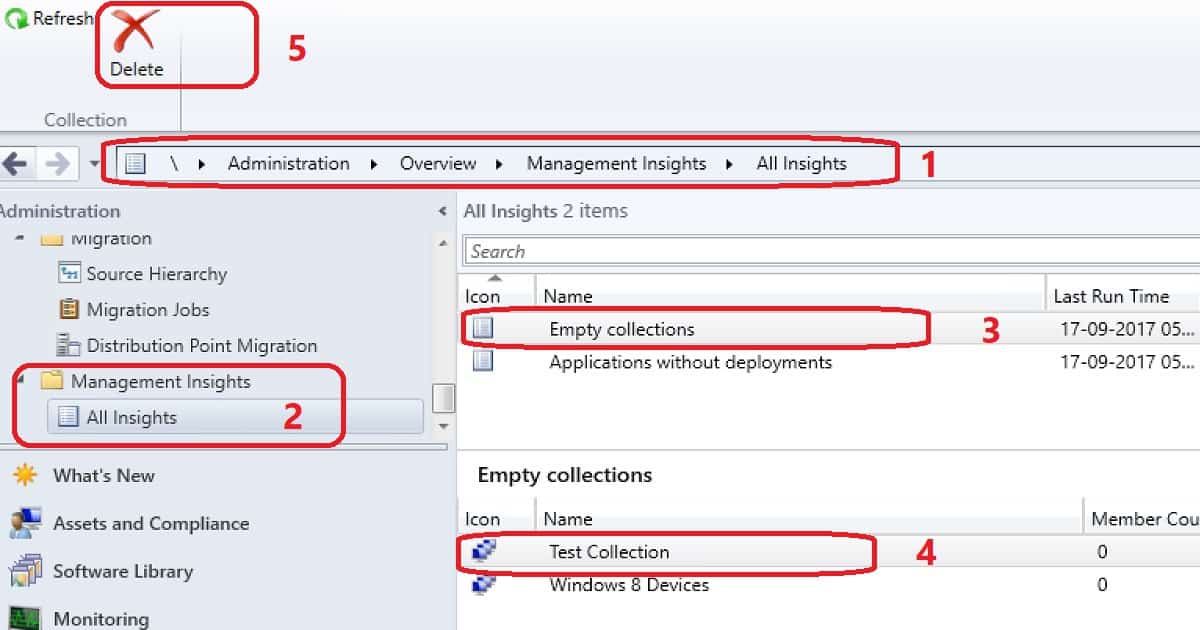
This is under \Administration\Overview\Management Insights\All Insights – EMPTY Collections node.
In the following screenshot, you can see the list of empty collections of the SCCM CB environment from the management insights node in the SCCM console.
You may also delete the empty collections from the “Management Insights – All Insights – Empty Collections” node.
You can Right-click on the empty collection and delete it. Otherwise, you can select the collection you want to delete and click the “Delete” button from the ribbon menu of the SCCM CB console. More details in the video tutorial are here.
Is SCCM CB Management Insights not Working as Expected?
Check out the log SMS_CLOUDCONNECTION.log and look for any error in the log file. Registry Key details of SCCM CB management insights component:- HKEY_LOCAL_ MACHINE \SOFTWARE \Microsoft\SMS\Components\SMS_CLOUDCONNECTION.
ERROR: Found exception System.IO.FileLoadException: Could not load file or assembly 'Microsoft.ConfigurationManager.ManagementInsights.MIWorker, Version=5.0.0.0, Culture=neutral, PublicKeyToken=31bf3856ad364e35' or one of its dependencies. Strong name validation failed. (Exception from HRESULT: 0x8013141A)~~File name: 'Microsoft.ConfigurationManager.ManagementInsights.MIWorker, Version=5.0.0.0, Culture=neutral, PublicKeyToken=31bf3856ad364e35' ---> System.Security.SecurityException: Strong name validation failed. (Exception from HRESULT: 0x8013141A)~~The Zone of the assembly that failed was:~~MyComputer~~ at System.Reflection.RuntimeAssembly._nLoad(AssemblyName fileName, String codeBase, Evidence assemblySecurity, RuntimeAssembly locationHint, StackCrawlMark& stackMark, IntPtr pPrivHostBinder, Boolean throwOnFileNotFound, Boolean forIntrospection, Boolean suppressSecurityChecks)~~ at System.Reflection.RuntimeAssembly.InternalLoadAssemblyName(AssemblyName assemblyRef, Evidence assemblySecurity, RuntimeAssembly reqAssembly, StackCrawlMark& stackMark, IntPtr pPrivHostBinder, Boolean throwOnFileNotFound, Boolean forIntrospection, Boolean suppressSecurityChecks)~~ at System.Reflection.RuntimeAssembly.InternalLoad(String assemblyString, Evidence assemblySecurity, StackCrawlMark& stackMark, IntPtr pPrivHostBinder, Boolean forIntrospection)~~ at System.Reflection.RuntimeAssembly.InternalLoad(String assemblyString, Evidence assemblySecurity, StackCrawlMark& stackMark, Boolean forIntrospection)~~ at System.Reflection.Assembly.Load(String assemblyString)~~ at Microsoft.ConfigurationManager.TaskExecutionManager.TaskExecution.InvokeWorker(String assemblyToLoad, String typeToLoad, String componentName)
What is SCCM CB Management Insights – Find Out Unused Collections and Applications
The Management Insights node in the SCCM CB console. This feature will help you maintain SCCM infra. At the moment, it will help you get the details of EMPTY collections and Applications without deployments.
References
- SCCM CB 1708 Preview Upgrade Video Guide and New Features – Here
- Update 1708 for Configuration Manager Technical Preview Branch – Available Now! – here
We are on WhatsApp now. To get the latest step-by-step guides, news, and updates, Join our Channel. Click here. HTMD WhatsApp.
Author
Anoop C Nair is Microsoft MVP! He is a Device Management Admin with more than 20 years of experience (calculation done in 2021) in IT. He is a Blogger, Speaker, and Local User Group HTMD Community leader. His main focus is on Device Management technologies like SCCM 2012, Current Branch, and Intune. He writes about ConfigMgr, Windows 11, Windows 10, Azure AD, Microsoft Intune, Windows 365, AVD, etc.




Great article, thanks!
Question: will it list applications without deployments but still referenced in TS or as dependencies of other deployed applications?
This relates to a feedback I submitted on an awesome blog about a script Maurice Daly developed:
https://www.scconfigmgr.com/2017/08/11/using-powershell-for-cleaning-up-packages-and-applications/
Sincerely,
Jose