






SCCM Management Insights Rules to Maintain Clean and Healthy Infra
Let’s check how SCCM Management Insights Rules to Maintain Clean and Healthy Infra. SCCM Management Insights Clean Healthy SCCM CB Environment. SCCM CB Management Insights is one of my favorite features.
I shared my experience with SCCM Management insights in this post. In this post, you will know the management insight rules to keep SCCM infra healthy.
SCCM Management Insights are by default enabled on 1802 and later. Trust me; it is very useful to keep your environment neat and clean. As a central admin of a global SCCM team, I will love this feature.
I have provided tips and tricks to keep the SCCM environment in the below section. MGMT insights are another way to track the health and tidiness of your SCCM environment.

Update – Microsoft has already released the SCCM CB’s latest version with improvements in Management insights and the dashboard.
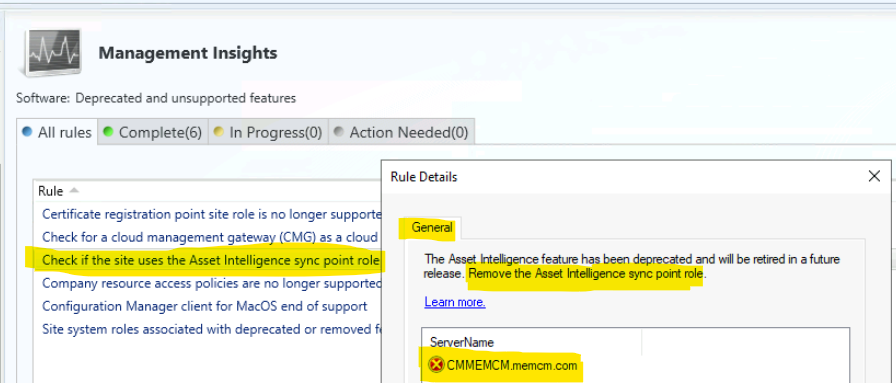
New Rules added with SCCM 2203 Release.
Let’s check out the new management insights rules added with SCCM 2203 version.
- Remove the certificate registration point site system role.
- Remove CMG deployment as a classic cloud service in Azure.
- Remove Asset Intelligence Sync Point role.
- Remove All policies for company resource access features.
- Remove SCCM Clients for macOS.
- Remove Enrollment Proxy point and Enrollment point roles from SCCM.
What are SCCM Management Insights?
SCCM Management Insights will help you gain valuable insights into the current state of the SCCM environment based on analysis of data in the site database.
The Management insights are based on analysis of data in the site database. One of the scenarios in the management insight would be useful to understand your environment better and take action based on the insight.
Management Insights is similar to a robotic assistant that will keep an on your SCCM environment for you and let you know the details. Who is not following your standard processes? Who is doing wrong or not recommended things within your SCCM hierarchy?
I would assume the SCCM product group will provide an option to create custom management insights possibility in the future. Management Insights feature was introduced with SCCM CB 1708 preview version.
Video Tutorial – Management Insights
In this video you will learn about management insights.
What are the Features of Management Insights in SCCM?
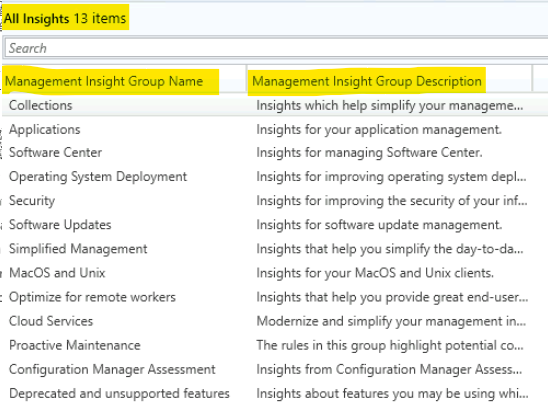
There is five (13) build in management insights options we have in SCCM CB 2203. Let’s take a look at those in detail. Some of them are updated in the below list and the screenshot. More updated details are available in the below section.
- Software Center – Insights for managing software center
- Applications – Insights for your application management
- Simplified Management – Insights that help you simplify the day to day management of your SCCM environment
- Collection – Insights that help simplify your management by cleaning up and re-configuring collections
- Cloud Services – Modernise and simplify your management infrastructure by leveraging the power of the cloud. SCCM is integrated with many cloud services, all of which enable more straightforward and more modern management of your devices.
Dashboard – SCCM Management Insights
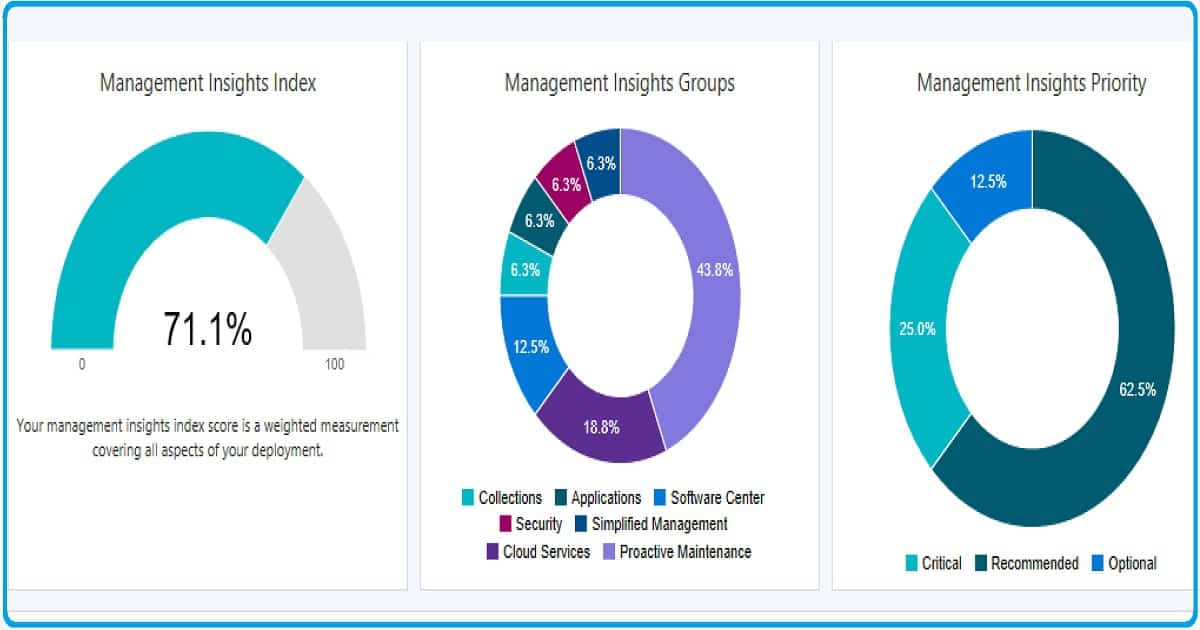
Management insights dashboard provides the following table to review SCCM infra with action items. The following are the three (3) graphical representations of SCCM Management Insights.
- Management Insights Index – Your Management insights index score is a weighted measurement covering all aspects of your deployment.
- Management Insights Groups – Collection, Applications, Software Center, Security, Simplified Management, Cloud Services, and Proactive Maintenance
- Management Insights Priority – Critical, Recommended, and Optional
The table view of insights is helpful to get an overview of action items. Please note that this view will be different for your environment.
| Insight Name | Group | Priority | Last Change | Status |
| Enable WSUS Cleanup | Proactive Maintenance | Recommended | 11-11-2018 10:57 | Action Needed |
| Enable devices to be hybrid Azure Active Directory joined | Cloud Services | Recommended | 11-11-2018 10:57 | Action Needed |
| Assess co-management readiness | Cloud Services | Recommended | 11-11-2018 10:57 | Action Needed |
| Configure Azure services for use with Configuration Manager | Cloud Services | Recommended | 11-11-2018 10:57 | Action Needed |
| Distribution points not serving content to clients | Proactive Maintenance | Recommended | 11-11-2018 13:14 | Action Needed |
| Applications without deployments | Applications | Optional | 11-11-2018 10:57 | Action Needed |
Where is the SCCM Management insights Node?
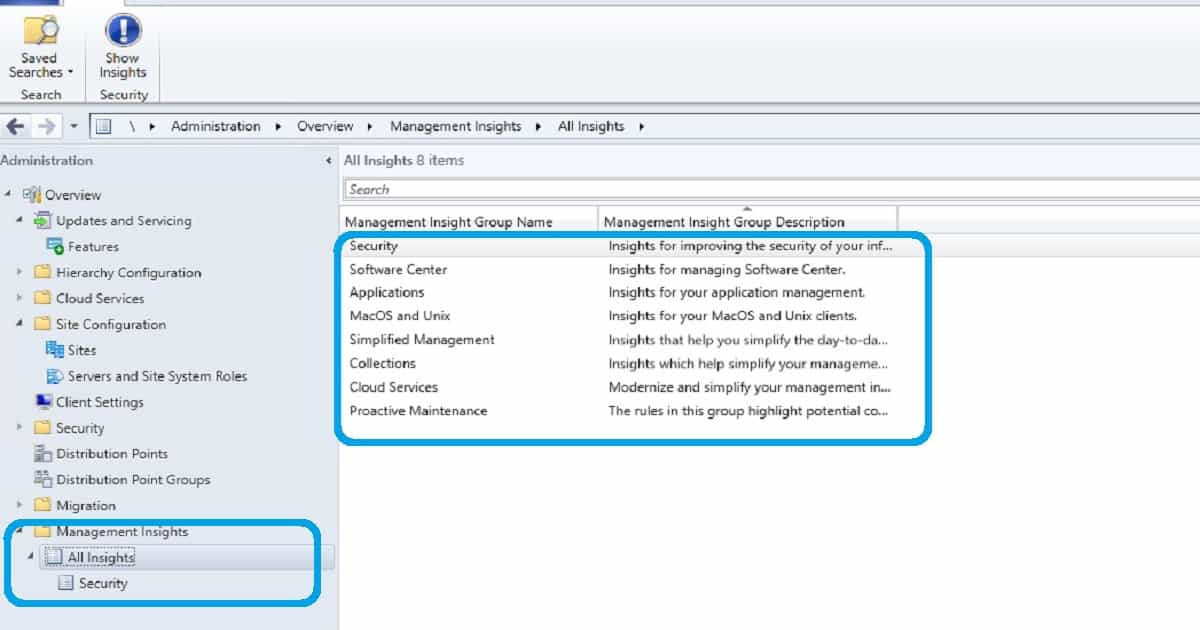
Navigate to SCCM – \Administration\Overview\Management Insights\All Insights. I have explained this in the video tutorial. Launch the SCCM console and navigate via \Administration\Overview\Management Insights
- \Administration\Overview\Management Insights\All Insights
- \Administration\Overview\Management Insights\All Insights\Security
- \Administration\Overview\Management Insights\All Insights\Software Center
- \Administration\Overview\Management Insights\All Insights\Applications
- \Administration\Overview\Management Insights\All Insights\MacOS and Unix
- \Administration\Overview\Management Insights\All Insights\Simplified Management
- \Administration\Overview\Management Insights\All Insights\Collections
- \Administration\Overview\Management Insights\All Insights\Cloud Services
- \Administration\Overview\Management Insights\All Insights\Proactive Maintenance
List of Groups – Management Insights
SCCM Management Insights Groups include the following groups. These insights groups are segregated based on SCCM functionality. And SCCM team will add new groups in each release of SCCM.
- Collection
- Applications
- Software Center
- Security
- Simplified Management
- macOS and Unix
- Cloud Services
- Proactive Maintenance
Each management insights group contains a set of rules, and those rules will help you keep the SCCM environment clean & healthy. The SCCM team is adding new rules in each release of SCCM.
List of Rules – Management Insights
The new management rules are getting added with every release of SCCM. The following SCCM management insights rules are available out of the box:
- Software Center – Rule 1 – Direct your user to the software center instead of the application catalog
- Software Center – Rule 2 – Use the new version of Software Center
- Security – UNsupported antimalware client versions
- macOS and Unix – SCEP for Mac and Linux end of support
- Application – Rule 1 – Applications without deployments
- Simplified Management – Rule 1 – Non-CB Client Versions
- Collection – Rule 1 – Empty Collections
- Cloud Services – Rule 1 – Assess co-management readiness. There are three (3) prerequisites for co-management
1. Update clients to the latest Windows 10 version
2. Configure Azure Services for use with SCCM
3. Enable Devices to be hybrid Azure Active Directory Joined - Cloud Services – Rule 2 – Configure Azure Services to use with SCCM
- Cloud Services – Rule 3 – Enable Devices to be hybrid Azure Active Directory joined
- Cloud Services – Rule 4 – Update Clients to the latest Windows Version
- Proactive Maintenance – Rule 1 -Boundary groups with no assigned site systems
- Proactive Maintenance – Rule 2 – Boundary groups with no members
- Proactive Maintenance – Rule 3 -Distribution points not serving content to clients
- Proactive Maintenance – Rule 4 – Enable WSUS Cleanup
- Proactive Maintenance – Rule 5 -Unused boot images
- Proactive Maintenance – Rule 6 -Unused configuration items
- Proactive Maintenance – Rule 7 -Upgrade peer cache sources to the latest version of the SCCM client
Logs and Management Insights Automatic Schedule
The management insight rules reevaluate their applicability on a weekly schedule. To reevaluate a rule on-demand, right-click the rule and select Re-evaluate. The log file for management insight rules is SMS_DataEngine.log on the site server.
Component registry key – HKLM\SOFTWARE\Microsoft\SMS\Tracing\SMS_DataEngine
Log File – SMS_DataEngine.log
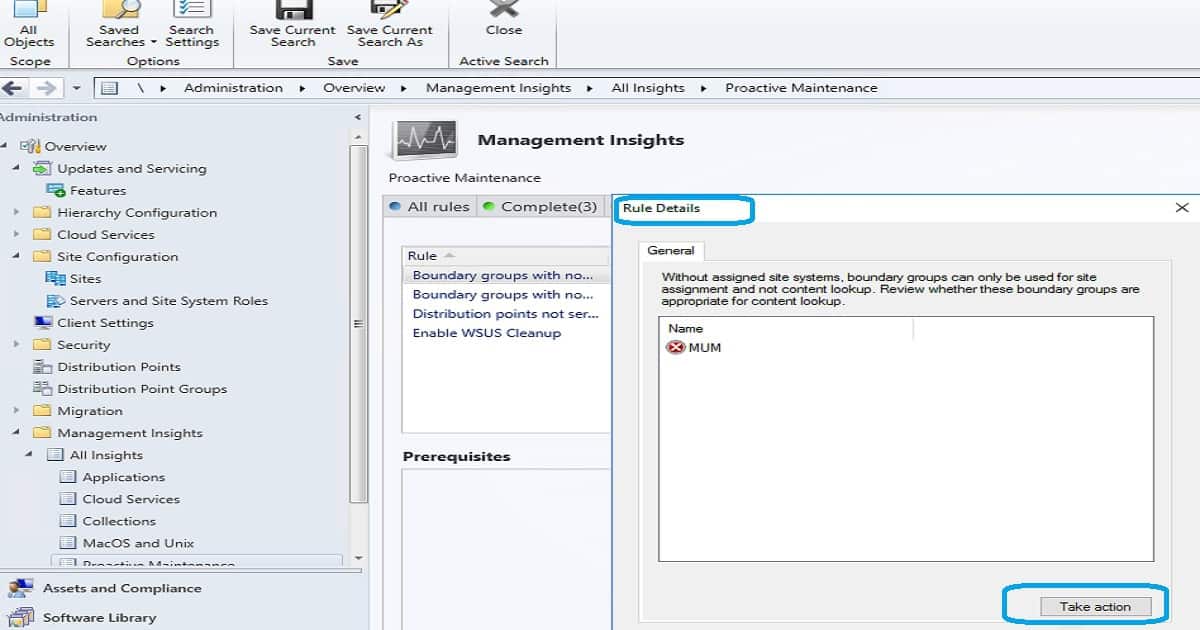
SCCM Management Insights – Take Action Button is Missing?
Have you seen Management insights, but there is no button called Take Action? How to fix this kind of issue? How to troubleshoot SCCM management insights?
First of all, you need to understand the SCCM management Insights Take Action option is available only for SCCM 1806 or later.
Navigate to a filtered view based on a query. For example, taking action on the empty collections rule shows just these collections in the list of collections. Then take further action, such as deleting a collection or modifying its membership rules.
Video SCCM Management Insights to Finetune SCCM Environment
Let’s check out the following video to understand the options of SCCM management insights to clean up the SCCM environment.
Software Center – Insights for Managing Software center
Software Center helps get the information and insights of software center versions available in your SCCM environment. A couple of out-of-box rules were created to find out software center versions. Also, it helps to clean up the old version of the SCCM software center and how to get new software center versions.
Rule 1 – Direct your user to the software center instead of the application catalog
Rule 2 – Use the new version of the Software Center
The application catalog is depreciated, and you should deploy the latest version of the software center.
Applications – Insights for Your Application Management
Application management options in management insight will help you find evil things happening within the application creation world. Let’s clean up the OLD applications of your SCCM environment using this feature. This helps to keep the health of all your application echo systems.
Rule 1 – Applications without deployments
Simplified Management – Simplify the day to day MGMT of Your Environment
SCCM simplified management rule in the SCCM management insight feature helps find out the non-SCCM CB client versions in your environment. This will help to keep your SCCM environment healthy and updated.
Rule 1 – Non-CB Client Versions
Collection – Simplify Device management – SCCM Management Insights Rules
SCCM management insights help to simplify device management options for your organization. The following rule of MGMT insights helps keep an eye on collections of your environment. This helps to clean up and re-configuring collections.
Rule 1 – Empty Collections
Cloud Services – Modernise & Simplify Device MGMT Infrastructure
Cloud services management insights are to get more details about modern management scenarios. One of the key modern management scenarios is enabling and keeping track of co-management features.
Modernize and simplify your management infrastructure by leveraging the power of the cloud. SCCM is integrated with many cloud services, all of which enable simpler and more modern management of your devices.
Rule 1: Assess co-management readiness. There are three (3) prerequisites for co-management 1—update clients to the latest Windows 10 version 2. Configure Azure Services for use with SCCM 3. Enable Devices to be hybrid Azure Active Directory Joined
Rule 2 : Configure Azure Services to use with SCCM
Rule 3: Enable Devices to be hybrid Azure Active Directory joined
Rule 4: Update Clients to the latest Windows Version
Resource
We are on WhatsApp. To get the latest step-by-step guides and news updates, Join our Channel. Click here –HTMD WhatsApp.
Author
Anoop C Nair is Microsoft MVP! He is a Device Management Admin with more than 20 years of experience (calculation done in 2021) in IT. He is a Blogger, Speaker, and Local User Group HTMD Community leader. His primary focus is Device Management technologies like SCCM 2012, Current Branch, and Intune. He writes about ConfigMgr, Windows 11, Windows 10, Azure AD, Microsoft Intune, Windows 365, AVD, etc.




Nice overview