






FIX Windows Update error 0x8024044a SCCM Scan Failed 0x80244017
Let’s find a fix for SCCM Scan Failed with errors 0x8024044a and 0x80244017. You see the Windows Update error 0x8024044a without SCCM as well. We deployed patches to Windows Server 2016 and 2019 using SCCM and waited till it hit the deadline.
I have another post, Fix SCCM Scan Failed to Add Update Source for WUAgent. Like any other error, this issue is a bit particular because it’s not generating only a single line error with a generic code but two different errors and two different error codes.
Before this post, I wrote two more posts for scan failure. One of them is Let’s see how I troubleshoot and fix the following error that failed to Run Search on WUAgent Error 0x8007000e. There are other posts to fix the scan that failed With Error 0x802440220. This error means Service Is Temporarily Overloaded.
There could be a scan error due to the incorrect proxy settings in the environment. System context proxy settings should be blank ( that means the internal FQDN should have direct access). In our case, the system context proxy setting also pointed to the proxy server.

- FIX Windows Update Issues for Windows 11 Errors Troubleshooting Tips
- Fix Windows 11 Upgrade Error 0xc11900130
SCCM Scan Failed with error 0x8024044a
Let’s check more details on SCCM Scan Failed with error 0x8024044a. The error code 0x8024044a is not available in the CMTrace error lookup.
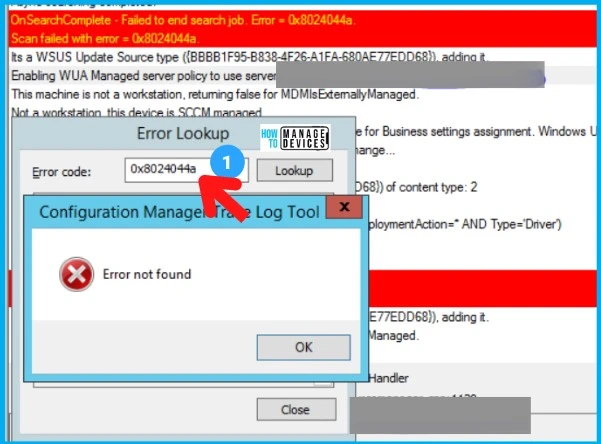
The screenshot above is the first error, and the screenshot below is the second error. Please note that both screenshots are from the same server, and both appear periodically, one after the other.
SCCM Scan Failed with error 0x80244017
The SCCM software update scan error 0x80244017. I have seen this error OnSearchComplete – Failed to end search job. Error = 0x80244017 in one of the HTMD posts – ConfigMgr Intranet Clients Can Use CMG Software Update Point SCCM. But there was no solution given in that comment/post.
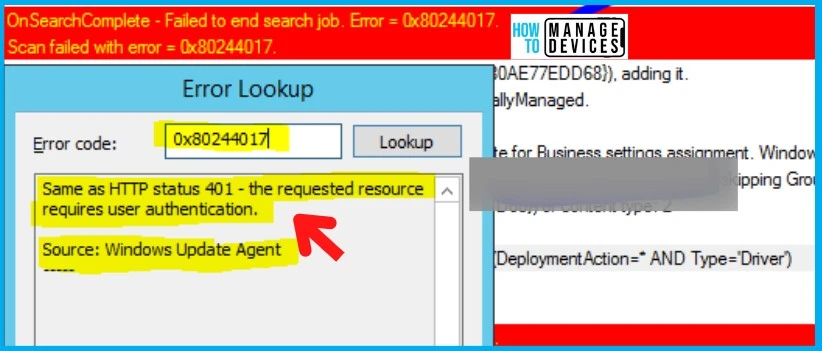
When jumping directly to the solution, let’s understand the root cause for better understanding. The screenshot was taken from WUHandler.log at the time of troubleshooting.
For more details on how to collect or read SCCM logs, please refer article below: – https://www.anoopcnair.com/sccm-logs-files-configmgr-memcm/.
Fix SCCM Scan Failed with error 0x8024044a
When we started troubleshooting, we found that the file that applies the group policy or SCCM policy shows the old modification date. But it should look like the below and should have a recent date and time.

The fix to the issue SCCM Scan Failed with error 0x8024044a is to rename the registry.pol and restart the SMS agent services.
- Go to the below path: C:\Windows\System32\GroupPolicy\Machine
- Rename the Registry.pol file.
- Take a copy of this file before you rename it.
- Now restart CCMEXEC- SMS Agent Host service and trigger SCAN.
- After this step, we started reading WUAhandler.log
It was installed, Rebooted. The server is Compliant. Happy Learning. You can also try renaming Software Distribution Folder if you still see any errors in WUAHandler. How to rename the Software Distribution Folder – Steps are given below:
- Start an elevated command prompt.
- Run the following commands hitting enter after each line:
net stop wuauserv
cd %systemroot%
ren SoftwareDistribution SoftwareDistribution.old
net start wuauserv
Once the above code is executed, try to reboot the Windows device to fix the issue with SCCM Scan Failed with error 0x8024044a issue.
The scan was completed successfully, and after triggering the “Software Update Deployment Evaluation Cycle,” patches were displayed in Software Center.
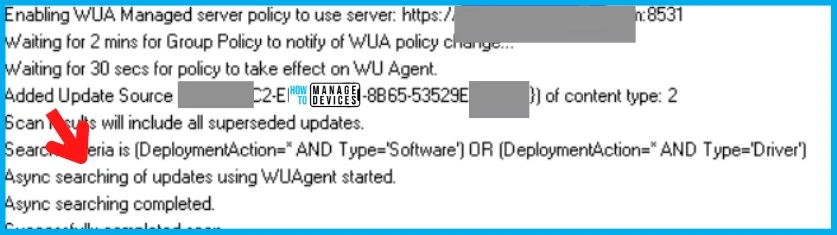
Fix SCCM Scan Failed with error 0x80244017
Let’s fix SCCM Scan Failed with error 0x80244017. The second issue is a bit confusing due to the error message it’s printing, but it also indicates that something is wrong between the client and server authentication against which the client is trying to scan.
I logged in to the SUP, which connects to the MS Update catalog, and started validating all the settings. This is what I noticed. It seems that there is a server issue 0x80244017 also involved. This could be related to the software update point. So I shifted the focus to SUP.
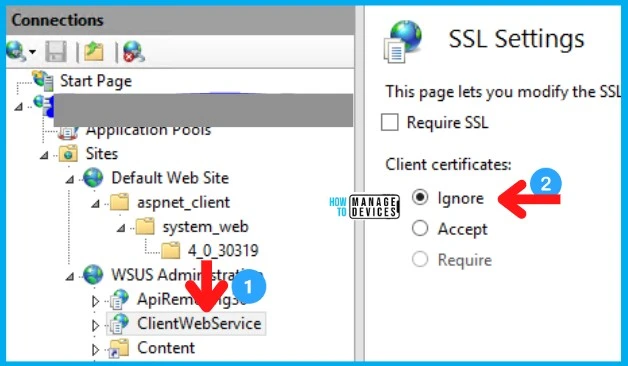
Let’s launch the IIS manager from the SUP server and check SUP IIS ClientWebService SSL Settings. SSL is the secured communication that is important for the communication between server and client.
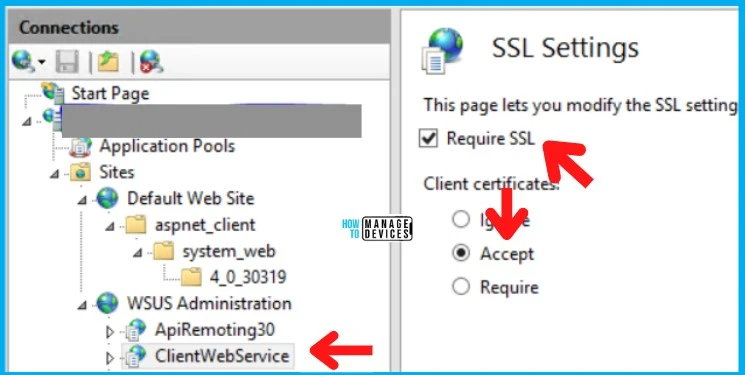
Let’s go through the following changes to fix the SCCM software updates SCAN failed issue 0x8024044a.
- I have changed it to Ignore
- Unchecked Require SSL
- Perform IISRESET
I went back to the client and initiated the scan. You see the Scan completed successfully and after triggering the “Software Update Deployment Evaluation Cycle.”
Disclaimer – The information provided on the site is for general informational purposes only. All information on the site is provided in good faith; however, we make no representation or warranty of any kind, express or implied, regarding the accuracy, adequacy, validity, reliability, availability, or completeness of any information on the website.
Resources
- Fix SCCM Scan Issues with Software Updates Patching | ConfigMgr
- SCCM How to Get a Troubleshooting Report for Patching Software Update Related Scan Errors
- How to troubleshoot software update scan failures in System Center 2012 Configuration Manager




Thanks a lot for your detailed solutions anoop.
I hope you’re doing well.
In my environment we have more machines with 80004005 , 87D00692 error codes.
It would be more appreciated if you provide the solution for the above error codes.
Thanks in advance.