






Latest SCCM Secondary Server Upgrade Guide | ConfigMgr | Configuration Manager
Let’s learn about the SCCM Secondary Server Upgrade process. I have already explained how to upgrade the primary server to the 2010 version.
Make sure you have all the prerequisites in place. ConfigMgr 2010 is Generally Available now. You don’t have to run the opt-in version script to make the 2010 version available in the console.
I have already published a step-by-step guide for the ConfigMgr 2010 production release. You can refer to SCCM Primary Server Upgrade to 2010. The upgrade checklist and prerequisites are also converted into that step-by-step guide.
I list the top 5 picks of ConfigMgr 2010. I think these new features benefit SCCM admins involved in day-to-day activities.

Table of Contents
Secondary Server Upgrade Video Experience
This is the upgrade video of the ConfigMgr 2006 secondary server upgrade.
- How to Install Secondary server
- How to FIX SCCM secondary server installation failure
- FIX Error 0x87d20002 SCCM Secondary Server Upgrade
Start SCCM Secondary Site Server Upgrade
Once the parent primary server is upgraded to the latest version of ConfigMgr, let’s start upgrading the secondary server.
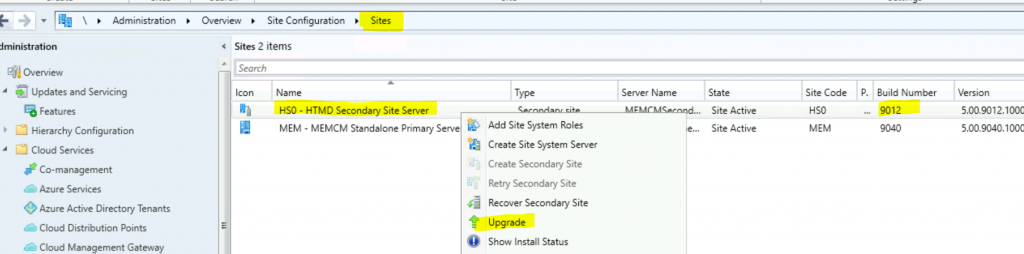
- Navigate to \Administration\Overview\Site Configuration\Sites.
- Select the Secondary server (Build number 9012, the 2006 version).
- Right-click and select the Upgrade option.
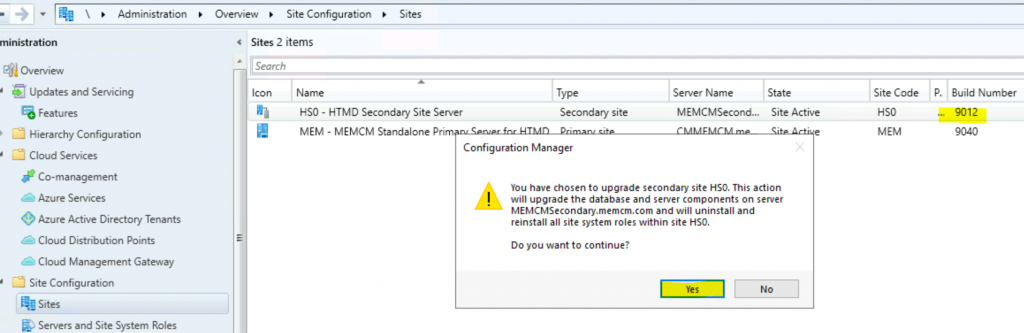
You have chosen to upgrade the secondary site HS0. This action will:
- Upgrade the database
- Upgrade server components on secondary server MEMCMSecondary.memcm.com
- Uninstall and reinstall all site system roles within site HS0.
- Click on Yes from the popup window.
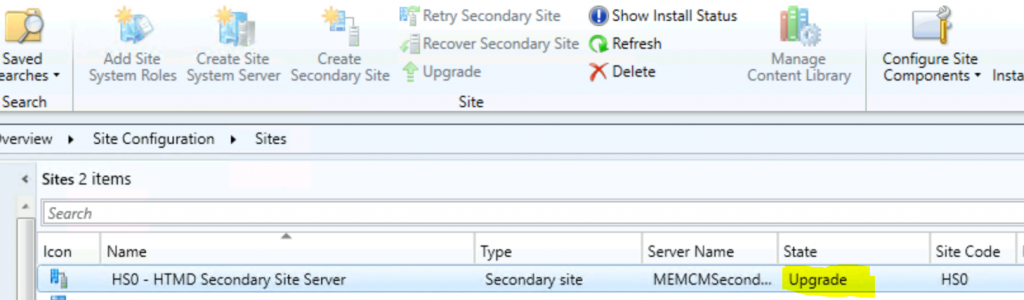
Secondary Site Upgrade Status
Now, the state of the secondary server has been changed to Upgrade from Active.
You can check the Configuration Manager secondary site server upgrade status from the primary server console.
- Navigate to \Administration\Overview\Site Configuration\Sites.
- Select the Secondary server.
- Click on Show Install Status from the ribbon menu.
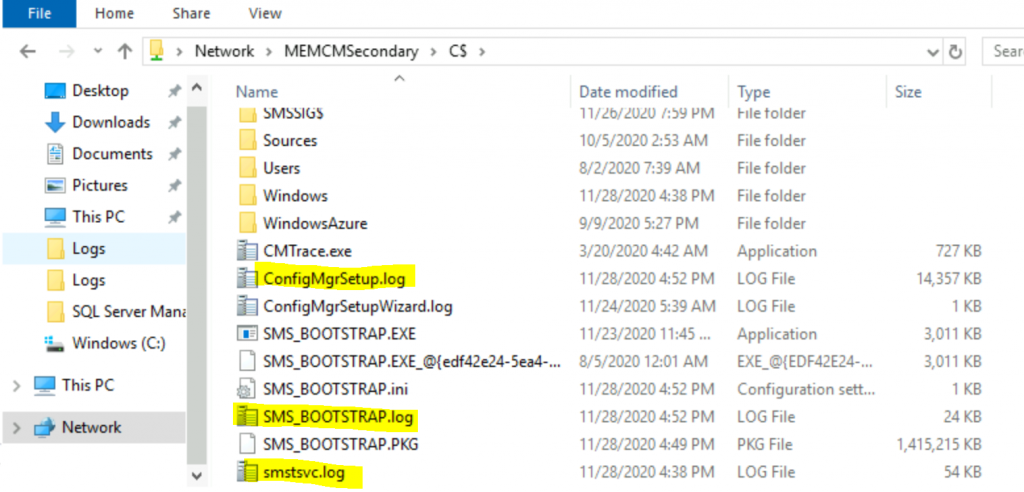
You can check the limited status of the secondary site upgrade from the ConfigMgr console. The rest of the information is stored in the following log files.
- SMStsvc.log @ Secondary Server
- SMS_Bootstrap.log @ Secondary Server
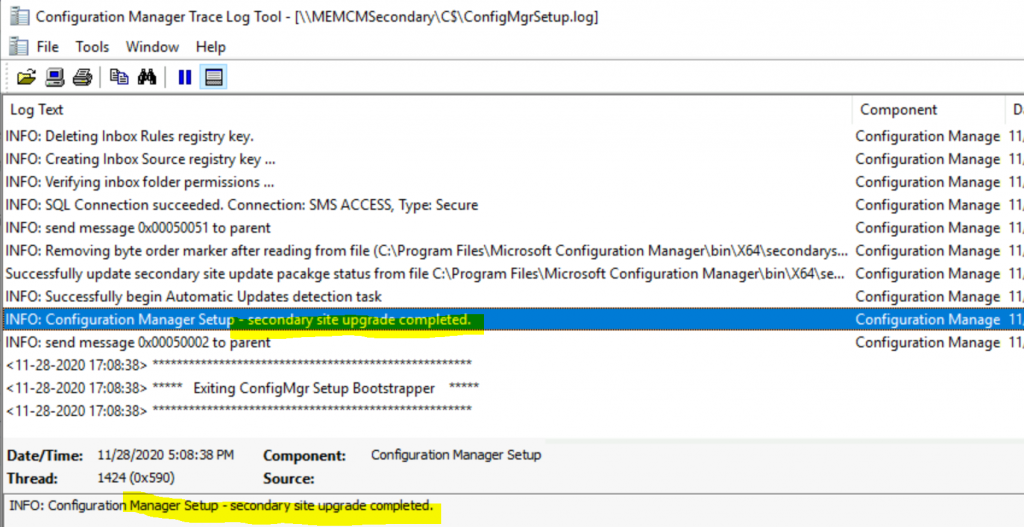
- ConfigMgrSetup.Log @ Secondary Server
Verification
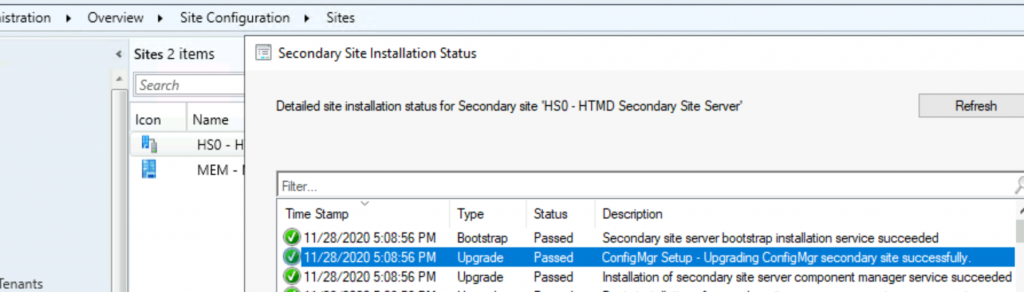
You can verify the successful upgrade of the ConfigMgr secondary server from the Primary server to show the install status button.
- Navigate to \Administration\Overview\Site Configuration\Sites.
- Select the Secondary server.
- Click on Show Install Status from the ribbon menu.
Successfully update secondary site update package status from file C:\Program Files\Microsoft Configuration Manager\bin\X64\secondarysiteupdatepackage.xml
INFO: Successfully begin Automatic Updates detection task
INFO: send message 0x00050002 to parent
<11-28-2020 17:08:38> Exiting ConfigMgr Setup Bootstrapper
Results
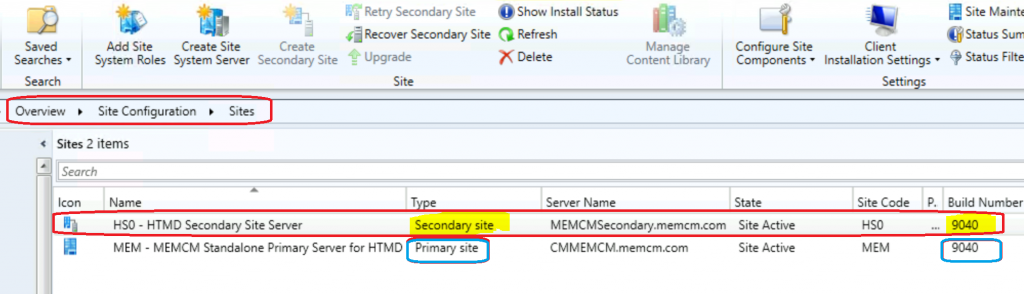
After a successful upgrade, you can check the build number of the secondary sites. Latest SCCM Secondary Server Upgrade Guide | ConfigMgr | Configuration Manager?
Secondary site Build # 9040
NOTE! – The build number 9040 is the same as the primary server version 2010.
Secondary Server Upgrade Video Experience
This is the upgrade video of the ConfigMgr 2006 secondary server upgrade.
Resources
- SCCM 2010 Primary Server Upgrade Guide https://www.anoopcnair.com/sccm-server-upgrade-to-2010–configmgr–guide–step-by-step/
- Known Issues with SCCM 2006
- Possible Issues with SCCM 2012 to CB Current Branch Upgrade
We are on WhatsApp. To get the latest step-by-step guides and news updates, Join our Channel. Click here –HTMD WhatsApp.
Author
Anoop C Nair is Microsoft MVP! He is a Device Management Admin with more than 20 years of experience (calculation done in 2021) in IT. He is a Blogger, Speaker, and Local User Group HTMD Community leader. His primary focus is Device Management technologies like SCCM 2012, Current Branch, and Intune. He writes about ConfigMgr, Windows 11, Windows 10, Azure AD, Microsoft Intune, Windows 365, AVD, etc.




Thank you for explaining this . Very helpful.