






FIX SCCM Software could not be found on any servers at this time
This post helps you with possible solutions to fix SCCM Software Center The software could not be found on any servers at this time. You might receive an error message while performing the activities from Software Center. There could be many reasons why you received the error.
Most of the time, you will see the issue related to Boundary Groups and distribution status for the content. It’s always good to validate the content distribution to ensure content was distributed and DPs are aligned with boundary groups.
In this scenario, the Inplace upgradation failed from Windows 10 to 11 with an error software that could not be found, that was only experienced with a single device, not for several client systems.
If you encounter an error code, you can use CMTrace to translate SCCM Error Codes To Error Messages. You also have multiple SCCM log viewer options to check different types of log files .log or .lo_ file extensions.

- Fix the SCCM Software Center cannot be loaded Issue with ConfigMgr
- FIX Software Center Crash Error SCNotification Has Stopped Working | SCCM
- Fix Unable to Download Software Change Returned Error Code 0x87D00669
Issue – SCCM Software Center The software could not be found on any servers at this time
The Windows Upgrade failed error was received while triggering the Inplace upgrade from Software Center. The software center showed a status Failed. Click on the hyperlink to get more information.
The software center error message “Unable to Make Changes to Your Software.” is one of the most common error messages. But it doesn’t mean that all the issues can be solved with one particular fix.
Click on more information to get the actual error code or details, and Here you can see the message “The software could not be found on any servers at this time” –
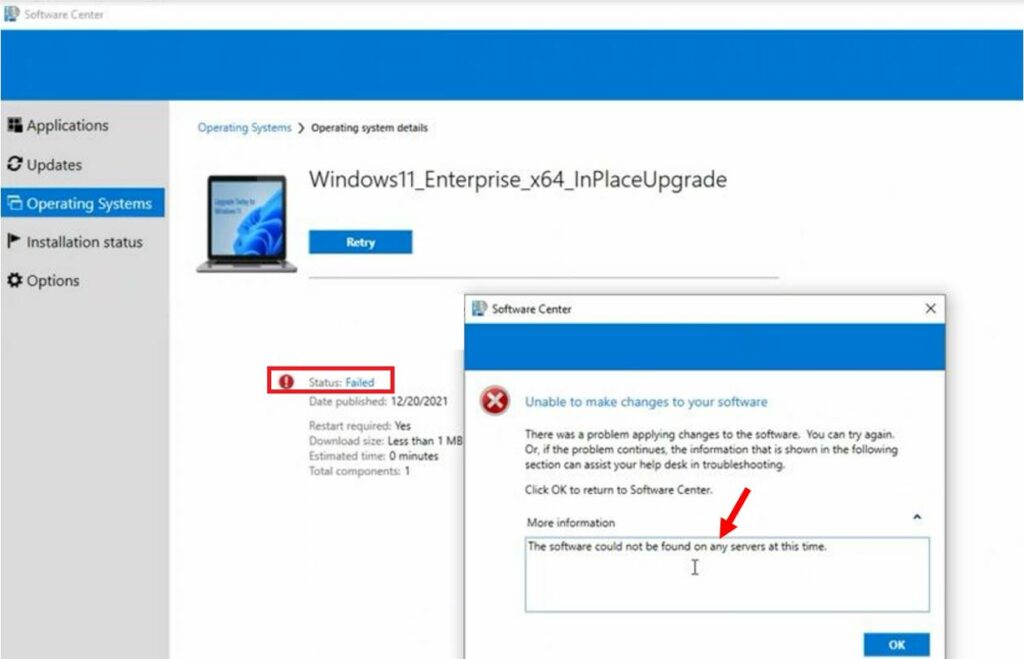
Further, we clicked on Retry to reinitiate the installation, which also ended up with the status failing in the software center.
It’s good to review the cas.log to check the content transfer and record details when referenced content distribution points are found. Let’s check SCCM Log Files Updated List for Client and Server components.
FIX – SCCM Software Center The software could not be found on any servers at this time
Let’s check the possible solutions to FIX the software could not be found. It could be different based on the details you get –
The first step is to validate that the associated Packages, Applications, and dependencies to the task sequence have been properly distributed to the distribution point or groups.
To resolve content transfer failures, the troubleshooting step is redistributing content to the problematic distribution point(s). You can check the details ConfigMgr Redistribute Content to Distribution Point | SCCM | Package | Best Way
We reviewed the CAS.log, which maintains the local package cache on the client. We noticed the content is not properly seen in the package/content information from the CAS.log.
When we checked the sccm cache, we could see the folder name that holds the content. We removed the content from SCCM Cache based on the Package id. The SCCM client cache on Windows computers stores temporary files used to install applications and programs.
Initiate the Machine Policy Request & Evaluation Cycle to speed up the inventory, SCCM client action Machine Policy Request & Evaluation Cycle “immediately” triggers the re-evaluation of the machine policy process from Windows 10 client, allowing client attempts to download a package.
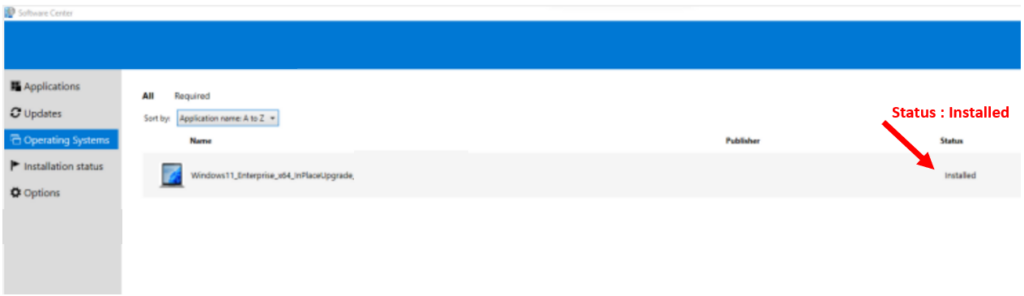
Launch the Software Center. Retrying to Upgrade Windows 11 Task Sequence, started deployment installation, and the machine was upgraded successfully to Windows 11.
Here you can see the Operating System deployment that shows the status, Installed.




I have encountered this problem when the content is on all DP’s and is also in the local cache on the machine. Issue turned out to be an install command that used PowerShell x64 command path instead of x86.
thank You . Distribute Content step was missing