






FIX SCCM SQL DB SUSPECT Mode Issues
FIX SCCM SQL DB SUSPECT Mode Issues ConfigMgr Endpoint Manager. I faced an interesting issue during the recent SCCM upgrade. As you must be aware, SCCM contains Database updates as well. Fix SCCM SQL DB SUSPECT mode.
In this post, you will find all the details on how to fix SQL database suspect mode issues in SCCM (System Center Configuration Manager). The guide provides step-by-step instructions to help you resolve these critical database problems, ensuring the smooth operation of your Configuration Manager environment.
Whether you are dealing with database corruption, connectivity issues, or unexpected shutdowns, this post offers practical solutions to get your SCCM SQL database back online and functioning correctly.
During the SCCM upgrade, the SCCM (ConfigMgr) server (unexpectedly) got restarted. I still don’t know the reason for restarting. After that restart, I tried re-running the R2 update, which failed.

- FIX SCCM SQL Replication Issues using Replication Link Analyzer
- Troubleshoot and FIX SCCM SQL Backlog Issues using SSMS
- FIX SCCM SQL Based Database Replication Failure Between CAS Primary
Table of Contents
Fix SCCM SQL DB SUSPECT Mode Issue
When I checked SQL Management Studio, the CM_CAS DB was locked and in SUSPECT mode. Please fix the SCCM SQL DB SUSPECT mode.
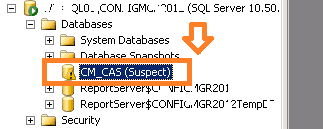
Troubleshooting via Log files – Fix SCCM SQL DB SUSPECT mode
ConfigMgrSetup.log had loads of SQL errors. Fix SCCM SQL DB SUSPECT mode.
ERROR: SQL Server error: [28000][18456][Microsoft][SQL Server Native Client 11.0][SQL Server]Login failed for user ‘ConfigMgr\Anoop’.
*** [42000][4060][Microsoft][SQL Server Native Client 11.0][SQL Server]Cannot open database “CM_CAS” requested by the login. The login failed.
ERROR: SQL Server error: [42000][4060][Microsoft][SQL Server Native Client 11.0][SQL Server]Cannot open database “CM_CAS” requested by the login. The login failed.
*** [28000][18456][Microsoft][SQL Server Native Client 11.0][SQL Server]Login failed for user ‘ConfigMgr\Anoop’.
*** Failed to connect to the SQL Server, connection type: SMS ACCESS.
ERROR: SQL Server connection to ACNSQL.ConfigMgr.com failed.
Setup cannot start the SQL Server to perform the upgrade. Contact your SQL administrator.
When I checked SQL Management Studio, the CM_CAS DB was locked and in SUSPECT mode. I have never seen or heard about this issue. So what’s next? A Google search hinted that this is a common issue for SQL support teams. There are a couple of steps to change from Suspect mode to Emergency mode. Once the DB is in emergency mode, we can perform or try some recovery (with Data loss) options.
Following are the SQL commands which I talked about:-
- EXEC sp_resetstatus ‘YOUR_DB_NAME’;
- ALTER DATABASE YOUR_DATABASE_NAME SET EMERGENCY
- DBCC checkdb(‘YOUR_DB_NAME’)
- ALTER DATABASE YOUR_DATABASE_NAME SET SINGLE_USER WITH ROLLBACK IMMEDIATE
- DBCC CheckDB (‘YOUR_DB_NAME’, REPAIR_ALLOW_DATA_LOSS)
- ALTER DATABASE YOUR_DB_NAME SET MULTI_USER
Resolution:- Fix SCCM SQL DB SUSPECT mode
The resolution for this issue was different. When I first saw the DB in SUSPECT mode, I restarted the SQL server, which didn’t make any difference. I restarted again after 2-3 hours. Woo hoo :)!
The second restart of the SQL server helped me. After the second restart, the CM_CAS DB came back to single-user mode. I changed it to multi-user mode using my previous post. More details on How to Fix the Error the database is in Single User Mode. Wow, that is it. After that, the SCCM 2012 R2 upgrade wizard ran successfully.
Resources
Free SCCM Training Part 1 | 17 Hours Of Latest Technical Content | ConfigMgr Lab HTMD Blog
How To Automatically Cleanup Intune Device | EndPoint Manager – HTMD Blog #2
We are on WhatsApp now. To get the latest step-by-step guides, news, and updates, Join our Channel. Click here. HTMD WhatsApp.
Author
Anoop C Nair is Microsoft MVP from 2015 onwards for consecutive 10 years! He is a Workplace Solution Architect with more than 22+ years of experience in Workplace technologies. He is a Blogger, Speaker, and Local User Group Community leader. His main focus is on Device Management technologies like SCCM and Intune. He writes about technologies like Intune, SCCM, Windows, Cloud PC, Windows, Entra, Microsoft Security, Career etc…




EXEC sp_resetstatus [CM_PS1];
ALTER DATABASE [CM_PS1] SET EMERGENCY
DBCC checkdb([CM_PS1])
ALTER DATABASE [CM_PS1] SET SINGLE_USER WITH ROLLBACK IMMEDIATE
DBCC CheckDB([CM_PS1],REPAIR_ALLOW_DATA_LOSS)
ALTER DATABASE [CM_PS1] SET MULTI_USER
After successfully executing this query my database”CM_PS1″ no longer be tagged as ‘suspect’ and now I am able to access the console.
Thanks for your suggestion.
EXEC sp_resetstatus [YourDatabase];
ALTER DATABASE [YourDatabase] SET EMERGENCY
DBCC checkdb([YourDatabase])
ALTER DATABASE [YourDatabase] SET SINGLE_USER WITH ROLLBACK IMMEDIATE
DBCC CheckDB ([YourDatabase], REPAIR_ALLOW_DATA_LOSS)
ALTER DATABASE [YourDatabase] SET MULTI_USER
This is working Properly